



时间同步不正常,处理chronyd确保时间一致
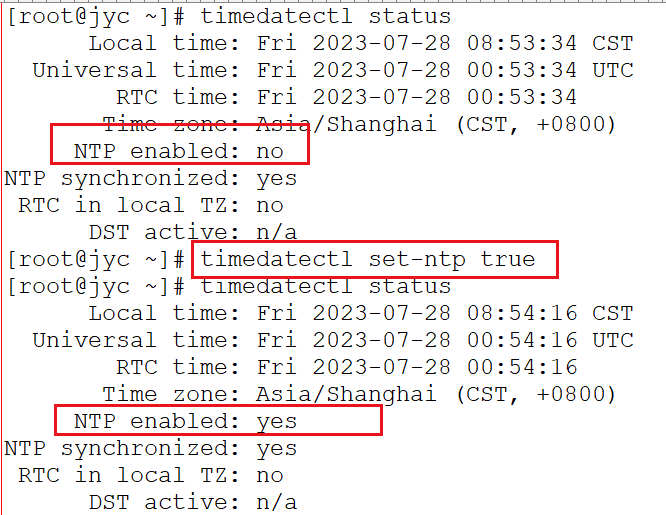
[root@jyc ~]# timedatectl status
      Local time: Fri 2023-07-28 08:53:34 CST
  Universal time: Fri 2023-07-28 00:53:34 UTC
        RTC time: Fri 2023-07-28 00:53:34
       Time zone: Asia/Shanghai (CST, +0800)
     NTP enabled: no
NTP synchronized: yes
 RTC in local TZ: no
      DST active: n/a
[root@jyc ~]# timedatectl set-ntp true #启用时间同步服务
[root@jyc ~]# timedatectl status
      Local time: Fri 2023-07-28 08:54:16 CST
  Universal time: Fri 2023-07-28 00:54:16 UTC
        RTC time: Fri 2023-07-28 00:54:16
       Time zone: Asia/Shanghai (CST, +0800)
     NTP enabled: yes
NTP synchronized: yes
 RTC in local TZ: no
      DST active: n/a
[root@jyc ~]# date
Fri Jul 28 08:54:18 CST 2023
[root@jyc ~]# chronyc sources -v
210 Number of sources = 1

  .-- Source mode  '^' = server, '=' = peer, '#' = local clock.
 / .- Source state '*' = current synced, '+' = combined , '-' = not combined,
| /   '?' = unreachable, 'x' = time may be in error, '~' = time too variable.
||                                                 .- xxxx [ yyyy ] +/- zzzz
||      Reachability register (octal) -.           |  xxxx = adjusted offset,
||      Log2(Polling interval) --.      |          |  yyyy = measured offset,
||                                \     |          |  zzzz = estimated error.
||                                 |    |           \
MS Name/IP address         Stratum Poll Reach LastRx Last sample
===============================================================================
^* 192.168.0.2                     5   9   377   315   -313us[ -314us] +/-   12ms
[root@jyc ~]# cat /etc/chrony.conf
# Use public servers from the pool.ntp.org project.
# Please consider joining the pool (http://www.pool.ntp.org/join.html).
#server 0.centos.pool.ntp.org iburst
#server 1.centos.pool.ntp.org iburst
#server 2.centos.pool.ntp.org iburst
server 192.168.0.2 iburst  #填写时间同步服务器的地址

# Record the rate at which the system clock gains/losses time.
driftfile /var/lib/chrony/drift

# Allow the system clock to be stepped in the first three updates
# if its offset is larger than 1 second.
makestep 1.0 3

# Enable kernel synchronization of the real-time clock (RTC).
rtcsync

# Enable hardware timestamping on all interfaces that support it.
#hwtimestamp *

# Increase the minimum number of selectable sources required to adjust
# the system clock.
#minsources 2

# Allow NTP client access from local network.
#allow 192.168.0.0/16

# Serve time even if not synchronized to a time source.
#local stratum 10

# Specify file containing keys for NTP authentication.
#keyfile /etc/chrony.keys

# Specify directory for log files.
logdir /var/log/chrony

# Select which information is logged.
#log measurements statistics tracking

[root@jyc ~]# systemctl enable chronyd
[root@jyc ~]# systemctl restart chronyd


[root@jyc ~]# timedatectl status
      Local time: Fri 2023-07-28 09:09:26 CST
  Universal time: Fri 2023-07-28 01:09:26 UTC
        RTC time: Fri 2023-07-28 01:09:26
       Time zone: Asia/Shanghai (CST, +0800)
     NTP enabled: yes
NTP synchronized: yes
 RTC in local TZ: no
      DST active: n/a
[root@jyc ~]# date
Fri Jul 28 09:09:30 CST 2023
[root@jyc ~]# chronyc -a makestep  #强制时间同步
200 OK

[root@jyc ~]# chronyc tracking
Reference ID    : 75080002 (dns2.online.tj.cn)
Stratum         : 6
Ref time (UTC)  : Fri Jul 28 01:16:55 2023
System time     : 0.000004204 seconds slow of NTP time
Last offset     : -0.000005968 seconds
RMS offset      : 0.000892102 seconds
Frequency       : 31.983 ppm slow
Residual freq   : -0.001 ppm
Skew            : 0.176 ppm
Root delay      : 0.000670372 seconds
Root dispersion : 0.011242659 seconds
Update interval : 64.5 seconds
Leap status     : Normal

[root@jyc ~]# chronyc sources -v
210 Number of sources = 1

  .-- Source mode  '^' = server, '=' = peer, '#' = local clock.
 / .- Source state '*' = current synced, '+' = combined , '-' = not combined,
| /   '?' = unreachable, 'x' = time may be in error, '~' = time too variable.
||                                                 .- xxxx [ yyyy ] +/- zzzz
||      Reachability register (octal) -.           |  xxxx = adjusted offset,
||      Log2(Polling interval) --.      |          |  yyyy = measured offset,
||                                \     |          |  zzzz = estimated error.
||                                 |    |           \
MS Name/IP address         Stratum Poll Reach LastRx Last sample
===============================================================================
^* dns1.online.tj.cn             5   6   377    53    -53us[  -85us] +/-   11ms
[root@jyc ~]# ping dns1.online.tj.cn  #ip变成域名,并且还不通,但同步却正常???后边解释dns解析问题
ping: dns1.online.tj.cn: Name or service not known
[root@jyc ~]# head /etc/chrony.conf
# Use public servers from the pool.ntp.org project.
# Please consider joining the pool (http://www.pool.ntp.org/join.html).
#server 0.centos.pool.ntp.org iburst
#server 1.centos.pool.ntp.org iburst
#server 2.centos.pool.ntp.org iburst
server 192.168.0.2 iburst

# Record the rate at which the system clock gains/losses time.
driftfile /var/lib/chrony/drift
由于配置了dns解析所以引起上述问题:(把resolv.conf文件删除掉或注释掉即可解决)
[root@jyc ~]# cat /etc/resolv.conf
nameserver 114.114.114.114
[root@jyc ~]# nslookup 192.168.0.2 (只是例子)
发现解析到了上述的域名dns1.online.tj.cn
[root@jyc ~]# ping www.baidu.com
PING www.a.shifen.com (110.242.68.4) 56(84) bytes of data.
64 bytes from 110.242.68.4 (110.242.68.4): icmp_seq=1 ttl=54 time=7.63 ms
64 bytes from 110.242.68.4 (110.242.68.4): icmp_seq=2 ttl=54 time=7.61 ms
64 bytes from 110.242.68.4 (110.242.68.4): icmp_seq=3 ttl=54 time=7.62 ms
^C
--- www.a.shifen.com ping statistics ---
3 packets transmitted, 3 received, 0% packet loss, time 2003ms
rtt min/avg/max/mdev = 7.617/7.625/7.634/0.101 ms
[root@jyc ~]# mv /etc/resolv.conf /etc/resolv.conf.bak
[root@jyc ~]# systemctl restart chronyd
[root@jyc ~]# chronyc sourcestats -v
210 Number of sources = 1
                             .- Number of sample points in measurement set.
                            /    .- Number of residual runs with same sign.
                           |    /    .- Length of measurement set (time).
                           |   |    /      .- Est. clock freq error (ppm).
                           |   |   |      /           .- Est. error in freq.
                           |   |   |     |           /         .- Est. offset.
                           |   |   |     |          |          |   On the -.
                           |   |   |     |          |          |   samples. \
                           |   |   |     |          |          |             |
Name/IP Address            NP  NR  Span  Frequency  Freq Skew  Offset  Std Dev
==============================================================================
192.168.0.2                   4   4     6     -3.418    480.043  -7453ns    86us
最后修改时间:2023-07-28 09:47:07
「喜欢这篇文章,您的关注和赞赏是给作者最好的鼓励」
关注作者
【版权声明】本文为墨天轮用户原创内容,转载时必须标注文章的来源(墨天轮),文章链接,文章作者等基本信息,否则作者和墨天轮有权追究责任。如果您发现墨天轮中有涉嫌抄袭或者侵权的内容,欢迎发送邮件至:contact@modb.pro进行举报,并提供相关证据,一经查实,墨天轮将立刻删除相关内容。
