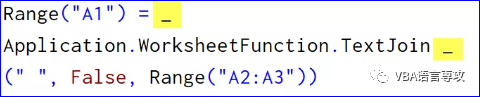
在编写VBA代码时,您可能会遇到一种情况,即您有一行冗长的代码,这使得每个人都很难阅读它。在这种情况下,最好的方法是使用VBA换行符。要输入VBA换行符,可以使用以下步骤:1) 首先,单击要从中换行的字符。2) 接下来,键入空格( )。3) 之后,键入下划线 (_)。4) 最后,按回车键以断开该行。但是有一件事你需要照顾;您不能在参数的中间添加换行符。While writing VBA codes, you might face a situation where you have a lengthy line of code, which makes it hard to read it for everyone. In that case, the best way is to use the VBA Line Break Character, To enter a VBA line break you can use the following steps.1)First, click on the character from where you want to break the line.2) Next, type a space( ).3) After that, type an underscore(_).4) In the end, hit enter to break the line.But there is one thing that you need to take care of; you can’t add a line break in the middle of the argument.
13 一行多行代码Multiple Lines of Code on One Line
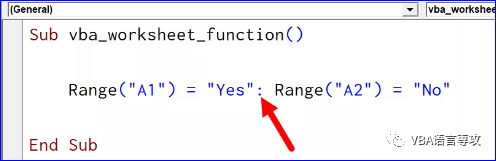
VBA还允许您在同一行上编写多行代码。假设您希望将以下两行代码合并到一行中。您可以使用冒号 (:)为此。VBA also allows you to write multiple lines of code on the same line. Let’s say you want to combine below two lines of code in a single line. You can use a colon (:) for that. 我20多年的VBA实践经验,全部浓缩在下面的各个教程中: