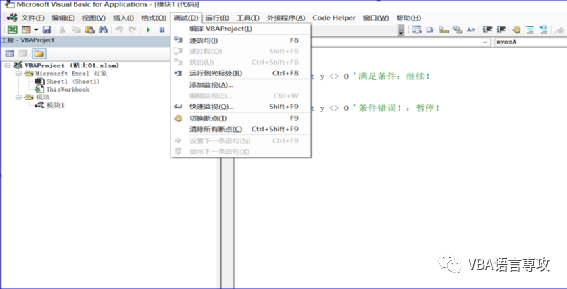
调试的关键是熟练地通过行或整个函数/过程单步执行代码。以下是菜单工具栏中的基本命令:DebugThe key to debugging is to skillfully step through your code either by line or an entire function/procedure. Here are the basic commands found in the menu toolbar:Debug 单步F8 – 单步执行每个过程/函数Step Into F8 – step into each procedure/function 单步SHIFT+F8 – 单步执行每个过程/函数(仅运行当前过程)Step Over SHIFT+F8 – step over every procedure/function (run just the current procedure) 单步执行 CTRL+SHIFT+F8 – 单步执行当前正在运行的过程 Step Out CTRL+SHIFT+F8 – step out of the current running procedure 运行到光标 CTRL+F8 – 在光标指向的行处执行并断开Run to Cursor CTRL+F8 – execute and break at the line pointed by the cursor 通常,这就足够了,尽管您可能希望熟悉菜单工具栏中的其他命令。DebugUsually this is enough although you might want to get familiar with the other commands in the menu toolbar.Debug
5 “即时”窗口和“Debug.print” The Immediate Window And Debug.print
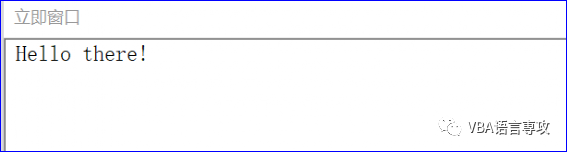
在VBA编辑器的左下角,您应该找到“即时”窗口。此面板可用于立即执行代码段(即使您的代码已暂停)。只需输入过程名称并按下回车键!此外,即时窗口是Debug.Print VBA 命令的默认输出,该命令打印某个提供的字符串(类似于 MsgBox,但不显示任何弹出窗口)。Debug.Print 命令对于输出 VBA 执行消息/状态或执行进度(例如,已处理项的数量)非常方便。ENTER即可输出结果。 ²备注:即时窗口的快捷键是Ctrl+G,可以通过快捷键来显示窗口 In the bottom left corner of VBA editor you should find the Immediate window. This panel can be used to execute immediately pieces of code (even your code is paused). Simply start typing and hit ! Additionally the Immediate window is the default output of the Debug.Print VBA command which prints a certain provided string (similarly like the MsgBox but does not display any pop-up). The Debug.Print command is very convenient for outputting VBA execution messages statuses or execution progress (e.g. number of processed items). ENTER Sub mynzB() Debug.Print "Hello there!"End Sub The output:输出:
6 总结Summary
调试是一项易于学习的技能。了解如何熟练调试VBA代码,并有益于您的编码经验和效率!Debugging is an easy skill to learn. Knowing how to skillfully debug VBA code with benefit your coding experience and efficiency! Let me know what you think! 本讲内容参考程序文件:Chapter01.xlsm 【分享成果,随喜正能量】我20多年的VBA实践经验,全部浓缩在下面的各个教程中: 【分享成果,随喜正能量】灵魂的一半是学识,另一半是支撑风骨的涵养,人到一定的年龄,便没兴趣在乎自己在别人眼中的定位,只想跟懂自己的人,说一声幸会。。