



适用范围
gaussdb openGauss 5.0.0 and later
问题概述
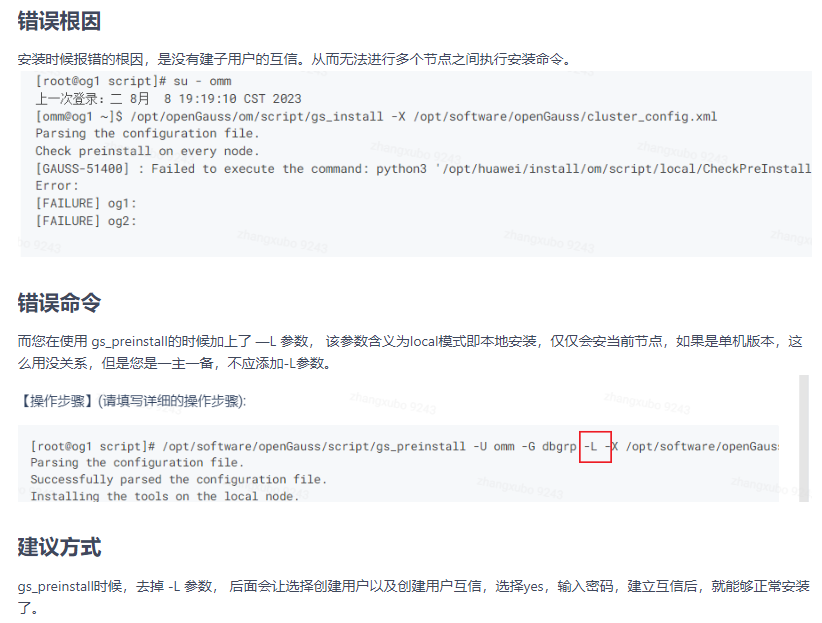
[GAUSS-51400] : Failed to execute the command: python3 '/opt/huawei/install/om/script/local/CheckPreInstall.py' -U omm -t preinstall. Result:{'og1': 'Failure', 'og2': 'Failure'}
问题原因
gs_preinstall 带路径执行造成安装失败,cd到目录再执行 ./gs_preinstall 安装成功

[root@og1 script]# /opt/software/openGauss/script/gs_preinstall -U omm -G dbgrp -L -X /opt/software/openGauss/cluster_config.xml
Parsing the configuration file.
Successfully parsed the configuration file.
Installing the tools on the local node.
Successfully installed the tools on the local node.
Setting host ip env
Successfully set host ip env.
Preparing SSH service.
Successfully prepared SSH service.
Checking OS software.
Successfully check os software.
Checking OS version.
Successfully checked OS version.
Creating cluster's path.
Successfully created cluster's path.
Set and check OS parameter.
Setting OS parameters.
Successfully set OS parameters.
Warning: Installation environment contains some warning messages.
Please get more details by "/opt/software/openGauss/script/gs_checkos -i A -h og1 --detail".
Set and check OS parameter completed.
Preparing CRON service.
Successfully prepared CRON service.
Setting user environmental variables.
Successfully set user environmental variables.
Setting the dynamic link library.
Successfully set the dynamic link library.
Setting Core file
Successfully set core path.
Setting pssh path
Successfully set pssh path.
Setting Cgroup.
Successfully set Cgroup.
Set ARM Optimization.
No need to set ARM Optimization.
Fixing server package owner.
Setting finish flag.
Successfully set finish flag.
Preinstallation succeeded.
[root@og1 script]# su - omm
上一次登录:二 8月  8 19:19:10 CST 2023
[omm@og1 ~]$ /opt/openGauss/om/script/gs_install -X /opt/software/openGauss/cluster_config.xml
Parsing the configuration file.
Check preinstall on every node.
[GAUSS-51400] : Failed to execute the command: python3 '/opt/huawei/install/om/script/local/CheckPreInstall.py' -U omm -t preinstall. Result:{'og1': 'Failure', 'og2': 'Failure'}.
Error:
[FAILURE] og1:
[FAILURE] og2:


[omm@og1 ~]$ exit
登出
[root@og1 script]# cd /opt/software/openGauss/script
[root@og1 script]# ./gs_preinstall -U omm -G dbgrp -X /opt/software/openGauss/cluster_config.xml
Parsing the configuration file.
Successfully parsed the configuration file.
Installing the tools on the local node.
Successfully installed the tools on the local node.
Are you sure you want to create trust for root (yes/no)?yes
Please enter password for root
Password:
Successfully created SSH trust for the root permission user.
Setting host ip env
Successfully set host ip env.
Distributing package.
Begin to distribute package to tool path.
Successfully distribute package to tool path.
Begin to distribute package to package path.
Successfully distribute package to package path.
Successfully distributed package.
Are you sure you want to create the user[omm] and create trust for it (yes/no)? yes
Preparing SSH service.
Successfully prepared SSH service.
Installing the tools in the cluster.
Successfully installed the tools in the cluster.
Checking hostname mapping.
Successfully checked hostname mapping.
Creating SSH trust for [omm] user.
Please enter password for current user[omm].
Password:
Checking network information.
All nodes in the network are Normal.
Successfully checked network information.
Creating SSH trust.
Creating the local key file.
Successfully created the local key files.
Appending local ID to authorized_keys.
Successfully appended local ID to authorized_keys.
Updating the known_hosts file.
Successfully updated the known_hosts file.
Appending authorized_key on the remote node.
Successfully appended authorized_key on all remote node.
Checking common authentication file content.
Successfully checked common authentication content.
Distributing SSH trust file to all node.
Distributing trust keys file to all node successfully.
Successfully distributed SSH trust file to all node.
Verifying SSH trust on all hosts.
Successfully verified SSH trust on all hosts.
Successfully created SSH trust.
Successfully created SSH trust for [omm] user.
Checking OS software.
Successfully check os software.
Checking OS version.
Successfully checked OS version.
Creating cluster's path.
Successfully created cluster's path.
Set and check OS parameter.
Setting OS parameters.
Successfully set OS parameters.
Warning: Installation environment contains some warning messages.
Please get more details by "/opt/software/openGauss/script/gs_checkos -i A -h og1,og2 --detail".
Set and check OS parameter completed.
Preparing CRON service.
Successfully prepared CRON service.
Setting user environmental variables.
Successfully set user environmental variables.
Setting the dynamic link library.
Successfully set the dynamic link library.
Setting Core file
Successfully set core path.
Setting pssh path
Successfully set pssh path.
Setting Cgroup.
Successfully set Cgroup.
Set ARM Optimization.
No need to set ARM Optimization.
Fixing server package owner.
Setting finish flag.
Successfully set finish flag.
Preinstallation succeeded.
[root@og1 script]# su - omm
上一次登录:二 8月  8 19:23:43 CST 2023
[omm@og1 ~]$ /opt/openGauss/om/script/gs_install -X /opt/software/openGauss/cluster_config.xml
Parsing the configuration file.
Check preinstall on every node.
Successfully checked preinstall on every node.
Creating the backup directory.
Successfully created the backup directory.
begin deploy..
Installing the cluster.
begin prepare Install Cluster..
Checking the installation environment on all nodes.
begin install Cluster..
Installing applications on all nodes.
Successfully installed APP.
begin init Instance..
encrypt cipher and rand files for database.
Please enter password for database:
Please repeat for database:
begin to create CA cert files
The sslcert will be generated in /opt/huawei/install/app/share/sslcert/om
NO cm_server instance, no need to create CA for CM.
Non-dss_ssl_enable, no need to create CA for DSS
Cluster installation is completed.
Configuring.
Deleting instances from all nodes.
Successfully deleted instances from all nodes.
Checking node configuration on all nodes.
Initializing instances on all nodes.
Updating instance configuration on all nodes.
Check consistence of memCheck and coresCheck on database nodes.
Successful check consistence of memCheck and coresCheck on all nodes.
Configuring pg_hba on all nodes.
Configuration is completed.
The cluster status is Normal.
Successfully started cluster.
Successfully installed application.
end deploy..

[omm@og1 ~]$ gs_om -t status --detail
[   Cluster State   ]

cluster_state   : Normal
redistributing  : No
current_az      : AZ_ALL

[  Datanode State   ]

    nodenode_ip         port      instance                            state
------------------------------------------------------------------------------------------
1  og1 192.168.137.27  15400      6001 /opt/huawei/install/data/dn   P Primary Normal
2  og2 192.168.137.28  15400      6002 /opt/huawei/install/data/dn   S Standby Normal
[omm@og1 ~]$ cat /etc/hosts
127.0.0.1   localhost localhost.localdomain localhost4 localhost4.localdomain4
::1         localhost localhost.localdomain localhost6 localhost6.localdomain6
192.168.137.27    og1
192.168.137.28    og2
192.168.137.27  og1  #Gauss OM IP Hosts Mapping
192.168.137.28  og2  #Gauss OM IP Hosts Mapping
127.0.0.1  localhost  #Gauss OM IP Hosts Mapping

[root@og1 openGauss]# cat cluster_config.xml
<?xml version="1.0" encoding="UTF-8"?>
<ROOT>
    <!-- openGauss整体信息 -->
    <CLUSTER>
        <!-- 数据库名称 -->
        <PARAM name="clusterName" value="Cluster_template" />
        <!-- 数据库节点名称(hostname) -->
        <PARAM name="nodeNames" value="og1,og2" />
        <!-- 数据库安装目录-->
        <PARAM name="gaussdbAppPath" value="/opt/huawei/install/app" />
        <!-- 日志目录-->
        <PARAM name="gaussdbLogPath" value="/var/log/omm" />
        <!-- 临时文件目录-->
        <PARAM name="tmpMppdbPath" value="/opt/huawei/tmp"/>
        <!-- 数据库工具目录-->
        <PARAM name="gaussdbToolPath" value="/opt/huawei/install/om" />
        <!-- 数据库core文件目录-->
        <PARAM name="corePath" value="/opt/huawei/corefile"/>
        <!-- 节点IP,与数据库节点名称列表一一对应 -->
        <PARAM name="backIp1s" value="192.168.137.27,192.168.137.28"/>
    </CLUSTER>
    <!-- 每台服务器上的节点部署信息 -->
    <DEVICELIST>
        <!-- 节点1上的部署信息 -->
        <DEVICE sn="og1">
            <!-- 节点1的主机名称 -->
            <PARAM name="name" value="og1"/>
            <!-- 节点1所在的AZ及AZ优先级 -->
            <PARAM name="azName" value="AZ1"/>
            <PARAM name="azPriority" value="1"/>
            <!-- 节点1的IP,如果服务器只有一个网卡可用,将backIP1和sshIP1配置成同一个IP -->
            <PARAM name="backIp1" value="192.168.137.27"/>
            <PARAM name="sshIp1" value="192.168.137.27"/>

            <!--dn-->
            <PARAM name="dataNum" value="1"/>
            <PARAM name="dataPortBase" value="15400"/>
            <PARAM name="dataNode1" value="/opt/huawei/install/data/dn,og2,/opt/huawei/install/data/dn"/>
            <PARAM name="dataNode1_syncNum" value="0"/>
        </DEVICE>

        <!-- 节点2上的节点部署信息,其中“name”的值配置为主机名称 -->
        <DEVICE sn="og2">
            <!-- 节点2的主机名称 -->
            <PARAM name="name" value="og2"/>
            <!-- 节点2所在的AZ及AZ优先级 -->
            <PARAM name="azName" value="AZ1"/>
            <PARAM name="azPriority" value="1"/>
            <!-- 节点2的IP,如果服务器只有一个网卡可用,将backIP1和sshIP1配置成同一个IP -->
            <PARAM name="backIp1" value="192.168.137.28"/>
            <PARAM name="sshIp1" value="192.168.137.28"/>
        </DEVICE>
    </DEVICELIST>
</ROOT>
[root@og1 openGauss]#
解决方案
cd /opt/software/openGauss/script
./gs_preinstall -U omm -G dbgrp -X /opt/software/openGauss/cluster_config.xml
参考文档
https://docs.opengauss.org/zh/docs/5.0.0/docs/InstallationGuide/%E5%88%9D%E5%A7%8B%E5%8C%96%E5%AE%89%E8%A3%85%E7%8E%AF%E5%A2%83.html
https://gitee.com/opengauss/openGauss-server/issues/I7RDH0
最后修改时间:2023-09-19 14:42:14
「喜欢这篇文章,您的关注和赞赏是给作者最好的鼓励」
关注作者
【版权声明】本文为墨天轮用户原创内容,转载时必须标注文章的来源(墨天轮),文章链接,文章作者等基本信息,否则作者和墨天轮有权追究责任。如果您发现墨天轮中有涉嫌抄袭或者侵权的内容,欢迎发送邮件至:contact@modb.pro进行举报,并提供相关证据,一经查实,墨天轮将立刻删除相关内容。
