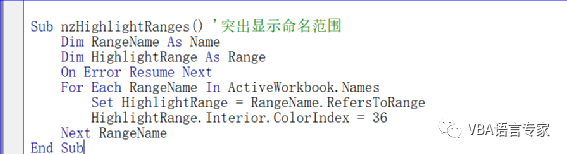
Sub nzHighlightRanges() '突出显示命名范围 Dim RangeName As Name Dim HighlightRange As Range On Error Resume Next For Each RangeName In ActiveWorkbook.Names Set HighlightRange = RangeName.RefersToRange HighlightRange.Interior.ColorIndex = 36 Next RangeNameEnd Sub 如果您不确定工作表中有多少个命名区域,则可以使用此代码突出显示所有这些命名区域。If you are not sure about how many named ranges you have in your worksheet then you can use this code to highlight all of them.
8 突出显示列中的差异Highlight Difference in Columns
Sub nzcolumnDifference() '突出显示列中的差异 Range("H14:H20,I14:I20").Select Selection.ColumnDifferences(ActiveCell).Select Selection.Style = ActiveWorkbook.Styles(1)End Sub 使用此代码,您可以突出显示两列(相应单元格)之间的差异。Using this code you can highlight the difference between two columns (corresponding cells).
9 突出显示行中的差异Highlight Difference in Rows
Sub nzrowDifference() '突出显示行中的差异 Range("H22:j22,H23:j23").Select Selection.RowDifferences(ActiveCell).SelectEnd Sub 通过使用此代码,您可以突出显示两行(相应单元格)之间的差异And by using this code you can highlight difference between two row (corresponding cells). 本示例选定工作表 Sheet1 上第一行中与单元格 D1 内容不同的单元格。This example selects the cells in row one on Sheet1 whose contents are different from those of cell D1. Worksheets("Sheet1").Activate Set c1 = ActiveSheet.Rows(1).RowDifferences( _ comparison:=ActiveSheet.Range("D1")) c1.Select 本讲内容参考程序文件:Chapter02.xlsm 【分享成果,随喜正能量】 我20多年的VBA实践经验,全部浓缩在下面的各个教程中:【分享成果,随喜正能量】如果你不给自己烦恼,别人也永远不可能给你烦恼。因为你自己的内心,你放不下。好好的管教你自己,不要管别人。不宽恕众生,不原谅众生,是苦了你自己。。