



一、概述
当我们想要sql查询返回的结果是Map类型的数据时,可以使用MyBatis的@MapKey注解
二、使用
-
Dao层
@MapKey("userId") Map<Integer, UserVO> findActionCount(@Param("userIds") List<Integer> userIds); -
mapper.xml文件
<select id="findActionCount" resultType="UserVO"> select user_id userId, count(x) actionCount from xxx where xxx </select> -
service层
Map<Integer, UserBaseVO> actionCountMap = userActionDao.findActionCount(userIds);
三、排坑
3.1、There is no getter for property named ‘xxx’ in ‘class java.lang.Long’
-
原因
因为我需要的是如下这种数据
{
  "1": 123,
  "2": 456
}
所以,就定义了一个Map<Integer, Long>的格式,mapper.xml层,resultMap=“java.lang.Long”
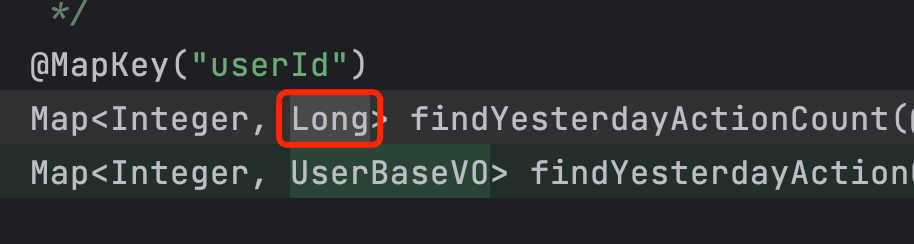
这种情况就会报There is no getter for property named ‘userId’ in ‘class java.lang.Long’
-
解决办法
@MapKey("key") Map<key, value> findActionCount(@Param("userIds") List<Integer> userIds);其中value必须是个包含key的对象,因此,将value换成一个包含key的对象即可
@MapKey("userId")
Map<Integer, UserVO> findActionCount(@Param("userIds") List<Integer> userIds);
最后修改时间:2024-07-03 21:00:04
「喜欢这篇文章,您的关注和赞赏是给作者最好的鼓励」
关注作者
【版权声明】本文为墨天轮用户原创内容,转载时必须标注文章的来源(墨天轮),文章链接,文章作者等基本信息,否则作者和墨天轮有权追究责任。如果您发现墨天轮中有涉嫌抄袭或者侵权的内容,欢迎发送邮件至:contact@modb.pro进行举报,并提供相关证据,一经查实,墨天轮将立刻删除相关内容。
