unique用于计算唯一值,value_counts用于分组计数:
In [10]: import numpy as np; import pandas as pdIn [11]: values = pd.Series(['apple', 'orange', 'apple',....: 'apple'] * 2)In [12]: valuesOut[12]:0 apple1 orange2 apple3 apple4 apple5 orange6 apple7 appledtype: objectIn [13]: pd.unique(values)Out[13]: array(['apple', 'orange'], dtype=object)In [14]: pd.value_counts(values)Out[14]:apple 6orange 2dtype: int64
许多数据系统(数据仓库、统计计算或其它应用)都发展出了特定的表征重复值的方法,以进行高效的存储和计算。在数据仓库中,最好的方法是使用包含不同值的维表(Dimension Table),将主要的参数存储为引用维表整数键:
In [15]: values = pd.Series([0, 1, 0, 0] * 2)In [16]: dim = pd.Series(['apple', 'orange'])In [17]: valuesOut[17]:0 01 12 03 04 05 16 07 0dtype: int64In [18]: dimOut[18]:0 apple1 orangedtype: object
可以使用take方法获取存储原始的字符串Series:
In [19]: dim.take(values)Out[19]:0 apple1 orange0 apple0 apple0 apple1 orange0 apple0 appledtype: object
Pandas的分类类型Categorical主要就是基于上述原理。

pandas的分类类型
pandas的Categorical分类类型,用于保存使用整数分类表示法的数据:
In [20]: fruits = ['apple', 'orange', 'apple', 'apple'] * 2In [21]: N = len(fruits)In [22]: df = pd.DataFrame({'fruit': fruits,....: 'basket_id': np.arange(N),....: 'count': np.random.randint(3, 15, size=N),....: 'weight': np.random.uniform(0, 4, size=N)},....: columns=['basket_id', 'fruit', 'count', 'weight'])In [23]: dfOut[23]:basket_id fruit count weight0 0 apple 5 3.8580581 1 orange 8 2.6127082 2 apple 4 2.9956273 3 apple 7 2.6142794 4 apple 12 2.9908595 5 orange 8 3.8452276 6 apple 5 0.0335537 7 apple 4 0.425778
df['fruit']是字符串对象的数组,可以转换为分类:
In [24]: fruit_cat = df['fruit'].astype('category')In [25]: fruit_catOut[25]:0 apple1 orange2 apple3 apple4 apple5 orange6 apple7 appleName: fruit, dtype: categoryCategories (2, object): [apple, orange]
fruit_cat的值不是NumPy数组,而是一个pandas.Categorical实例:
In [26]: c = fruit_cat.valuesIn [27]: type(c)Out[27]: pandas.core.categorical.Categorical
分类对象有categories和codes属性:
In [28]: c.categoriesOut[28]: Index(['apple', 'orange'], dtype='object')In [29]: c.codesOut[29]: array([0, 1, 0, 0, 0, 1, 0, 0], dtype=int8)
直接创建pandas.Categorical:
In [32]: my_categories = pd.Categorical(['foo', 'bar', 'baz', 'foo', 'bar'])In [33]: my_categoriesOut[33]:[foo, bar, baz, foo, bar]Categories (3, object): [bar, baz, foo]
已知分类编码时,可以使用from_codes构造器:
In [34]: categories = ['foo', 'bar', 'baz']In [35]: codes = [0, 1, 2, 0, 0, 1]In [36]: my_cats_2 = pd.Categorical.from_codes(codes, categories)In [37]: my_cats_2Out[37]:[foo, bar, baz, foo, foo, bar]Categories (3, object): [foo, bar, baz]
使用from_codes或其它的构造器时,可以通过ordered=True指定分类是有顺序的:
In [38]: ordered_cat = pd.Categorical.from_codes(codes, categories,....: ordered=True)In [39]: ordered_catOut[39]:[foo, bar, baz, foo, foo, bar]Categories (3, object): [foo < bar < baz]
输出[foo < bar < baz]指明‘foo’位于‘bar’的前面,以此类推。无序的分类实例可以通过as_ordered排序:
In [40]: my_cats_2.as_ordered()Out[40]:[foo, bar, baz, foo, foo, bar]Categories (3, object): [foo < bar < baz]
分类数组可以包括任意不可变类型。
用分类进行计算
使用pandas.qcut面元函数会返回pandas.Categorical,通过分位面元可以提取一些统计信息:
In [42]: draws = np.random.randn(1000)In [44]: bins = pd.qcut(draws, 4)In [45]: binsOut[45]:[(-0.684, -0.0101], (-0.0101, 0.63], (-0.684, -0.0101], (-0.684, -0.0101], (0.63,3.928], ..., (-0.0101, 0.63], (-0.684, -0.0101], (-2.95, -0.684], (-0.0101, 0.63], (0.63, 3.928]]Length: 1000Categories (4, interval[float64]): [(-2.95, -0.684] < (-0.684, -0.0101] < (-0.010, 0.63] < (0.63, 3.928]]
默认标签为样本数据范围,也可以使用labels参数指定:
In [46]: bins = pd.qcut(draws, 4, labels=['Q1', 'Q2', 'Q3', 'Q4'])In [47]: binsOut[47]:[Q2, Q3, Q2, Q2, Q4, ..., Q3, Q2, Q1, Q3, Q4]Length: 1000Categories (4, object): [Q1 < Q2 < Q3 < Q4]In [48]: bins.codes[:10]Out[48]: array([1, 2, 1, 1, 3, 3, 2, 2, 3, 3], dtype=int8)
可以将Categories分类数据传入groupby提取一些汇总信息:
In [49]: bins = pd.Series(bins, name='quartile')In [50]: results = (pd.Series(draws)....: .groupby(bins)....: .agg(['count', 'min', 'max'])....: .reset_index())In [51]: resultsOut[51]:quartile count min max0 Q1 250 -2.949343 -0.6854841 Q2 250 -0.683066 -0.0101152 Q3 250 -0.010032 0.6288943 Q4 250 0.634238 3.927528
分位数列保存了原始的面元分类信息,包括排序:
In [52]: results['quartile']Out[52]:0 Q11 Q22 Q33 Q4Name: quartile, dtype: categoryCategories (4, object): [Q1 < Q2 < Q3 < Q4]
用分类提高性能
DataFrame列的分类使用的内存通常相对直接存储少的多
示例:
In [53]: N = 10000000In [54]: draws = pd.Series(np.random.randn(N))In [55]: labels = pd.Series(['foo', 'bar', 'baz', 'qux'] * (N // 4))
现在,将标签转换为分类:
In [56]: categories = labels.astype('category')
这时,可以看到标签使用的内存远比分类多:
In [57]: labels.memory_usage()Out[57]: 80000080In [58]: categories.memory_usage()Out[58]: 10000272
转换为分类需要消耗一定的CPU资源,但这是一次性的代价:
In [59]: %time _ = labels.astype('category')CPU times: user 490 ms, sys: 240 ms, total: 730 msWall time: 726 ms
GroupBy使用分类操作明显更快,是因为底层的算法使用整数编码数组。
Series的分类方法
Series.cat的分类方法主要有:
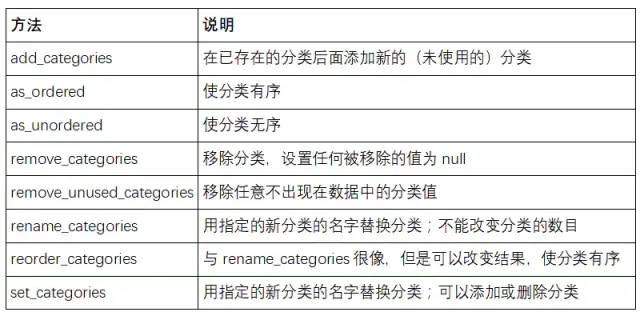
类似于Series.str处理器的字符串方法。下面演示了Series.cat最常用的方法。
有如下分类数据:
In [60]: s = pd.Series(['a', 'b', 'c', 'd'] * 2)In [61]: cat_s = s.astype('category')In [62]: cat_sOut[62]:0 a1 b2 c3 d4 a5 b6 c7 ddtype: categoryCategories (4, object): [a, b, c, d]
Series的cat属性提供了分类方法的入口:
In [63]: cat_s.cat.codesOut[63]:0 01 12 23 34 05 16 27 3dtype: int8In [64]: cat_s.cat.categoriesOut[64]: Index(['a', 'b', 'c', 'd'], dtype='object')
set_categories方法可以设置数据的实际分类集:
In [65]: actual_categories = ['a', 'b', 'c', 'd', 'e']In [66]: cat_s2 = cat_s.cat.set_categories(actual_categories)In [67]: cat_s2Out[67]:0 a1 b2 c3 d4 a5 b6 c7 ddtype: categoryCategories (5, object): [a, b, c, d, e]
新的分类集在后续操作中会体现出差异,例如value_counts分组计数:
In [68]: cat_s.value_counts()Out[68]:d 2c 2b 2a 2dtype: int64In [69]: cat_s2.value_counts()Out[69]:d 2c 2b 2a 2e 0dtype: int64
在大数据集中,过滤完大DataFrame或Series之后,许多分类可能不会出现在数据中,可以使用remove_unused_categories方法删除没看到的分类:
In [70]: cat_s3 = cat_s[cat_s.isin(['a', 'b'])]In [71]: cat_s3Out[71]:0 a1 b4 a5 bdtype: categoryCategories (4, object): [a, b, c, d]In [72]: cat_s3.cat.remove_unused_categories()Out[72]:0 a1 b4 a5 bdtype: categoryCategories (2, object): [a, b]
one-hot编码
pandas.get_dummies函数可以将分类数据转换为包含one-hot编码的DataFrame:
In [73]: cat_s = pd.Series(['a', 'b', 'c', 'd'] * 2, dtype='category')In [74]: pd.get_dummies(cat_s)Out[74]:a b c d0 1 0 0 01 0 1 0 02 0 0 1 03 0 0 0 14 1 0 0 05 0 1 0 06 0 0 1 07 0 0 0 1

factorize自然数编码
factorize方法主要用于自然数编码,缺失值会被记做-1,其中sort参数表示是否排序后赋值:
In [3]:codes, uniques = pd.factorize(['b', None, 'a', 'c', 'b'], sort=True)In [4]:codesOut[4]:array([ 1, -1, 0, 2, 1], dtype=int64)In [5]:uniquesOut[5]:array(['a', 'b', 'c'], dtype=object)