



积分
符号积分
积分与求导的关系:
符号运算可以用 sympy
模块完成。
In [1]:
# 先导入 init_printing 模块方便其显示:from sympy import init_printinginit_printing()from sympy import symbols, integrateimport sympy
产生 x 和 y 两个符号变量,并进行运算:
In [2]:
x, y = symbols('x y')z = sympy.sqrt(x**2 + y**2)display(z)# 对于生成的符号变量 z,我们将其中的 x 利用 subs 方法替换为 3:display(z.subs(x, 3))# 再替换 y:display(z.subs(x, 3).subs(y, 4))
还可以从 sympy.abc
中导入现成的符号变量:
In [3]:
# 还可以从 sympy.abc 中导入现成的符号变量:from sympy.abc import thetay = sympy.sin(theta) ** 2display(y)Y = integrate(y)print("对 y 进行积分:")display(Y)
对 y 进行积分:
计算
In [4]:
import numpy as npnp.set_printoptions(precision=3)Y.subs(theta, np.pi) - Y.subs(theta, 0)
Out[4]:
计算积分数值
计算
In [5]:
integrate(y, (theta, 0, sympy.pi))
Out[5]:
显示的是字符表达式,查看具体数值可以使用 evalf()
方法,或者传入 numpy.pi
,而不是 sympy.pi
:
In [6]:
integrate(y, (theta, 0, sympy.pi)).evalf()
Out[6]:
In [7]:
integrate(y, (theta, 0, np.pi))
Out[7]:
不定积分
根据牛顿莱布尼兹公式,这两个数值应该相等。
产生不定积分对象:
In [8]:
Y_indef = sympy.Integral(y)Y_indef
Out[8]:
In [9]:
print(type(Y_indef))
<class 'sympy.integrals.integrals.Integral'>
定积分
In [10]:
Y_def = sympy.Integral(y, (theta, 0, sympy.pi))Y_def
Out[10]:
产生函数
In [11]:
Y_raw = lambda x: integrate(y, (theta, 0, x))Y = np.vectorize(Y_raw)Y
Out[11]:
<numpy.vectorize at 0xeaaff60>
In [12]:
%matplotlib inlineimport matplotlib.pyplot as pltx = np.linspace(0, 2 * np.pi)p = plt.plot(x, Y(x))t = plt.title(r'$Y(x) = \int_0^x sin^2(\theta) d\theta$')
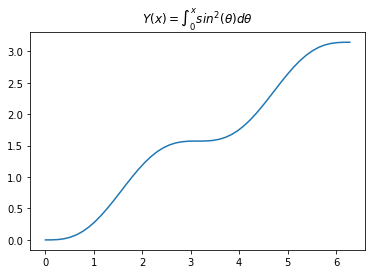
数值积分
数值积分:
In [13]:
# 导入贝塞尔函数:from scipy.special import jvdef f(x):return jv(2.5, x)x = np.linspace(0, 10)p = plt.plot(x, f(x), 'k-')
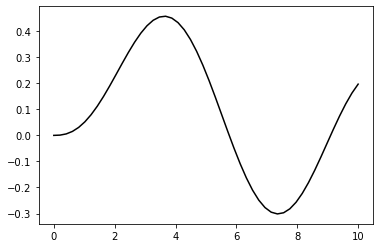
quad
函数
Quadrature 积分的原理参见:
http://en.wikipedia.org/wiki/Numerical_integration#Quadrature_rules_based_on_interpolating_functions
quad 返回一个 (积分值,误差) 组成的元组:
In [14]:
from scipy.integrate import quadinterval = [0, 6.5]value, max_err = quad(f, *interval)print("积分值:", value)print("最大误差:", max_err)
积分值:1.2847429723410955最大误差:2.3418185139578114e-09
积分区间图示,蓝色为正,红色为负:
In [15]:
print(f"integral = {value:.9f}")print(f"upper bound on error: {max_err:.2e}")x = np.linspace(0, 10, 100)p = plt.plot(x, f(x), 'k-')x = np.linspace(0, 6.5, 45)p = plt.fill_between(x, f(x), where=f(x) > 0, color="blue")p = plt.fill_between(x, f(x), where=f(x) < 0, color="red", interpolate=True)
integral = 1.284742972
upper bound on error: 2.34e-09
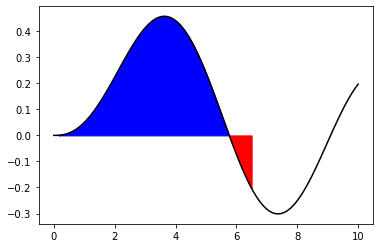
积分到无穷
In [16]:
from numpy import infinterval = [0., inf]def g(x):return np.exp(-x**1 / 2)value, max_err = quad(g, *interval)print(f"最大误差(upper bound on error): {max_err:.4e}")x = np.linspace(0, 10, 50)fig = plt.figure(figsize=(10, 3))p = plt.plot(x, g(x), 'k-')p = plt.fill_between(x, g(x))plt.annotate(r"$\int_0^{\infty}e^{-x^1/2}dx = $" + str(value), (4, 0.6),fontsize=16)plt.show()
最大误差(upper bound on error): 7.1615e-11
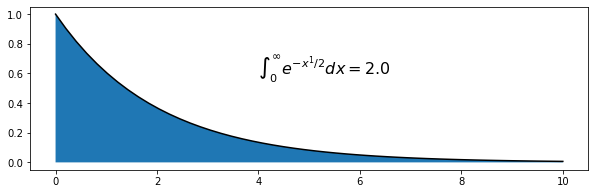
双重积分
假设我们要进行如下的积分:
def h(x, t, n):return np.exp(-x * t) / (t ** n)
一种方式是调用两次 quad
函数,不过这里 quad
的返回值不能向量化,所以使用了修饰符 vectorize
将其向量化:
In [18]:
from numpy import vectorize@vectorizedef int_h_dx(t, n):"""Time integrand of h(x)."""return quad(h, 0, np.inf, args=(t, n))[0]
In [19]:
@vectorizedef I_n(n):return quad(int_h_dx, 1, np.inf, args=(n))
In [20]:
I_n([0.5, 1.0, 2.0, 5])
Out[20]:
(array([2. , 1. , 0.5, 0.2]),
 array([4.507e-12, 4.340e-14, 5.551e-15, 2.220e-15]))
或者直接调用 dblquad
函数,并将积分参数传入,传入方式有多种,后传入的先进行积分:
In [21]:
from scipy.integrate import dblquad@vectorizedef I(n):"""Same as I_n, but using the built-in dblquad"""x_lower = 0x_upper = np.infreturn dblquad(h,lambda t_lower: 1,lambda t_upper: np.inf,x_lower,x_upper,args=(n, ))I_n([0.5, 1.0, 2.0, 5])
Out[21]:
(array([2. , 1. , 0.5, 0.2]),
 array([4.507e-12, 4.340e-14, 5.551e-15, 2.220e-15]))
采样点积分
trapz 方法 和 simps 方法
In [22]:
from scipy.integrate import trapz, simps# sin 函数, 100 个采样点和 5 个采样点:x_s = np.linspace(0, np.pi, 5)y_s = np.sin(x_s)x = np.linspace(0, np.pi, 100)y = np.sin(x)p = plt.plot(x, y, 'k:')p = plt.plot(x_s, y_s, 'r+', markersize=12)p = plt.fill_between(x_s, y_s, color="gray")
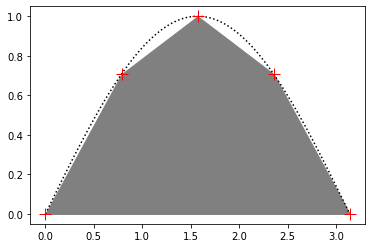
sin
函数, 100
个采样点和 5
个采样点:
采用 trapezoidal 方法 和 simpson 方法 对这些采样点进行积分(函数积分为 2):
In [23]:
print(f"trapezoidal 方法对5个采样点积分 : {trapz(y_s, x_s):.3f}")print(f"simpson 方法对5个采样点积分 : {simps(y_s, x_s):.3f}")print(f"trapezoidal 方法对100个采样点积分 : {trapz(y, x):.3f}")print(f"simpson 方法对100个采样点积分 : {simps(y, x):.3f}")
trapezoidal 方法对5个采样点积分 : 1.896
simpson 方法对5个采样点积分 : 2.005
trapezoidal 方法对100个采样点积分 : 2.000
simpson 方法对100个采样点积分 : 2.000
使用 ufunc 进行积分
Numpy
中有很多 ufunc
对象:
In [24]:
type(np.add)
Out[24]:
numpy.ufunc
In [25]:
# np.add.accumulate 相当于 cumsum :np.info(np.add.accumulate)
accumulate(array, axis=0, dtype=None, out=None)
Accumulate the result of applying the operator to all elements.

For a one-dimensional array, accumulate produces results equivalent to::

  r = np.empty(len(A))
  t = op.identity        # op = the ufunc being applied to A's  elements
  for i in range(len(A)):
      t = op(t, A[i])
      r[i] = t
  return r

For example, add.accumulate() is equivalent to np.cumsum().

For a multi-dimensional array, accumulate is applied along only one
axis (axis zero by default; see Examples below) so repeated use is
necessary if one wants to accumulate over multiple axes.

Parameters
----------
array : array_like
    The array to act on.
axis : int, optional
    The axis along which to apply the accumulation; default is zero.
dtype : data-type code, optional
    The data-type used to represent the intermediate results. Defaults
    to the data-type of the output array if such is provided, or the
    the data-type of the input array if no output array is provided.
out : ndarray, None, or tuple of ndarray and None, optional
    A location into which the result is stored. If not provided or None,
    a freshly-allocated array is returned. For consistency with
    ``ufunc.__call__``, if given as a keyword, this may be wrapped in a
    1-element tuple.

    .. versionchanged:: 1.13.0
       Tuples are allowed for keyword argument.

Returns
-------
r : ndarray
    The accumulated values. If `out` was supplied, `r` is a reference to
    `out`.

Examples
--------
1-D array examples:

>>> np.add.accumulate([2, 3, 5])
array([ 2,  5, 10])
>>> np.multiply.accumulate([2, 3, 5])
array([ 2,  6, 30])

2-D array examples:

>>> I = np.eye(2)
>>> I
array([[1.,  0.],
       [0.,  1.]])

Accumulate along axis 0 (rows), down columns:

>>> np.add.accumulate(I, 0)
array([[1.,  0.],
       [1.,  1.]])
>>> np.add.accumulate(I) # no axis specified = axis zero
array([[1.,  0.],
       [1.,  1.]])

Accumulate along axis 1 (columns), through rows:

>>> np.add.accumulate(I, 1)
array([[1.,  1.],
       [0.,  1.]])
In [26]:
from sympy.abc import thetay = sympy.sin(theta)display(y)Y = integrate(y)display(Y)
In [27]:
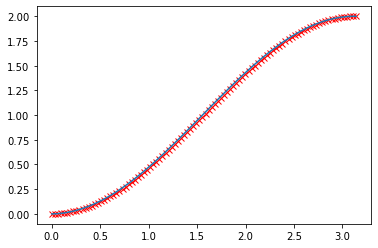
x = np.linspace(0, np.pi, 100)y = np.sin(x)diff = x[1] - x[0]result_np = np.add.accumulate(y) * diffp = plt.plot(x, - np.cos(x) + np.cos(0), 'rx')p = plt.plot(x, result_np)print(result_np[-1])print((- np.cos(x) + np.cos(0))[-1])
1.9998321638939924
2.0
速度比较
计算积分:
In [28]:
import sympyfrom sympy.abc import x as sympy_x, theta
In [29]:
end = np.pi * 20x = np.linspace(0, end, 10000)y = np.sin(x)sympy_y = vectorize(lambda x: sympy.integrate(sympy.sin(theta), (theta, 0, x)))
numpy
方法:
In [30]:
%timeit np.add.accumulate(y) * (x[1] - x[0])y0 = np.add.accumulate(y) * (x[1] - x[0])print("result = ", y0[-1])
64.7 µs ± 6.37 µs per loop (mean ± std. dev. of 7 runs, 10000 loops each)
result = -2.3413804475641734e-17
quad
方法:
In [31]:
%timeit quad(np.sin, 0, end)value, max_err = quad(np.sin, 0, end)print("result = ", value)
40.6 µs ± 7.68 µs per loop (mean ± std. dev. of 7 runs, 10000 loops each)
result = 3.437813371530083e-15
trapz
方法:
In [32]:
%timeit trapz(y, x)y1 = trapz(y, x)print("result = ", y1)
121 µs ± 15 µs per loop (mean ± std. dev. of 7 runs, 10000 loops each)
result = -4.440892098500626e-16
simps
方法:
In [33]:
%timeit simps(y, x)y3 = simps(y, x)print("result = ", y3)
596 µs ± 15.6 µs per loop (mean ± std. dev. of 7 runs, 1000 loops each)
result = 3.284285549683824e-16
sympy
积分方法:
In [35]:
%timeit sympy_y(end)y4 = sympy_y(end)print("result = ", y4)
6.82 ms ± 789 µs per loop (mean ± std. dev. of 7 runs, 100 loops each)
result = 0
