



mysql8.0的binlog占用太大,默认为30天,修改保留策略7天.
[root@mysql-node-1 mysql]# mysql -h10.10.15.107 -u root -p"xxxx"
mysql: [Warning] Using a password on the command line interface can be insecure.
Welcome to the MySQL monitor.  Commands end with ; or \g.
Your MySQL connection id is 3137772
Server version: 8.0.32 MySQL Community Server - GPL

Copyright (c) 2000, 2023, Oracle and/or its affiliates.

Oracle is a registered trademark of Oracle Corporation and/or its
affiliates. Other names may be trademarks of their respective
owners.

Type 'help;' or '\h' for help. Type '\c' to clear the current input statement.
mysql> show variables like '%logs%';
+-------------------------------+---------+
| Variable_name                 | Value   |
+-------------------------------+---------+
| binlog_expire_logs_auto_purge | ON      |
| binlog_expire_logs_seconds    | 2592000 |
| expire_logs_days              | 0       |
| innodb_print_ddl_logs         | OFF     |
+-------------------------------+---------+
4 rows in set (0.01 sec)

mysql> set global binlog_expire_logs_seconds=604800;
Query OK, 0 rows affected (0.00 sec)

mysql> show variables like '%logs%';
+-------------------------------+--------+
| Variable_name                 | Value  |
+-------------------------------+--------+
| binlog_expire_logs_auto_purge | ON     |
| binlog_expire_logs_seconds    | 604800 |
| expire_logs_days              | 0      |
| innodb_print_ddl_logs         | OFF    |
+-------------------------------+--------+
4 rows in set (0.00 sec)
mysql> flush logs;
Query OK, 0 rows affected (0.01 sec)
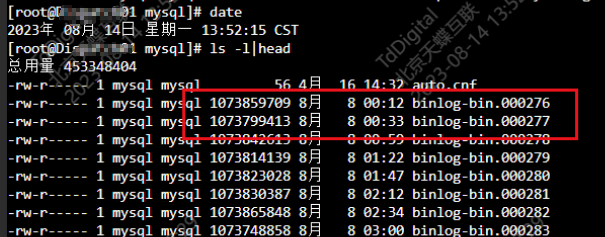
修改配置文件/etc/my.cnf确保下次启动也生效。
vi /etc/my.cnf

binlog_expire_logs_seconds=604800
如何手动清理binlog
1.使用MySQL命令行
在MySQL命令行中,使用PURGE BINARY LOGS语句可以删除所有指定日期前创建的过期binlog日志文件。

例如,为了删除超过7天的binlog日志文件,可以运行以下命令:

PURGE BINARY LOGS BEFORE DATE_SUB(NOW(), INTERVAL 7 DAY);

2.按照binlog名称删除
将mysql-bin.000018之前的日志清理掉
mysql> purge binary logs to 'mysql-bin.000018';
Query OK, 0 rows affected (0.01 sec)

3.按照时间删除
## 删除2023-08-14 18:08:00之前的binlog日志
mysql> purge binary logs before '2023-08-14 18:08:00';
Query OK, 0 rows affected, 1 warning (0.02 sec)
mysql5.x版本时应修改参数:
expire_logs_days=7
「喜欢这篇文章,您的关注和赞赏是给作者最好的鼓励」
关注作者
【版权声明】本文为墨天轮用户原创内容,转载时必须标注文章的来源(墨天轮),文章链接,文章作者等基本信息,否则作者和墨天轮有权追究责任。如果您发现墨天轮中有涉嫌抄袭或者侵权的内容,欢迎发送邮件至:contact@modb.pro进行举报,并提供相关证据,一经查实,墨天轮将立刻删除相关内容。
