



orchestrator+vip方式实现MySQL高可用
- 系统:CentOS 7.6
- 服务器
192.168.20.101 node1
192.168.20.102 node2
192.168.20.103 node3
- 数据库版本: MySQL 5.7.27 均已安装
GTID 已开启
log-slave-updates = ON
report_host最好也配置上
- orchestrator 版本 : v3.1.4
MySQL主从配置略...,需注意设置主从时添加参数如下,优化发现切换时间,另外需要注意写个脚本更改切换后的 rpl_semi_sync_slave_enabled/rpl_semi_sync_master_enabled/read_only/super_read_only 参数,若rpl_semi_sync_source_timeout设置值小的话问题不大
change master to
master_host='192.168.20.101',
master_port=3306,
master_user='rpl',
master_password='123456',
master_auto_position=1,
MASTER_HEARTBEAT_PERIOD=2,
MASTER_CONNECT_RETRY=1,
MASTER_RETRY_COUNT=86400;
set global slave_net_timeout=8;
set global read_only=1;
set global super_read_only=1;
1-基础配置
1.1-hosts配置
每台机器分别添加hosts
echo '192.168.20.101 node1' >> /etc/hosts
echo '192.168.20.102 node2' >> /etc/hosts
echo '192.168.20.103 node3' >> /etc/hosts
1.2-配置ssh免密
所有机器执行:
# 一路回车
ssh-keygen
ssh-copy-id node1
ssh-copy-id node2
ssh-copy-id node3
2-部署 orchestrator
2.1-下载
下载路径:[openark/orchestrator](openark/orchestrator)
wget https://github.com/openark/orchestrator/releases/download/v3.1.4/orchestrator-3.1.4-1.x86_64.rpm
wget https://github.com/openark/orchestrator/releases/download/v3.1.4/orchestrator-client-3.1.4-1.x86_64.rpm
2.2-安装
三台机器都安装 orchestrator的服务端和客户端
# 安装依赖
yum -y install jq
# 安装
[root@node1 ~]# rpm -ivh orchestrator-3.1.4-1.x86_64.rpm
Preparing... ################################# [100%]
Updating / installing...
1:orchestrator-1:3.1.4-1 ################################# [100%]
[root@node1 ~]# rpm -ivh orchestrator-client-3.1.4-1.x86_64.rpm
Preparing... ################################# [100%]
Updating / installing...
1:orchestrator-client-1:3.1.4-1 ################################# [100%]
2.3-创建orchestrator管理用户
# mysql 主库上操作
mysql> CREATE USER 'orchestrator'@'192.168.20.%' IDENTIFIED BY '123456';
mysql> GRANT SUPER, PROCESS, REPLICATION SLAVE, RELOAD ON *.* TO 'orchestrator'@'192.168.20.%';
mysql> GRANT SELECT ON mysql.slave_master_info TO 'orchestrator'@'192.168.20.%';
2.4-设置配置文件
cp /usr/local/orchestrator/orchestrator-sample-sqlite.conf.json /etc/orchestrator.conf.json
vi /etc/orchestrator.conf.json 修改如下几个参数:
- MySQLTopologyUser/MySQLTopologyPassword 检测MySQL集群的用户名/密码
- SQLite3DataFile SQLite库存放路径,需要有写的权限
- DefaultInstancePort mysql 实例端口
- FailureDetectionPeriodBlockMinutes 在该时间内再次出现故障,不会被多次发现。
- coveryPeriodBlockSeconds 在该时间内再次出现故障,不会进行迁移,避免出现并发恢复和不稳定。
- RecoverMasterClusterFilters 只对匹配这些正则表达式模式的集群进行主恢复(“*”模式匹配所有)。
- RecoverIntermediateMasterClusterFilters 只对匹配这些正则表达式模式的集群进行主恢复(“*”模式匹配所有)。
- PostFailoverProcesses 修改为脚本实际的存放路径
- 添加Raft相关 Raft相关用于做orchestrator高可用
- RaftBind 修改为本机IP
{
"Debug": true,
"EnableSyslog": false,
"ListenAddress": ":3000",
"MySQLTopologyUser": "orchestrator",
"MySQLTopologyPassword": "123456",
"MySQLTopologyCredentialsConfigFile": "",
"MySQLTopologySSLPrivateKeyFile": "",
"MySQLTopologySSLCertFile": "",
"MySQLTopologySSLCAFile": "",
"MySQLTopologySSLSkipVerify": true,
"MySQLTopologyUseMutualTLS": false,
"BackendDB": "sqlite",
"SQLite3DataFile": "/usr/local/orchestrator/orchestrator.db",
"MySQLConnectTimeoutSeconds": 1,
"DefaultInstancePort": 3306,
"DiscoverByShowSlaveHosts": true,
"InstancePollSeconds": 5,
"DiscoveryIgnoreReplicaHostnameFilters": [
"a_host_i_want_to_ignore[.]example[.]com",
".*[.]ignore_all_hosts_from_this_domain[.]example[.]com",
"a_host_with_extra_port_i_want_to_ignore[.]example[.]com:3307"
],
"UnseenInstanceForgetHours": 240,
"SnapshotTopologiesIntervalHours": 0,
"InstanceBulkOperationsWaitTimeoutSeconds": 10,
"HostnameResolveMethod": "default",
"MySQLHostnameResolveMethod": "@@hostname",
"SkipBinlogServerUnresolveCheck": true,
"ExpiryHostnameResolvesMinutes": 60,
"RejectHostnameResolvePattern": "",
"ReasonableReplicationLagSeconds": 10,
"ProblemIgnoreHostnameFilters": [],
"VerifyReplicationFilters": false,
"ReasonableMaintenanceReplicationLagSeconds": 20,
"CandidateInstanceExpireMinutes": 60,
"AuditLogFile": "",
"AuditToSyslog": false,
"RemoveTextFromHostnameDisplay": ".mydomain.com:3306",
"ReadOnly": false,
"AuthenticationMethod": "",
"HTTPAuthUser": "",
"HTTPAuthPassword": "",
"AuthUserHeader": "",
"PowerAuthUsers": [
"*"
],
"ClusterNameToAlias": {
"127.0.0.1": "test suite"
},
"ReplicationLagQuery": "",
"DetectClusterAliasQuery": "SELECT SUBSTRING_INDEX(@@hostname, '.', 1)",
"DetectClusterDomainQuery": "",
"DetectInstanceAliasQuery": "",
"DetectPromotionRuleQuery": "",
"DataCenterPattern": "[.]([^.]+)[.][^.]+[.]mydomain[.]com",
"PhysicalEnvironmentPattern": "[.]([^.]+[.][^.]+)[.]mydomain[.]com",
"PromotionIgnoreHostnameFilters": [],
"DetectSemiSyncEnforcedQuery": "",
"ServeAgentsHttp": false,
"AgentsServerPort": ":3001",
"AgentsUseSSL": false,
"AgentsUseMutualTLS": false,
"AgentSSLSkipVerify": false,
"AgentSSLPrivateKeyFile": "",
"AgentSSLCertFile": "",
"AgentSSLCAFile": "",
"AgentSSLValidOUs": [],
"UseSSL": false,
"UseMutualTLS": false,
"SSLSkipVerify": false,
"SSLPrivateKeyFile": "",
"SSLCertFile": "",
"SSLCAFile": "",
"SSLValidOUs": [],
"URLPrefix": "",
"StatusEndpoint": "/api/status",
"StatusSimpleHealth": true,
"StatusOUVerify": false,
"AgentPollMinutes": 60,
"UnseenAgentForgetHours": 6,
"StaleSeedFailMinutes": 60,
"SeedAcceptableBytesDiff": 8192,
"PseudoGTIDPattern": "",
"PseudoGTIDPatternIsFixedSubstring": false,
"PseudoGTIDMonotonicHint": "asc:",
"DetectPseudoGTIDQuery": "",
"BinlogEventsChunkSize": 10000,
"SkipBinlogEventsContaining": [],
"ReduceReplicationAnalysisCount": true,
"FailureDetectionPeriodBlockMinutes": 5,
"RecoveryPeriodBlockSeconds": 30,
"RecoveryIgnoreHostnameFilters": [],
"RecoverMasterClusterFilters": [
"*"
],
"RecoverIntermediateMasterClusterFilters": [
"*"
],
"OnFailureDetectionProcesses": [
"echo '`date +'%Y-%m-%d %T'` Detected {failureType} on {failureCluster}. Affected replicas: {countSlaves}' >> /tmp/recovery.log"
],
"PreGracefulTakeoverProcesses": [
"echo '`date +'%Y-%m-%d %T'` Planned takeover about to take place on {failureCluster}. Master will switch to read_only' >> /tmp/recovery.log"
],
"PreFailoverProcesses": [
"echo '`date +'%Y-%m-%d %T'` Will recover from {failureType} on {failureCluster}' >> /tmp/recovery.log"
],
"PostFailoverProcesses": [
"echo '`date +'%Y-%m-%d %T'` (for all types) Recovered from {failureType} on {failureCluster}. Failed: {failedHost}:{failedPort}; Successor: {successorHost}:{successorPort}; failureClusterAlias:{failureClusterAlias}' >> /tmp/recovery.log",
"/usr/local/orchestrator/orch_hook.sh {failureType} {failureClusterAlias} {failedHost} {successorHost} >> /tmp/orch.log"
],
"PostUnsuccessfulFailoverProcesses": [ "echo '`date +'%Y-%m-%d %T'` Unsuccessful Failover ' >> /tmp/recovery.log"],
"PostMasterFailoverProcesses": [
"echo '`date +'%Y-%m-%d %T'` Recovered from {failureType} on {failureCluster}. Failed: {failedHost}:{failedPort}; Promoted: {successorHost}:{successorPort}' >> /tmp/recovery.log"
],
"PostIntermediateMasterFailoverProcesses": [
"echo '`date +'%Y-%m-%d %T'` Recovered from {failureType} on {failureCluster}. Failed: {failedHost}:{failedPort}; Successor: {successorHost}:{successorPort}' >> /tmp/recovery.log"
],
"PostGracefulTakeoverProcesses": [
"echo '`date +'%Y-%m-%d %T'` Planned takeover complete' >> /tmp/recovery.log"
],
"CoMasterRecoveryMustPromoteOtherCoMaster": true,
"DetachLostSlavesAfterMasterFailover": true,
"ApplyMySQLPromotionAfterMasterFailover": true,
"PreventCrossDataCenterMasterFailover": false,
"PreventCrossRegionMasterFailover": false,
"MasterFailoverDetachReplicaMasterHost": false,
"MasterFailoverLostInstancesDowntimeMinutes": 0,
"PostponeReplicaRecoveryOnLagMinutes": 0,
"OSCIgnoreHostnameFilters": [],
"GraphiteAddr": "",
"GraphitePath": "",
"GraphiteConvertHostnameDotsToUnderscores": true,
"ConsulAddress": "",
"ConsulAclToken": "",
"RaftEnabled":true,
"RaftDataDir":"/usr/local/orchestrator",
"RaftBind":"192.168.20.101",
"DefaultRaftPort":10008,
"RaftNodes":[
"192.168.20.101",
"192.168.20.102",
"192.168.20.103"
]
}
2.5-配置文件复制到其他机器上去
scp /etc/orchestrator.conf.json root@node2:/etc/orchestrator.conf.json
scp /etc/orchestrator.conf.json root@node3:/etc/orchestrator.conf.json
修改最后的 `"RaftBind":"192.168.20.101",` 的地址为本机地址
2.6-VIP切换脚本创建
所有服务器均创建,建议创建一个后复制过去改下
/usr/local/orchestrator/orch_hook.sh
/usr/local/orchestrator/orch_vip.sh
2.6.1-orch_hook.sh
可能需要修改:
- 注意脚本路径当前为:/usr/local/orchestrator/orch_vip.sh
- array=( ens32 "192.168.20.111" root "192.168.20.101")
对应值为: 网卡名称 VIP地址 ssh用户名 本机IP
- MYSQL_PWD 忽略
[root@node1 orchestrator]# cat orch_hook.sh
#!/bin/bash
isitdead=$1
cluster=$2
oldmaster=$3
newmaster=$4
mysqluser="orchestrator"
export MYSQL_PWD="xxxpassxxx"
logfile="/var/log/orch_hook.log"
# list of clusternames
#clusternames=(rep blea lajos)
# clustername=( interface IP user Inter_IP)
#rep=( ens32 "192.168.56.121" root "192.168.56.125")
if [[ $isitdead == "DeadMaster" ]]; then
array=( ens32 "192.168.20.111" root "192.168.20.101")
interface=${array[0]}
IP=${array[1]}
user=${array[2]}
if [ ! -z ${IP} ] ; then
echo $(date)
echo "Revocering from: $isitdead"
echo "New master is: $newmaster"
echo "/usr/local/orchestrator/orch_vip.sh -d 1 -n $newmaster -i ${interface} -I ${IP} -u ${user} -o $oldmaster" | tee $logfile
/usr/local/orchestrator/orch_vip.sh -d 1 -n $newmaster -i ${interface} -I ${IP} -u ${user} -o $oldmaster
#mysql -h$newmaster -u$mysqluser < /usr/local/bin/orch_event.sql
else
echo "Cluster does not exist!" | tee $logfile
fi
elif [[ $isitdead == "DeadIntermediateMasterWithSingleSlaveFailingToConnect" ]]; then
array=( ens32 "192.168.20.111" root "192.168.20.101")
interface=${array[0]}
IP=${array[3]}
user=${array[2]}
slavehost=`echo $5 | cut -d":" -f1`
echo $(date)
echo "Revocering from: $isitdead"
echo "New intermediate master is: $slavehost"
echo "/usr/local/orchestrator/orch_vip.sh -d 1 -n $slavehost -i ${interface} -I ${IP} -u ${user} -o $oldmaster" | tee $logfile
/usr/local/orchestrator/orch_vip.sh -d 1 -n $slavehost -i ${interface} -I ${IP} -u ${user} -o $oldmaster
elif [[ $isitdead == "DeadIntermediateMaster" ]]; then
array=( ens32 "192.168.20.111" root "192.168.20.101")
interface=${array[0]}
IP=${array[3]}
user=${array[2]}
slavehost=`echo $5 | sed -E "s/:[0-9]+//g" | sed -E "s/,/ /g"`
showslave=`mysql -h$newmaster -u$mysqluser -sN -e "SHOW SLAVE HOSTS;" | awk '{print $2}'`
newintermediatemaster=`echo $slavehost $showslave | tr ' ' '\n' | sort | uniq -d`
echo $(date)
echo "Revocering from: $isitdead"
echo "New intermediate master is: $newintermediatemaster"
echo "/usr/local/orchestrator/orch_vip.sh -d 1 -n $newintermediatemaster -i ${interface} -I ${IP} -u ${user} -o $oldmaster" | tee $logfile
/usr/local/orchestrator/orch_vip.sh -d 1 -n $newintermediatemaster -i ${interface} -I ${IP} -u ${user} -o $oldmaster
fi
2.6.2-orch_vip.sh
需要发邮件可以修改`emailaddress`的地址,并将 `sendmail`改为 1
[root@node1 orchestrator]# cat orch_vip.sh
#!/bin/bash
emailaddress="email@example.com"
sendmail=0
function usage {
cat << EOF
usage: $0 [-h] [-d master is dead] [-o old master ] [-s ssh options] [-n new master] [-i interface] [-I] [-u SSH user]
OPTIONS:
-h Show this message
-o string Old master hostname or IP address
-d int If master is dead should be 1 otherweise it is 0
-s string SSH options
-n string New master hostname or IP address
-i string Interface exmple eth0:1
-I string Virtual IP
-u string SSH user
EOF
}
while getopts ho:d:s:n:i:I:u: flag; do
case $flag in
o)
orig_master="$OPTARG";
;;
d)
isitdead="${OPTARG}";
;;
s)
ssh_options="${OPTARG}";
;;
n)
new_master="$OPTARG";
;;
i)
interface="$OPTARG";
;;
I)
vip="$OPTARG";
;;
u)
ssh_user="$OPTARG";
;;
h)
usage;
exit 0;
;;
*)
usage;
exit 1;
;;
esac
done
if [ $OPTIND -eq 1 ]; then
echo "No options were passed";
usage;
fi
shift $(( OPTIND - 1 ));
# discover commands from our path
ssh=$(which ssh)
arping=$(which arping)
ip2util=$(which ip)
# command for adding our vip
cmd_vip_add="sudo -n $ip2util address add ${vip} dev ${interface}"
# command for deleting our vip
cmd_vip_del="sudo -n $ip2util address del ${vip}/32 dev ${interface}"
# command for discovering if our vip is enabled
cmd_vip_chk="sudo -n $ip2util address show dev ${interface} to ${vip%/*}/32"
# command for sending gratuitous arp to announce ip move
cmd_arp_fix="sudo -n $arping -c 1 -I ${interface} ${vip%/*} "
# command for sending gratuitous arp to announce ip move on current server
cmd_local_arp_fix="sudo -n $arping -c 1 -I ${interface} ${vip%/*} "
vip_stop() {
rc=0
# ensure the vip is removed
$ssh ${ssh_options} -tt ${ssh_user}@${orig_master} \
"[ -n \"\$(${cmd_vip_chk})\" ] && ${cmd_vip_del} && sudo ${ip2util} route flush cache || [ -z \"\$(${cmd_vip_chk})\" ]"
rc=$?
return $rc
}
vip_start() {
rc=0
# ensure the vip is added
# this command should exit with failure if we are unable to add the vip
# if the vip already exists always exit 0 (whether or not we added it)
$ssh ${ssh_options} -tt ${ssh_user}@${new_master} \
"[ -z \"\$(${cmd_vip_chk})\" ] && ${cmd_vip_add} && ${cmd_arp_fix} || [ -n \"\$(${cmd_vip_chk})\" ]"
rc=$?
$cmd_local_arp_fix
return $rc
}
vip_status() {
$arping -c 1 -I ${interface} ${vip%/*}
if ping -c 1 -W 1 "$vip"; then
return 0
else
return 1
fi
}
if [[ $isitdead == 0 ]]; then
echo "Online failover"
if vip_stop; then
if vip_start; then
echo "$vip is moved to $new_master."
if [ $sendmail -eq 1 ]; then mail -s "$vip is moved to $new_master." "$emailaddress" < /dev/null &> /dev/null ; fi
else
echo "Can't add $vip on $new_master!"
if [ $sendmail -eq 1 ]; then mail -s "Can't add $vip on $new_master!" "$emailaddress" < /dev/null &> /dev/null ; fi
exit 1
fi
else
echo $rc
echo "Can't remove the $vip from orig_master!"
if [ $sendmail -eq 1 ]; then mail -s "Can't remove the $vip from orig_master!" "$emailaddress" < /dev/null &> /dev/null ; fi
exit 1
fi
elif [[ $isitdead == 1 ]]; then
echo "Master is dead, failover"
# make sure the vip is not available
if vip_status; then
if vip_stop; then
if [ $sendmail -eq 1 ]; then mail -s "$vip is removed from orig_master." "$emailaddress" < /dev/null &> /dev/null ; fi
else
if [ $sendmail -eq 1 ]; then mail -s "Couldn't remove $vip from orig_master." "$emailaddress" < /dev/null &> /dev/null ; fi
exit 1
fi
fi
if vip_start; then
echo "$vip is moved to $new_master."
if [ $sendmail -eq 1 ]; then mail -s "$vip is moved to $new_master." "$emailaddress" < /dev/null &> /dev/null ; fi
else
echo "Can't add $vip on $new_master!"
if [ $sendmail -eq 1 ]; then mail -s "Can't add $vip on $new_master!" "$emailaddress" < /dev/null &> /dev/null ; fi
exit 1
fi
else
echo "Wrong argument, the master is dead or live?"
fi
2.7-设置VIP
仅在master节点上创建VIP
# 添加VIP
ip addr add 192.168.20.111 dev ens32
# 删除 ip addr del 192.168.20.111 dev ens32
2.8-启动orchestrator
所有机器启动
cd /usr/local/orchestrator && nohup ./orchestrator --config=/etc/orchestrator.conf.json http &
2.9-设置环境变量
因为配置了Raft,有多个Orchestrator,所以需要ORCHESTRATOR_API的环境变量,orchestrator-client会自动选择leader。
所有机器执行 vi /etc/profile
# 在最后添加
export ORCHESTRATOR_API="node1:3000/api node2:3000/api node3:3000/api"
# 添加完成后source生效
source /etc/profile
2.10-发现拓扑
# 任意服务器上执行,发现leader在哪
[root@node2 ~]# orchestrator-client -c which-api
node1:3000/api
# 在任意服务器上执行
[root@node2 ~]# orchestrator-client -c discover -i 192.168.20.101:3306
node1:3306
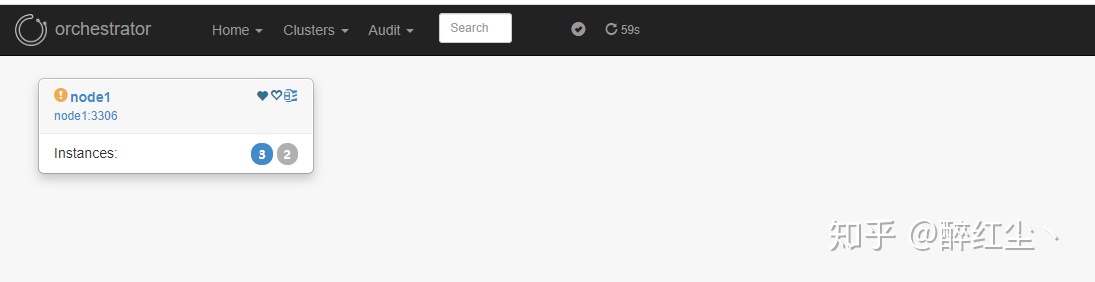
展开
3-测试
3.1-kill或关闭mysql
结果会自动进行切换,IP自动漂移
3.2-直接poweroff掉master服务器
结果会自动进行切换,IP自动漂移
3.3-恢复
change master to master_host='192.168.20.101',master_port=3306,master_user='orchestrator',master_password='123456',master_auto_position=1,MASTER_HEARTBEAT_PERIOD=2,MASTER_CONNECT_RETRY=1,MASTER_RETRY_COUNT=86400;
set global slave_net_timeout=8;
# 从库设置为只读
set global read_only=1;
set global super_read_only=1;
start slave;
show slave status\G
4.1-查看拓扑
# 任意一个节点
[root@node1 orchestrator]# orchestrator-client -c topology -i node2
node1:3306 [0s,ok,5.7.27-log,rw,ROW,>>,GTID]
+ node2:3306 [0s,ok,5.7.27-log,ro,ROW,>>,GTID]
+ node3:3306 [0s,ok,5.7.27-log,ro,ROW,>>,GTID]
4.2-设置为只读模式/读写模式
# 设置node2为只读模式
orchestrator-client -c set-read-only -i node2
# 设置node2为读写模式
orchestrator-client -c set-writeable -i node2
4.3-优雅的进行主和指定从切换
# 提升node2为master,原主node1需要手动去执行 start slave
orchestrator-client -c graceful-master-takeover -a node1:3306 -d node2:3306
原结构:
node1:3306 [0s,ok,5.7.27-log,rw,ROW,>>,GTID]
+ node2:3306 [0s,ok,5.7.27-log,ro,ROW,>>,GTID]
+ node3:3306 [0s,ok,5.7.27-log,ro,ROW,>>,GTID]
变更后结构:
node2:3306 [0s,ok,5.7.27-log,rw,ROW,>>,GTID]
- node1:3306 [null,nonreplicating,5.7.27-log,ro,ROW,>>,GTID,downtimed] # 需要手动启动slave
+ node3:3306 [0s,ok,5.7.27-log,ro,ROW,>>,GTID]
