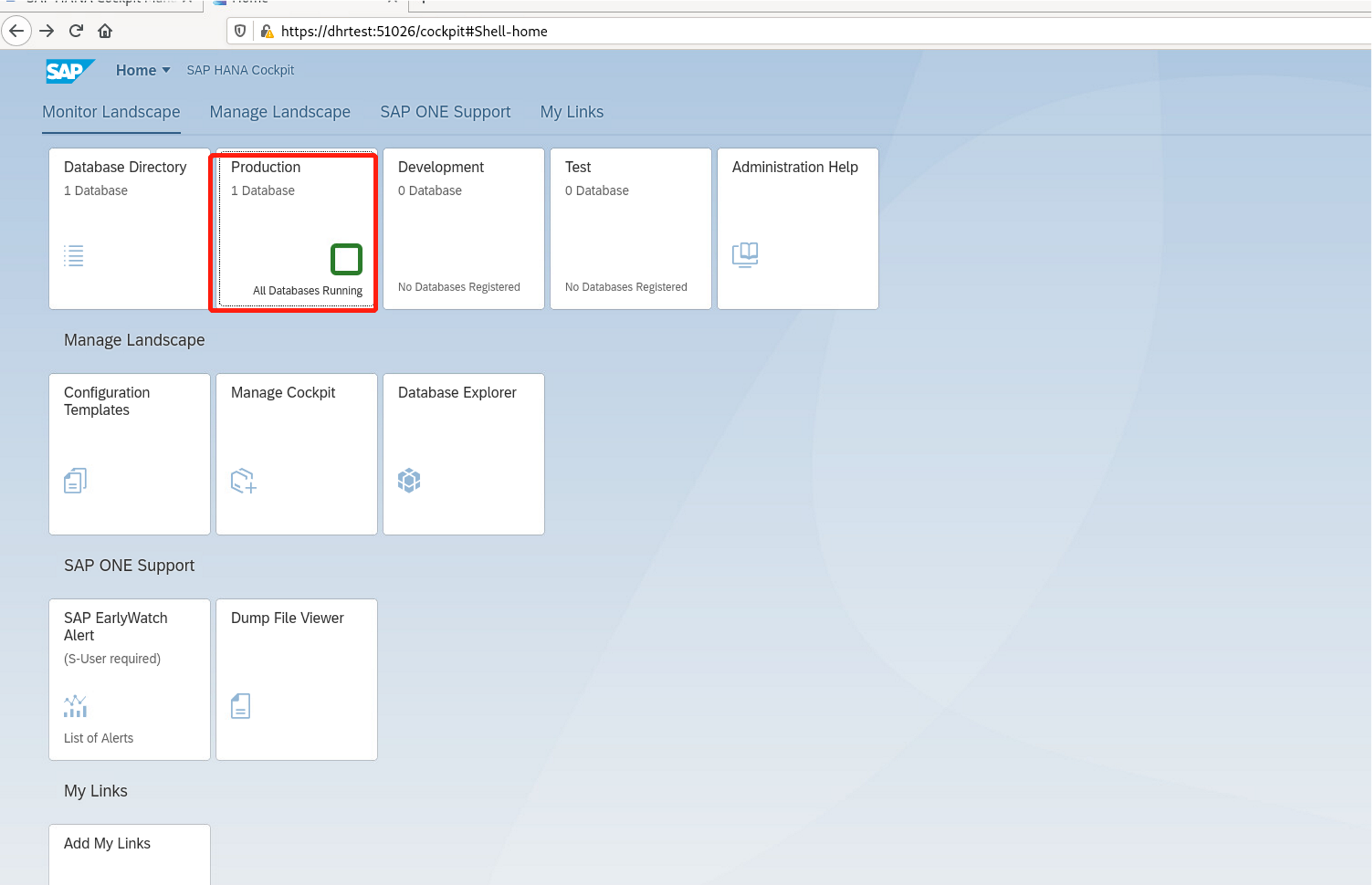
Hana cockpit简介:提供了聚合、系统和数据库的管理功能,例如数据库监控、用户管理和数据备份。你能用hana cockpit启动和停止系统和服务、监控系统、配置系统设置、管理用户用授权。
1.参考文档:
https://mp.weixin.qq.com/s/1rPFJ9AZrZHqlo1upjjuQg
2.下载地址:
3.解压
dhrtest:/software/cockpit # ./sapcar_1320-80000935.exe -manifest SIGNATURE.SMF -xvf SAPHANACOCKPIT14_10-70002299.SAR
4.安装
dhrtest:/software/cockpit # ./hdblcm.sh
SAP HANA Lifecycle Management - SAP HANA Cockpit 2.0.14.10.0
************************************************************
Choose an action
Index | Action | Description
--------------------------------------------------------------------------------------------------------
1 | DQQ (install) | Install SAP HANA Cockpit on SAP HANA Database version 2.00.055.00.1615413201
2 | HAT (install) | Install SAP HANA Cockpit on SAP HANA Database version 2.00.055.00.1615413201
3 | install | Install new SAP HANA Cockpit system
4 | Exit (do nothing) |
Enter selected action index [4]: 3
Enter Installation Path [/hana/shared]: 输入安装路径
Enter Local Host Name [dhrtest]: 输入本机的主机名
Enter SAP HANA System ID [H4C]: 输入HANA的systemid
Enter Instance Number [96]: 输入实例编号
Do you want to enable data and log volume encryption? [n]: 是否启动数据和日志的加密
Apply System Size Dependent Resource Limits? (SAP Note 3014176) [y]: y
Enter Master Password: 输入master的密码Ctest123
Confirm Master Password: 确认密码
Summary before execution:
=========================
SAP HANA Cockpit System Installation
Installation Parameters
Remote Execution: ssh
Use single master password for all users, created during installation: Yes
Database Isolation: low
Create initial tenant database: No
Install Execution Mode: optimized
Installation Path: /hana/shared
Local Host Name: dhrtest
SAP HANA System ID: H4C
Instance Number: 96
Configure Python version: python3
Local Host Worker Group: default
System Usage: custom
Location of Data Volumes: /hana/shared/data/H4C
Location of Log Volumes: /hana/shared/log/H4C
Directory containing custom configurations: /software/cockpit/HDB_SERVER_LINUX_X86_64/configurations/custom
Certificate Host Names: dhrtest -> dhrtest
System Administrator Home Directory: /usr/sap/H4C/home
System Administrator Login Shell: /bin/bash
System Administrator User ID: 1007
ID of User Group (sapsys): 1002
Restart system after machine reboot?: Yes
Inter Service Communication Mode: standard
XS Advanced App Working Path: /hana/shared/H4C/xs/app_working
Organization Name For Space "SAP": HANACockpit
XS Advanced Admin User: COCKPIT_ADMIN
Customer Space Name: cockpit
Routing Mode: ports
XS Advanced Domain Name (see SAP Note 2245631): dhrtest
Run Applications in SAP Space with Separate OS User (y/n): No
Run Applications in Customer Space with Separate OS User (y/n): No
XS Advanced Components: all
Do not start the selected XS Advanced components after installation: none
Software Components
SAP HANA Database
Install version 2.00.059.00.1636704142
Location: /software/cockpit/HDB_SERVER_LINUX_X86_64/server
SAP HANA Cockpit Stack
Install version 2.0.14.10.0
Location: /software/cockpit
SAP HANA XS Advanced Runtime
Install version 1.0.146.924
Location: /software/cockpit/XSA_RT_20_LINUX_X86_64/packages
XS Advanced Components
SAP HANA Cockpit
Install version 2.0014.10
Location: /software/cockpit/COCKPIT2_APP/sap-xsac-cockpit-2.14.10.zip
SAP HANA tools for accessing catalog content, data preview, SQL console, etc.
Install version 2.014.220501
Location: /software/cockpit/XSAC_HRTT_20/sap-xsac-hrtt-onprem-2.14.220501.zip
Develop and run portal services for customer apps on XSA
Install version 2.006.2
Location: /software/cockpit/SAP_PORTAL_SERVICES/sap-portal-services-assembly-2.6.2.zip
XSA Cockpit 1
Install version 1.001.27
Location: /software/cockpit/XSA_COCKPIT/cockpit-web-xsa-assembly-1.1.27.zip
Automatically Assigned Roles
Host: dhrtest Role: XS Advanced Runtime Worker (xs_worker)
Log File Locations
Log directory: /var/tmp/hdb_H4C_hdblcm_install_2022-06-10_03.22.19
Trace location: /var/tmp/hdblcm_2022-06-10_03.22.19_2175.trc
Do you want to continue? (y/n): y
Installing components...
Installing SAP HANA Database...
Preparing package 'Saphostagent Setup'...
Preparing package 'Python3 Runtime'...
Preparing package 'Python Support'...
Preparing package 'Python Runtime'...
Preparing package 'Product Manifest'...
Preparing package 'Binaries'...
Preparing package 'Offline Cockpit'...
Preparing package 'Krb5 Runtime'...
Preparing package 'Installer'...
Preparing package 'Ini Files'...
Preparing package 'Documentation'...
Creating System...
Extracting software...
Installing package 'Saphostagent Setup'...
Installing package 'Python3 Runtime'...
Installing package 'Python Support'...
Installing package 'Python Runtime'...
Installing package 'Product Manifest'...
Installing package 'Binaries'...
Installing package 'Offline Cockpit'...
Installing package 'Krb5 Runtime'...
Installing package 'Installer'...
Installing package 'Ini Files'...
Installing package 'Documentation'...
Creating instance...
Installing Resident hdblcm...
Installing SAP HANA XS Advanced Runtime...
Preparing package 'sapjvm 8'...
Preparing package 'SapMachine 11'...
Preparing package 'Runtime'...
Preparing package 'Platform Router'...
Preparing package 'Node12'...
Preparing package 'Installer'...
Preparing package 'Installation Scripts'...
Preparing package 'Initial Content'...
Installing SAP HANA XS RUNTIME to /hana/shared/H4C/xs...
Installing package 'sapjvm 8'...
Installing package 'SapMachine 11'...
Installing package 'Runtime'...
Installing package 'Platform Router'...
Installing package 'Node12'...
Installing package 'Installer'...
Installing package 'Installation Scripts'...
Installing package 'Initial Content'...
Configuring SAP HANA Database...
Configuring System...
Configuring instance...
Starting instances...
Starting 5 processes on host 'dhrtest' (worker):
Starting on 'dhrtest' (worker): hdbdaemon, hdbcompileserver, hdbnameserver, hdbpreprocessor, hdbwebdispatcher
Starting on 'dhrtest' (worker): hdbdaemon, hdbwebdispatcher
All server processes started on host 'dhrtest' (worker).
Finalizing installation of SAP HANA Database...
Finalizing System Installation...
Starting SAP HANA Database system...
Finalizing installation of SAP HANA XS Advanced Runtime...
Installing SAP HANA XS RUNTIME to /hana/shared/H4C/xs...
Configuring software...
Updating core of XS Advanced Runtime
Starting INSTALLATION of XS advanced core v1.0.146.924
Starting step: Check preconditions
Starting step: Maintain SYS_XSA users and database UUIDs
Starting step: Maintain XSA schema and users
Creating XSA admin user 'COCKPIT_ADMIN'
Creating user 'SYS_XS_RUNTIME'
Creating XSA Info database user
Starting step: Maintain tenant information
Starting step: Ensure LM service user password
Starting step: Adapt installation properties after standard software installation
Starting step: Check compatibility with Node.js
Starting step: Parallel installation steps
Starting step: Enable diserver
Starting step: OID DB user and schema
Starting step: Instance manager schema and users
Starting step: SBSS users and schema
Creating instance manager admin database user
Starting step: UAA service broker users and schema
Creating UAA secure store user
Starting step: UAA Server tomcat context configuration
Creating instance manager database user
Creating UAA database user
Starting step: Router certificate
Starting step: Maintain the HANA service broker schema and users
Creating the HANA broker cloud controller and admin users
Starting step: Recover bindings and instances of HDI-Broker
Starting step: Move app working directories
Starting step: Maintain XSA user group
Starting step: Maintain core version
Installing content of SAP HANA XS Advanced Runtime...
Installing SAP HANA XS RUNTIME to /hana/shared/H4C/xs...
Updating content of XS Advanced Runtime
Starting UPDATE of XS advanced content from v0.0.0.0 to v1.0.146.924
Assigning Additional Roles to the Local Host...
Adding role 'xs_worker' on local host 'dhrtest'...
Starting 2 processes on host dhrtest:
Starting on dhrtest: hdbxscontroller, hdbxsuaaserver
Starting on dhrtest: hdbxscontroller
Server processes started on host dhrtest.
Loading initial content of XS Advanced Runtime
Starting INSTALLATION of XS advanced content v1.0.146.924
Starting step: Check preconditions
Starting step: Wait for database to become available
Starting step: Wait for XSA services
Starting step: Check if the default domain is pointing to the right host
Starting step: UAA broker configuration
Starting step: Check if the default domain is pointing to the right host
Starting step: Configure the OIDC service
Starting step: Wait for at least one Execution Agent
Starting step: Hana-Service-Broker configuration
Starting step: Configure UAA SAML Trust
Starting step: Organizations and spaces
Creating organization 'HANACockpit'
Creating space 'SAP'
Creating space 'cockpit'
Starting step: Parallel installation steps
Starting step: Environment Configuration
Starting step: Python Buildpack
Starting step: Node.js Buildpack
Starting step: JDBC Driver v1
Starting step: Java Buildpack
Starting step: Node.js 8
Starting step: JDBC Driver v2
Starting step: Node.js 14
Starting step: Node.js 10
Starting step: SAP JVM 8 JRE
Starting step: SAP JVM 8
Starting step: Node.js 12
Starting step: SapMachine 11
Starting step: TomEE 1.7
Starting step: UAA service broker
Starting step: Hana-Service-Broker
Starting step: Tomcat8
Starting step: TomEE 7.0
Uploading the HANA JDBC driver runtime v1
Uploading the TomEE 7.0 runtime
Uploading the Tomcat 8 runtime
Uploading Python buildpack
Uploading the TomEE 1.7 runtime
Uploading the SapMachine 11 runtime
Creating broker uaa-security
Uploading Python buildpack
Uploading the Node.js 10 runtime
Uploading the Node.js 14 runtime
Uploading the Node.js 12 runtime
Uploading the SAP JVM 8 runtime
Uploading the SAP JVM 8 JRE runtime
Uploading the HANA JDBC driver runtime v2
Uploading Node.js buildpack
Creating broker hdi-broker
Uploading Java buildpack
Starting step: Instance-Manager
Creating broker instance-manager
Starting step: Register extra tenant database
Starting step: Set the default database mappings
Starting step: Maintain XSA user group
Starting step: Audit-Log Service (DB)
Creating application auditlog-db
Creating service auditlog-db-container
Uploading files for application auditlog-db
Starting step: Audit-Log Service (Server)
Creating application auditlog-server
Creating service auditlog-sbss
Uploading files for application auditlog-server
Starting step: Audit-Log Service (Broker)
Creating application auditlog-broker
Uploading files for application auditlog-broker
Creating broker auditlog
Starting step: Update of Auditlog Broker bindings
Starting step: Deploy Service
Creating application deploy-service
Creating service deploy-service-auditlog
Creating service deploy-service-auditlog
Creating service deploy-service-fss
Creating service deploy-service-ss
Creating service deploy-service-database
Creating service deploy-service-uaa
Uploading files for application deploy-service
Starting application deploy-service
Starting step: Parallel installation steps
Starting step: Product Installer
Creating service lcm-view-grantor
Creating service lm-service-credentials
Uploading 1 files:
Creating service "product-installer-database" from MTA resource "product-installer-database"...
Creating service "component-registry-database" from MTA resource "component-registry-database"...
Creating service "alm-uaa" from MTA resource "alm-uaa"...
Creating service "product-installer-fss" from MTA resource "product-installer-fss"...
Creating application "component-registry-db" from MTA module "component-registry-db"...
Uploading application "component-registry-db"...
Creating application "product-installer" from MTA module "product-installer"...
Uploading application "product-installer"...
Starting application "product-installer"...
Starting step: Audit Log UI
Starting step: Clear the XSA Secure Store
Starting step: Maintain version
Updating SAP HANA Cockpit Instance Integration on Local Host...
Deploying SAP Host Agent configurations...
Installing SAP HANA Cockpit Stack...
Creating Component List...
Installing XS Advanced Components...
Installing SAP HANA tools for accessing catalog content, data preview, SQL console, etc....
Deploying in org "HANACockpit" and space "SAP"
Creating service "hrtt-datasource" from MTA resource "hrtt-datasource"...
Creating service "cockpit-datasource" from MTA resource "cockpit-datasource"...
Creating service "hrtt-uaa" from MTA resource "hrtt-uaa"...
Creating service "hrtt-auditlog" from MTA resource "hrtt-auditlog"...
Creating service "hrtt-keystore" from MTA resource "hrtt-keystore"...
Creating application "hrtt-service" from MTA module "hrtt-service"...
Uploading application "hrtt-service"...
Starting application "hrtt-service"...
Creating application "sqlanlz-svc" from MTA module "sqlanlz-svc"...
Uploading application "sqlanlz-svc"...
Starting application "sqlanlz-svc"...
Creating application "sqlanlz-ui" from MTA module "sqlanlz-ui"...
Uploading application "sqlanlz-ui"...
Starting application "sqlanlz-ui"...
Creating application "hrtt-sapui5" from MTA module "hrtt-sapui5"...
Uploading application "hrtt-sapui5"...
Starting application "hrtt-sapui5"...
Creating application "hrtt-core" from MTA module "hrtt-core"...
Uploading application "hrtt-core"...
Starting application "hrtt-core"...
Creating configuration change subscription from MTA module "hrtt-service" to MTA resource "cockpit-persistence-svc"...
Creating configuration change subscription from MTA module "hrtt-service" to MTA resource "cockpit-message-svc"...
Creating configuration change subscription from MTA module "hrtt-service" to MTA resource "cockpit-landscape-svc"...
Creating configuration change subscription from MTA module "hrtt-service" to MTA resource "datastore-feature"...
Creating configuration change subscription from MTA module "hrtt-service" to MTA resource "dwf-runtime-ui"...
Creating configuration change subscription from MTA module "hrtt-service" to MTA resource "cockpit-hdb-svc"...
Creating configuration change subscription from MTA module "sqlanlz-svc" to MTA resource "cockpit-hdbui-svc"...
Installation of archive file '[/software/cockpit/XSAC_HRTT_20/sap-xsac-hrtt-onprem-2.14.220501.zip]' finished successfully.
Installing Develop and run portal services for customer apps on XSA...
Deploying in org "HANACockpit" and space "SAP"
Creating service "hana-schema" from MTA resource "hana-schema"...
Creating service "portal-sbss" from MTA resource "portal-sbss"...
Creating service "hana-secure" from MTA resource "hana-secure"...
Creating application "sap-portal-static-resources" from MTA module "sap-portal-static-resources"...
Uploading application "sap-portal-static-resources"...
Starting application "sap-portal-static-resources"...
Creating application "sap-portal-persistency" from MTA module "sap-portal-persistency"...
Uploading application "sap-portal-persistency"...
Starting application "sap-portal-persistency"...
Creating service broker "sap-portal-services"...
Installation of archive file '[/software/cockpit/SAP_PORTAL_SERVICES/sap-portal-services-assembly-2.6.2.zip]' finished successfully.
Installing XSA Cockpit 1...
Deploying in org "HANACockpit" and space "SAP"
Creating service "xsa-cockpit-db" from MTA resource "xsa-cockpit-db"...
Creating service "xsa-cockpit-uaa" from MTA resource "xsa-cockpit-uaa"...
Creating application "xsa-cockpit" from MTA module "xsa-cockpit"...
Uploading application "xsa-cockpit"...
Starting application "xsa-cockpit"...
Creating configuration change subscription from MTA module "xsa-cockpit" to MTA resource "plugins"...
Registering service URL "https://dhrtest:51016" named "xsa-cockpit"...
Installation of archive file '[/software/cockpit/XSA_COCKPIT/cockpit-web-xsa-assembly-1.1.27.zip]' finished successfully.
Installing SAP HANA Cockpit...
Deploying in org "HANACockpit" and space "SAP"
Creating service "cockpit-uaa" from MTA resource "cockpit-uaa"...
Creating service "cockpit-ps-host" from MTA resource "cockpit-ps-host"...
Creating service "cockpit-ps-content" from MTA resource "cockpit-ps-content"...
Creating service "auditlog" from MTA resource "auditlog"...
Creating application "cockpit-message-svc" from MTA module "cockpit-message-svc"...
Uploading application "cockpit-message-svc"...
Starting application "cockpit-message-svc"...
Creating application "cockpit-persistence-svc" from MTA module "cockpit-persistence-svc"...
Uploading application "cockpit-persistence-svc"...
Starting application "cockpit-persistence-svc"...
Creating application "cockpit-hdb-svc" from MTA module "cockpit-hdb-svc"...
Uploading application "cockpit-hdb-svc"...
Starting application "cockpit-hdb-svc"...
Creating application "cockpit-rule-svc" from MTA module "cockpit-rule-svc"...
Uploading application "cockpit-rule-svc"...
Starting application "cockpit-rule-svc"...
Creating application "cockpit-collection-svc" from MTA module "cockpit-collection-svc"...
Uploading application "cockpit-collection-svc"...
Starting application "cockpit-collection-svc"...
Creating application "cockpit-hdbui-svc" from MTA module "cockpit-hdbui-svc"...
Uploading application "cockpit-hdbui-svc"...
Starting application "cockpit-hdbui-svc"...
Creating application "cockpit-xsa-svc" from MTA module "cockpit-xsa-svc"...
Uploading application "cockpit-xsa-svc"...
Starting application "cockpit-xsa-svc"...
Creating application "cockpit-ui5-svc" from MTA module "cockpit-ui5-svc"...
Uploading application "cockpit-ui5-svc"...
Starting application "cockpit-ui5-svc"...
Creating application "cockpit-landscape-svc" from MTA module "cockpit-landscape-svc"...
Uploading application "cockpit-landscape-svc"...
Starting application "cockpit-landscape-svc"...
Creating application "cockpit-flp-content" from MTA module "cockpit-flp-content"...
Uploading application "cockpit-flp-content"...
Creating application "cockpit-telemetry-svc" from MTA module "cockpit-telemetry-svc"...
Uploading application "cockpit-telemetry-svc"...
Starting application "cockpit-telemetry-svc"...
Creating application "cockpit-web-app" from MTA module "cockpit-web-app"...
Uploading application "cockpit-web-app"...
Starting application "cockpit-web-app"...
Creating application "cockpit-adminui-svc" from MTA module "cockpit-adminui-svc"...
Uploading application "cockpit-adminui-svc"...
Starting application "cockpit-adminui-svc"...
Creating application "cockpit-admin-web-app" from MTA module "cockpit-admin-web-app"...
Uploading application "cockpit-admin-web-app"...
Starting application "cockpit-admin-web-app"...
Creating application "cockpit-js-svc" from MTA module "cockpit-js-svc"...
Uploading application "cockpit-js-svc"...
Starting application "cockpit-js-svc"...
Registering service URL "https://dhrtest:51026" named "hana-cockpit"...
Registering service URL "https://dhrtest:51028" named "hana-cockpit-admin"...
Updating application "hrtt-service" from MTA "com.sap.xsa.hrtt" for subscription "cockpit-persistence-svc"
Updating application "hrtt-service" from MTA "com.sap.xsa.hrtt" for subscription "cockpit-message-svc"
Updating application "hrtt-service" from MTA "com.sap.xsa.hrtt" for subscription "cockpit-landscape-svc"
Updating application "hrtt-service" from MTA "com.sap.xsa.hrtt" for subscription "cockpit-hdb-svc"
Updating application "sqlanlz-svc" from MTA "com.sap.xsa.hrtt" for subscription "cockpit-hdbui-svc"
Stopping application "hrtt-service"...
Starting application "hrtt-service"...
Stopping application "sqlanlz-svc"...
Starting application "sqlanlz-svc"...
Installation of archive file '[/software/cockpit/COCKPIT2_APP/sap-xsac-cockpit-2.14.10.zip]' finished successfully.
SAP HANA Cockpit System installed
Launch SAP HANA cockpit by opening https://dhrtest:51026
Launch SAP HANA cockpit manager by opening https://dhrtest:51028
Log file written to '/var/tmp/hdb_H4C_hdblcm_install_2022-06-10_03.22.19/hdblcm.log' on host 'dhrtest'.
5.通过xs命令行的方式查看HANA Cockpit 和Cockpit Manager的端口号
dhrtest:~ # su - h4cadm
dhrtest:h4cadm> cd /usr/sap/H4C/HDB96
dhrtest:h4cadm> xs-admin-login
PASSWORD for user COCKPIT_ADMIN> 输入密码Ctest123
API_URL: https://dhrtest:39630
USERNAME: COCKPIT_ADMIN
Authenticating...
ORG: HANACockpit
SPACE: SAP
API endpoint: https://dhrtest:39630 (API version: 1)
User: COCKPIT_ADMIN
Org: HANACockpit
Space: SAP
dhrtest:h4cadm> xs apps
Getting apps in org "HANACockpit" / space "SAP" as COCKPIT_ADMIN...
Found apps:
name requested state instances tasks memory disk alerts urls
--------------------------------------------------------------------------------------------------------------------------
auditlog-broker STARTED 1/1 - 64.0 MB <unlimited> https://dhrtest:51003
auditlog-db STOPPED 0/1 - 16.0 MB <unlimited> <none>
auditlog-server STARTED 1/1 - 256 MB <unlimited> https://dhrtest:51002
cockpit-admin-web-app STARTED 1/1 - 128 MB <unlimited> https://dhrtest:51028
cockpit-adminui-svc STARTED 1/1 - 128 MB <unlimited> https://dhrtest:51027
cockpit-collection-svc STARTED 1/1 - 768 MB <unlimited> https://dhrtest:51020
cockpit-flp-content STOPPED 0/1 - 32.0 MB <unlimited> <none>
cockpit-hdb-svc STARTED 1/1 - 768 MB <unlimited> https://dhrtest:51022
cockpit-hdbui-svc STARTED 1/1 - 128 MB <unlimited> https://dhrtest:51024
cockpit-js-svc STARTED 1/1 - 512 MB <unlimited> https://dhrtest:51032
cockpit-landscape-svc STARTED 1/1 - 128 MB <unlimited> https://dhrtest:51023
cockpit-message-svc STARTED 1/1 - 128 MB <unlimited> https://dhrtest:51017
cockpit-persistence-svc STARTED 1/1 - 1.00 GB <unlimited> https://dhrtest:51021
cockpit-rule-svc STARTED 1/1 - 1.00 GB <unlimited> https://dhrtest:51031
cockpit-telemetry-svc STARTED 1/1 - 768 MB <unlimited> https://dhrtest:51030
cockpit-ui5-svc STARTED 1/1 - 256 MB <unlimited> https://dhrtest:51033
cockpit-web-app STARTED 1/1 - 512 MB <unlimited> https://dhrtest:51026
cockpit-xsa-svc STARTED 1/1 - 768 MB <unlimited> https://dhrtest:51029
component-registry-db STOPPED 0/1 - 16.0 MB <unlimited> <none>
deploy-service STARTED 1/1 - 320 MB <unlimited> https://dhrtest:51004
hrtt-core STARTED 1/1 - 256 MB <unlimited> https://dhrtest:51011
hrtt-sapui5 STARTED 1/1 - 256 MB <unlimited> https://dhrtest:51010
hrtt-service STARTED 1/1 - 512 MB <unlimited> https://dhrtest:51007
product-installer STARTED 1/1 - 275 MB <unlimited> https://dhrtest:51005
sap-portal-persistency STARTED 1/1 - 256 MB <unlimited> https://dhrtest:51012
sap-portal-static-resources STARTED 1/1 - 1.00 GB <unlimited> https://dhrtest:51015
sqlanlz-svc STARTED 1/1 - 512 MB <unlimited> https://dhrtest:51008
sqlanlz-ui STARTED 1/1 - 256 MB <unlimited> https://dhrtest:51009
xsa-cockpit STARTED 1/1 - 512 MB <unlimited> https://dhrtest:51016
dhrtest:h4cadm>
6.登录cockpit manager添加要监控管理的数据库
输入 COCKPIT_ADMIN/Ctest123
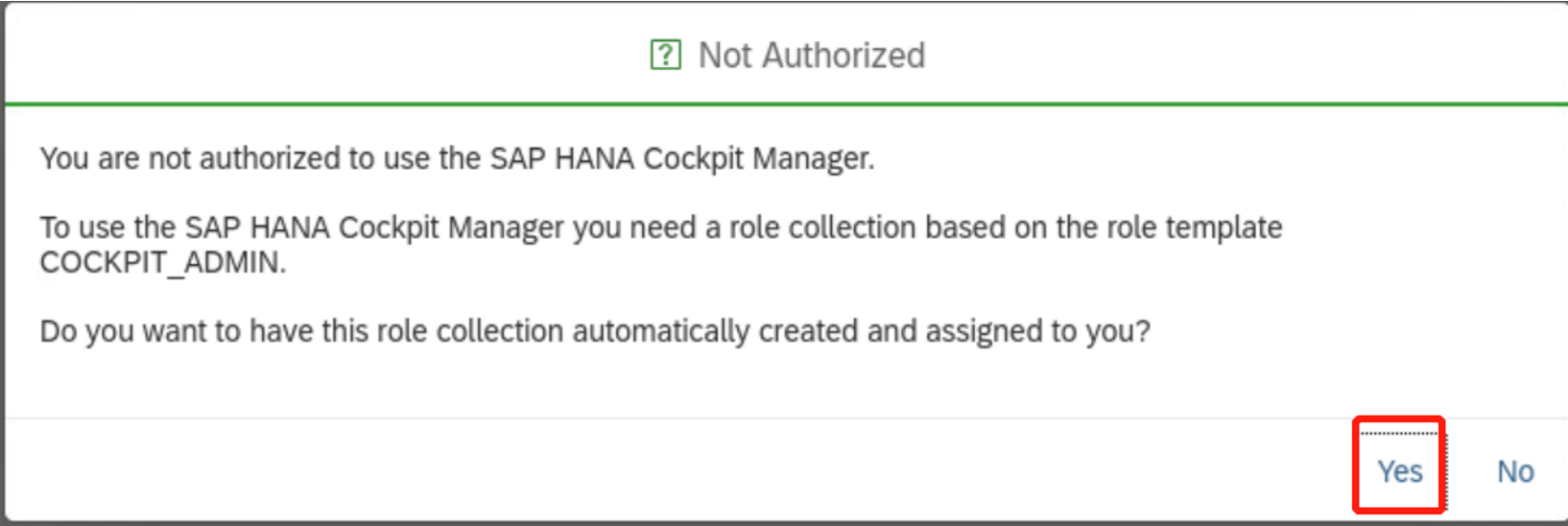
cockpit安装完后,第一次登录hana cockpit manager需要给用户cockpit_admin授权,如下图所示,点yes完成角色授权后登录
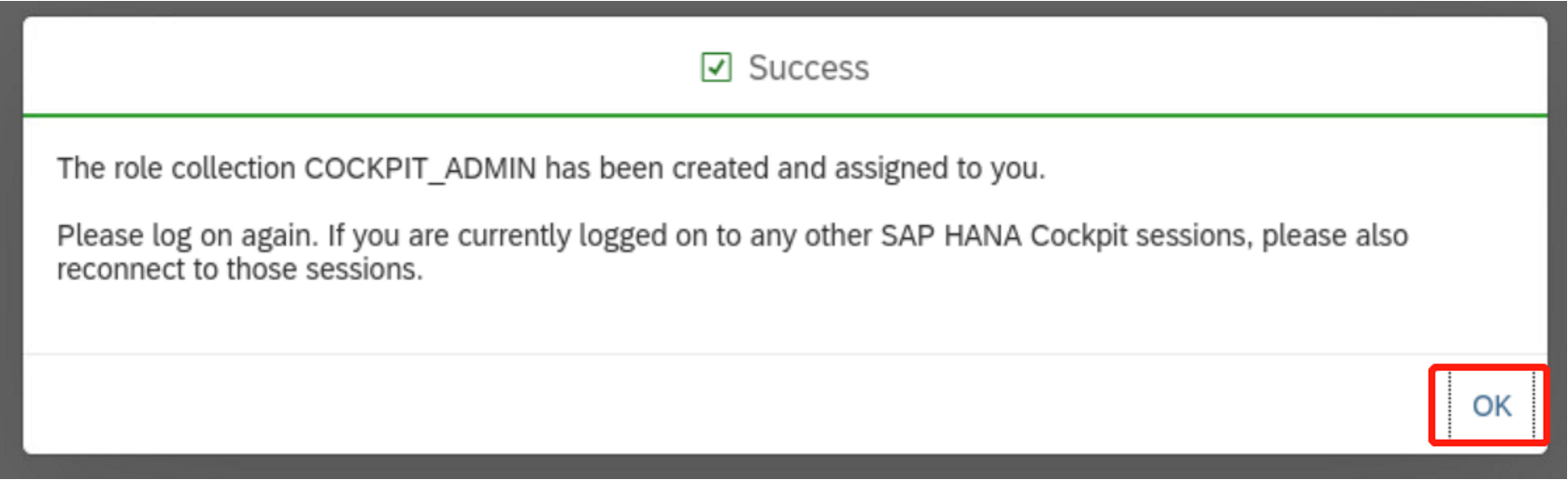
授权完后会需要重新登录
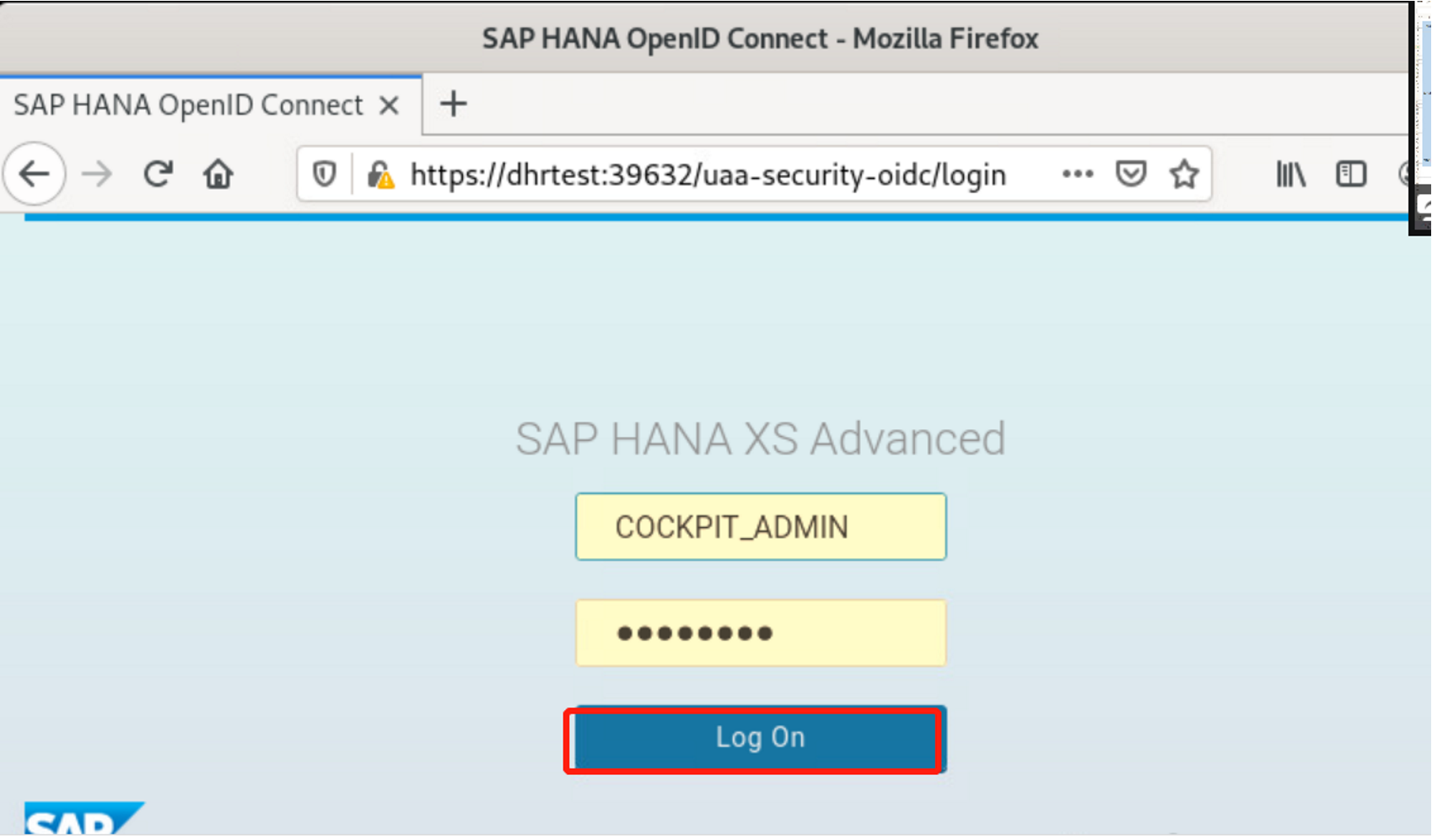
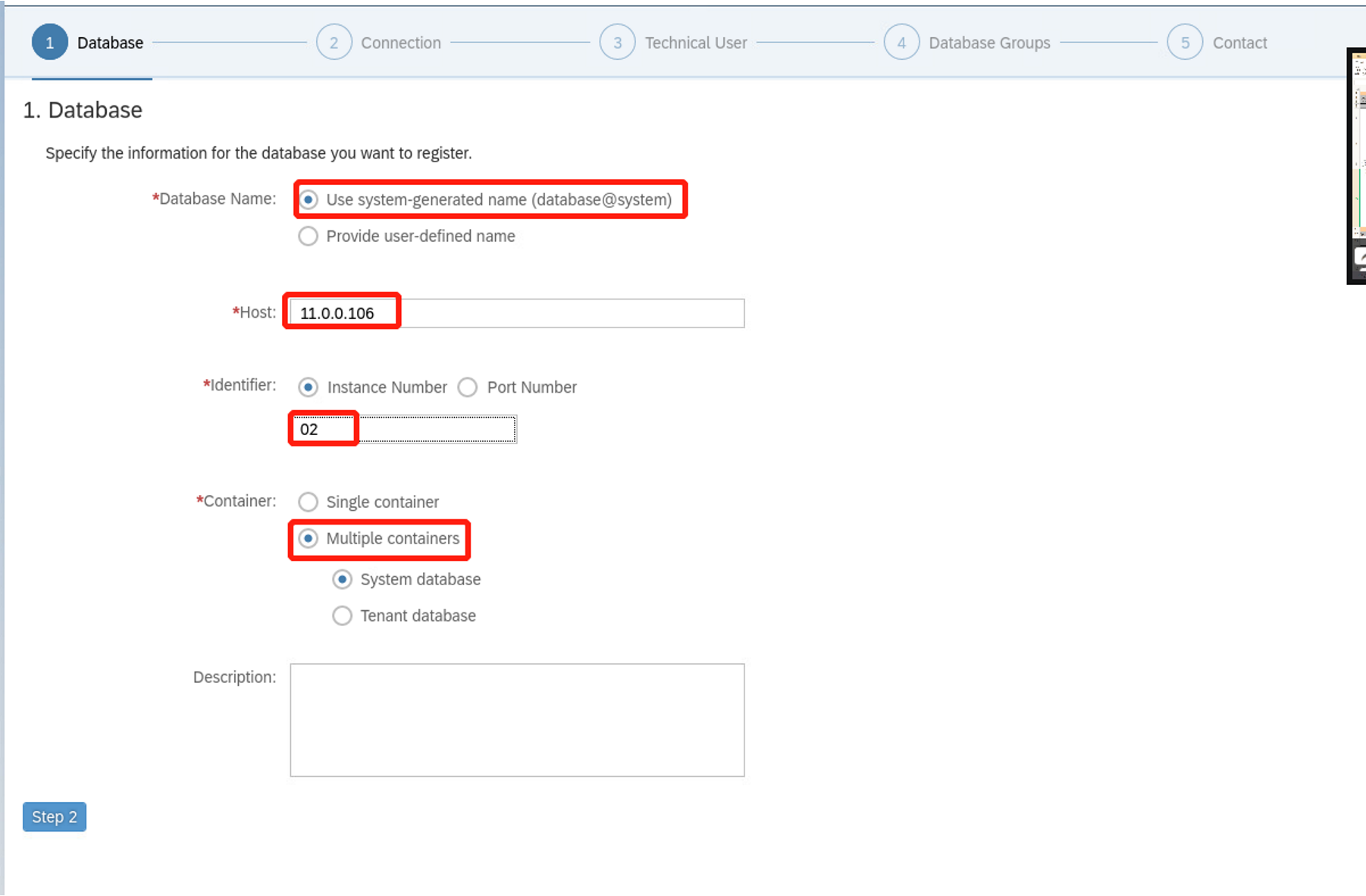
选择“register a database "

输入要管理的数据库的主机IP,instance number,container类型等信息
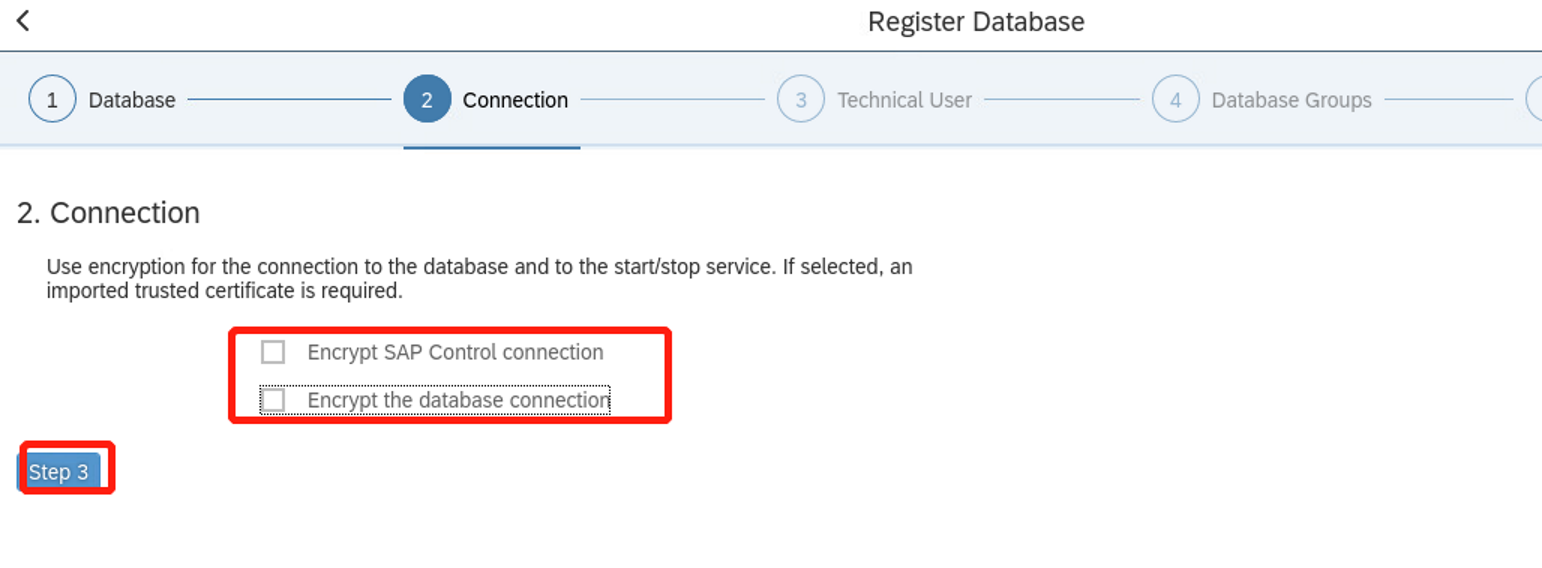
取消加密,启用加密需要在hana server端配置加密
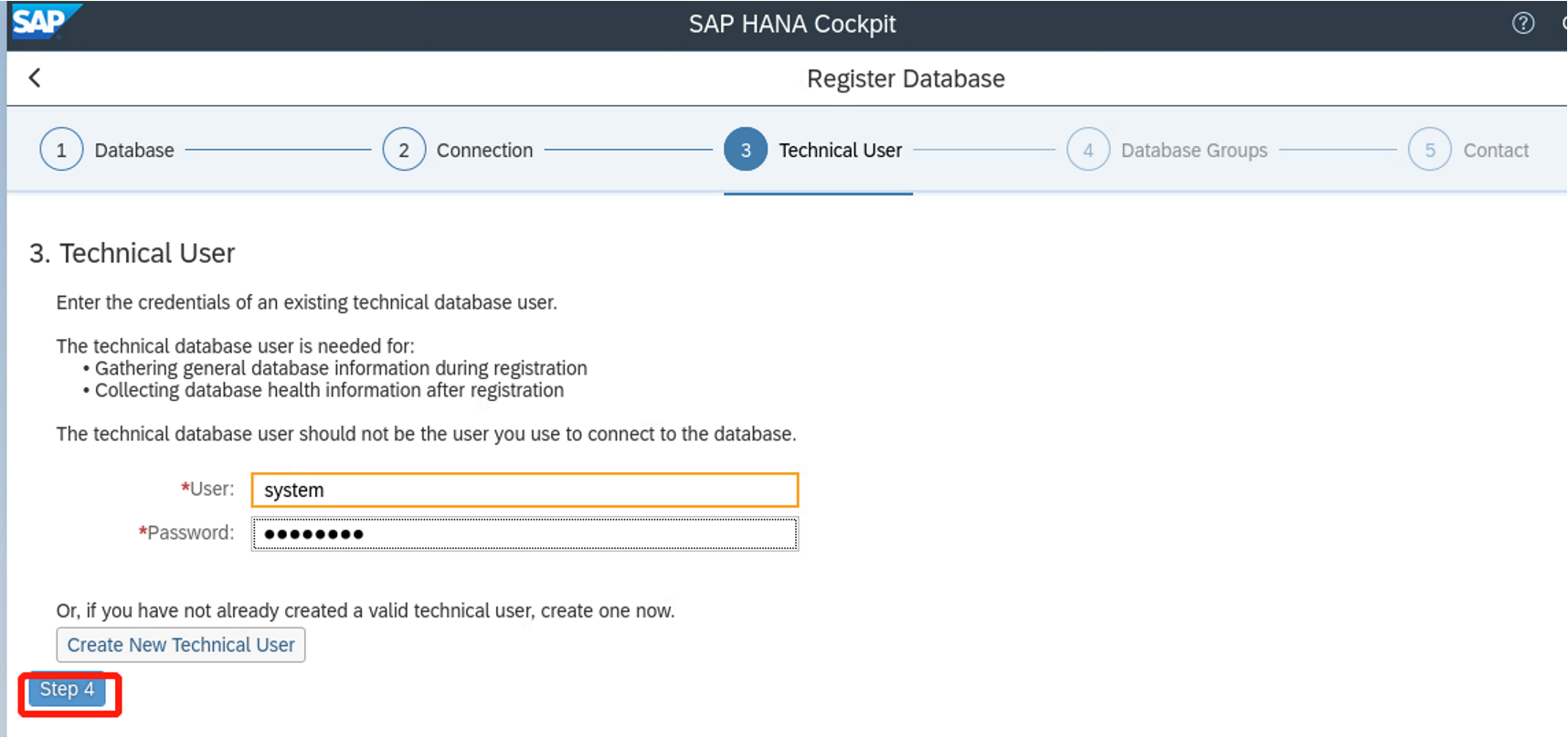
输入管理用户账号和口令,可以使用system用户,也可以再创建一个新的管理用户
默认,点击step5

指定管理员信息,点击review
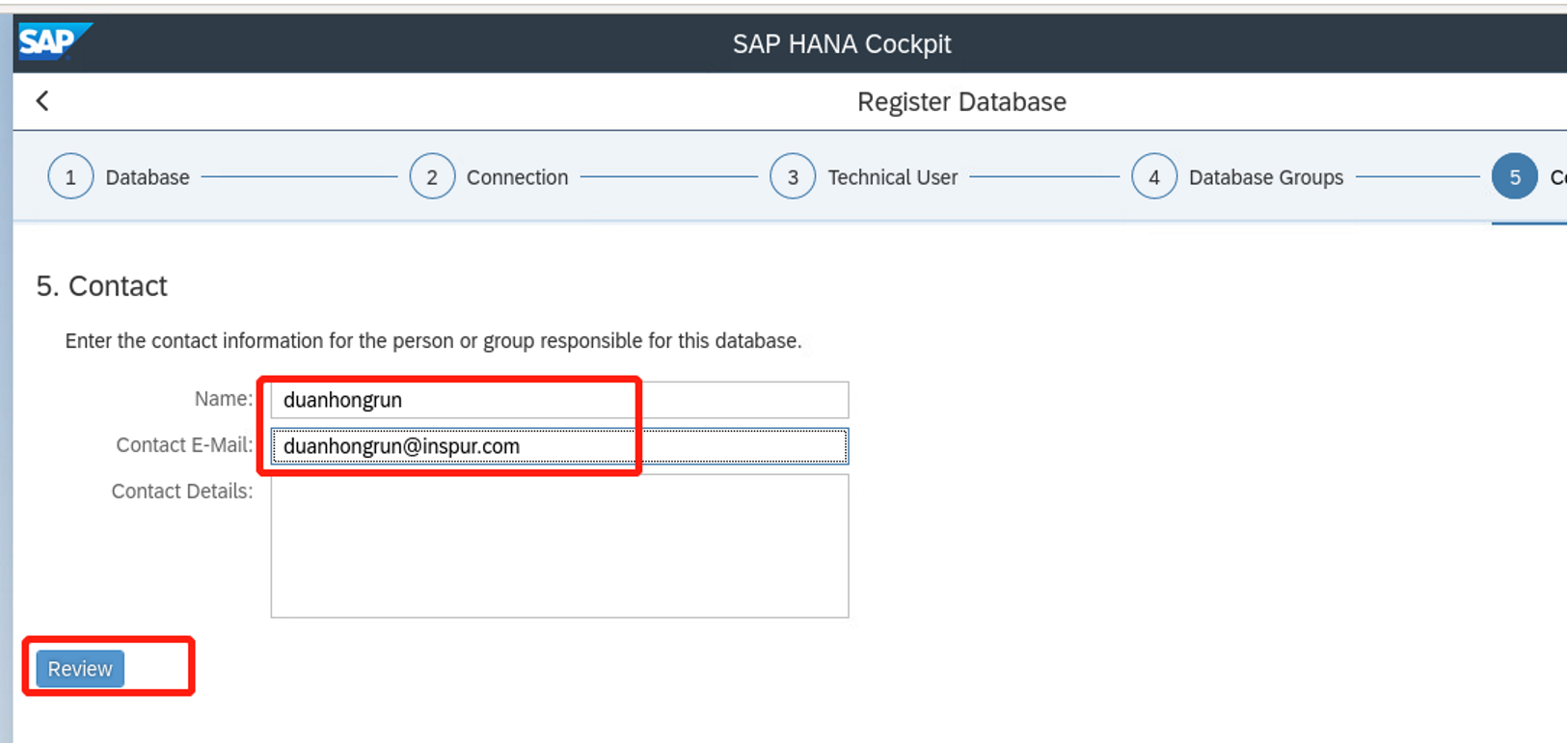
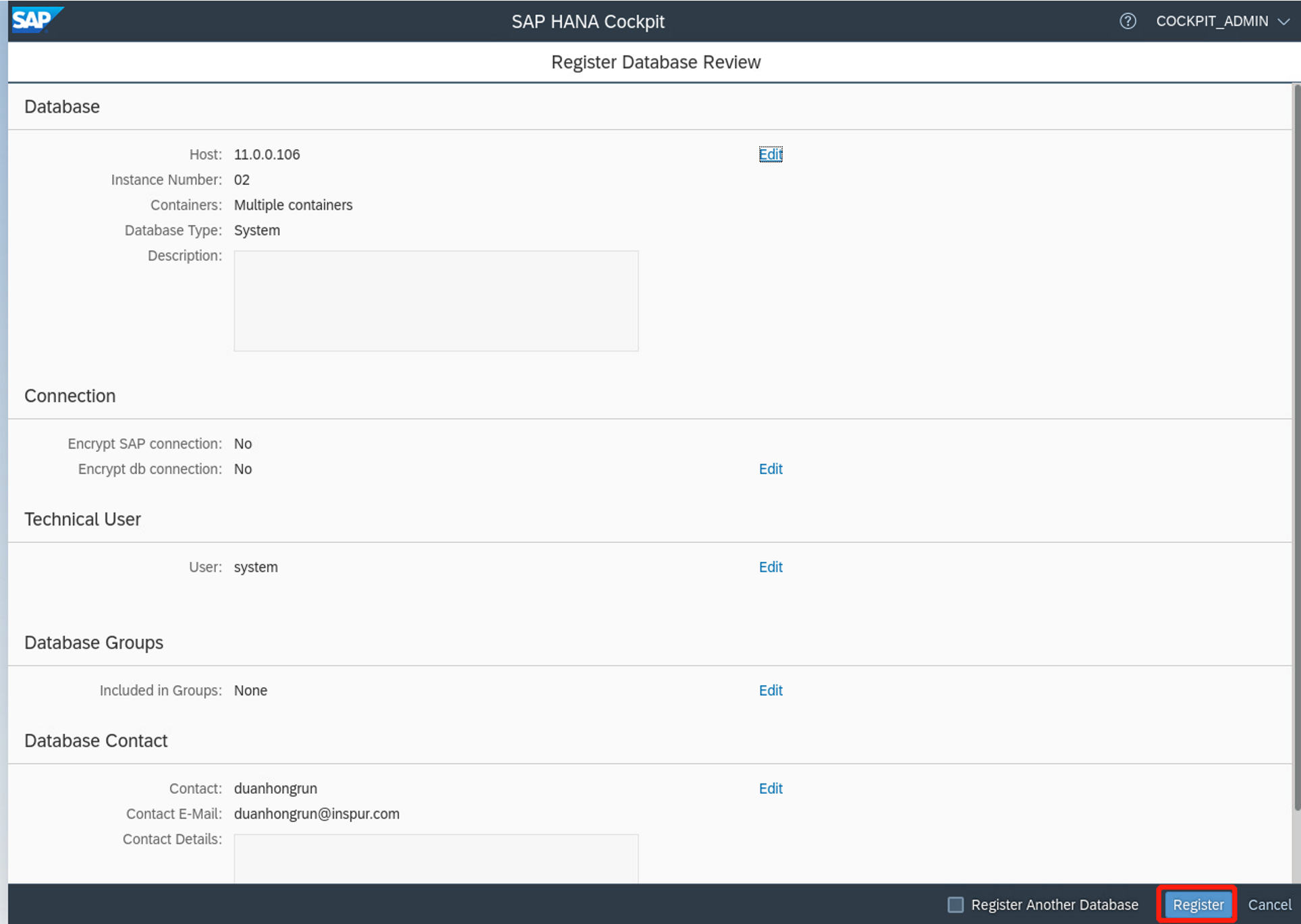
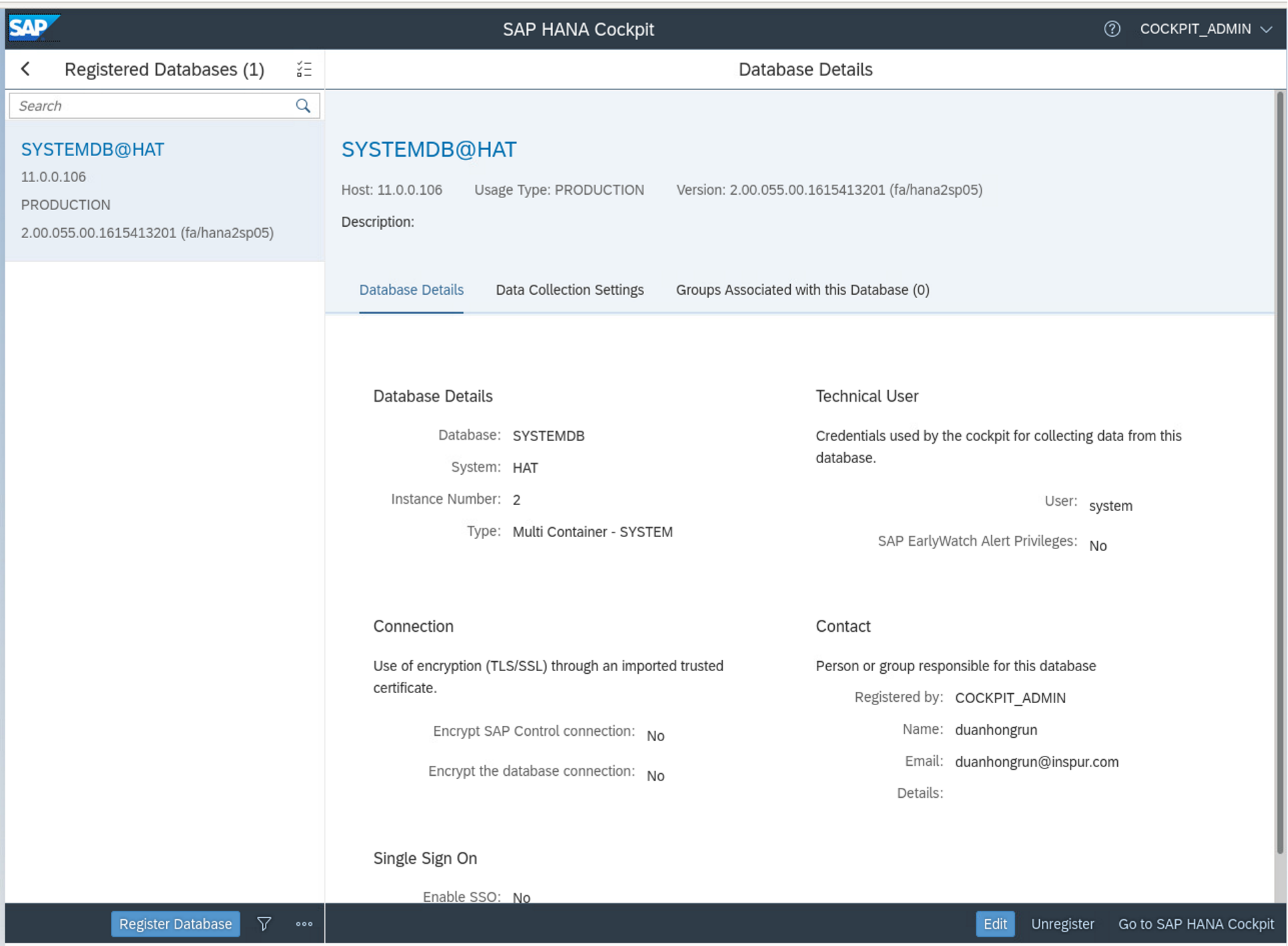
被管理的数据库添加完成后,登录hana cockpit界面 https://dhrtest:51026 查看和管理该数据库了。
点击进去就可以进行监控了