



一、项目需求:
Python 语言编码的项目,需要将 Excel 数据导入 8a 集群。不能使用 ETL 工具。
二、Python 实验环境:
1、操作系统:windows 7 64 bit;
2、Python 版本:3.6.8
可从官网(https://www.python.org/)下载并安装。
3、安装第三方组件:
保证本机外网通畅的情况下,在控制台执行:
pip install pandas
pip install munpy
三、数据源和目标表:
1、数据源:drinks.xls

2、目标表结构:
CREATE TABLE "drinks" (
  "country" varchar(50) DEFAULT NULL,
  "beer_servings" int(11) DEFAULT NULL,
  "spirit_servings" int(11) DEFAULT NULL,
  "wine_servings" int(11) DEFAULT NULL,
  "total_litres_of_pure_alcohol" double DEFAULT NULL,
  "continent" varchar(50) DEFAULT NULL
) ENGINE=EXPRESS DEFAULT CHARSET=utf8 TABLESPACE='sys_tablespace';
四、实例代码:
# -*- coding: utf-8 -*-
import pandas as pd
import numpy as np
from GBaseConnector import connect,GBaseError
config = {'host':'111.161.65.149','port':32800,'database':'courseware',
          'user':'gbase','passwd':'gbase20110531'}

if __name__=='__main__':
    df = pd.read_excel('drinks.xls', keep_default_na=False) # 用 pandas 读取源文件到 dataframe 对象中,keep_default_na 的作用是处理空值
    ndData = np.array(df) # dataframe 转 ndArray Object
    lstData = ndData.tolist() # ndArray Object 转 list
    #print(lstData)
    try:
        conn = connect() # 创建数据库连接对象
        conn.connect(**config) # 导入数据库连接参数
        cur = conn.cursor() # 得到 cursor 对象

        opfmt = "INSERT INTO drinks(country,beer_servings,spirit_servings,wine_servings,total_litres_of_pure_alcohol,continent)\
         VALUES(%s, %s, %s, %s, %s, %s)" # 预处理 SQL 文

        cur.executemany(opfmt, lstData) # 批量插入列表中的数据到目标表 drinks
    except GBaseError.DatabaseError as e:
        print(e)
    finally:
        conn.close() # 关闭数据库连接
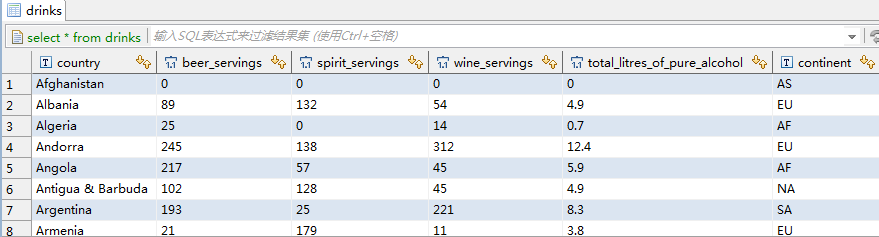
五、查看结果:
select * from drinks;
「喜欢这篇文章,您的关注和赞赏是给作者最好的鼓励」
关注作者
【版权声明】本文为墨天轮用户原创内容,转载时必须标注文章的来源(墨天轮),文章链接,文章作者等基本信息,否则作者和墨天轮有权追究责任。如果您发现墨天轮中有涉嫌抄袭或者侵权的内容,欢迎发送邮件至:contact@modb.pro进行举报,并提供相关证据,一经查实,墨天轮将立刻删除相关内容。
