



适用范围
操作系统版本:7.6
数据库版本:11.2.0.4
问题概述
安装完了grid软件之后,集群无法启动。查看报错信息
CRS-4046: Invalid Oracle Clusterware configuration.
CRS-4000: Command Status
根据报错信息提示,可以看出集群配置无效。
问题原因
查看root.sh执行脚本的输出日志发现了相同的报错信息,root.sh没有执行完成,集群配置中与原环境有冲突,导致集群配置失败,多次执行安装脚本,就容易遇到这个问题。
解决方案
使用./rootcrs.pl脚本工具对集群进行反配置。把残留的配置信息清除了之后,重新执行root.sh脚本对集群进行配置。
[grid@rac11g01 ~]$ cd $ORACLE_HOME/crs/install
执行脚本
./rootcrs.pl -deconfig -force -verbose
-deconfig: 表示进行集群配置的反配置(Deconfiguration)操作,这个操作是为了卸载集群配置,使数据库集群从节点上移除,反配置是在移除Oracle集群环境之前的必要步骤。-force是强制进行反配置操作,忽略过程中会提示的报错信息。-verbose会将执行命令的详细信息输出出来。
在执行脚本之前,需要确保自己操作系统上之后安装了,perl-devel以及perl-Env依赖包,如果没有的话,执行脚本会报以下的错误信息
Can't locate Env.pm in @INC (@INC contains: /usr/local/lib64/perl5 /usr/local/share/perl5 /usr/lib64/perl5/vendor_perl /usr/share/perl5/vendor_perl /usr/lib64/perl5 /usr/share/perl5 . .) at crsconfig_lib.pm line 703.
BEGIN failed--compilation aborted at crsconfig_lib.pm line 703.
Compilation failed in require at ./rootcrs.pl line 305.
BEGIN failed--compilation aborted at ./rootcrs.pl line 305.
执行脚本之后,看到了以下输出信息如下:
Using configuration parameter file: ./crsconfig_params
CRS-4046: Invalid Oracle Clusterware configuration.
CRS-4000: Command Stop failed, or completed with errors.
CRS-4046: Invalid Oracle Clusterware configuration.
CRS-4000: Command Delete failed, or completed with errors.
CRS-4046: Invalid Oracle Clusterware configuration.
CRS-4000: Command Stop failed, or completed with errors.
You must kill ohasd processes or reboot the system to properly
cleanup the processes started by Oracle clusterware
ACFS-9313: No ADVM/ACFS installation detected.
Failure in execution (rc=-1, 0, No such file or directory) for command /etc/init.d/ohasd deinstall
Successfully deconfigured Oracle Restart stack
日志中提示了需要kill ohasd进程或者是重启机器,反配置执行完成。
重启了机器之后,重新执行root.sh日志信息如下:
/grid/app/11.2.0/grid/root.shPerforming root user operation for Oracle 11g
The following environment variables are set as:
ORACLE_OWNER= grid
ORACLE_HOME= /grid/app/11.2.0/grid
Enter the full pathname of the local bin directory: [/usr/local/bin]: Copying dbhome to /usr/local/bin ...
Copying oraenv to /usr/local/bin ...
Copying coraenv to /usr/local/bin ...
Creating /etc/oratab file...
Entries will be added to the /etc/oratab file as needed by
Database Configuration Assistant when a database is created
Finished running generic part of root script.
Now product-specific root actions will be performed.
Using configuration parameter file: /grid/app/11.2.0/grid/crs/install/crsconfig_params
Creating trace directory
User ignored Prerequisites during installation
Installing Trace File Analyzer
OLR initialization - successful
root wallet
root wallet cert
root cert export
peer wallet
profile reader wallet
pa wallet
peer wallet keys
pa wallet keys
peer cert request
pa cert request
peer cert
pa cert
peer root cert TP
profile reader root cert TP
pa root cert TP
peer pa cert TP
pa peer cert TP
profile reader pa cert TP
profile reader peer cert TP
peer user cert
pa user cert
Adding Clusterware entries to inittab
ohasd failed to start
Failed to start the Clusterware. Last 20 lines of the alert log follow:
2023-07-06 15:13:19.538:
[client(42175)]CRS-2101:The OLR was formatted using version 3.
CRS-2672: Attempting to start 'ora.mdnsd' on 'rac1'
CRS-2676: Start of 'ora.mdnsd' on 'rac1' succeeded
CRS-2672: Attempting to start 'ora.gpnpd' on 'rac1'
CRS-2676: Start of 'ora.gpnpd' on 'rac1' succeeded
CRS-2672: Attempting to start 'ora.cssdmonitor' on 'rac1'
CRS-2672: Attempting to start 'ora.gipcd' on 'rac1'
CRS-2676: Start of 'ora.cssdmonitor' on 'rac1' succeeded
CRS-2676: Start of 'ora.gipcd' on 'rac1' succeeded
CRS-2672: Attempting to start 'ora.cssd' on 'rac1'
CRS-2672: Attempting to start 'ora.diskmon' on 'rac1'
CRS-2676: Start of 'ora.diskmon' on 'rac1' succeeded
CRS-2676: Start of 'ora.cssd' on 'rac1' succeeded
ASM created and started successfully.
Disk Group OCR created successfully.
clscfg: -install mode specified
Successfully accumulated necessary OCR keys.
Creating OCR keys for user 'root', privgrp 'root'..
Operation successful.
CRS-4256: Updating the profile
Successful addition of voting disk 8d44ee009f814f74bf00a23ce737807d.
Successful addition of voting disk 099f9520e57d4fcbbf573f596b672b5c.
Successful addition of voting disk 9a27d25fa7184f77bf68bb8f4759aac0.
Successfully replaced voting disk group with +OCR.
CRS-4256: Updating the profile
CRS-4266: Voting file(s) successfully replaced
## STATE File Universal Id File Name Disk group
-- ----- ----------------- --------- ---------
1. ONLINE 8d44ee009f814f74bf00a23ce737807d (/dev/asm-ocr1) [OCR]
2. ONLINE 099f9520e57d4fcbbf573f596b672b5c (/dev/asm-ocr2) [OCR]
3. ONLINE 9a27d25fa7184f77bf68bb8f4759aac0 (/dev/asm-ocr3) [OCR]
Located 3 voting disk(s).
CRS-2672: Attempting to start 'ora.asm' on 'rac1'
CRS-2676: Start of 'ora.asm' on 'rac1' succeeded
CRS-2672: Attempting to start 'ora.OCR.dg' on 'rac1'
CRS-2676: Start of 'ora.OCR.dg' on 'rac1' succeeded
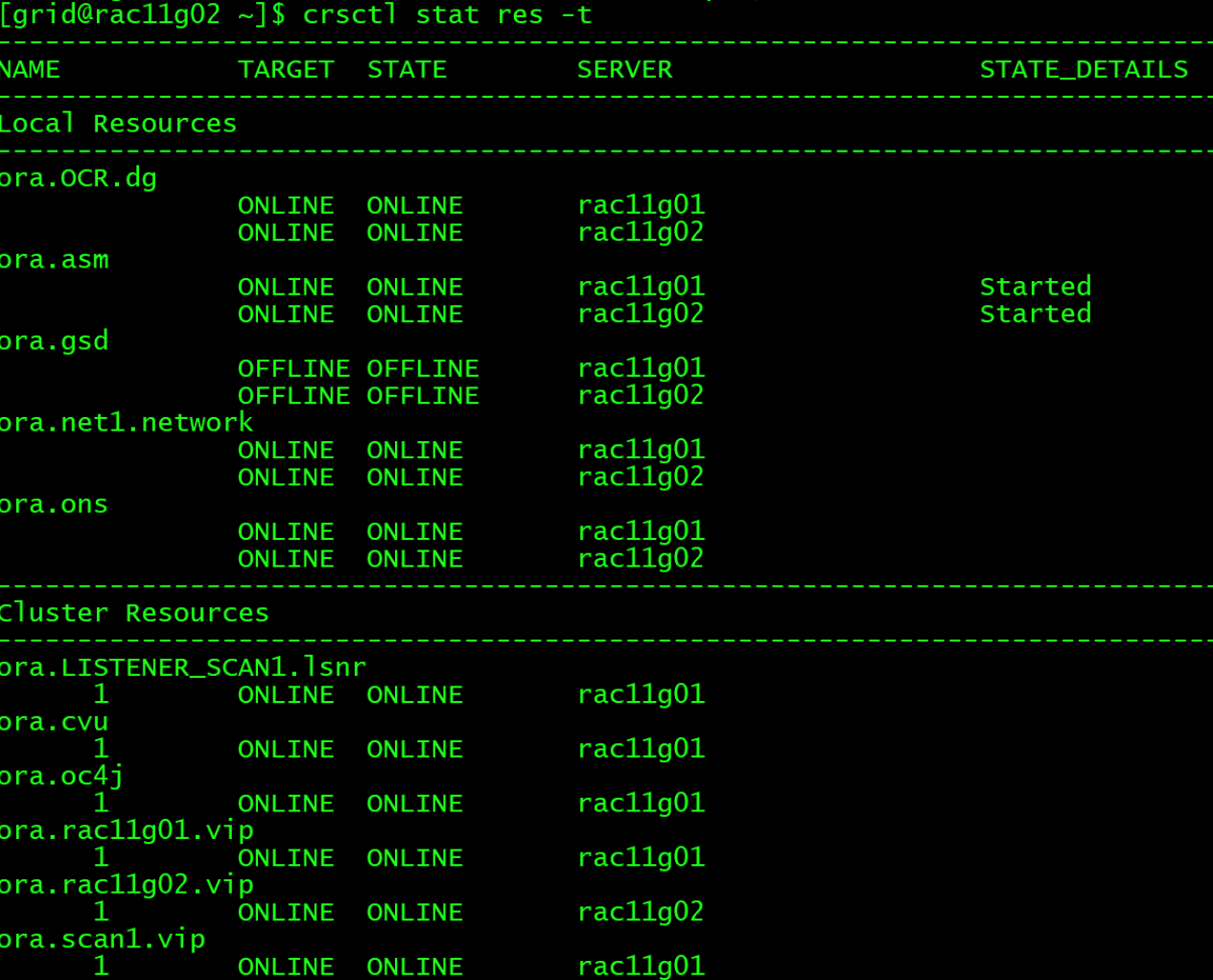
Configure Oracle Grid Infrastructure for a Cluster ... succeeded执行完成之后,查看集群状态,集群状态恢复正常。
「喜欢这篇文章,您的关注和赞赏是给作者最好的鼓励」
关注作者
【版权声明】本文为墨天轮用户原创内容,转载时必须标注文章的来源(墨天轮),文章链接,文章作者等基本信息,否则作者和墨天轮有权追究责任。如果您发现墨天轮中有涉嫌抄袭或者侵权的内容,欢迎发送邮件至:contact@modb.pro进行举报,并提供相关证据,一经查实,墨天轮将立刻删除相关内容。
