



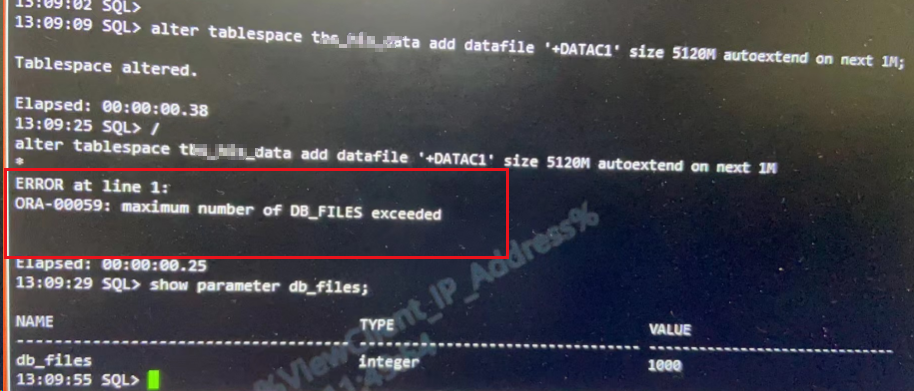
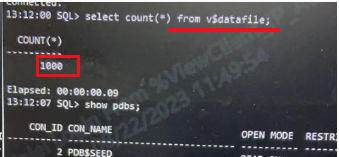
处理办法:调大db_files(需重启实例生效)
SQL> select value from v$parameter where name = 'db_files';

VALUE
--------------------------------------------------------------------------------
200

SQL> select records_total from v$controlfile_record_section where type = 'DATAFILE';

RECORDS_TOTAL
-------------
         1024

SQL> alter system set db_files=5000 scope=spfile sid='*';

System altered.

--重启数据库集群实例

SQL> select value from v$parameter where name = 'db_files';

VALUE
--------------------------------------------------------------------------------
5000

SQL> select records_total from v$controlfile_record_section where type = 'DATAFILE';

RECORDS_TOTAL
-------------
         1024  --这个不变化,如果文件个数超过1024了,自动扩,无需关心

SQL> show parameter db_files;

NAME                                 TYPE
------------------------------------ ----------------------
VALUE
------------------------------
db_files                             integer
5000
SQL>
相关参考:
How to increase db_files parameter? (Doc ID 2658128.1)
There are 2 limits, DB_FILES is a hard limit and MAXDATAFILES a soft limit.

DB_FILES is the limit on the total number of files associated with a particular INSTANCE of a database.

MAXDATAFILES is specified in the clause the last time CREATE DATABASE or CREATE CONTROLFILE was executed (database limit).

When MAXDATAFILES is reached, the controlfile will expand automatically (as long as there is disk space available) so that the data files section can accommodate more files. Recreating the control file is not required to increase the MAXDATAFILES parameter.

You can find these 2 values:

select value from v$parameter where name = 'db_files'; <<<<<<<DB_FILES

select records_total from v$controlfile_record_section where type = 'DATAFILE'; <<<<<<<<<< MAXDATAFILES

The default values for MAXDATAFILES is 30, the maximum value can be increased is 65534 (recreating the control file).

Note that within this there is a restriction of 1022 files per tablespace that cannot be changed.

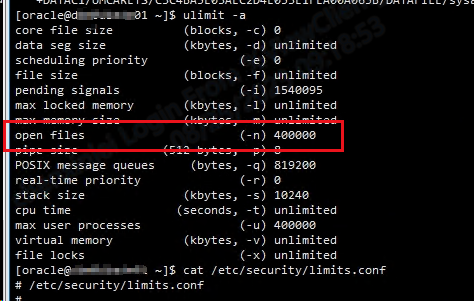
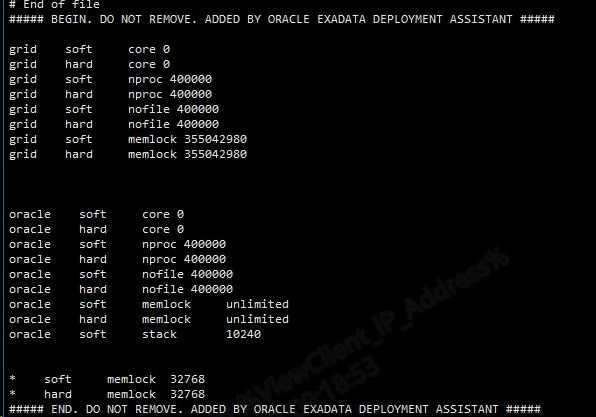
If you decide to increase the limit of the number of files you should check also at OS level the maximum number of open files

Here you have the recommended values:

Resource Shell Limit   Resource    Soft Limit     Hard Limit

--------------------   --------    ----------     ----------

Open file descriptors  nofile      at least 1024  at least 65536

References:

https://docs.oracle.com/cd/E11882_01/server.112/e40402/limits002.htm#REFRN0042
另外需了解db_files并不是越大越好,会占用更多内存。
参考:https://blog.csdn.net/liqfyiyi/article/details/40593663
「喜欢这篇文章,您的关注和赞赏是给作者最好的鼓励」
关注作者
【版权声明】本文为墨天轮用户原创内容,转载时必须标注文章的来源(墨天轮),文章链接,文章作者等基本信息,否则作者和墨天轮有权追究责任。如果您发现墨天轮中有涉嫌抄袭或者侵权的内容,欢迎发送邮件至:contact@modb.pro进行举报,并提供相关证据,一经查实,墨天轮将立刻删除相关内容。
