



MyBatis-Plus:告别繁琐,轻松上手快速入门和高级查询
今日目标
能够基于MyBatisPlus完成标准Dao开发
一、MyBatisPlus简介
1. MyBatisPlus概述
思考:MyBatisPlus的优点有哪些?
1.1 MyBatis介绍
MyBatisPlus(简称MP)是基于MyBatis框架基础上开发的增强型工具,旨在简化开发、提高效率
官网:
https://mybatis.plus/
https://mp.baomidou.com/
愿景
我们的愿景是成为 MyBatis 最好的搭档,就像魂斗罗 中的 1P、2P,基友搭配,效率翻倍。

1.2 MyBatisPlus特性
无侵入:只做增强不做改变,不会对现有工程产生影响 强大的 CRUD 操作:内置通用 Mapper,少量配置即可实现单表CRUD 操作 支持 Lambda:编写查询条件无需担心字段写错 支持主键自动生成 内置分页插件 ……
2. 快速入门
2.1 创建数据库和表
-- 创建测试库
create database  if not exists mp character set utf8;
use mp;
-- 创建测试表
CREATE TABLE `tb_student` (
                           `id` bigint(20) NOT NULL AUTO_INCREMENT COMMENT '主键ID',
                           `name` varchar(30) DEFAULT NULL COMMENT '姓名',
                           `age` int(11) DEFAULT NULL COMMENT '年龄',
                           `email` varchar(50) DEFAULT NULL COMMENT '邮箱',
                           PRIMARY KEY (`id`)
) ENGINE=InnoDB AUTO_INCREMENT=1 DEFAULT CHARSET=utf8;
-- 插入测试数据
INSERT INTO `tb_student` (`id`,  `name`, `age`, `email`) VALUES ('1', '张三', '18', 'test1@zbbmeta.cn');
INSERT INTO `tb_student` (`id`, `name`, `age`, `email`) VALUES ('2', '李四', '20', 'test2@zbbmeta.cn');
INSERT INTO `tb_student` (`id`,  `name`, `age`, `email`) VALUES ('3',  '王五', '28', 'test3@zbbmeta.cn');
INSERT INTO `tb_student` (`id`, `name`, `age`, `email`) VALUES ('4',  '赵六', '21', 'test4@zbbmeta.cn');
INSERT INTO `tb_student` (`id`,  `name`, `age`, `email`) VALUES ('5', '孙七', '24', 'test5@zbbmeta');
2.2 项目搭建
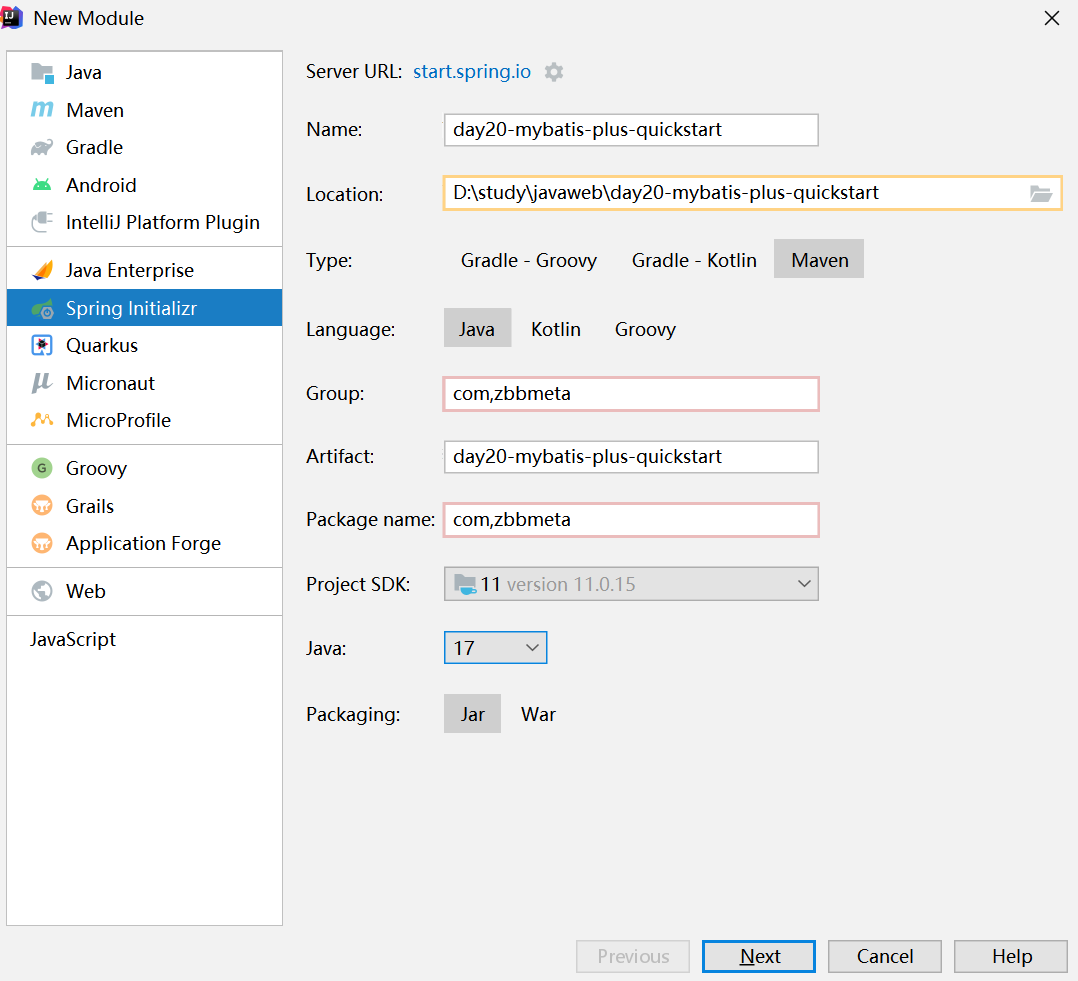
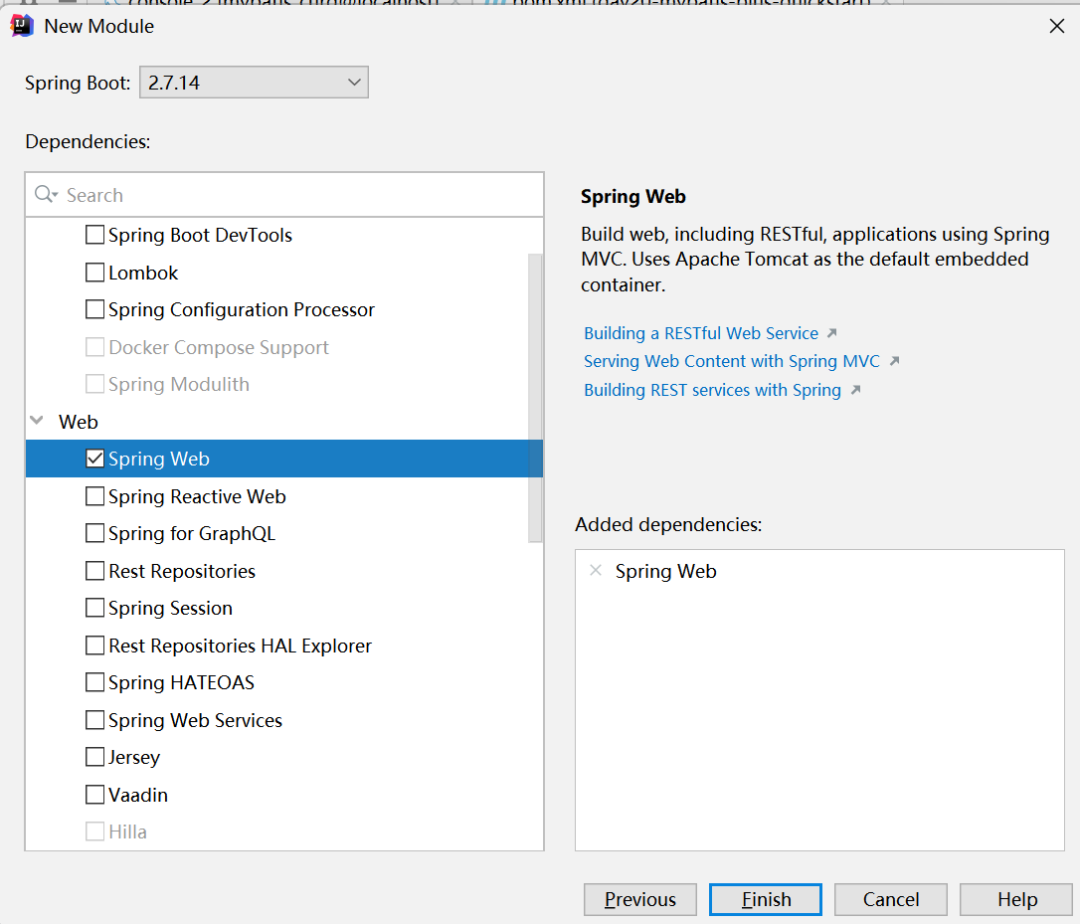
2.2.1创建SpringBoot项目
2.2.2 导入依赖
   <dependencies>
<!--        web-->
        <dependency>
            <groupId>org.springframework.boot</groupId>
            <artifactId>spring-boot-starter-web</artifactId>
        </dependency>

<!--        mysql-->
        <dependency>
            <groupId>mysql</groupId>
            <artifactId>mysql-connector-java</artifactId>
        </dependency>
<!--        mybatis-plus-->
        <dependency>
            <groupId>com.baomidou</groupId>
            <artifactId>mybatis-plus-boot-starter</artifactId>
            <version>3.5.3</version>
        </dependency>

        <dependency>
            <groupId>org.projectlombok</groupId>
            <artifactId>lombok</artifactId>
        </dependency>

        <dependency>
            <groupId>org.springframework.boot</groupId>
            <artifactId>spring-boot-starter-test</artifactId>
        </dependency>
    </dependencies>
2.2.3 配置application.yml
spring:
  datasource:
    driver-class-name: com.mysql.cj.jdbc.Driver
    url: jdbc:mysql://localhost:3306/mp?serverTimezone=UTC
    username: root
    password: root
mybatis-plus:
  configuration:
    map-underscore-to-camel-case: true  #开启驼峰命名
2.2.4 编写实体类
package com.zbbmeta.entity;

import com.baomidou.mybatisplus.annotation.IdType;
import com.baomidou.mybatisplus.annotation.TableField;
import com.baomidou.mybatisplus.annotation.TableId;
import com.baomidou.mybatisplus.annotation.TableName;
import lombok.Data;

@Data
@TableName("tb_student")
public class Student {

    @TableId(value = "ID",type = IdType.AUTO)
    private Long id;
    private String name;
    private Integer age;
    private String email;
}
2.2.5 定义数据接口,继承BaseMapper
package com.zbbmeta.mapper;

import com.baomidou.mybatisplus.core.mapper.BaseMapper;
import com.zbbmeta.entity.Student;
import org.apache.ibatis.annotations.Mapper;
import org.springframework.boot.autoconfigure.SpringBootApplication;


public interface StudentMapper extends BaseMapper<Student> {
}
2.2.6 修改启动类
@MapperScan("com.zbbmeta.mapper")
@SpringBootApplication
public class MybatisQucikStartApplication {
    public static void main(String[] args) {

        SpringApplication.run(MybatisQucikStartApplication.class,args);
    }
}
2.2.7 编写测试用例
package com.zbbmeta.mapper;

import com.zbbmeta.entity.Student;
import org.junit.jupiter.api.Test;
import org.springframework.beans.factory.annotation.Autowired;
import org.springframework.boot.test.context.SpringBootTest;

import java.util.List;

@SpringBootTest
public class StudentMapperTest {

    @Autowired
    private StudentMapper studentMapper;


    @Test
    public void testGetAll(){
        List<Student> studentList = studentMapper.selectList(null);
        System.out.println("studentList = " + studentList);
    }
}
测试结果:

二、标准数据层开发
1. MyBatisPlus的CRUD操作
| 功能 | (mybatis)自定义接口 | MP接口 |
|---|---|---|
| 新增 | boolean save(T t) | int insert(T t) |
| 删除 | boolean delete(int id) | int deleteById(Serializable id) |
| 修改 | boolean update(T t) | int updateById(T t) |
| 根据id查询 | T getById(int id) | T selectById(Serializable id) |
| 查询全部 | List<T> getAll() | List<T> selectList() |
| 分页查询 | PageInfo<T> getAll(int page, int size) | IPage<T> selectPage(IPage<T> page) |
| 按条件查询 | List<T> getAll(Condition condition) | IPage<T> selectPage(Wrapper<T> queryWrapper) |
package com.zbbmeta.mapper;

import com.zbbmeta.entity.Student;
import org.junit.jupiter.api.Test;
import org.springframework.beans.factory.annotation.Autowired;
import org.springframework.boot.test.context.SpringBootTest;
import java.util.List;

@SpringBootTest
public class StudentMapperTest {
    @Autowired
    private StudentMapper studentMapper;

    @Test
    public void testGetAll(){
        List<Student> studentList = studentMapper.selectList(null);
        System.out.println("studentList = " + studentList);
    }
    /**
     * 新增
     */
    @Test
    void testSave() {
        Student student = new Student();
        student.setName("老九");
        student.setAge(99);
        student.setEmail("laojiu@zbbmeta.cn");
        studentMapper.insert(student);
    }
    /**
     * 根据ID删除
     */
    @Test
    void testDelete() {
        studentMapper.deleteById(1);
    }
    /**
     * 更新数据
     */
    @Test
    void testUpdate() {
        Student student = new Student();
        student.setId(1L);
        student.setName("张三三");
        student.setAge(99);
        studentMapper.updateById(student);
    }
    /**
     * 根据ID查询
     */
    @Test
    void testGetById() {
        Student student = studentMapper.selectById(2L);
        System.out.println(student);
    }
}
2. MyBatisPlus分页功能
| 功能 | (mybatis)自定义接口 | MP接口 |
|---|---|---|
| 分页查询 | PageInfo<T> getAll(int page, int size) | IPage<T> selectPage(IPage<T> page) |
2.1 MyBatisPlus分页使用
2.1.1 设置分页拦截器作为Spring管理的bean
package com.zbbmeta.config;

import com.baomidou.mybatisplus.extension.plugins.MybatisPlusInterceptor;
import com.baomidou.mybatisplus.extension.plugins.inner.PaginationInnerInterceptor;
import org.springframework.context.annotation.Bean;
import org.springframework.context.annotation.Configuration;

/**
 * @author springboot葵花宝典
 * @ClassName MybatisPlusConfig
 * @description: TODO
 * @date 2023年08月17日
 * @version: 1.0
 */
@Configuration
public class MybatisPlusConfig {
    @Bean
    public MybatisPlusInterceptor mybatisPlusInterceptor(){
        //1 创建MybatisPlusInterceptor拦截器对象
        MybatisPlusInterceptor mpInterceptor=new MybatisPlusInterceptor();
        //2 添加分页拦截器
        mpInterceptor.addInnerInterceptor(new PaginationInnerInterceptor());
        return mpInterceptor;
    }
}
2.1.2:执行分页查询
  //分页查询
  @Test
  void testSelectPage(){
      //1 创建IPage分页对象,设置分页参数
      IPage<Student> page=new Page<>(1,3);
      //2 执行分页查询
      studentMapper.selectPage(page,null);
      //3 获取分页结果
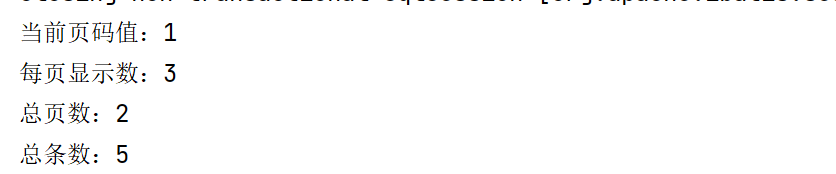
      System.out.println("当前页码值:"+page.getCurrent());
      System.out.println("每页显示数:"+page.getSize());
      System.out.println("总页数:"+page.getPages());
      System.out.println("总条数:"+page.getTotal());
      System.out.println("当前页数据:"+page.getRecords());
  }
显示结果:
2.2 开启MyBatisPlus日志
  datasource:
    driver-class-name: com.mysql.cj.jdbc.Driver
    url: jdbc:mysql://localhost:3306/mp?serverTimezone=UTC
    username: root
    password: root
mybatis-plus:
  configuration:
    log-impl: org.apache.ibatis.logging.stdout.StdOutImpl #开启mp输出到控制台
2.3 解决日志打印过多问题
2.3.1 取消初始化spring日志打印
做法:在resources下新建一个logback.xml文件,名称固定,内容如下:
<?xml version="1.0" encoding="UTF-8"?>
<configuration>

</configuration>
关于logback参考播客:https://www.jianshu.com/p/75f9d11ae011
2.3.2 取消SpringBoot启动banner图标
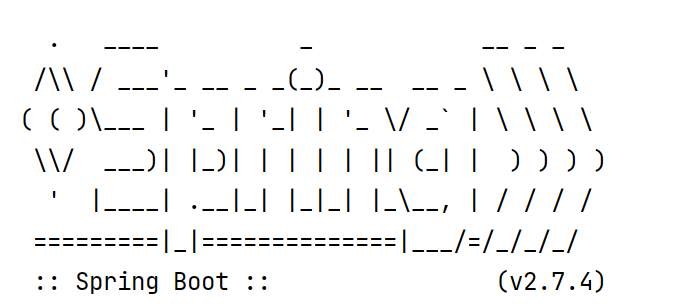
spring:
  main:
    banner-mode: off # 关闭SpringBoot启动图标(banner)
2.3.3 取消MybatisPlus启动banner图标
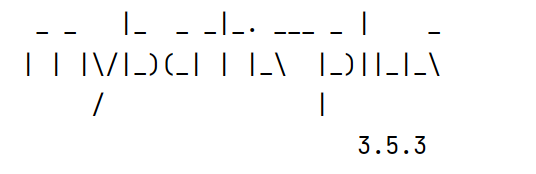
# mybatis-plus日志控制台输出
mybatis-plus:
  configuration:
    log-impl: org.apache.ibatis.logging.stdout.StdOutImpl
  global-config:
    banner: off # 关闭mybatisplus启动图标
三、DQL编程控制
1. 条件查询方式
MyBatisPlus将书写复杂的SQL查询条件进行了封装,使用编程的形式完成查询条件的组合
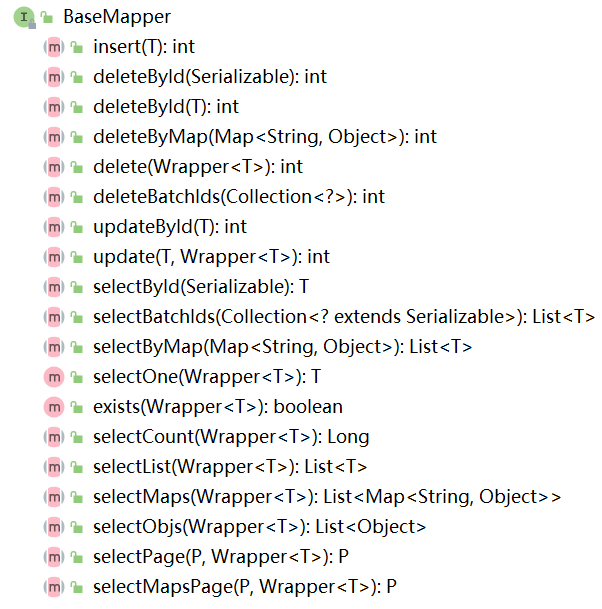
1.1 条件查询
1.1.1 方式一:按条件查询
//方式一:按条件查询
QueryWrapper<Student> qw=new QueryWrapper<>();
qw.gt("age", 18);
List<Student> studentList = studentMapper.selectList(qw);
System.out.println(studentList);
1.1.2 方式二:lambda格式按条件查询
  //方式二:lambda格式按条件查询
  QueryWrapper<Student> qw = new QueryWrapper<>();
  qw.lambda().gt(Student::getAge, 10);
  List<Student> studentList = studentMapper.selectList(qw);
  System.out.println(studentList);
1.1.3 方式三:lambda格式按条件查询(推荐)
//方式三:lambda格式按条件查询
LambdaQueryWrapper<Student> lqw = new LambdaQueryWrapper<Student>();
lqw.gt(Student::getAge, 10);
List<Student> studentList = studentMapper.selectList(lqw);
System.out.println(studentList);
1.2 组合条件
1.2.1 并且关系(and)
//并且关系
LambdaQueryWrapper<Student> lqw = new LambdaQueryWrapper<>();
//并且关系:10到30岁之间
lqw.gt(Student::getAge, 30).gt(Student::getAge, 10);
List<Student> studentList = studentMapper.selectList(lqw);
System.out.println(studentList);
1.2.2 或者关系(or)
//或者关系
LambdaQueryWrapper<Student> lqw = new LambdaQueryWrapper<>();
//或者关系:小于10岁或者大于30岁
lqw.lt(Student::getAge, 10).or().gt(Student::getAge, 30);
List<Student> studentList = studentMapper.selectList(lqw);
System.out.println(studentList);
1.3 NULL值处理
思考:在多条件查询中,有条件的值为空应该怎么解决?
1.3.1 if语句控制条件追加
Integer minAge=10;  //将来有用户传递进来,此处简化成直接定义变量了
Integer maxAge=null;  //将来有用户传递进来,此处简化成直接定义变量了
LambdaQueryWrapper<Student> lqw = new LambdaQueryWrapper<>();
if(minAge!=null){
    lqw.gt(Student::getAge, minAge);
}
if(maxAge!=null){
    lqw.lt(Student::getAge, maxAge);
}
List<Student> studentList = studentMapper.selectList(lqw);
studentList.forEach(System.out::println);
1.3.2 条件参数控制
Integer minAge=10;  //将来有用户传递进来,此处简化成直接定义变量了
Integer maxAge=null;  //将来有用户传递进来,此处简化成直接定义变量了
LambdaQueryWrapper<Student> lqw = new LambdaQueryWrapper<>();
//参数1:如果表达式为true,那么查询才使用该条件
lqw.gt(minAge!=null,Student::getAge, minAge);
lqw.lt(maxAge!=null,Student::getAge, maxAge);
List<Student> studentList = studentMapper.selectList(lqw);
studentList.forEach(System.out::println);
1.3.3 条件参数控制(链式编程)
Integer minAge=10;  //将来有用户传递进来,此处简化成直接定义变量了
Integer maxAge=null;  //将来有用户传递进来,此处简化成直接定义变量了
LambdaQueryWrapper<Student> lqw = new LambdaQueryWrapper<>();
//参数1:如果表达式为true,那么查询才使用该条件
lqw.gt(minAge!=null,Student::getAge, minAge)
        .lt(maxAge!=null,Student::getAge, maxAge);
List<Student> studentList = studentMapper.selectList(lqw);
studentList.forEach(System.out::println);
2. 查询投影-设置【查询字段、分组、分页】
2.1 查询结果包含模型类中部分属性
QueryWrapper<Student> lqw = new QueryWrapper<>();
lqw.select("id", "name", "age", "email");
List<Student> studentList = studentMapper.selectList(lqw);
System.out.println(studentList);
2.2 查询结果包含模型类中未定义的属性
QueryWrapper<Student> lqw = new QueryWrapper<>();
lqw.select("count(*) as age, email");
lqw.groupBy("email");
List<Map<String, Object>> userList = studentMapper.selectMaps(lqw);
System.out.println(userList);
3. 查询条件设定
思考:多条件查询有哪些组合?
范围匹配(> 、 = 、between) 模糊匹配(like) 空判定(null) 包含性匹配(in) 分组(group) 排序(order) ……
3.1 查询条件
查到name=李四信息(eq匹配)
LambdaQueryWrapper<Student> lqw = new LambdaQueryWrapper<>();
//等同于=
lqw.eq(Student::getName, "李四");
Student student = studentMapper.selectOne(lqw);
查找学生的年龄区间(le ge匹配 或 between匹配)
LambdaQueryWrapper<Student> lqw = new LambdaQueryWrapper<>();
//范围查询 lt le gt ge eq between
lqw.between(Student::getAge, 0, 60);
List<Student> studentList = studentMapper.selectList(lqw);
System.out.println(studentList);
查找张姓学生(非全文检索版:like匹配)
LambdaQueryWrapper<Student> lqw = new LambdaQueryWrapper<>();
//模糊匹配 like
lqw.like(Student::getName, "李");
List<Student> studentList = studentMapper.selectList(lqw);
System.out.println(studentList);
统计报表(分组查询聚合函数)
QueryWrapper<Student> qw = new QueryWrapper<>();
qw.select("name","count(*) as nums");
qw.groupBy("name");
List<Map<String, Object>> maps = studentMapper.selectMaps(qw);
System.out.println(maps);
3.2 查询API
更多查询条件设置参看 https://mybatis.plus/guide/wrapper.html#abstractwrapper
文章转载自springboot葵花宝典,如果涉嫌侵权,请发送邮件至:contact@modb.pro进行举报,并提供相关证据,一经查实,墨天轮将立刻删除相关内容。
