



Feast 和 Tecton 是海外久负盛名的 Feature Store 框架,也是很多特征工程同学期望了解的技术模块之一,本文将拆解部分 Feast 的核心功能并对其拆解阐述。
产品定位
Feast (Feature Store) is a customizable operational data system that re-uses existing infrastructure to manage and serve machine learning features to realtime models.
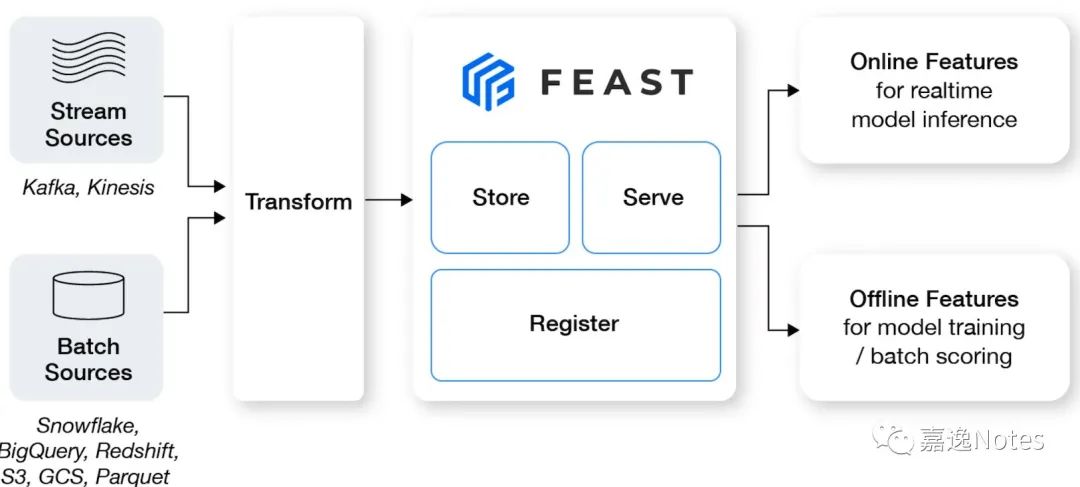
综上,Feast 的定位是一个 data system,主要做三件事情:
•特征存储(Store)•特征 Serving(Serve)•特征元信息管理(Register)
围绕这三点衍生出各种各样的功能,比如 Streaming Ingestion,流批存储一致,特征血缘关系等。
概念介绍
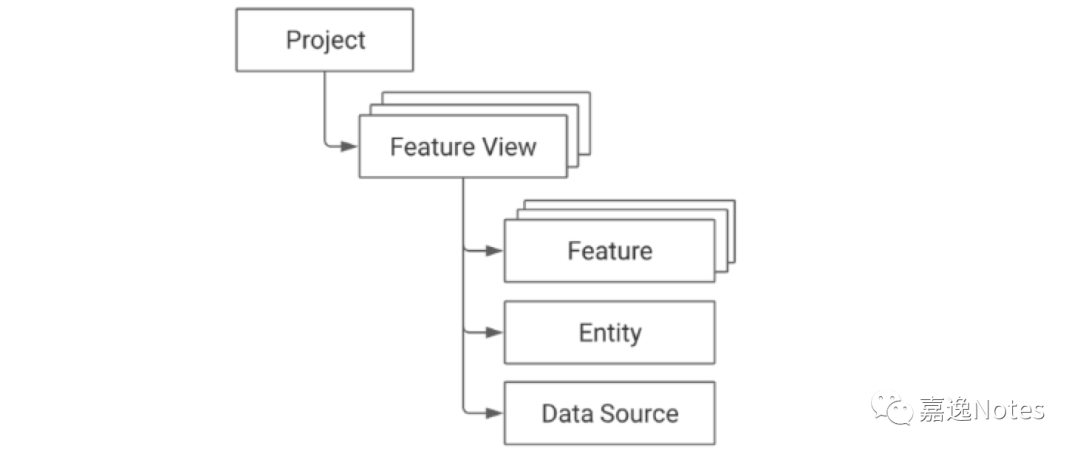
•Project:一个 Project 表示项目,不同 Project 在物理上相互隔离,类似多租户、多 namespace 的概念;•Feature View:一个 Project 会包含多个 Feature View(多组特征),TTL 表示允许用户往前追溯的时间,支持轻量的 on-demand transformations:
•Feature:一个特征;•Entity:特征主键,关联对应若干个特征,需要关联主键 id;•Data Source:Feature View 对应的数据源;
举个例子
以 Uber 的使用场景为例,会有 driver 和 customer 两个主体,我们需要构建基于 driver 和 customer 特征,那么 driver 对应的 Data Source 就对应一个 Feature View,在 Feature View 中的 Entity 是 driver,主键是 driver_id,会存在 driver 画像相关的特征,另一边 customer 也类似,customer 的 Data Source 对应另一个 Feature View,Entity 是 customer,主键是 customer_id,存储 customer 相关特征。
技术架构
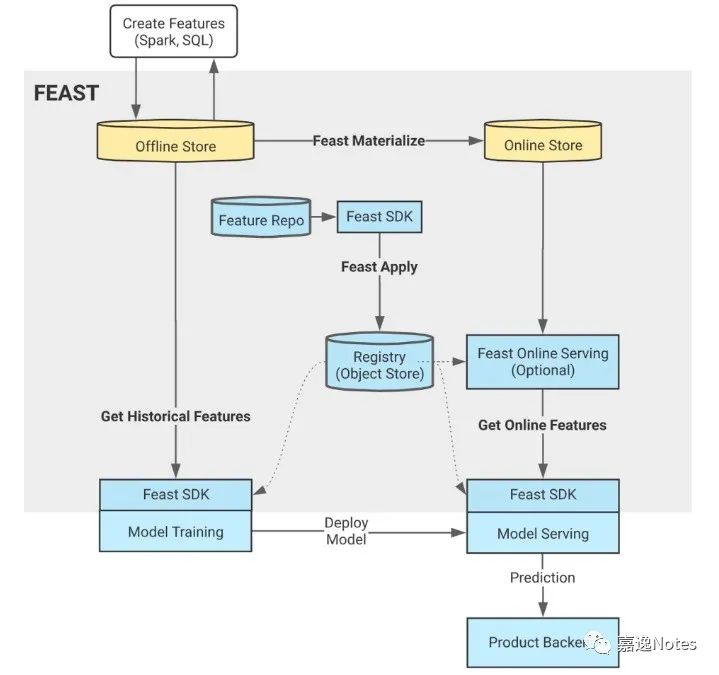
我们从上图可以看到,先使用 Feast Apply 初始化 Registry,拿到所有的 meta,然后 Feast SDK 可以对 Offline 和 Online Store 进行操作,对于新写入的数据,会先使用 Spark SQL 写入到 Offline Store,再通过 Materialize 接口调用将数据回灌进 Online Store。
Data Source
Data Source 分为以下几类:
•Batch DataSource:数据仓库中的数据•Stream DataSource:
•Push Source:允许用户将特征 push 进 Feast,并同时在 offline 和 online store 生效;•Stream Source:对接 Kafka 或 Kinesis Source;
•Request DataSource:需要用户在发起 Request 时才会生效,对应 OnDemandFeatureView;
Batch DataSource 和 Stream DataSource 比较好理解,Push Source 主要提供给用户一个 API,允许用户在代码中实时将特征值 push 到 Online 和 Offline Store,免去了 Offline Store 到 Online Store 的 Materialize 过程,这里主要讲讲 Push Source 和 RequestDataSource。
关于 Request DataSource,Feast 目前只支持了 UDF 能力,还比较初级,使用方式如下:
def udf2(features_df: pd.DataFrame) -> pd.DataFrame:df = pd.DataFrame()df["output1"] = features_df["feature1"] + 100df["output2"] = features_df["feature2"] + 100return dfon_demand_feature_view_3 = OnDemandFeatureView(name="my-on-demand-feature-view",sources=sources,schema=[Field(name="output1", dtype=Float32),Field(name="output2", dtype=Float32),],udf=udf2,udf_string="udf2 source code",)
我们可以看到这里的 udf 是基于 pandas dataframe,如果数据在 Hive 或者其他大数据上怎么办?在 Feast 的处理流程里会先通过不同引擎实现的 _to_df_internal 方法将数据转换成单机的 pd.DataFrame,然后再进行 UDF 转换(没错,数据量太大就处理不了)。
Offline Store(具有 Time-Travel 的功能)
Offline Store 中支持 BigQuery File RedShift Snowflake Athena MsSQL Postgres Spark Trino 等常用存储和计算引擎。
Offline Store 中有个很重要的接口 get_historical_features(entity_df, features) 是基于 entity_id 和 timestamp 来获取该 timestamp 最准确的特征值,为了避免特征穿越的问题(特征穿越可以参考 link[1] ),我们需要在历史的 offline store 中找到最接近 timestamp(但不能超过),我们把这个过程叫做 point-in-time join。
entity_df 中包含 entity_id(如 driver_id)和 timestamp,features 则是需要查询的 feature 名字,我们根据 registry 中的 meta 定位到各个 feature 所在的 FeatureView 和 DataSource,然后根据不同的 DataSource 发起 point-in-time join,这里以 Spark 为例:
Spark 这里做的非常有意思,直接用 SparkSQL 来高效完成了这个过程,通过 template 模板语言来编程,将这个流程给固定下来,我们来看里面两个关键 SQL 语句:
{{ featureview.name }}__base AS (SELECTsubquery.*,entity_dataframe.entity_timestamp,entity_dataframe.{{featureview.name}}__entity_row_unique_idFROM {{ featureview.name }}__subquery AS subqueryINNER JOIN {{ featureview.name }}__entity_dataframe AS entity_dataframeON TRUEAND subquery.event_timestamp <= entity_dataframe.entity_timestamp{% if featureview.ttl == 0 %}{% else %}AND subquery.event_timestamp >= entity_dataframe.entity_timestamp - {{ featureview.ttl }} * interval '1' second{% endif %}{% for entity in featureview.entities %}AND subquery.{{ entity }} = entity_dataframe.{{ entity }}{% endfor %}),
这里的 subquery 是 FeatureView 的子查询(根据时间戳做了一次比较粗粒度的过滤),我们可以把 subquery 当做是 FeatureView 的数据,entity_dataframe 是用户传入的 entity_df 数据,包含用户需要查询的 entity_id(如 driver_id)和 timestamp,这里将两者进行 JOIN,JOIN 条件是:
1.FeatureView 中的时间戳 < 用户传入的时间戳2.FeatureView 中的时间戳 > 用户传入的时间戳 - TTL3.entity_id 相同
通过这一 SQL 语句,将相同 entity_id 的 FeatureView 中小于传入 timestamp 的特征数据都保留了下来,接下来我们需要找到最接近 timestamp 的那个 feature:
{{ featureview.name }}__latest AS (SELECTevent_timestamp,{% if featureview.created_timestamp_column %}created_timestamp,{% endif %}{{featureview.name}}__entity_row_unique_idFROM(SELECT *,ROW_NUMBER() OVER(PARTITION BY {{featureview.name}}__entity_row_unique_idORDER BY event_timestamp DESC{% if featureview.created_timestamp_column %},created_timestamp DESC{% endif %}) AS row_numberFROM {{ featureview.name }}__base{% if featureview.created_timestamp_column %}INNER JOIN {{ featureview.name }}__dedupUSING ({{featureview.name}}__entity_row_unique_id, event_timestamp, created_timestamp){% endif %})WHERE row_number = 1)
SparkSQL 中基于 ROW_NUMBER 窗口函数的经典用法,将 FeatureView 中的 event_timestamp 倒排后编号,取 row_number = 1 的数据,经过这两个操作,成功拿到了对于每个 entity_id 的最接近 timestamp 的特征值数据。
Online Store
Online Store 支持 BigTabel Cassandra DynamoDB / HBase / MySQL / Redis 等常用的低时延存储。
Materialize 是 Offline Store 将数据同步到 Online Store 最主要的手段之一,Materialize 的过程是将 Offline Store 中每个 entity_id 最新的特征数据写入到 Online Store。这个 Materialize 过程通过 materialize_incremental 方法表达:
我们还是以 Spark 为例,先取得 Offline Store 和 Online Store 同时存在的 FeatureView,再从 FeatureView 的最近一次同步时间来决定此次同步的 start_date 和 end_date,然后调用各个引擎的 materialize 方法,Spark 中依旧使用 SQL 来表达:
SELECT{field_string}{f", {repr(DUMMY_ENTITY_VAL)} AS {DUMMY_ENTITY_ID}" if not join_key_columns else ""}FROM (SELECT {field_string},ROW_NUMBER() OVER({partition_by_join_key_string} ORDER BY {timestamp_desc_string}) AS feast_row_FROM {from_expression} t1WHERE {timestamp_field} BETWEEN TIMESTAMP('{start_date_str}') AND TIMESTAMP('{end_date_str}')) t2WHERE feast_row_ = 1
如上所示,field_string 表示特征名字段,这里 SQL 中使用 ROW_NUMBER() 窗口函数根据 entity_id 和 timestamp 取得每一个 entity_id 中最新的特征值,拿到 Spark DataFrame 后通过 foreachPartition 调用分布式写入 Online Store:
spark_df.foreachPartition(lambda x: _process_by_partition(x, spark_serialized_artifacts))
Registry
Registry 负责 meta 存储,用于存储 meta 信息,比如上面提到的 Materialize 过程,就会在每次 Materialize 完成后,将 FeatureView 的元信息(如最近一次 materialize 时间)写入到 Registry,Registry 的存储主要包含刚刚提到的概念(我们可以将 Registry 想象成一个 PB 对象,实际也是这么做的),包括 entities, feature_views, data_sources, feature_services 等等。
Registry 支持两种形式:
•Local / Remote:本地 Registry 做缓存,维护 RegistryProto PB 对象,本地修改完成后,同步到 S3 / GCS 等 Remote 存储;•SQL Registry:通过 Postgres / SqlLite 等数据库提供 Registry 的访问和更新;
一些感受
开源版的 Feast,该有的组件都有,麻雀虽小,五脏俱全,相信大部分使用的企业通过一定的拓展能力,是能够在初期满足开发需求的,整体架构简单且容易理解。先说优点:
•最大的优点是接口设计友好且用户体验感较强(这里指的是对算法工程师或 DS友好,并非是开发 feast 的开发者友好),其中最惊喜的点是,用户无需在创建 feature 时关注 Offline 和 Online 的概念,feature 在 Online 和 Offline 的名字、计算逻辑、语义、数值都是完完全全对齐的,用户不需要有任何的线上线下不一致的负担;•生态丰富,支持了很多 AWS 的云上产品,适合上云企业快速搭建,避免重复造轮子或拓展实现,框架中大部分的代码都是生态组件,在 core / runtime 功能还不够的情况下支持这么多生态相信也是能够获取这么多用户的原因之一;•接口简洁,抽象统一,我们看看 Feast 在 demo 中的一段 workflow:
def run_demo():store = FeatureStore(repo_path=".")print("\n--- Run feast apply ---")subprocess.run(["feast", "apply"])print("\n--- Historical features for training ---")fetch_historical_features_entity_df(store, for_batch_scoring=False)print("\n--- Historical features for batch scoring ---")fetch_historical_features_entity_df(store, for_batch_scoring=True)print("\n--- Load features into online store ---")store.materialize_incremental(end_date=datetime.now())print("\n--- Online features ---")fetch_online_features(store)print("\n--- Online features retrieved (instead) through a feature service---")fetch_online_features(store, source="feature_service")print("\n--- Online features retrieved (using feature service v3, which uses a feature view with a push source---")fetch_online_features(store, source="push")print("\n--- Simulate a stream event ingestion of the hourly stats df ---")event_df = pd.DataFrame.from_dict({"driver_id": [1001],"event_timestamp": [datetime.now(),],"created": [datetime.now(),],"conv_rate": [1.0],"acc_rate": [1.0],"avg_daily_trips": [1000],})print(event_df)store.push("driver_stats_push_source", event_df, to=PushMode.ONLINE_AND_OFFLINE)print("\n--- Online features again with updated values from a stream push---")fetch_online_features(store, source="push")print("\n--- Run feast teardown ---")subprocess.run(["feast", "teardown"])
区区 30+ 行代码就完成了 离线(point-in-time) 特征获取、在线特征获取,实时写入新特征、批式写入新特征等多个功能,并且在接口上非常统一,并没有因为离在线不同的存储带来接口上各种繁杂的参数和不一致的代码风格,用户只需要拿到 feature_store 这个 Python 对象,就能完成所有和特征相关的事情;(并且能够将这些文件写在同一个文件里)
再说两个缺点:
•能够支持的数据量比较小,即使使用 Spark,在 UDF 和其他场景都需要将 Spark DataFrame 转换为 pandas DF,对单机的配置较高;•框架基本还是离线生态,基本上是只让特征数据从 Offline Store 进入,通过同步的方式向 Online Store 进行同步,在实时特征的支持力度还不够;
References
[1]
link: https://zhuanlan.zhihu.com/p/402812843
