作者 | sqlboy-yuzhenc
整理编辑 | Debra Chen
在实际应用中,我们经常需要将特定的任务通知给特定的人,虽然 Apache DolphinScheduler 在安全中心提供了告警组和告警实例,但是配置起来相对复杂,并且还需要在定时调度时指定告警组。通过这篇文章,你将学到一个简单的方法,无需任何配置,只需要在用户表(t_ds_user)表中增加字段钉钉名称(dignding_name),创建用户时指定用户的手机号码和维护对应的钉钉名称,就能轻松实现 Apache DolphinScheduler 任务失败时钉钉告警到指定的人。
安装插件plpython3u

psql etl -U postgres
create extension plpython3u
pip安装requests
cd opt && wget https://bootstrap.pypa.io/get-pip.py
python get-pip.py
pip install requests
创建发送钉钉的存储过程
plpython3u为不受信语言,所以只能被超级用户使用
create or replace function tool.sp_send(
message json
,webhook varchar
,secret varchar
)
returns text
language plpython3u
security definer
as $function$
import requests
import json
import time
import hmac
import hashlib
import base64
import urllib.parse
"""
/*
* 作者 : v-yuzhenc
* 功能 : 给钉钉发送一条消息
* message : 需要发送的消息,json格式,详情参考https://open.dingtalk.com/document/robots/custom-robot-access
* webhook : 钉钉机器人的webhook
* secret : 钉钉机器人的secret
* */
"""
v_timestamp = str(round(time.time() * 1000))
p_secret = secret
secret_enc = p_secret.encode('utf-8')
string_to_sign = '{}\n{}'.format(v_timestamp, p_secret)
string_to_sign_enc = string_to_sign.encode('utf-8')
hmac_code = hmac.new(secret_enc, string_to_sign_enc, digestmod=hashlib.sha256).digest()
v_sign = urllib.parse.quote_plus(base64.b64encode(hmac_code))
# 钉钉自定义机器人的webhook地址
p_webhook = webhook
webhook_url = p_webhook+"×tamp="+v_timestamp+"&sign="+v_sign
# 要发送的消息内容
p_message = json.loads(message)
# 发送POST请求
response = requests.post(webhook_url, data=json.dumps(p_message), headers={"Content-Type": "application/json"})
# 打印响应结果
return response.text
$function$;
alter function tool.sp_send(json,varchar,varchar) owner to tool;
grant execute on function tool.sp_send(json,varchar,varchar) to public;
测试发送钉钉的存储过程
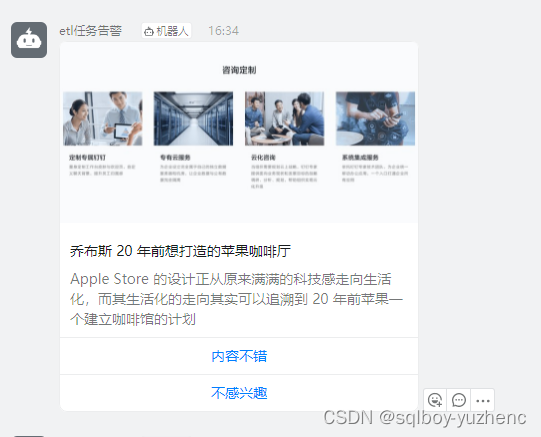
select sp_send('{
"msgtype": "actionCard",
"actionCard": {
"title": "我 20 年前想打造一间苹果咖啡厅,而它正是 Apple Store 的前身",
"text": " \n\n #### 乔布斯 20 年前想打造的苹果咖啡厅 \n\n Apple Store 的设计正从原来满满的科技感走向生活化,而其生活化的走向其实可以追溯到 20 年前苹果一个建立咖啡馆的计划",
"btnOrientation": "0",
"btns": [
{
"title": "内容不错",
"actionURL": "https://www.dingtalk.com/"
},
{
"title": "不感兴趣",
"actionURL": "https://www.dingtalk.com/"
}
]
}
}'::json);
参考:
自定义机器人安全设置 - 钉钉开放平台 https://open.dingtalk.com/document/robots/customize-robot-security-settings
自定义机器人接入 - 钉钉开放平台 https://open.dingtalk.com/document/robots/custom-robot-access
t_ds_user增加字段
alter table t_ds_user add column dingding_name varchar(100);
--人为将海豚账号对应的钉钉用户名更新上去
编写触发器
CREATE OR REPLACE FUNCTION dp.tg_ds_udef_alert_ding()
 RETURNS trigger
 LANGUAGE plpgsql
AS $function$
/*
 * 作者:v-yuzhenc
 * 功能:海豚调度工作流失败自动告警
 * */
declare
    i record;
    v_user varchar;
    v_mobile varchar;
    v_content text;
    v_message varchar;
begin
    if new.state in (4,5,6) then
        for i in (
            select
			     d.user_name
			    ,d.phone
			    ,d.dingding_name
			    ,g.name project_name
			    ,e.name process_name
			    ,string_agg(distinct b.name||' '||to_char(b.end_time,'yyyy-mm-dd hh24:mi:ss'),'\r\n') task_name
			from t_ds_process_instance a
			inner join t_ds_task_instance b
			on (a.id = b.process_instance_id)
			inner join t_ds_task_definition c
			on (b.task_code = c.code and b.task_definition_version = c."version")
			inner join t_ds_user d
			on (c.user_id = d.id)
			inner join t_ds_process_definition e
			on (a.process_definition_code = e.code and a.process_definition_version = e."version")
			inner join t_ds_project g
            on (e.project_code = g.code)
			where c.task_type <> 'SUB_PROCESS'
			    and a.state = 6
			    and b.state = 6
			    and a.id = new.id
			group by d.user_name
				,d.phone
				,d.dingding_name
				,g.name
				,e.name
        ) loop
            v_mobile := i.phone;
            v_user := i.dingding_name;
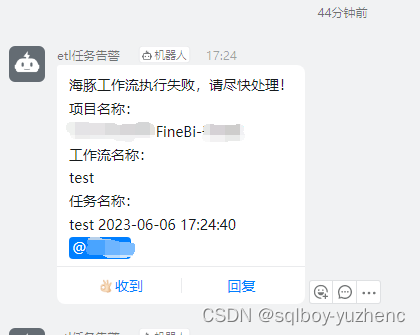
            v_content := '海豚工作流执行失败,请尽快处理!\r\n项目名称:\r\n'||i.project_name||'\r\n工作流名称:\r\n'||i.process_name||'\r\n任务名称:\r\n'||i.task_name;
            v_message := $v_message${
    "at": {
        "atMobiles":[
            "$v_message$||v_mobile||$v_message$"
        ],
        "atUserIds":[
            "$v_message$||v_user||$v_message$"
        ],
        "isAtAll": false
    },
    "text": {
        "content":"$v_message$||v_content||$v_message$"
    },
    "msgtype":"text"
}$v_message$;
            --告警
            perform tool.sp_send(v_message::json);
        end loop;
    end if;
    return new;
end;
$function$
;

create trigger tg_state_ds_process_instance after update on t_ds_process_instance for each row execute procedure tg_ds_udef_alert_ding();
测试
参与贡献
随着国内开源的迅猛崛起,Apache DolphinScheduler 社区迎来蓬勃发展,为了做更好用、易用的调度,真诚欢迎热爱开源的伙伴加入到开源社区中来,为中国开源崛起献上一份自己的力量,让本土开源走向全球。

参与 DolphinScheduler 社区有非常多的参与贡献的方式,包括:

贡献第一个PR(文档、代码) 我们也希望是简单的,第一个PR用于熟悉提交的流程和社区协作以及感受社区的友好度。
社区汇总了以下适合新手的问题列表:https://github.com/apache/dolphinscheduler/issues/5689
非新手问题列表:https://github.com/apache/dolphinscheduler/issues?q=is%3Aopen+is%3Aissue+label%3A%22volunteer+wanted%22
如何参与贡献链接:https://dolphinscheduler.apache.org/zh-cn/community/development/contribute.html
来吧,DolphinScheduler开源社区需要您的参与,为中国开源崛起添砖加瓦吧,哪怕只是小小的一块瓦,汇聚起来的力量也是巨大的。
参与开源可以近距离与各路高手切磋,迅速提升自己的技能,如果您想参与贡献,我们有个贡献者种子孵化群,可以添加社区小助手微信(Leonard-ds) ,手把手教会您( 贡献者不分水平高低,有问必答,关键是有一颗愿意贡献的心 )。

添加社区小助手微信(Leonard-ds,好友申请注明“入交流群+姓名+公司+职位信+是否是用户”,群里是实名制,仅用于验证身份)
如果想参与贡献,添加小助手微信时请说明想参与贡献。
来吧,开源社区非常期待您的参与。
☞Apache DolphinScheduler 支持使用 OceanBase 作为元数据库啦!