



PostgreSQL高可用—repmgr功能简介
repmgr简介
repmgr——Replication Manger for PostgreSQL cluster
- 开源插件,直接编译安装,无需其他依赖。
- 配置操作简单
- 轻量级高可用管理工具
- 分布式管理,易扩展,可在线动态增删集群节点
repmgr使用限制
-
repmgr is free and open-source software licensed under the GNU Public License (GPL) v3. This means you are free to use and modify repmgr as you see fit, however any modifications you make may only be distributed under the same terms.
-
repmgr works on Linux and most UNIX-like systems, including Mac OS X.
-
repmgr 5.3 works with PostgreSQL 9.4 ~ PostgreSQL 14.
| repmgr version | Supported PostgreSQL versions |
|---|---|
| repmgr 5.3 | 9.4,9.5,9.6,10,11,12,13,14 |
| repmgr 5.2 | 9.4,9.5,9.6,10,11,12,13 |
| repmgr 5.1 | 9.3,9.4,9.5,9.6,10,11,12 |
| repmgr 5.0 | 9.3,9.4,9.5,9.6,10,11,12 |
| repmgr 4.x | 9.3,9.4,9.5,9.6,10,11 |
| repmgr 3.x | 9.3,9.4,9.5,9.6 |
| repmgr 2.x | 9.0,9.1,9.2,9.3,9.4 |
相关术语
流复制集群(replication cluster)
在repmgr文档里,流复制集群是指通过物理流复制协议建立连接的PostgreSQL网络集群。
节点(node)
节点是流复制集群中的单个PostgreSQL服务器。
上游节点(upstream node)
standby从节点通过wal receiver进程连接并获取流复制的节点,一般指主节点或级联复制下standby从节点的父节点。
failover
当主节点发生故障时,合适的从节点提升为主节点的过程。repmgr守护进程可以进行自动failover以最大限度减少故障时间。
switchover
在某些场景,例如硬件或者操作系统需要维护的情况下,需要主节点脱机,并选择合适的从节点提升为新的主节点。
fencing
failover时从节点提升为主节点且必须确保原主库不能同时上线,否则可能会导致脑裂,所以失败的主节点必须被隔离。
witness server
witness server节点是一个单独存在的节点,用于防止脑裂情况的出现。
系统组件
repmgr
- 搭建standby节点
- 提升standby为primary
- 切换primary和standby角色
- 查看流复制集群的状态
repmgrd(replication manager daemon)
- 监控和记录流复制性能
- 检测primary节点故障并选择合适的standby节点提升为新的primary来执行failover故障转移
- 提供事件通知,可通过用户自定义脚本将事件信息以邮件形式发送给用户
- 一键暂停所有repmgrd
- 为多数据中心提供location分组配置
- 多种检测可用性的方法:ping、connection、query
元数据介绍
nodes
nodes元数据表主要用来记录流复制集群中各节点的信息,包括节点标识信息、节点状态信息等。
events
events元数据表主要用来记录repmgr管理的事件信息。
monitoring_history
monitoring_history元数据表主要用来记录repmgr的历史监控信息。
voting_term
voting_term元数据表用来记录投票信息。
show_nodes
show_nodes元数据表是一个视图,以nodes为基础,增加了显示上游节点的信息。
replication_status
replication_status元数据表是一个视图,当开启repmgrd守护进程时,显示当前各standby节点的监控转态。
repmgr管理
repmgr架构
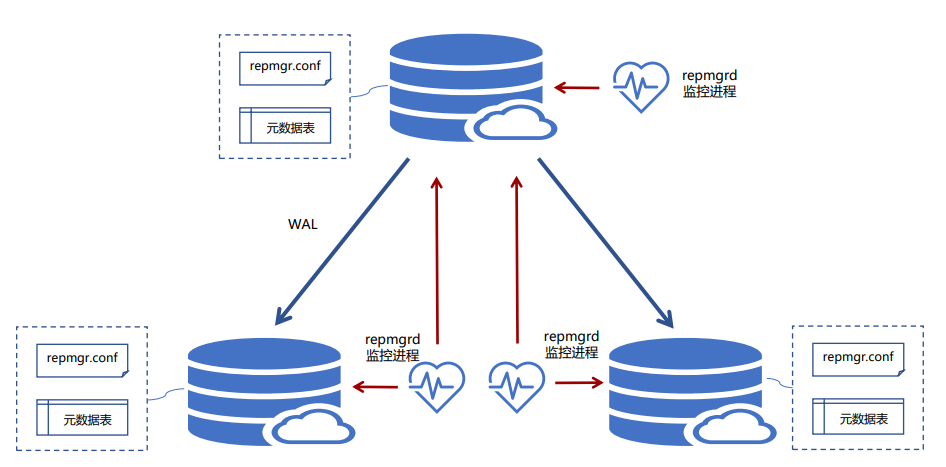
repmgr参数配置
配置前置条件
- 安装完PostgreSQL
- 安装完repmgr
- 各节点数据库宿主用户ssh免密
PostgreSQL配置参数
- shared_preload_libraries=‘repmgr’
- hot_standby=on
- wal_level=replica
- max_wal_senders=10
- max_replication_slots=12
- wal_log_hints=on
- archive_mode / archive_command
- wal_keep_segments / wal_keep_size
repmgr.comf配置
- v5.2 新增include
- v5.2新增include_if_exists
- v5.2新增include_dir
基础配置参数
- node_id集群中唯一的正整数
- node_name集群中唯一的字符串,通常配置为主机名
- conninfo数据库连接字符串,集群中的所有服务器都必须能够使用此字符串免密连接到本地节点
- data_directory节点的数据目录,repmgr需要使用该数据目录对PostgreSQL服务进行操作管理
可选配置参数
- config_directory
- replication_user
- location
- use_replication_slots
- ssh_options
- pg_bindir
- repmgr_bindir
PG启停服务配置
- service_start_command
- service_stop_command
- service_restart_command
- service_reload_command
日志配置
- log_level:DEBUG,INFO,NOTICE,WARNING,ERROR,ALERT,CRIT or EMERG
- log_file:日志文件的路径
- log_status_interval:repmgrd记录状态消息的时间间隔
密码管理
- conninfo
- PGPASSWORD
- .pgpass文件
- HBA设置trust认证
事件通知
- event_notifications
- event_notification_command
repmgr HBA配置
local   all     all     trust
host    repmgr  repmgr  192.168.60.191/32       trust
host    repmgr  repmgr  192.168.60.192/32       trust
host    repmgr  repmgr  192.168.60.193/32       trust
host    repmgr  repmgr  192.168.60.194/32       trust
host    all     all     0/0     md5
host    all     all     ::/0    md5
# forbid self-replication its own IP
local   replication     all     reject
host    replication     all     127.0.0.0/8     reject
host    replication     all     ::1/128         reject
# allow any standby connection
host    replication     repuser 0/0     trust
集群管理
standby clone
- repmgr standby clone -dry-run
repmgr --host=192.168.60.190 --port=5433 --dbname=repmgr \
--replication-user=repuser \
--config-file=/opt/pg14.1/repmgr.conf \
standby clone --dry-run
–dry-run:测试检查,并不会实际的数据拷贝,只是检查命令是否有问题,是否报错。如果存在报错,针对报错做针对性的检查命令。
- repmgr standby clone
repmgr --host=192.168.60.190 --port=5433 --dbname=repmgr \
--replication-user=repuser \
--config-file=/opt/pg14.1/repmgr.conf \
- cascading replication
–upstream-node-id
-
pg_basebackup options
pg_basebackup_options(repmgr.conf)
-
tablespace mapping
tablespace_mapping=’/tblspc1=/data/tblspc1’(repmgr.conf)
register/unregister
-
repmgr primary register
repmgr --config-file=/opt/pg14.1/repmgr.conf \
primary register/unregister
-
repmgr standby register
repmgr --config-file=/opt/pg14.1/repmgr.conf \
standby register/unregister
-
repmgr witness register
repmgr --config-file=/opt/pg14.1/repmgr.conf \
witness register/unregister --host=PrimaryIP
-
测试检查
–dry-run
-
强制注册
–force
standby promote
-
node1
repmgr --config-file=/opt/pg14.1/repmgr.conf cluster show
pg_ctl stop --mode=fast --pgdata=/pgdata
-
node2
repmgr --config-file=/home/postgres/pgdata-14/repmgr.conf cluster show
-
repmgr standby promote
repmgr --config-file=/opt/pg14.1/repmgr.conf \
standby promote
node2:repmgr --config-file=/opt/pg14.1/repmgr.conf cluster show --compact
standby follow
-
repmgr standby follow
node2:repmgr --config-file=/opt/pg14.1/repmgr.conf \
standby follow
node3:repmgr --config-file=/opt/pg14.1/repmgr.conf cluster show --compact
standby promote & follow
-
repmgr standby promote
repmgr --condif-file=/opt/pg14.1/repmgr.conf \
standby promote --siblings-follow
repmgr --config-file=/opt/pg14.1/repmgr.conf cluster show --compact
node check
-
repmgr nodecheck
repmgr --config-file=/opt/pg14.1/repmgr.conf node check --superuser=postgres
- –archive-ready
- –downstream
- –uptream
- –replication-lag
- –role
- –slots
- –missing-slots
- –data-directory-config
standby swichover
-
repmgr standby switchover -dry-run
repmgr --config-file=/opt/pg14.1/repmgr.conf \
standby switchover --siblings-follow --dry-run
-
repmgr standby switchover
repmgr --config-file=/opt/pg14.1/repmgr.conf \
standby switchover --siblings-follow
node rejoin
-
repmgr node rejoin -dry-run
repmgr --config-file=/opt/pg14.1/repmgr.conf \
node rejoin -d ‘host=192.168.137.102 port=5433 user=repmgr dbname=repmgr connect_timeout=2’ --dry-run
-
repmgr node rejoin
repmgr --config-file=/opt/pg14.1/repmgr.conf \
node rejoin -d ‘host=192.168.137.102 port=5433 user=repmgr dbname=repmgr connect_timeout=2’
node service
-
repmgr node service -dry-run
repmgr --config-file=/opt/pg14.1/repmgr.conf \
node service --action=start|stop|restart|reload --dry-run
-
repmgr node service
repmgr --config-file=/opt/pg14.1/repmgr.conf \
node service --action=start|stop|restart|reload
node status
-
本地节点执行如下命令
repmgr --config-file=/opt/pg14.1/repmgr.conf \
node status
cluster show
-
任意节点都可以执行如下命令
repmgr --config-file=/opt/pg14.1/repmgr.conf \
cluster show --compact
repmgrd
自动故障转移
repmgrd参数配置
-
failover配置
- failover:automatic,manual
- promote_command=‘repmgr sytandby promote’
- follow_command=‘repmgr standby follow --upstream-node-id=%n’
-
监控配置
- monitoring_history=‘yes’
- monitor_interval_secs=2
- connection_check_type=ping
- reconnect_attempts=6
- reconnect_interval=10
-
repmgrd服务配置
- repmgrd_service_start_command=’/usr/bin/sudo /usr/bin/systemctl start repmgr’
- repmgrd_service_stop_command=’/usr/bin/sudo /usr/bin/systemctl stop repmgr’
-
日志轮换(依赖操作系统logrotate)
/var/log/repmgr/repmgrd.log {
	missingok
	compress
	rotate 52
	maxsize 100M
	weekly
	create 0600 postgres postgres
	postrotate
		/usr/bin/killall -HUP repmgrd
	endscript
}
daemon start / stop
-
repmgr darmon start
-
repmgr --config-file=/opt/pg14.1/repmgr.conf \
daemon start --dry-run
-
repmgr --config-file=/opt/pg14.1/repmgr.conf \
daemon start
-
-
repmgr daemon stop
-
repmgr --config-file=/opt/pg14.1/repmgr.conf \
daemon stop
-
repmgrd 切换
witness
connection_check_type
选项connection_check_type用于选择repmgrd用于确定上游节点是否可用的方法。
可能的值包括:
ping(默认)-使用PQping()确定服务器可用性
connection-通过尝试与上游节点建立新连接来确定服务器可用性
query-通过现有连接在节点上执行SQL语句来确定服务器可用性
该查询是一个最小的一次性查询(选择1),用于确定服务器是否可以接受查询。
primary visibility consensus
-
repmgr.conf
primary_visibility_consensus
standby disconnection on failover
-
repmgr.conf
standby_disconnect_on_failover=true
-
postgresql version
version >= 9.5
-
repmgr role
superuser
failover validation
-
repmgr.conf
failover_validation_command=/path/to/script.sh %n %a
cascading replication
PostgreSQL从9.2开始支持级联复制,repmgr和repmgrd通过跟踪standby 节点之间的关系来支持standby节点的级联复制,每个节点都注册级联了其上游节点的信息。
当primary节点故障发生故障转移时,最顶层的standby节点进行promote操作,下游standby节点将不会受到影响,并能继续正常工作(即便它所连的上游节点变为主库),但是如果该节点的直接上游节点失败,“cascaded standby” 级联复制standby节点会尝试重新直接连接上游节点的父节点。
primary监控standby失联
- child_nodes_check_interval
- child_nodes_disconnect_command
- child_nodes_disconnect_timeout
- child_nodes_connected_min_count
- child_nodes_disconnect_min_count
- child_nodes_connected_include_witness
repmgrd暂停服务
在正常操作时,repmgrd监视它正在运行的PostgreSQL节点的状态,如果检测到故障,讲采取适当的措施,例如将节点提升为主节点。但是,repmgrd无法区分计划中的中断(如执行switchover)和实际的服务器中断。通过可以“repmgr service pause” 命令暂停repmgrd服务,即指示其不要执行任何操作,例如执行故障转移。
注意:可以从任何节点完成此操作,而无需分别pause/unpause 每个repmgrd。
degraded monitoring
- 发生failover时,主节点网络中没可见节点。
- 发生failover时,没有可用的候选节点。
- 发生failover时,无法提升候选节点。
- 发生failover时,节点无法follow新主节点。
- 发生failover时,无可用主节点。
- 发生failover时,节点未启用自动故障转移。
- repmgrd正在监控主节点,但是它不可用(并且没有其他节点被提升为主节点)
