



1、关闭防火墙
systemctl disable firewalld
systemctl stop firewalld
2、关闭selinux
vim /etc/selinux/config
SELINUX=disabled
3、修改Linux内核参数
vim /etc/sysctl.conf
fs.aio-max-nr=1048576
fs.file-max=6815744
kernel.sem=250 32000 100 128
kernel.shmall=2097152
kernel.shmmax=2147483648
kernel.shmmni=4096
net.core.rmem_default=1048576
net.core.rmem_max=4194304
net.core.wmem_default=262144
net.core.wmem_max=1048576
net.ipv4.ip_local_port_range=9000 65500
sysctl -p生效
4、安装Oracle12c的依赖包
yum install binutils gcc gcc-c++ glibc glibc-devel ksh libaio libaio-devel libgcc libstdc++ libstdc++-devel libXext libXtst libX11 libXau libxcb libXi make sysstat libnsl.x86_64
5、创建Oracle用户和用户组
groupadd oinstall
groupadd dba
useradd -g oinstall -G dba oracle
echo "oracle" | passwd oracle --stdin
id oracle看一下
6、修改oracle用户权限文件
vim /etc/security/limits.conf
oracle soft nofile 65536
oracle hard nofile 65536
oracle soft nproc 2047
oracle hard nproc 16384
oracle soft stack 10240
7、vim /etc/pam.d/login
session required /lib64/security/pam_limits.so
session required pam_limits.so
8、vim /etc/profile
#oracle config
if [ $USER = "oracle" ]; then
if [ $SHELL = "/bin/ksh" ]; then
ulimit -p 16384
ulimit -n 65536
else
ulimit -u 16384 -n 65536
fi
fi
9、创建安装目录和文件权限
mkdir -p /home/oracle/u1/database/oracle/product/12.2.0
mkdir /home/oracle/u1/database/oracle/oradata
mkdir /home/oracle/u1/database/oracle/inventory
mkdir /home/oracle/u1/database/oracle/fast_recovery_area
chown -R oracle:oinstall /home/oracle/u1/database/oracle/
chmod -R 755 /home/oracle/u1/database/oracle/
10、配置Oracle环境变量
umask 022
ORACLE_BASE=/home/oracle/u1/database/oracle
ORACLE_HOME=$ORACLE_BASE/product/12.2.0/dbhome_1
ORACLE_SID=orcl
PATH=$PATH:$ORACLE_HOME/bin
LD_LIBRARY_PATH=$ORACLE_HOME/lib:/usr/12.2.0/lib:$LD_LIBRARY_PATH
LANG=C
export ORACLE_BASE ORACLE_HOME ORACLE_SID PATH LD_LIBRARY_PATH LANG
11、上传oracle12c的二进制安装包并解压
[oracle@edc-pdf-dmdb13 ~]$ pwd
/home/oracle
[oracle@edc-pdf-dmdb13 ~]$ ll
total 3372752
-rw-r--r-- 1 root root 3453696911 Oct 9 21:27 V839960-01.zip
[oracle@edc-pdf-dmdb13 ~]$ unzip V839960-01.zip
[oracle@edc-pdf-dmdb13 database]$ ls
install response rpm runInstaller sshsetup stage welcome.html
然后将reponse文件夹整个复制到/home/oracle/
cp -R /home/oracle/database /home/oracle/
chmod -R 777 /home/oracle/response
12、执行vim db_install.rsp,将db_install.rsp脚本中这些变量值设置成如下内容
oracle.install.option=INSTALL_DB_SWONLY
ORACLE_HOSTNAME=jamysong
UNIX_GROUP_NAME=oinstall
INVENTORY_LOCATION=/home/oracle/u1/database/oracle/inventory
SELECTED_LANGUAGES=en,zh_CN
ORACLE_HOME=/home/oracle/u1/database/oracle/product/12.2.0/dbhome_1
ORACLE_BASE=/home/oracle/u1/database/oracle
oracle.install.db.InstallEdition=EE
oracle.install.db.OSDBA_GROUP=dba
oracle.install.db.OSOPER_GROUP=dba
oracle.install.db.OSBACKUPDBA_GROUP=dba
oracle.install.db.OSDGDBA_GROUP=dba
oracle.install.db.OSKMDBA_GROUP=dba
oracle.install.db.OSRACDBA_GROUP=dba
DECLINE_SECURITY_UPDATES=true
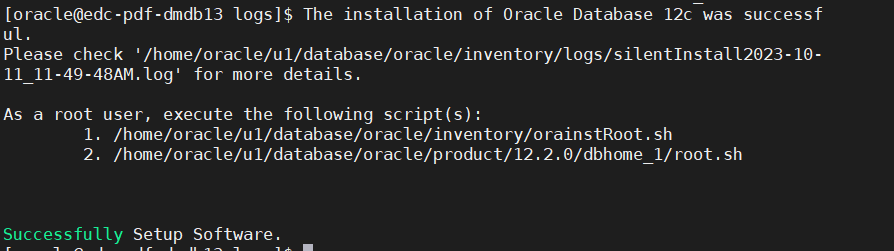
13、安装数据库软件
cd /home/oracle/database
./runInstaller -silent -responseFile /home/oracle/response/db_install.rsp -ignorePrereq
跑脚本,切换到root用户下执行下面命令
su root
sh /home/oracle/u1/database/oracle/inventory/orainstRoot.sh
sh /home/oracle/u1/database/oracle/product/12.2.0/dbhome_1/root.sh

14、配置监听
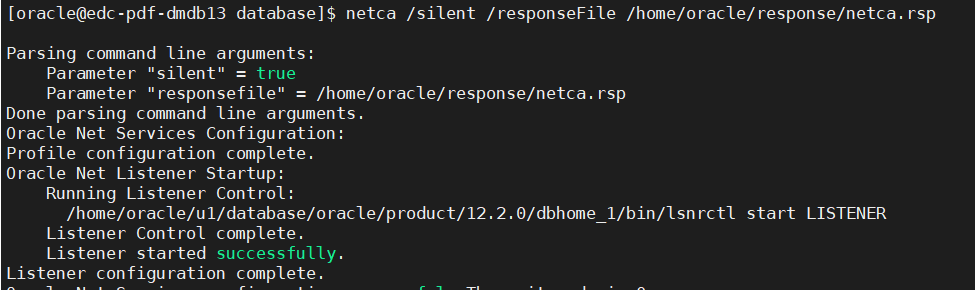
netca /silent /responseFile /home/oracle/response/netca.rsp
检查:netstat -tunlp | grep 1521
15、创建数据库
vim /home/oracle/response/dbca.rsp 修改如下内容
responseFileVersion=/oracle/assistants/rspfmt_dbca_response_schema_v12.2.0
gdbName=orcl
sid=orcl
databaseConfigType=SI
createAsContainerDatabase=false
templateName=/home/oracle//u1/database/oracle/product/12.2.0/dbhome_1/assistants/dbca/templates/General_Purpose.dbc
emExpressPort=5500
omsPort=0
characterSet=AL32UTF8
listeners=LISTENER
memoryPercentage=40
automaticMemoryManagement=false
totalMemory=2000
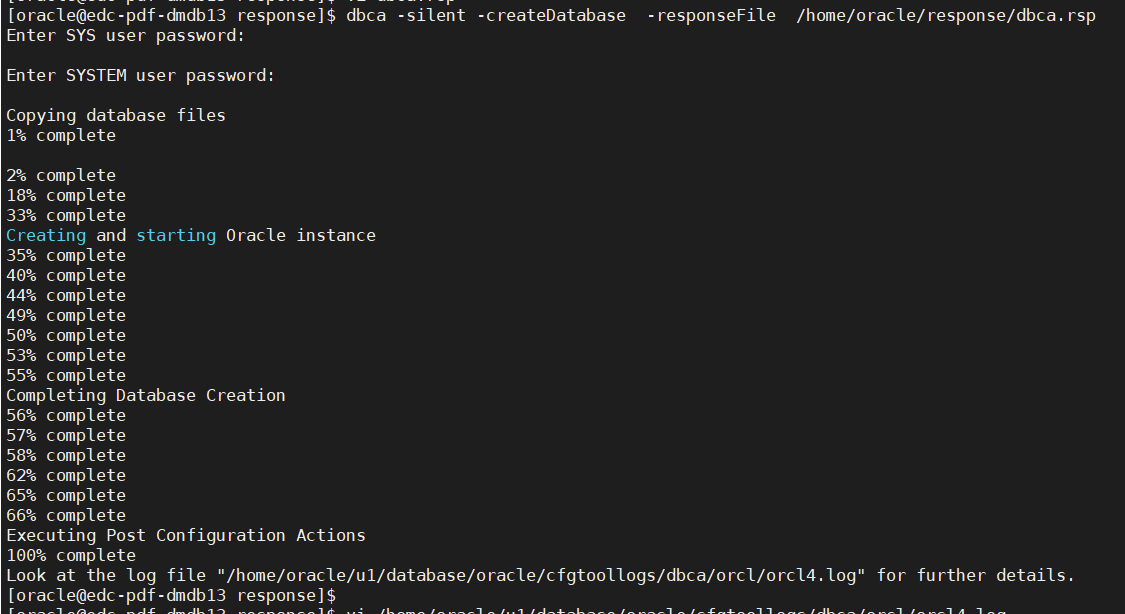
执行建库命令dbca -silent -createDatabase -responseFile /home/oracle/response/dbca.rsp
同时输入SYS,SYSTEM密码
16、登录数据库
export ORACLE_SID=orcl
sqlplus / as sysdba
17、创建pdb
create pluggable database pdb01 admin user admin_pdb01 identified by oracle roles=(connect,resource) file_name_convert=('/data/app/oracle/oradata/pdbseed',' /data/app/oracle/oradata/pdb01');
