



搭建环境构造
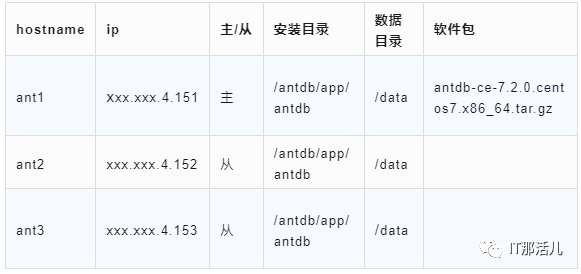
准备工作
useradd antdb passwd antdb 123456
[root@ant2 ~]# useradd antdb
passwd antdb[root@ant2 ~]# passwd antdb
Changing password for user antdb.
New password:
BAD PASSWORD: The password is shorter than 8 characters
Retype new password:
passwd: all authentication tokens updated successfully.
[root@ant2 ~]#
vi  /etc/security/limits.conf
antdb soft nproc 65536
antdb hard nproc 65536
antdb soft nofile 278528
antdb hard nofile 278528
antdb soft stack unlimited
antdb soft core unlimited
antdb hard core unlimited
antdb soft memlock 250000000
antdb hard memlock 250000000
su - antdb
ulimit -a

[antdb@ant2 ~]$ ulimit -a
core file size (blocks, -c) unlimited
data seg size (kbytes, -d) unlimited
scheduling priority (-e) 0
file size (blocks, -f) unlimited
pending signals (-i) 31077
max locked memory (kbytes, -l) 250000000
max memory size (kbytes, -m) unlimited
open files                      (-n) 278528
pipe size (512 bytes, -p) 8
POSIX message queues (bytes, -q) 819200
real-time priority (-r) 0
stack size (kbytes, -s) unlimited
cpu time (seconds, -t) unlimited
max user processes (-u) 65536
virtual memory (kbytes, -v) unlimited
file locks (-x) unlimited
[root@ant2 ~]# vi /etc/sudoers
antdb ALL=(ALL) NOPASSWD: ALL
su - antdb
sudo id

[antdb@ant2 ~]$ sudo id

We trust you have received the usual lecture from the local System
Administrator. It usually boils down to these three things:

     #1) Respect the privacy of others.
    #2) Think before you type.
     #3) With great power comes great responsibility.

[sudo] password for antdb:
uid=0(root) gid=0(root) groups=0(root) context=unconfined_u:unconfined_r:unconfined_t:s0-s0:c0.c1023
[antdb@ant2 ~]$
systemctl disable firewalld.service
检查
systemctl status firewalld.service
[root@ant2 ~]# systemctl stop firewalld.service
[root@ant2 ~]# systemctl status firewalld.service
● firewalld.service - firewalld - dynamic firewall daemon
  Loaded: loaded (/usr/lib/systemd/system/firewalld.service; disabled; vendor preset: enabled)
  Active: inactive (dead)
    Docs: man:firewalld(1)

Jun 26 23:08:17 wzj systemd[1]: Starting firewalld - dynamic firewall daemon...
Jun 26 23:08:17 wzj systemd[1]: Started firewalld - dynamic firewall daemon.
Jun 26 23:08:17 wzj firewalld[866]: WARNING: AllowZoneDrifting is enabled. This is considered an insecure configuration option. It will b...g it now.
Jun 26 23:41:44 ant2 systemd[1]: Stopping firewalld - dynamic firewall daemon...
Jun 26 23:41:46 ant2 systemd[1]: Stopped firewalld - dynamic firewall daemon.
Hint: Some lines were ellipsized, use -l to show in full.
[root@ant2 ~]#
grubby --update-kernel=ALL --args="numa=off "
numactl --hardware
systemctl stop tuned
systemctl disable tuned
cat /proc/cmdline
[root@ant2 ~]# cat /proc/cmdline
BOOT_IMAGE=/vmlinuz-3.10.0-1160.71.1.el7.x86_64 root=/dev/mapper/centos-root ro crashkernel=auto rd.lvm.lv=centos/root rd.lvm.lv=centos/swap rhgb quiet LANG=en_US.UTF-8 numa=off
cat /sys/kernel/mm/transparent_hugepage/enabled
如果结果是[always] madvise never,则透明大页是开启状态,需要关闭; 如果结果是always madvise [never],则透明大页是关闭状态,跳过此步骤;
echo never > /sys/kernel/mm/transparent_hugepage/enabled
echo never > /sys/kernel/mm/transparent_hugepage/defrag
cat /sys/kernel/mm/transparent_hugepage/enabled
[root@ant2 ~]# cat sys/kernel/mm/transparent_hugepage/enabled
[always] madvise never
[root@ant2 ~]#
[root@ant2 ~]# cat /sys/kernel/mm/transparent_hugepage/enabled
[always] madvise never
[root@ant2 ~]# echo never > /sys/kernel/mm/transparent_hugepage/enabled
[root@ant2 ~]# echo never > /sys/kernel/mm/transparent_hugepage/defrag
[root@ant2 ~]# cat /sys/kernel/mm/transparent_hugepage/enabled
always madvise [never]
[root@ant2 ~]#
sed -i 's/SELINUX=enforcing/SELINUX=disabled/' /etc/selinux/config
reboot
# 检查是否关闭
/usr/sbin/sestatus –v
# 期待结果
SELinux status: disabled
[root@ant2 ~]# sed -i 's/SELINUX=enforcing/SELINUX=disabled/' /etc/selinux/config
[root@ant2 ~]# reboot

[root@ant2 ~]# /usr/sbin/sestatus –v
SELinux status: disabled
搭建环境
mkdir  -p  /data/
mkdir  -p  /antdb/app/antdb
chown -R antdb:antdb  /antdb/app/antdb
chown -R antdb:antdb  /data
chmod 0700 /data /*这个不设置后面备节点可能起不来
[antdb@ant1 antdb-ce-7.2.0.centos7.x86_64]$ sh antdb_install.sh
[Info] AntDB install begins
get_os_info...
get_os_info...succeeded.
get_hardwareinfo...
get_hardwareinfo...succeeded.
check_hardwareinfo...

[Note] Continue to do AntDB initialization? [yes/no, Default: yes] no
[Info] AntDB init terminates
[antdb@ant1 antdb-ce-7.2.0.centos7.x86_64]$ source /home/antdb/.bashrc
# 切换到antdb用户
su - antdb
# 生成公钥和密钥
# 执行下面的命令,按三次回车
ssh-keygen -t rsa
# 用ssh-copy-id 把公钥复制到远程主机上
# 目标ip换成其他主机的ip,
ssh-copy-id -p $sshport -i .ssh/id_rsa.pub antdb@目标ip
# 循环在每个节点执行上面的步骤,让每个节点之间互信
# 验证互信是否生效,如果不需要密码即可远程登录,就表示已经生效
ssh -p $sshport 目标ip
[antdb@ant1 ~]$ ssh-keygen -t rsa
Generating public/private rsa key pair.
Enter file in which to save the key (/home/antdb/.ssh/id_rsa):
Created directory '/home/antdb/.ssh'.
Enter passphrase (empty for no passphrase):
Enter same passphrase again:
Your identification has been saved in /home/antdb/.ssh/id_rsa.
Your public key has been saved in /home/antdb/.ssh/id_rsa.pub.
The key fingerprint is:
SHA256:wT9SB8ojKIEGKeezJl14CuhGl5YBtFXjFAa4Vld5cAI antdb@ant1
The key's randomart image is:
+---[RSA 2048]----+
|+=+ooE++o.. |
|+o+++o.+oo . |
|+++.*.. B . . |
|o++*o . = . |
|+oo* S o |
|.o= . . |
|.o |
| |
| |
+----[SHA256]-----+
[antdb@ant1 ~]$

[antdb@ant1 ~]$ ssh-copy-id -p 22 -i .ssh/id_rsa.pub antdb@xxx.xxx.4.152
/bin/ssh-copy-id: INFO: Source of key(s) to be installed: ".ssh/id_rsa.pub"
The authenticity of host 'xxx.xxx.4.152 (xxx.xxx.4.152)' can't be established.
ECDSA key fingerprint is SHA256:26uNCCST/w+rYICYhNV/4iWZq8tFM0GIj6QQRVELu/c.
ECDSA key fingerprint is MD5:0f:fb:e2:2c:4d:42:8d:3a:ae:0c:eb:b4:ec:89:e9:14.
Are you sure you want to continue connecting (yes/no)? yes
/bin/ssh-copy-id: INFO: attempting to log in with the new key(s), to filter out any that are already installed
/bin/ssh-copy-id: INFO: 1 key(s) remain to be installed -- if you are prompted now it is to install the new keys
antdb@xxx.xxx.4.152's password:

Number of key(s) added: 1

Now try logging into the machine, with: "ssh -p '22' 'antdb@xxx.xxx.4.152'"
and check to make sure that only the key(s) you wanted were added.
[antdb@ant1 .ssh]$ ssh xxx.xxx.4.152
Last login: Mon Jul 3 20:00:03 2023
[antdb@ant2 ~]$ ssh 22 xxx.xxx.4.152
ssh: connect to host 22 port 22: Invalid argument
[antdb@ant2 ~]$ ssh -p 22 xxx.xxx.4.152
The authenticity of host 'xxx.xxx.4.152 (xxx.xxx.4.152)' can't be established.
ECDSA key fingerprint is SHA256:26uNCCST/w+rYICYhNV/4iWZq8tFM0GIj6QQRVELu/c.
ECDSA key fingerprint is MD5:0f:fb:e2:2c:4d:42:8d:3a:ae:0c:eb:b4:ec:89:e9:14.
Are you sure you want to continue connecting (yes/no)? yes
Warning: Permanently added 'xxx.xxx.4.152' (ECDSA) to the list of known hosts.
^[[A^C
[antdb@ant2 ~]$ ssh -p 22 xxx.xxx.4.153
Last login: Mon Jul 3 20:00:17 2023
[antdb@ant3 ~]$
[antdb@ant1 common]$ cat initconf-c.ini
## clusterinfo 配置项说明:
##
## cluster_type 分类:
## C_ALONE 表示集中式单机版:只需要设定 clusterinfo 和 primaryinfo
## C_HA 表示集中式高可用版:需要设定 primaryinfo、standbyinfo、etcdinfo、patroniinfo 的配置信息
## cluster_name:数据库集簇的名称
## cluster_user: 数据库的超级用户,一般设定为执行此安装程序的操作系统用户
[clusterinfo]
cluster_type = C_HA
cluster_name = antdbcluster
cluster_user = antdb
## primaryinfo 配置项说明:
##
## antdb_apppath:主节点数据库程序目录
## antdb_datapath:主节点数据库的数据目录;需要设定为空目录,且不要和其它配置项中的目录交叉
## antdb_password:数据库的超级用户的初始密码(超级用户名参见 “cluster_user”)
## antdb_port:主节点数据库端口号
## primary_ip:主节点数据库 ip,即执行此安装程序的主机 ip
## primary_sshport:执行此安装程序的主机的 SSH 服务端口号
[primary_info]
primary_ip = xxx.xxx.4.151
primary_sshport = 22
antdb_apppath = /antdb/app/antdb
antdb_datapath = /data
antdb_password = 123456
antdb_port = 6655
## standbyinfo 配置项说明:
##
## standby_node 格式:name,standby_ip,standby_sshport,antdb_apppath,antdb_datapath,antdb_port
## name:备节点名称,仅作为标识,唯一
## standby_ip:备节点 ip 地址
## standby_sshport:备节点 SSH 服务端口号
## antdb_apppath:备节点存放数据库应用程序的目录,建议与主节点使用相同路径
## antdb_datapath:备节点存放数据库数据的目录,建议与主节点使用相同路径
## antdb_port:备节点数据库的端口号
[standby_info]
standby_node = standby1,xxx.xxx.4.152,22,/antdb/app/antdb,/data,6655
standby_node = standby2,xxx.xxx.4.153,22,/antdb/app/antdb,/data,6655
## etcd_info 配置项说明:
##
## etcd_node 格式:name,etcd_datapath,clienport,peerport,hostinfo
## name:etcd 节点名称,唯一
## etcd_datapath:etcd 数据目录,不要与数据库数据目录交叉
## clienport:客户端访问 etcd 使用的端口号
## peerport:etcd 通信端口号
## hostinfo:数据库节点名称,primary 表示主节点,其它为备节点名称;标识了 etcd 与哪个数据库节点位于同一节点
[etcd_info]
etcd_node = etcd-1,/antdb/etcd,12379,12380,primary
etcd_node = etcd-2,/antdb/etcd,12379,12380,standby1
etcd_node = etcd-3,/antdb/etcd,12379,12380,standby2
## patroni_info 配置项说明:
##
## patroni_node 格式:name,patroni_port,hostinfo
## name:patroni 节点的名称,唯一
## patroni_port:patroni 服务使用的端口号
## hostinfo:数据库节点名称,primary 表示主节点,其它为备节点名称;标识了 patroni 与哪个数据库节点位于同一节点
[patroni_info]
patroni_node = patroni-1,8008,primary
patroni_node = patroni-2,8008,standby1
patroni_node = patroni-3,8008,standby2
[antdb@ant1 antdb-ce-7.2.0.centos7.x86_64]$ sh antdb_init.sh -c setup/common/initconf-c.ini
[Info] AntDB init begins
[Info] Checking sudo without password ... ok
[Info] Checking ipcalc ... ok
[Info] Checking netstat ... ok
[Info] Checking nproc ... ok
[Info] Checking rsync ... ok
[Info] Checking SSH ... ok
[Info] Checking configuration file format ... ok
[Info] Checking cluster_type ... C_HA
[Info] Checking cluster_user ... antdb
[Info] Checking cluster_name ... antdbcluster
[Info] Checking primary_ip ... xxx.xxx.4.151
[Info] Checking primary_sshport ... 22
[Info] Checking antdb_apppath ... ok
[Info] Checking antdb_datapath ... ok
[Info] Checking antdb_port ... ok
[Info] Checking antdb_password ... ok
[Info] Checking HA node number ... ok
[Info] Checking standby(standby1) sudo without password ... ok
[Info] Checking standby(standby1) antdb_apppath ... ok
[Info] Checking standby(standby1) antdb_datapath ... ok
[Info] Checking standby(standby1) name ... ok
[Info] Checking standby(standby1) dbport ... ok
[Info] Checking standby(standby2) sudo without password ... ok
[Info] Checking standby(standby2) antdb_apppath ... ok
[Info] Checking standby(standby2) antdb_datapath ... ok
[Info] Checking standby(standby2) name ... ok
[Info] Checking standby(standby2) dbport ... ok
[Info] Checking etcd(etcd-1) host ... ok
[Info] Checking etcd(etcd-1) etcd_datapath ... ok
[Info] Checking etcd(etcd-1) clientport ... ok
[Info] Checking etcd(etcd-1) peerport ... ok
[Info] Checking etcd(etcd-2) host ... ok
[Info] Checking etcd(etcd-2) etcd_datapath ... ok
[Info] Checking etcd(etcd-2) clientport ... ok
[Info] Checking etcd(etcd-2) peerport ... ok
[Info] Checking etcd(etcd-3) host ... ok
[Info] Checking etcd(etcd-3) etcd_datapath ... ok
[Info] Checking etcd(etcd-3) clientport ... ok
[Info] Checking etcd(etcd-3) peerport ... ok
[Info] Checking patroni(patroni-1) host ... ok
[Info] Checking patroni(patroni-1) patroni_port ... ok
[Info] Checking patroni(patroni-2) host ... ok
[Info] Checking patroni(patroni-2) patroni_port ... ok
[Info] Checking patroni(patroni-3) host ... ok
[Info] Checking patroni(patroni-3) patroni_port ... ok
[Info] Setting running environment ... ok
[Info] Setting patroni Shebang ... ok
[Info] Initializing local database ... ok
[Info] Setting database configuration ... ok
[Info] Setting ulimit ... ok
[Info] Starting AntDB ... ok
[Info] Creating default database ... ok
[Info] Setting database password ... ok
[Info] Setting hba for standby ... ok
[Info] Creating replication user ... ok
[Info] Copying files to remote host(xxx.xxx.4.152) ... ok
[Info] Setting ulimit on remote host(xxx.xxx.4.152) ... ok
[Info] Copying files to remote host(xxx.xxx.4.153) ... ok
[Info] Setting ulimit on remote host(xxx.xxx.4.153) ... ok
[Info] Setting etcd configuration(primary) ... ok
[Info] Setting etcd configuration(xxx.xxx.4.152) ... ok
[Info] Setting etcd configuration(xxx.xxx.4.153) ... ok
[Info] Starting etcd ... done
[Info] Checking etcd cluster ... ok
[Info] Setting patroni configuration(primary) ... ok
[Info] Starting patroni(primary) ... ok
[Info] Setting patroni configuration(xxx.xxx.4.152) ... ok
[Info] Starting patroni(xxx.xxx.4.152) ... ok
[Info] Setting patroni configuration(xxx.xxx.4.153) ... ok
[Info] Starting patroni(xxx.xxx.4.153) ... ok
[Info] AntDB config:
+---------------------------------------------+
| Config +
+---------------------------------------------+
| /etc/etcd/etcd_antdbcluster.yaml |
| /etc/patroni/patroni_antdbcluster.yaml |
+---------------------------------------------+
[Info] Waiting for cluster's state becoming consistent ... ok
[Info] AntDB cluster:
+ Cluster: antdbcluster (7251580465914355974) ---------------+----+-----------+
| Member | Host | Role | State | TL | Lag in MB |
+-----------+-------------------+---------+------------------+----+-----------+
| patroni-1 | xxx.xxx.4.151:6655 | Leader | running | 2 | |
| patroni-2 | xxx.xxx.4.152:6655 | Replica | stopped | | unknown |
| patroni-3 | xxx.xxx.4.153:6655 | Replica | creating replica | | unknown |
+-----------+-------------------+---------+------------------+----+-----------+
[Info] AntDB logon:
        adb -d "database" -U "user" -p "port"
[Info] AntDB init succeeds
[antdb@ant1 antdb-ce-7.2.0.centos7.x86_64]$ patronictl -c /etc/patroni/patroni_antdbcluster.yaml list
+ Cluster: antdbcluster (7251626854967426851) ------+----+-----------+
| Member | Host | Role | State | TL | Lag in MB |
+-----------+-------------------+---------+---------+----+-----------+
| patroni-1 | xxx.xxx.4.151:6655 | Leader | running |  2 | |
| patroni-2 | xxx.xxx.4.152:6655 | Replica | running | 2 |        31 |
| patroni-3 | xxx.xxx.4.153:6655 | Replica | running |  2 | 0 |
+-----------+-------------------+---------+---------+----+-----------+

本文作者:事业二部(上海新炬中北团队)
本文来源:“IT那活儿”公众号

文章转载自IT那活儿,如果涉嫌侵权,请发送邮件至:contact@modb.pro进行举报,并提供相关证据,一经查实,墨天轮将立刻删除相关内容。
