插件介绍
在进行postgres的服务端编程的时候,常常会发现pg的函数和存储过程是一个黑盒,内部的任何问题都有可能造成性能瓶颈。通常会遇到以下情况:
出现问题的语句,其实执行地非常快,但是调用过次数多导致变慢
随机出现的性能瓶颈问题
生产系统上出现了性能问题(尽管我们不愿意直接上生产系统排查)
以上的出现的性能问题只能采取人肉分析(分析schema、统计信息、SQL语句)、断点(pldebugger)的形式进行排查,排查时间长且不直观、问题时隐时现(甚至对于问题1,根本无法排查出来),因此需要有一个更好的排查方式,同时具备良好的展示方式,来帮助我们找到性能瓶颈的点。
plprofiler(https://github.com/bigsql/plprofiler)提供了一个简洁的postgres函数和存储过程的性能采集方式,用于发现pg的函数和存储过程性能瓶颈,从而让dba和开发人员能够进行针对性地对函数和存储过程、schema等进行优化。
为方便表达,后面统称 函数和存储过程 为 函数。
基本原理
在执行函数/语句前后加入钩子函数,进入的时候记录时间,出来的时候记录时间,两者相减即可得到该函数/语句的执行时间。
注意一下,这里的时间是Wall-Clock time,即真实时间,区分于CPU时间。例如pg_sleep(10),真实时间为10s,cpu时间只有0.001s。这里,该函数的真实时间为10s。
后续所有的数据分析都会基于这部分数据进行,分析运行时间的基本原理是:
self_time = total_time - children_time
基于该算式可以得到该函数的实际消耗时间。例如上述的pg_sleep(10)函数,它不包含语句粒度的子调用,因此children_time为0s,计算得到self_time是10s。
火焰图
plprofiler使用了火焰图作为其展示方式,需要搭配其python客户端使用,可以自动生成火焰图。
火焰图出自Brendan Gregg之手,感兴趣的话可以了解一下他的博客和书籍
火焰图是一个可视化地进行性能分析的利器。性能问题同样遵循着二八定律,即大部分的性能瓶颈是由少部分的问题导致的,因此,基于这个前提,找到导致大部分瓶颈的少部分问题成为了性能优化的关键。

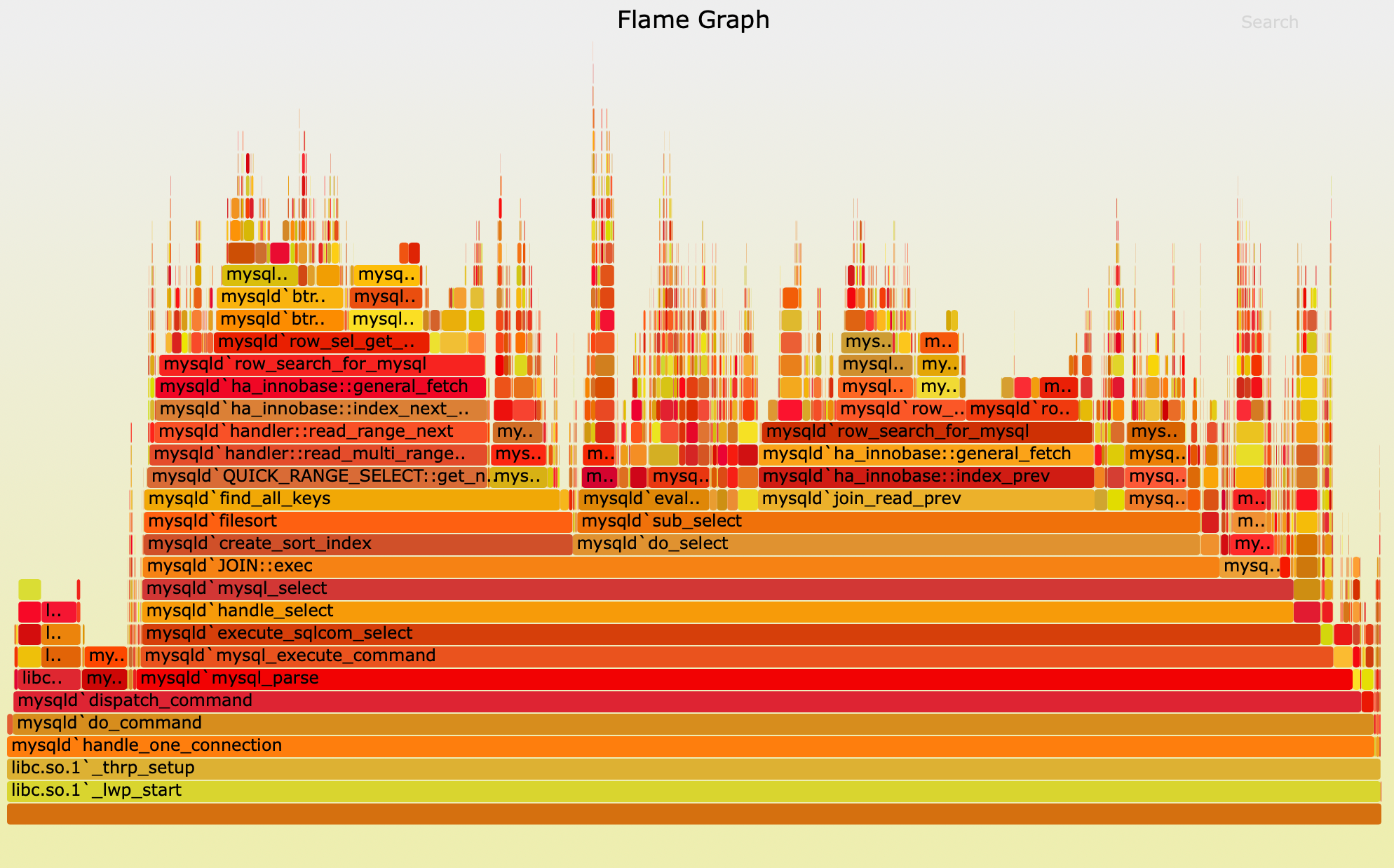
http://www.brendangregg.com/FlameGraphs/cpu-mysql-updated.svg
上图是Brendan Gregg博客的示例,这是一个mysql内核的CPU火焰图。
火焰图是可以用鼠标进行交互的,有需要的话可以点击上述链接,进行交互操作
可以看一下这个火焰图,X轴显示该层的总体堆栈,按字母顺序排序,Y轴显示堆栈深度,从底部的零开始计数。每个矩形代表一个栈帧。矩形越宽,它在堆栈中出现的频率就越高。顶部边缘显示了on-CPU的内容,在它下面是它的父函数。颜色通常不重要,它只是随机选择的,用来以区分矩形。
在该CPU火焰图中,矩形宽度对应着CPU的周期,矩形越宽,代表消耗的CPU周期越多(描述的并不完全准确,因为该图是基于采样的,但是采样足够多,基本上可以认为是正确的)。可以观察到该图中大部分的性能消耗主要是在两处row_search_for_mysql函数内,可以点击该函数,继续放大视图查找性能瓶颈点从而发现问题。
发现导致性能瓶颈的头部问题后,就可以针对这些头部问题进行优化操作。大部分情况下,优化完这部分问题后,性能瓶颈就能够得到消除。如果还是存在问题,就重复以上流程,因此一个性能优化的工作可以按照以下范式进行:
1. 发现性能瓶颈
2. 找到头部问题
3. 消除头部问题
4. 重新观测性能表现,如果存在问题,回到1
在plprofiler的火焰图中,区别于CPU火焰图,矩形宽度的含义略有变化,代表的是在该函数内的停留时间,即上面所述的Wall-Clock time。同样区别于CPU火焰图,产生的火焰图基于统计。
CPU火焰图 | plprofiler火焰图 | |
矩形宽度 | CPU周期 | 真实时间 |
统计形式 | 采样 | 统计 |
基本使用
这里的例子摘自官方README,先从https://github.com/bigsql/plprofiler获取源码。
准备
首先导出环境变量,为了运行demo,你只需要修改这部分内容:
export PGHOST=localhost
export PGPORT=5432
export PGUSER=postgres
export PGPASSWORD=password
export PGDATABASE=pgbench_plprofiler
export PLPROFILER_PATH=/path-to-plprofiler/
export USE_PGXS=1
export PATH=/path-to-pgsql/bin:$PATH
进入到源码目录下,安装服务端插件和客户端插件。
cd $PLPROFILER_PATH
make install #sudo make install
cd $PLPROFILER_PATH/python-plprofiler
python setup.py install #sudo python setup.py install
创建数据库,创建插件。
psql postgres
> CREATE DATABASE pgbench_plprofiler;
> \c pgbench_plprofiler
> CREATE EXTENSION plprofiler;
准备表、数据和函数。
cd $PLPROFILER_PATH/examples
bash prepdb.sh
进行分析
运行plprofiler命令进行性能分析:
plprofiler run --command "SELECT tpcb(1, 2, 3, -42)" --output tpcb-test1.html
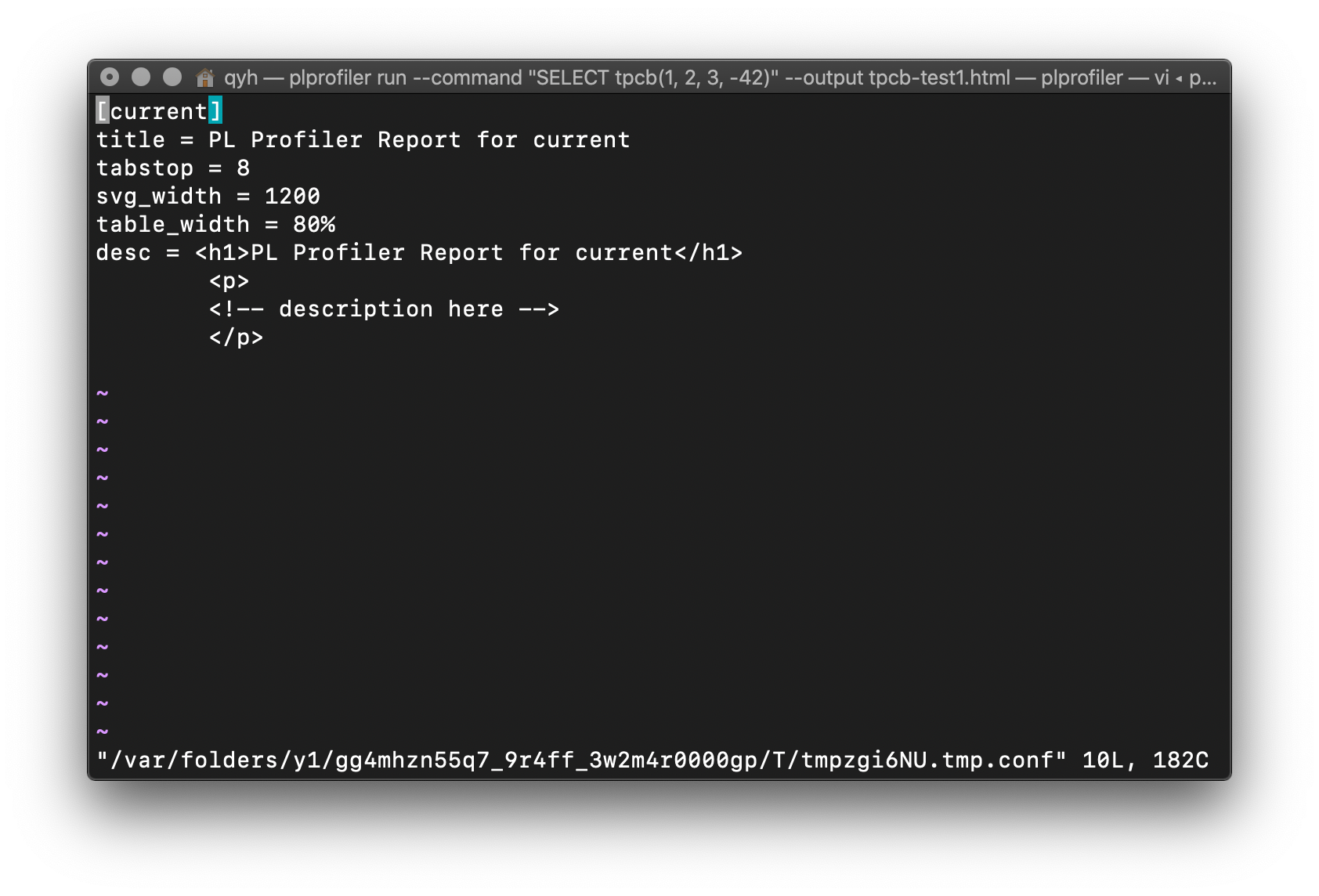
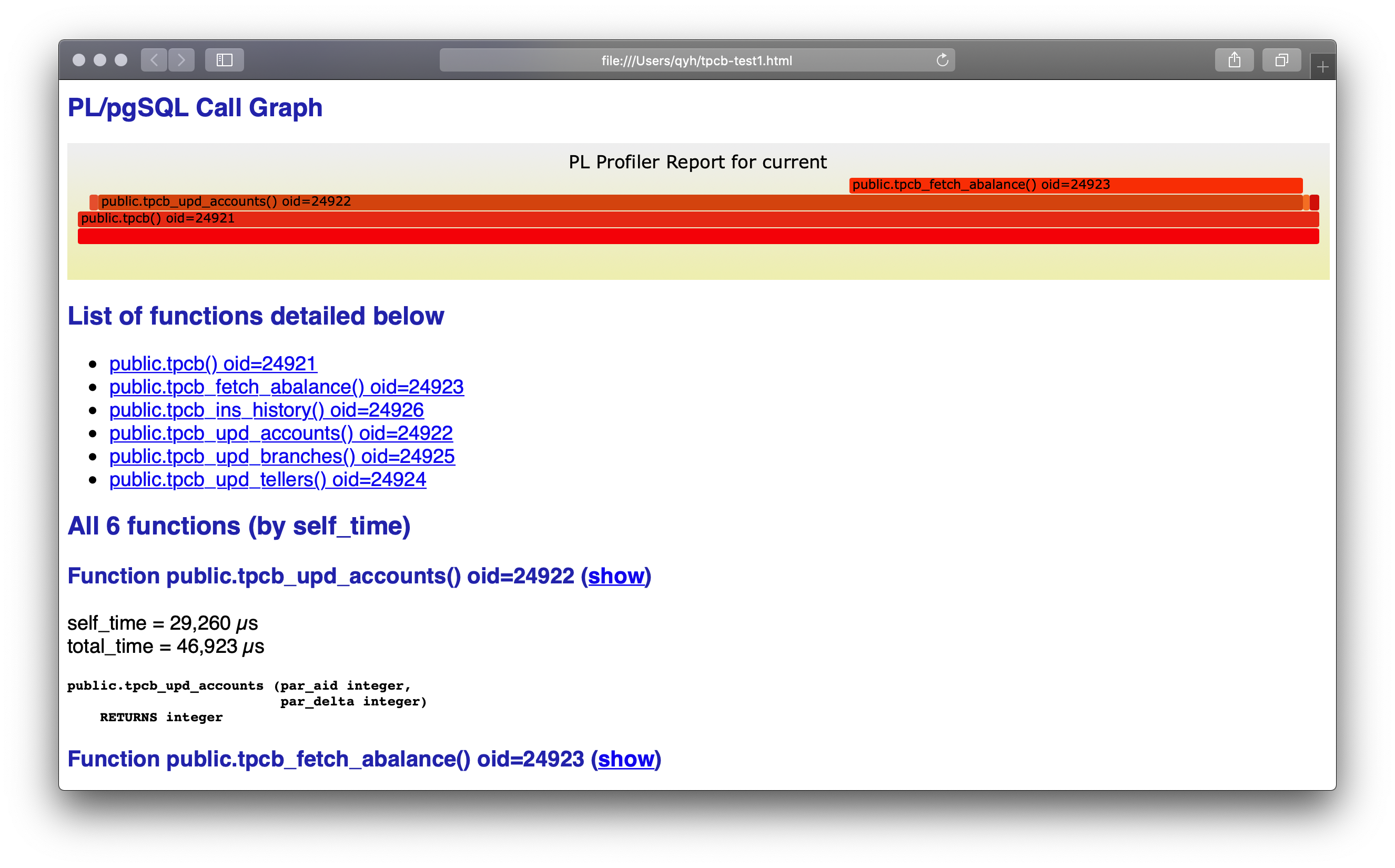
命令完成后,会进入编辑界面,你可以在这里编辑输出网页的标题、长宽、描述等信息。可以不用编辑,直接退出,在执行命令的路径下,可以看到输出的网页 tpcb-test1.html,使用浏览器打开这个网页。
网页的最上方是火焰图,下面是函数列表,再下面是各个函数的签名以及执行时间的详细信息,从火焰图中我们可以发现最影响性能的函数是tpcb_fetch_abalance。继而我们可以分析出,是由于没有创建索引导致性能很差。(尽管tpcb_upd_accounts性能也很差,但它有可能只是它的子函数的受害者,我们需要优化完子函数再观察情况)。
我们可以创建索引完成这次优化:
psql
> CREATE INDEX pgbench_accounts_aid_idx ON pgbench_accounts (aid);
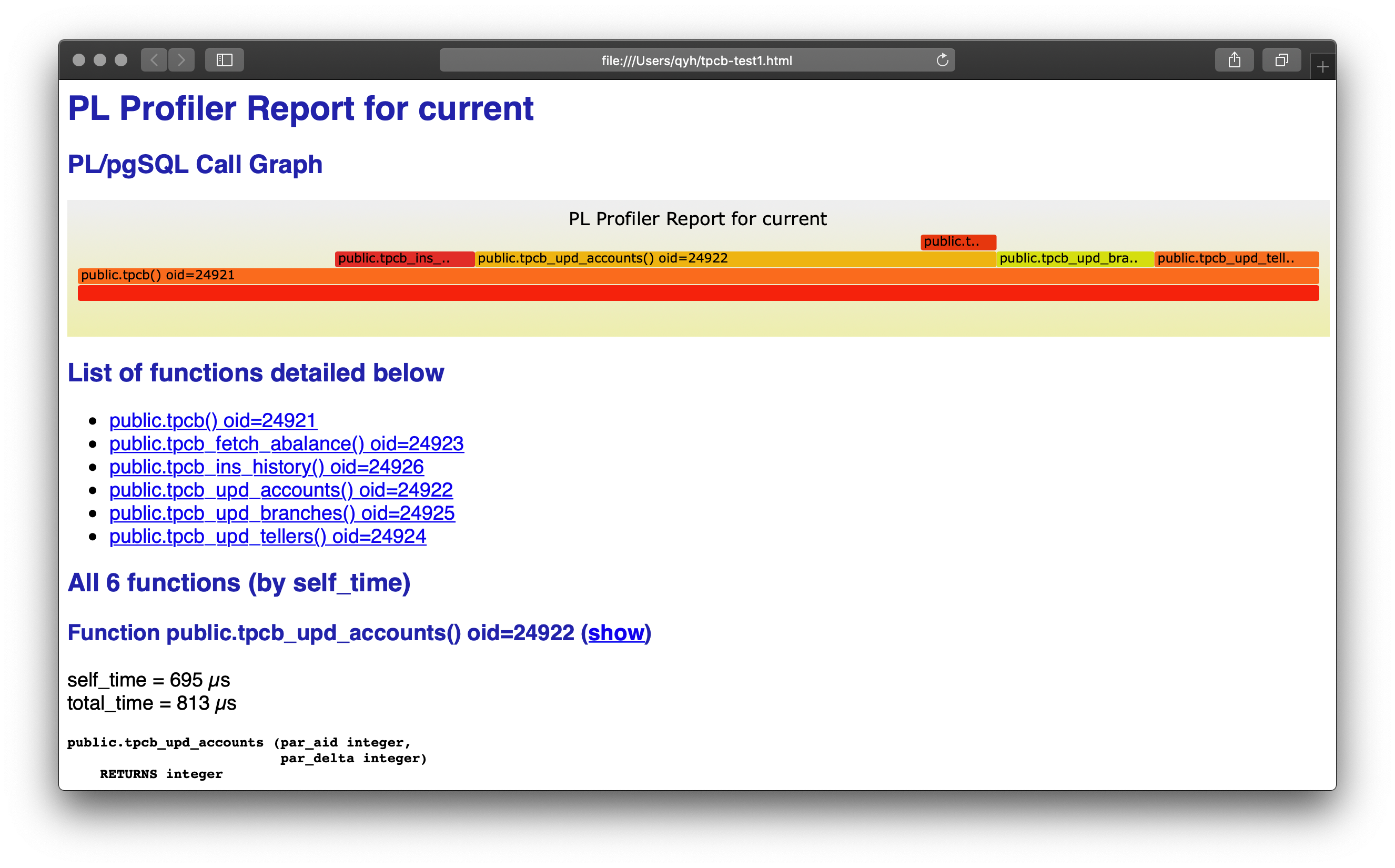
再次运行plprofiler命令进行性能分析,得到以下结果:
可以看到火焰图发生了变化,tpcb_fetch_abalance不再是性能瓶颈,新的性能瓶颈出现了。由于优化了tpcb_fetch_abalance,可以在下面看到tpcb_upd_accounts的执行时间也大大缩短了,它确实只是子函数的受害者。
如果符合期望,这次的优化可能就到此为止了。如果仍然不满足,那可以用新的火焰图继续分析出性能瓶颈。
总结:
可以看到plprofiler不能告诉我们该如何去做优化,它只能告诉我们在pg里的一个复杂的函数中,到底是哪一行出现了性能问题,得到这个信息后,我们再针对性地对这一行进行优化,有可能是索引问题,有可能是SQL问题,需要具体问题具体分析。
但是很多时候我们仅仅是难以发现是哪一行,这时候需要使用plprofiler,当发现哪一行存在问题后,问题往往很快就能解决了。
实现分析
钩子函数
plprofiler主要是通过插件的形式,hook函数和存储过程的执行的关键路径进行实现的。
PG内核的说明:src/pl/plpgsql/src/plpgsql.h:1061
结构体为PLpgSQL_plugin,主要有5个钩子函数:
void    (*func_setup) (PLpgSQL_execstate *estate, PLpgSQL_function *func);
void    (*func_beg) (PLpgSQL_execstate *estate, PLpgSQL_function *func);
void    (*func_end) (PLpgSQL_execstate *estate, PLpgSQL_function *func);
void    (*stmt_beg) (PLpgSQL_execstate *estate, PLpgSQL_stmt *stmt);
void    (*stmt_end) (PLpgSQL_execstate *estate, PLpgSQL_stmt *stmt);
func_setup函数在调用函数的时候进行调用,在初始化函数定义的局部参数之前。
func_beg函数在调用函数的时候进行调用,在初始化函数定义的局部参数之后。
func_end函数在调用函数结束的时候进行调用。
stmt_beg函数在调用语句之前进行调用。
stmt_end函数在调用语句之后进行调用。
在开始钩子函数中,会获取当前开始时间、以及哪一行,在结束钩子函数中,会获取当前结束时间,并将该行的信息统计记录下来。
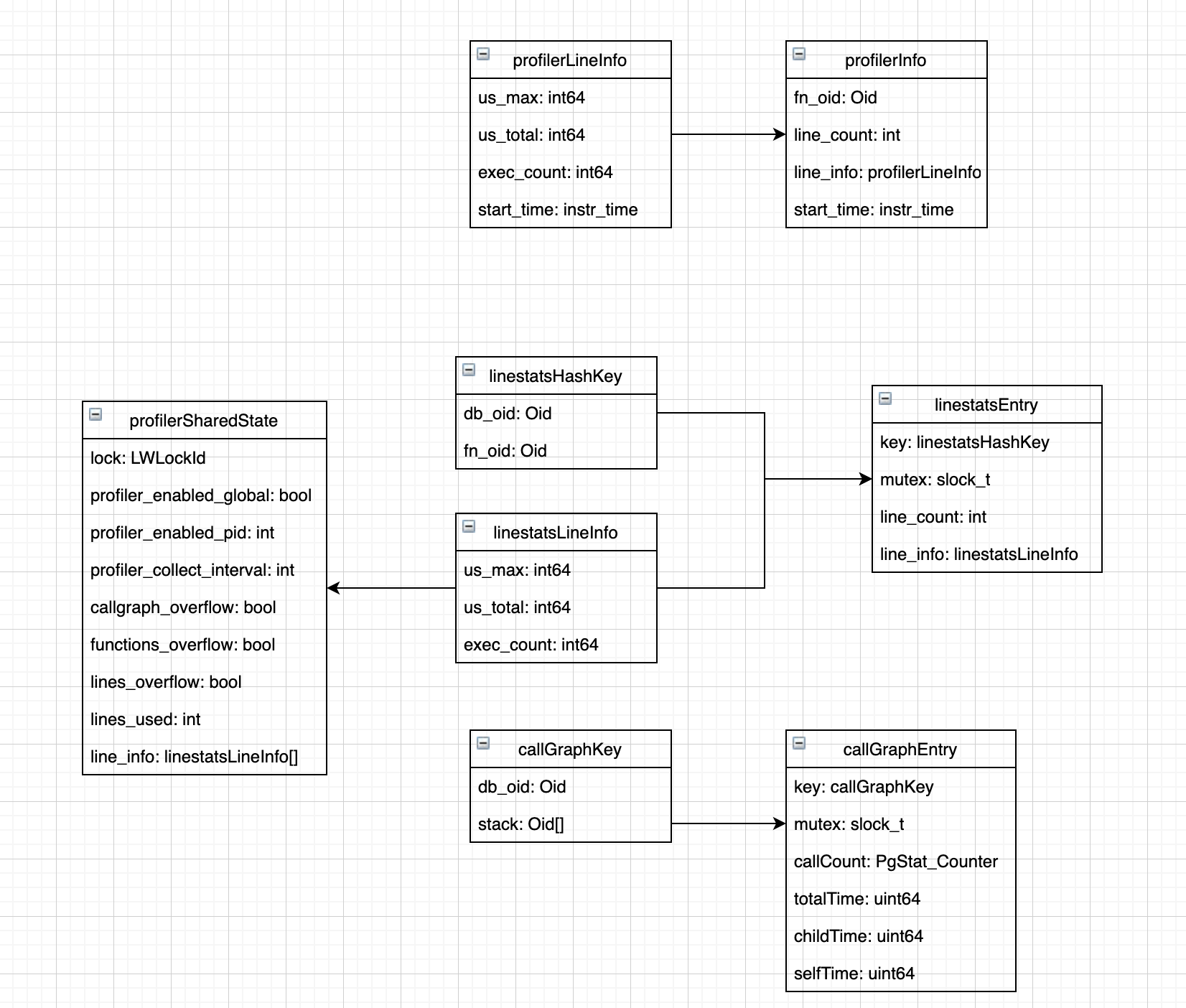
为了完成数据的记录和分析,还有部分辅助的数据结构,包括函数的信息、调用链等。这些数据结构的内容和关系如下:
数据收集
数据收集部分以stmt的开始和结束为例。
static void
profiler_stmt_beg(PLpgSQL_execstate *estate, PLpgSQL_stmt *stmt)
{
    profilerLineInfo   *line_info;
    profilerInfo       *profiler_info;

    /* 检查profiler是否启用 */
    if (!profiler_active)
        return;

    /* plugin_info储存的是profilerInfo信息,即当前函数的执行信息,如果为空,则说明是匿名代码块 */
    /* Ignore anonymous code block. */
    if (estate->plugin_info == NULL)
        return;

    /* Set the start time of the statement */
    profiler_info = (profilerInfo *)estate->plugin_info;
    if (stmt->lineno < profiler_info->line_count)
    {
        line_info = profiler_info->line_info + stmt->lineno;
        /* 在这里记录开始时间 */
        INSTR_TIME_SET_CURRENT(line_info->start_time);
    }

    /* Check the call graph stack. */
    callgraph_check(profiler_info->fn_oid);
}
static void
profiler_stmt_end(PLpgSQL_execstate *estate, PLpgSQL_stmt *stmt)
{
    ...

    /* 如果没有新数据,就不进行分析,防止每次都进行分析 */
    /* Tell collect_data() that new information has arrived locally. */
    have_new_local_data = true;

    /* 计算经历的时间,记录最大时间、总时间,增加执行次数 */
    INSTR_TIME_SET_CURRENT(end_time);
    INSTR_TIME_SUBTRACT(end_time, line_info->start_time);

    elapsed = INSTR_TIME_GET_MICROSEC(end_time);

    if (elapsed > line_info->us_max)
        line_info->us_max = elapsed;

    line_info->us_total += elapsed;
    line_info->exec_count++;
}
数据分析
分析部分主要是profiler_collect_data函数,该函数会在func_end结束时运行,意味着每执行一次pl/pgSQL函数会收集一次的数据,或者通过手动触发。
可以看到收集了两部分数据:
调用图数据,即callGraphEntry,对应了火焰图的原始数据
行统计数据,即linestatsEntry,对应了每个函数的统计数据
static int32
profiler_collect_data(void)
{
    ...
    /* 如果没有新数据,就不进行分析,防止每次都进行分析 */
    if (!have_new_local_data)
        return 0;
    have_new_local_data = false;

    /* 分析前需要获取hash table锁 */
    LWLockAcquire(plpss->lock, LW_SHARED);

    /* 1.将调用图数据分析进入共享内存 */
    hash_seq_init(&hash_seq, callgraph_hash);
    while ((cge1 = hash_seq_search(&hash_seq)) != NULL)
    {
        /* 将cge1导入callgraph_hash,并将相关信息记录进去 */
        ...
        cge2->callCount += cge1->callCount;
        cge2->totalTime += cge1->totalTime;
        cge2->childTime += cge1->childTime;
        cge2->selfTime  += cge1->selfTime;

        /* 清空已经记录过的信息 */
        cge1->callCount = 0;
        cge1->totalTime = 0;
        cge1->childTime = 0;
        cge1->selfTime = 0;
        ...
    }

    /* 2.将行统计数据导入共享内存 */
    hash_seq_init(&hash_seq, functions_hash);
    while ((lse1 = hash_seq_search(&hash_seq)) != NULL)
    {
        /* 将cge1导入functions_hash,并将相关信息记录进去 */
        ...
        for (i = 0; i < lse1->line_count && i < lse2->line_count; i++)
        {
            /* 更新每一行的最大执行时间、总执行时间、执行次数 */
            if (lse1->line_info[i].us_max > lse2->line_info[i].us_max)
                lse2->line_info[i].us_max = lse1->line_info[i].us_max;
            lse2->line_info[i].us_total += lse1->line_info[i].us_total;
            lse2->line_info[i].exec_count += lse1->line_info[i].exec_count;
        }
        ...
    }

    ...
}
对外接口
对外接口比较多,主要是将数据吐给前端,也比较乏善可陈,仅在这里列出,不做具体分析。
接口名称 | IN | OUT | 描述 | |||||||||||||||||||||||||||||||||||||||||||||||||||||||||||||||||||||||||||||||||||||||||||||||||||||||||||||
pl_profiler_callgraph_local | SETOF record | OUT stack oid[], OUT call_count bigint, OUT us_total bigint, OUT us_children bigint, OUT us_self bigint | Returns the content of the local call graph hash table as a set of rows. | |||||||||||||||||||||||||||||||||||||||||||||||||||||||||||||||||||||||||||||||||||||||||||||||||||||||||||||
pl_profiler_callgraph_overflow | boolean | Return the flag callgraph_overflow from the shared state. | ||||||||||||||||||||||||||||||||||||||||||||||||||||||||||||||||||||||||||||||||||||||||||||||||||||||||||||||
pl_profiler_callgraph_shared | SETOF record | OUT stack oid[], OUT call_count bigint, OUT us_total bigint, OUT us_children bigint, OUT us_self bigint | Returns the content of the shared call graph hash table as a set of rows. | |||||||||||||||||||||||||||||||||||||||||||||||||||||||||||||||||||||||||||||||||||||||||||||||||||||||||||||
pl_profiler_collect_data | integer | SQL level callable function to collect profiling data from the local tables into the shared hash tables. | ||||||||||||||||||||||||||||||||||||||||||||||||||||||||||||||||||||||||||||||||||||||||||||||||||||||||||||||
pl_profiler_func_oids_local | oid[] | Returns an array of all function Oids that we have linestat information for in the local hash table. | ||||||||||||||||||||||||||||||||||||||||||||||||||||||||||||||||||||||||||||||||||||||||||||||||||||||||||||||
pl_profiler_func_oids_shared | oid[] | Returns an array of all function Oids that we have linestat information for in the shared hash table. | ||||||||||||||||||||||||||||||||||||||||||||||||||||||||||||||||||||||||||||||||||||||||||||||||||||||||||||||
pl_profiler_funcs_source | SETOF record | func_oids oid[], OUT func_oid oid, OUT line_number bigint, OUT source text | Return the source code of a number of functions specified by an input array of Oids. | |||||||||||||||||||||||||||||||||||||||||||||||||||||||||||||||||||||||||||||||||||||||||||||||||||||||||||||
pl_profiler_functions_overflow | boolean | Return the flag functions_overflow from the shared state. | ||||||||||||||||||||||||||||||||||||||||||||||||||||||||||||||||||||||||||||||||||||||||||||||||||||||||||||||
pl_profiler_get_collect_interval | boolean | Report pid profiling state. | ||||||||||||||||||||||||||||||||||||||||||||||||||||||||||||||||||||||||||||||||||||||||||||||||||||||||||||||
pl_profiler_get_enabled_global | boolean | Report global profiling state. | ||||||||||||||||||||||||||||||||||||||||||||||||||||||||||||||||||||||||||||||||||||||||||||||||||||||||||||||
pl_profiler_get_enabled_local | boolean | Report local profiling state. | ||||||||||||||||||||||||||||||||||||||||||||||||||||||||||||||||||||||||||||||||||||||||||||||||||||||||||||||
pl_profiler_get_enabled_pid | boolean | Report pid profiling state. | ||||||||||||||||||||||||||||||||||||||||||||||||||||||||||||||||||||||||||||||||||||||||||||||||||||||||||||||
pl_profiler_get_stack | text[] | stack oid[] | Converts a stack in Oid[] format into a text[]. | |||||||||||||||||||||||||||||||||||||||||||||||||||||||||||||||||||||||||||||||||||||||||||||||||||||||||||||
pl_profiler_lines_overflow | boolean | Return the flag lines_overflow from the shared state. | ||||||||||||||||||||||||||||||||||||||||||||||||||||||||||||||||||||||||||||||||||||||||||||||||||||||||||||||
pl_profiler_linestats_local | SETOF record | OUT func_oid oid, OUT line_number bigint, OUT exec_count bigint, OUT total_time bigint, OUT longest_time bigint | Returns the content of the local line stats hash table as a set of rows. | |||||||||||||||||||||||||||||||||||||||||||||||||||||||||||||||||||||||||||||||||||||||||||||||||||||||||||||
pl_profiler_linestats_shared | SETOF record | OUT func_oid oid, OUT line_number bigint, OUT exec_count bigint, OUT total_time bigint, OUT longest_time bigint | Returns the content of the shared line stats hash table as a set of rows. | |||||||||||||||||||||||||||||||||||||||||||||||||||||||||||||||||||||||||||||||||||||||||||||||||||||||||||||
pl_profiler_reset_local | void | Drop all data collected in the local hash tables. | ||||||||||||||||||||||||||||||||||||||||||||||||||||||||||||||||||||||||||||||||||||||||||||||||||||||||||||||
pl_profiler_reset_shared | void | Drop all data collected in the shared hash tables and the shared state. | ||||||||||||||||||||||||||||||||||||||||||||||||||||||||||||||||||||||||||||||||||||||||||||||||||||||||||||||
pl_profiler_set_collect_interval | boolean | seconds integer | Turn pid profiling on or off. | |||||||||||||||||||||||||||||||||||||||||||||||||||||||||||||||||||||||||||||||||||||||||||||||||||||||||||||
pl_profiler_set_enabled_global | boolean | enabled boolean | Turn global profiling on or off. | |||||||||||||||||||||||||||||||||||||||||||||||||||||||||||||||||||||||||||||||||||||||||||||||||||||||||||||
pl_profiler_set_enabled_local | boolean | enabled boolean | Turn local profiling on or off. | |||||||||||||||||||||||||||||||||||||||||||||||||||||||||||||||||||||||||||||||||||||||||||||||||||||||||||||
pl_profiler_set_enabled_pid | boolean | pid integer | Turn pid profiling on or off. | |||||||||||||||||||||||||||||||||||||||||||||||||||||||||||||||||||||||||||||||||||||||||||||||||||||||||||||
pl_profiler_version | integer | Get int version. | ||||||||||||||||||||||||||||||||||||||||||||||||||||||||||||||||||||||||||||||||||||||||||||||||||||||||||||||
pl_profiler_versionstr | text | Get text version. 插件介绍在进行postgres的服务端编程的时候,常常会发现pg的函数和存储过程是一个黑盒,内部的任何问题都有可能造成性能瓶颈。通常会遇到以下情况:
以上的出现的性能问题只能采取人肉分析(分析schema、统计信息、SQL语句)、断点(pldebugger)的形式进行排查,排查时间长且不直观、问题时隐时现(甚至对于问题1,根本无法排查出来),因此需要有一个更好的排查方式,同时具备良好的展示方式,来帮助我们找到性能瓶颈的点。 plprofiler(https://github.com/bigsql/plprofiler)提供了一个简洁的postgres函数和存储过程的性能采集方式,用于发现pg的函数和存储过程性能瓶颈,从而让dba和开发人员能够进行针对性地对函数和存储过程、schema等进行优化。 为方便表达,后面统称 函数和存储过程 为 函数。 基本原理在执行函数/语句前后加入钩子函数,进入的时候记录时间,出来的时候记录时间,两者相减即可得到该函数/语句的执行时间。 注意一下,这里的时间是Wall-Clock time,即真实时间,区分于CPU时间。例如pg_sleep(10),真实时间为10s,cpu时间只有0.001s。这里,该函数的真实时间为10s。 后续所有的数据分析都会基于这部分数据进行,分析运行时间的基本原理是: 基于该算式可以得到该函数的实际消耗时间。例如上述的pg_sleep(10)函数,它不包含语句粒度的子调用,因此children_time为0s,计算得到self_time是10s。 火焰图plprofiler使用了火焰图作为其展示方式,需要搭配其python客户端使用,可以自动生成火焰图。 火焰图出自Brendan Gregg之手,感兴趣的话可以了解一下他的博客和书籍 火焰图是一个可视化地进行性能分析的利器。性能问题同样遵循着二八定律,即大部分的性能瓶颈是由少部分的问题导致的,因此,基于这个前提,找到导致大部分瓶颈的少部分问题成为了性能优化的关键。 http://www.brendangregg.com/FlameGraphs/cpu-mysql-updated.svg 上图是Brendan Gregg博客的示例,这是一个mysql内核的CPU火焰图。 火焰图是可以用鼠标进行交互的,有需要的话可以点击上述链接,进行交互操作 可以看一下这个火焰图,X轴显示该层的总体堆栈,按字母顺序排序,Y轴显示堆栈深度,从底部的零开始计数。每个矩形代表一个栈帧。矩形越宽,它在堆栈中出现的频率就越高。顶部边缘显示了on-CPU的内容,在它下面是它的父函数。颜色通常不重要,它只是随机选择的,用来以区分矩形。 在该CPU火焰图中,矩形宽度对应着CPU的周期,矩形越宽,代表消耗的CPU周期越多(描述的并不完全准确,因为该图是基于采样的,但是采样足够多,基本上可以认为是正确的)。可以观察到该图中大部分的性能消耗主要是在两处row_search_for_mysql函数内,可以点击该函数,继续放大视图查找性能瓶颈点从而发现问题。 发现导致性能瓶颈的头部问题后,就可以针对这些头部问题进行优化操作。大部分情况下,优化完这部分问题后,性能瓶颈就能够得到消除。如果还是存在问题,就重复以上流程,因此一个性能优化的工作可以按照以下范式进行: 在plprofiler的火焰图中,区别于CPU火焰图,矩形宽度的含义略有变化,代表的是在该函数内的停留时间,即上面所述的Wall-Clock time。同样区别于CPU火焰图,产生的火焰图基于统计。
基本使用这里的例子摘自官方README,先从https://github.com/bigsql/plprofiler获取源码。 准备首先导出环境变量,为了运行demo,你只需要修改这部分内容: 进入到源码目录下,安装服务端插件和客户端插件。 创建数据库,创建插件。 准备表、数据和函数。 进行分析运行plprofiler命令进行性能分析: 命令完成后,会进入编辑界面,你可以在这里编辑输出网页的标题、长宽、描述等信息。可以不用编辑,直接退出,在执行命令的路径下,可以看到输出的网页 tpcb-test1.html,使用浏览器打开这个网页。 网页的最上方是火焰图,下面是函数列表,再下面是各个函数的签名以及执行时间的详细信息,从火焰图中我们可以发现最影响性能的函数是tpcb_fetch_abalance。继而我们可以分析出,是由于没有创建索引导致性能很差。(尽管tpcb_upd_accounts性能也很差,但它有可能只是它的子函数的受害者,我们需要优化完子函数再观察情况)。 我们可以创建索引完成这次优化: 再次运行plprofiler命令进行性能分析,得到以下结果: 可以看到火焰图发生了变化,tpcb_fetch_abalance不再是性能瓶颈,新的性能瓶颈出现了。由于优化了tpcb_fetch_abalance,可以在下面看到tpcb_upd_accounts的执行时间也大大缩短了,它确实只是子函数的受害者。 如果符合期望,这次的优化可能就到此为止了。如果仍然不满足,那可以用新的火焰图继续分析出性能瓶颈。 总结: 可以看到plprofiler不能告诉我们该如何去做优化,它只能告诉我们在pg里的一个复杂的函数中,到底是哪一行出现了性能问题,得到这个信息后,我们再针对性地对这一行进行优化,有可能是索引问题,有可能是SQL问题,需要具体问题具体分析。 实现分析钩子函数plprofiler主要是通过插件的形式,hook函数和存储过程的执行的关键路径进行实现的。 结构体为PLpgSQL_plugin,主要有5个钩子函数: func_setup函数在调用函数的时候进行调用,在初始化函数定义的局部参数之前。 在开始钩子函数中,会获取当前开始时间、以及哪一行,在结束钩子函数中,会获取当前结束时间,并将该行的信息统计记录下来。 为了完成数据的记录和分析,还有部分辅助的数据结构,包括函数的信息、调用链等。这些数据结构的内容和关系如下: 数据收集数据收集部分以stmt的开始和结束为例。 数据分析分析部分主要是profiler_collect_data函数,该函数会在func_end结束时运行,意味着每执行一次pl/pgSQL函数会收集一次的数据,或者通过手动触发。 可以看到收集了两部分数据:
对外接口对外接口比较多,主要是将数据吐给前端,也比较乏善可陈,仅在这里列出,不做具体分析。
|