



微服务安全吗?
微服务安全吗?其实存在很多隐患,常规的做法是将微服务置于私有局域网中,通过网关报漏服务。如果破坏者一旦进入了你的私有局域网中,微服务是及其危险的。
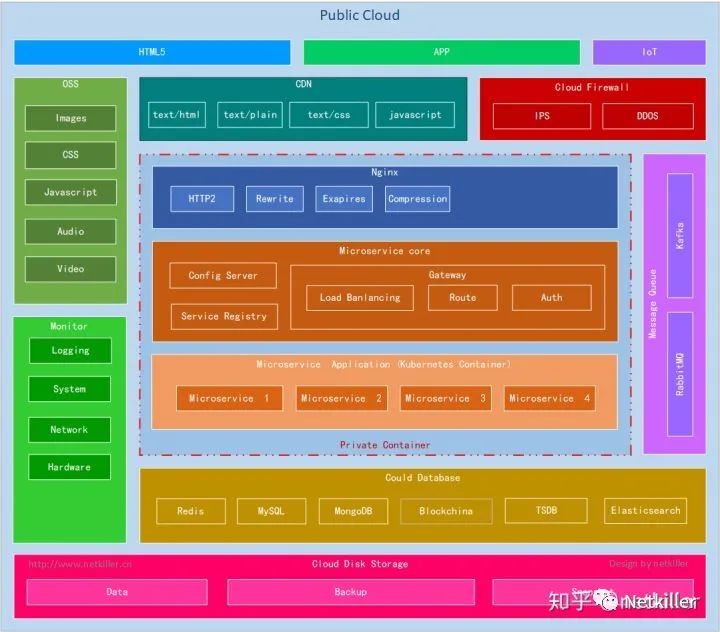
配置中心的隐患
配置中心的安全隐患
配置中心有以下几种安全隐患
配置中心报漏在公网IP之下
配置中心没有做用户验证
配置文件中存在敏感信息
明文传输内容
配置有泄漏敏感信息的隐患,你的配置中心是不是也这样?
iMac:workspace neo$ curl http://localhost:8888/netkiller-dev-master.json
{"sms":{"gateway":{"url":"https://sms.netkiller.cn/v1","username":"netkiller","password":"123456"}}}
给配置中心增加SSL和HTTP认证,可以让配置中心更安全。
iMac:resources neo$ curl -i -k https://config:s3cr3t@localhost:8888/netkiller-dev.json
HTTP/2 200
set-cookie: JSESSIONID=9E77660C8DC7669121C8D122A48D8737; Path=/; Secure; HttpOnly
x-content-type-options: nosniff
x-xss-protection: 1; mode=block
cache-control: no-cache, no-store, max-age=0, must-revalidate
pragma: no-cache
expires: 0
strict-transport-security: max-age=31536000 ; includeSubDomains
x-frame-options: DENY
content-type: application/json
content-length: 100
date: Mon, 07 Sep 2020 08:24:39 GMT

{"sms":{"gateway":{"url":"https://sms.netkiller.cn/v1","username":"netkiller","password":"123456"}}}
我们将 HTTP2 SSL 应用在配置中心后,就不担心配置文件被嗅探器抓到。
注册中心的隐患
注册中心一不小心就被公网IP报曝漏出去,甚至有被恶意注册的风险。
注册中心有以下几种安全隐患
注册中心没有做用户验证,任何人都能访问
注册中心曝漏在公网IP之下,被恶意注册的风险。
从openfeign 访问 euerka server 明文传输内容
你的注册中心是不是这样的?
iMac:workspace neo$ curl http://localhost:8761/eureka/apps
<applications>
  <versions__delta>1</versions__delta>
  <apps__hashcode>UP_1_</apps__hashcode>
  <application>
    <name>WEBFLUX</name>
    <instance>
      <instanceId>192.168.3.85:webflux</instanceId>
      <hostName>192.168.3.85</hostName>
      <app>WEBFLUX</app>
      <ipAddr>192.168.3.85</ipAddr>
      <status>UP</status>
      <overriddenstatus>UNKNOWN</overriddenstatus>
      <port enabled="true">8080</port>
      <securePort enabled="false">443</securePort>
      <countryId>1</countryId>
      <dataCenterInfo class="com.netflix.appinfo.InstanceInfo$DefaultDataCenterInfo">
        <name>MyOwn</name>
      </dataCenterInfo>
      <leaseInfo>
        <renewalIntervalInSecs>30</renewalIntervalInSecs>
        <durationInSecs>90</durationInSecs>
        <registrationTimestamp>1599106511367</registrationTimestamp>
        <lastRenewalTimestamp>1599106931380</lastRenewalTimestamp>
        <evictionTimestamp>0</evictionTimestamp>
        <serviceUpTimestamp>1599106511367</serviceUpTimestamp>
      </leaseInfo>
      <metadata>
        <management.port>8080</management.port>
      </metadata>
      <homePageUrl>http://192.168.3.85:8080/</homePageUrl>
      <statusPageUrl>http://192.168.3.85:8080/actuator/info</statusPageUrl>
      <healthCheckUrl>http://192.168.3.85:8080/actuator/health</healthCheckUrl>
      <vipAddress>webflux</vipAddress>
      <secureVipAddress>webflux</secureVipAddress>
      <isCoordinatingDiscoveryServer>false</isCoordinatingDiscoveryServer>
      <lastUpdatedTimestamp>1599106511368</lastUpdatedTimestamp>
      <lastDirtyTimestamp>1599106511299</lastDirtyTimestamp>
      <actionType>ADDED</actionType>
    </instance>
  </application>
</applications>
经过安全加固后
Eureka Web 界面进入需要输入用户名和密码,HTTP2 SSL 加密传输页面内容。
https://localhost:8761
iMac:resources neo$ curl -k https://eureka:s3cr3t@localhost:8761/eureka/apps
<applications>
  <versions__delta>1</versions__delta>
  <apps__hashcode>UP_2_</apps__hashcode>
  <application>
    <name>MICROSERVICE-RESTFUL</name>
    <instance>
      <instanceId>192.168.3.85:microservice-restful:8081</instanceId>
      <hostName>192.168.3.85</hostName>
      <app>MICROSERVICE-RESTFUL</app>
      <ipAddr>192.168.3.85</ipAddr>
      <status>UP</status>
      <overriddenstatus>UNKNOWN</overriddenstatus>
      <port enabled="true">8081</port>
      <securePort enabled="false">443</securePort>
      <countryId>1</countryId>
      <dataCenterInfo class="com.netflix.appinfo.InstanceInfo$DefaultDataCenterInfo">
        <name>MyOwn</name>
      </dataCenterInfo>
      <leaseInfo>
        <renewalIntervalInSecs>30</renewalIntervalInSecs>
        <durationInSecs>90</durationInSecs>
        <registrationTimestamp>1599532959290</registrationTimestamp>
        <lastRenewalTimestamp>1599533499404</lastRenewalTimestamp>
        <evictionTimestamp>0</evictionTimestamp>
        <serviceUpTimestamp>1599532959290</serviceUpTimestamp>
      </leaseInfo>
      <metadata>
        <management.port>8081</management.port>
      </metadata>
      <homePageUrl>http://192.168.3.85:8081/</homePageUrl>
      <statusPageUrl>http://192.168.3.85:8081/actuator/info</statusPageUrl>
      <healthCheckUrl>http://192.168.3.85:8081/actuator/health</healthCheckUrl>
      <vipAddress>microservice-restful</vipAddress>
      <secureVipAddress>microservice-restful</secureVipAddress>
      <isCoordinatingDiscoveryServer>false</isCoordinatingDiscoveryServer>
      <lastUpdatedTimestamp>1599532959291</lastUpdatedTimestamp>
      <lastDirtyTimestamp>1599532959204</lastDirtyTimestamp>
      <actionType>ADDED</actionType>
    </instance>
  </application>
  <application>
    <name>OPENFEIGN</name>
    <instance>
      <instanceId>192.168.3.85:openfeign:8088</instanceId>
      <hostName>192.168.3.85</hostName>
      <app>OPENFEIGN</app>
      <ipAddr>192.168.3.85</ipAddr>
      <status>UP</status>
      <overriddenstatus>UNKNOWN</overriddenstatus>
      <port enabled="true">8088</port>
      <securePort enabled="false">443</securePort>
      <countryId>1</countryId>
      <dataCenterInfo class="com.netflix.appinfo.InstanceInfo$DefaultDataCenterInfo">
        <name>MyOwn</name>
      </dataCenterInfo>
      <leaseInfo>
        <renewalIntervalInSecs>30</renewalIntervalInSecs>
        <durationInSecs>90</durationInSecs>
        <registrationTimestamp>1599533216972</registrationTimestamp>
        <lastRenewalTimestamp>1599533517001</lastRenewalTimestamp>
        <evictionTimestamp>0</evictionTimestamp>
        <serviceUpTimestamp>1599533216972</serviceUpTimestamp>
      </leaseInfo>
      <metadata>
        <management.port>8088</management.port>
      </metadata>
      <homePageUrl>http://192.168.3.85:8088/</homePageUrl>
      <statusPageUrl>http://192.168.3.85:8088/actuator/info</statusPageUrl>
      <healthCheckUrl>http://192.168.3.85:8088/actuator/health</healthCheckUrl>
      <vipAddress>openfeign</vipAddress>
      <secureVipAddress>openfeign</secureVipAddress>
      <isCoordinatingDiscoveryServer>false</isCoordinatingDiscoveryServer>
      <lastUpdatedTimestamp>1599533216972</lastUpdatedTimestamp>
      <lastDirtyTimestamp>1599533216920</lastDirtyTimestamp>
      <actionType>ADDED</actionType>
    </instance>
  </application>
</applications>
Eureka 客户端
Eureka Client 的安全配置与Eureka Server/Config Server 类似
Eureka 客户端有以下几种安全隐患
服务报漏在公网IP之下,任何人都不经过 Eureka Server 和 Openfeign 绕开后直接访问服务
明文传输内容
最终总结
H5 / App
    ^
    |
 HTTP2 ssl
    |
    V
Openfeign <--- HTTP2 ssl ---> Eureka Server
                                  ^
                                  |
                                  |
                              HTTP2 ssl
                                  |
                                  |
                                  V
                             Eureka Client  <--- HTTP2 ssl ---> Config Server
作者相关文章:
转载请注明出处与作者声明,扫描二维码关注作者公众好,不定期更新文章

文章转载自netkiller,如果涉嫌侵权,请发送邮件至:contact@modb.pro进行举报,并提供相关证据,一经查实,墨天轮将立刻删除相关内容。
