



错误信息
当启动openGauss数据库出现如下异常时
[GAUSS-53600]: Can not start the database, the cmd is source /home/omm/.bashrc; python3 '/opt/software/om/script/local/StartInstance.py' -U omm -R /opt/software/inst                                         all/app -t 300 --security-mode=off,  Error:
[FAILURE] openEuler:
[GAUSS-51607] : Failed to start instance. Error: Please check the gs_ctl log for failure details.
[2023-10-19 19:18:46.091][3568][][gs_ctl]: gs_ctl started,datadir is /opt/software/install/data/dn
[2023-10-19 19:18:46.283][3568][][gs_ctl]: waiting for server to start...
.0 LOG:  [Alarm Module]can not read GAUSS_WARNING_TYPE env.

0 LOG:  [Alarm Module]Host Name: openEuler

0 LOG:  [Alarm Module]Host IP: openEuler. Copy hostname directly in case of taking 10s to use 'gethostbyname' when /etc/hosts does not contain <HOST IP>

0 LOG:  [Alarm Module]Cluster Name: dbCluster

0 LOG:  [Alarm Module]Invalid data in AlarmItem file! Read alarm English name failed! line: 58

0 WARNING:  failed to open feature control file, please check whether it exists: FileName=gaussdb.version, Errno=2, Errmessage=No such file or directory.
0 WARNING:  failed to parse feature control file: gaussdb.version.
0 WARNING:  Failed to load the product control file, so gaussdb cannot distinguish product version.
The core dump path is an invalid directory
2023-10-19 19:18:46.340 65311096.1 [unknown] 140241130020800 [unknown] 0 dn_6001 DB010  0 [REDO] LOG:  Recovery parallelism, cpu count = 1, max = 4, actual = 1
2023-10-19 19:18:46.340 65311096.1 [unknown] 140241130020800 [unknown] 0 dn_6001 DB010  0 [REDO] LOG:  ConfigRecoveryParallelism, true_max_recovery_parallelism:4, ma                                         x_recovery_parallelism:4
2023-10-19 19:18:46.345 65311096.1 [unknown] 140241130020800 [unknown] 0 dn_6001 00000  0 [BACKEND] LOG:  [Alarm Module]can not read GAUSS_WARNING_TYPE env.

2023-10-19 19:18:46.345 65311096.1 [unknown] 140241130020800 [unknown] 0 dn_6001 00000  0 [BACKEND] LOG:  [Alarm Module]Host Name: openEuler

2023-10-19 19:18:46.345 65311096.1 [unknown] 140241130020800 [unknown] 0 dn_6001 00000  0 [BACKEND] LOG:  [Alarm Module]Host IP: openEuler. Copy hostname directly in                                          case of taking 10s to use 'gethostbyname' when /etc/hosts does not contain <HOST IP>

2023-10-19 19:18:46.345 65311096.1 [unknown] 140241130020800 [unknown] 0 dn_6001 00000  0 [BACKEND] LOG:  [Alarm Module]Cluster Name: dbCluster

2023-10-19 19:18:46.345 65311096.1 [unknown] 140241130020800 [unknown] 0 dn_6001 00000  0 [BACKEND] LOG:  [Alarm Module]Invalid data in AlarmItem file! Read alarm En                                         glish name failed! line: 58

2023-10-19 19:18:46.350 65311096.1 [unknown] 140241130020800 [unknown] 0 dn_6001 00000  0 [BACKEND] LOG:  loaded library "security_plugin"
2023-10-19 19:18:46.351 65311096.1 [unknown] 140241130020800 [unknown] 0 dn_6001 42809  0 [BACKEND] LOG:  could not bind IPv4 socket at the 0 time: Cannot assign req                                         uested address
2023-10-19 19:18:46.351 65311096.1 [unknown] 140241130020800 [unknown] 0 dn_6001 42809  0 [BACKEND] HINT:  Port 15432 is used, run 'netstat -anop|grep 15432' or 'lso                                         f -i:15432'(need root) to see who is using this port.
.2023-10-19 19:18:47.353 65311096.1 [unknown] 140241130020800 [unknown] 0 dn_6001 42809  0 [BACKEND] LOG:  could not bind IPv4 socket at the 1 time: Cannot assign re                                         quested address
2023-10-19 19:18:47.353 65311096.1 [unknown] 140241130020800 [unknown] 0 dn_6001 42809  0 [BACKEND] HINT:  Port 15432 is used, run 'netstat -anop|grep 15432' or 'lso                                         f -i:15432'(need root) to see who is using this port.
.2023-10-19 19:18:48.354 65311096.1 [unknown] 140241130020800 [unknown] 0 dn_6001 42809  0 [BACKEND] LOG:  could not bind IPv4 socket at the 2 time: Cannot assign re                                         quested address
2023-10-19 19:18:48.354 65311096.1 [unknown] 140241130020800 [unknown] 0 dn_6001 42809  0 [BACKEND] HINT:  Port 15432 is used, run 'netstat -anop|grep 15432' or 'lso                                         f -i:15432'(need root) to see who is using this port.
.sh: line 1: lsof: command not found
2023-10-19 19:18:49.357 65311096.1 [unknown] 140241130020800 [unknown] 0 dn_6001 00000  0 [BACKEND] LOG:  exec cmd: lsof -i:15432
2023-10-19 19:18:49.358 65311096.1 [unknown] 140241130020800 [unknown] 0 dn_6001 00000  0 [BACKEND] LOG:  exec cmd: netstat -anp | grep 15432
sh: line 1: netstat: command not found
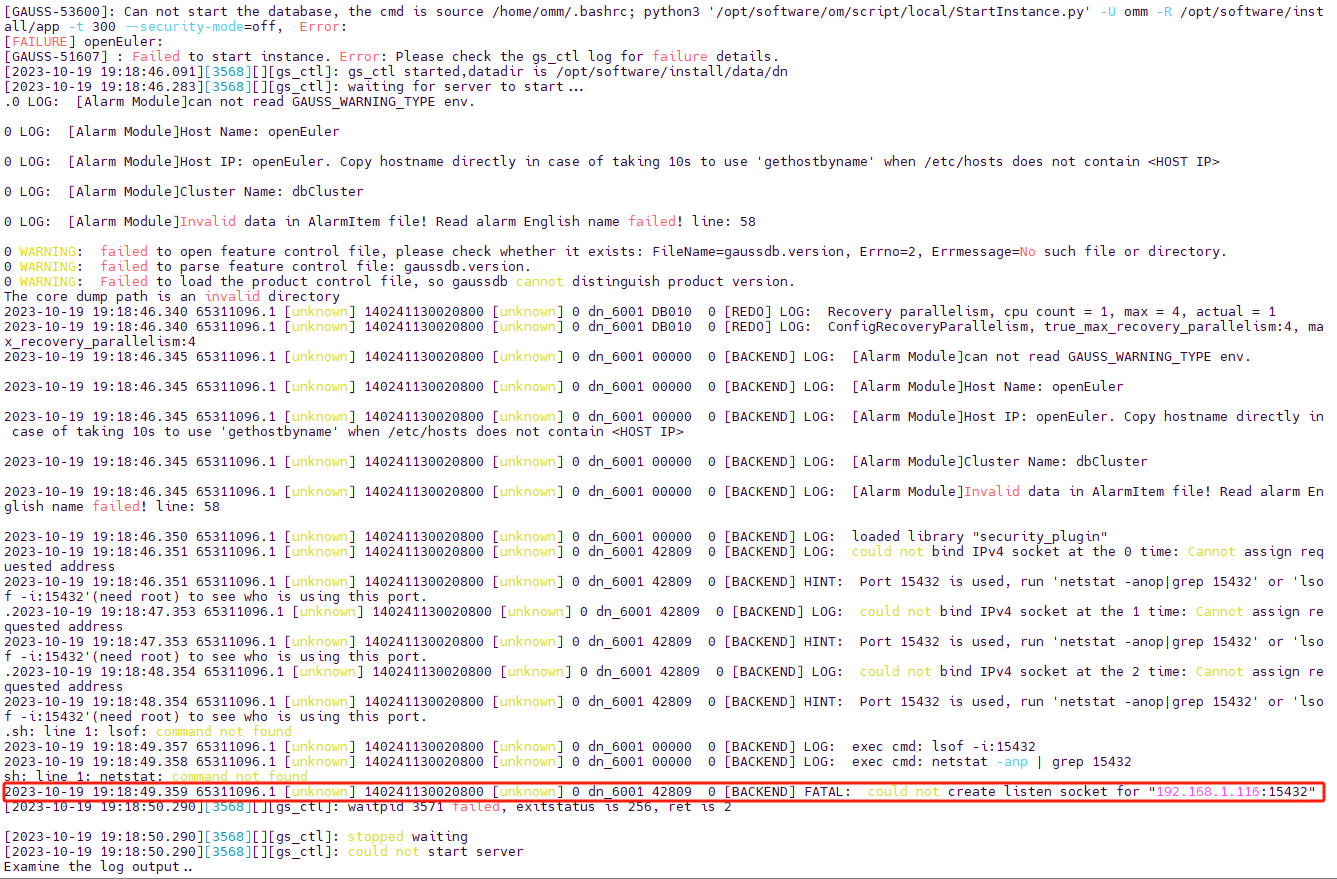
2023-10-19 19:18:49.359 65311096.1 [unknown] 140241130020800 [unknown] 0 dn_6001 42809  0 [BACKEND]
[2023-10-19 19:18:50.290][3568][][gs_ctl]: waitpid 3571 failed, exitstatus is 256, ret is 2

[2023-10-19 19:18:50.290][3568][][gs_ctl]: stopped waiting
[2023-10-19 19:18:50.290][3568][][gs_ctl]: could not start server
错误重点提示
注意看FATAL后的报错信息是否是一样的报错,如果是说明与本篇博文错误原因一样,是因为当前主机IP与数据库配置文件中记录的主机地址不符导致的无法启动
解决办法
首先查看自己的postgresql.conf配置文件中记录主机地址的参数是哪两个参数,或者直接根据本文的查看直接更改即可(参数名是一样的),grep后面跟的就是要模糊查询的内容
cat /opt/software/install/data/dn/postgresql.conf | grep address

根据返回结果可以发现与主机IP相关联的参数分别是 listen_addresses 和 local_bind_address,接下来需要做的就是使用gs_guc参数将IP改为当前主机IP,如果不知道当前主机IP可以使用 ifconfig 或者 ip a 命令查看
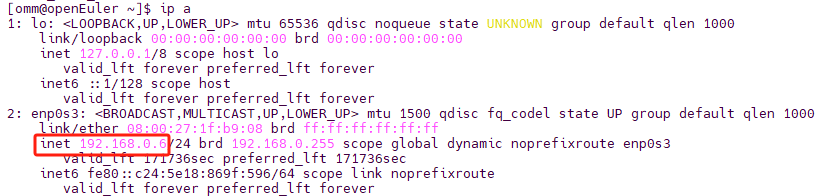
更改参数执行命令如下所示,
gs_guc set -N all -I all -c "listen_addresses = 'localhost,192.168.0.6'"
gs_guc set -N all -I all -c "local_bind_address = '192.168.0.6'"
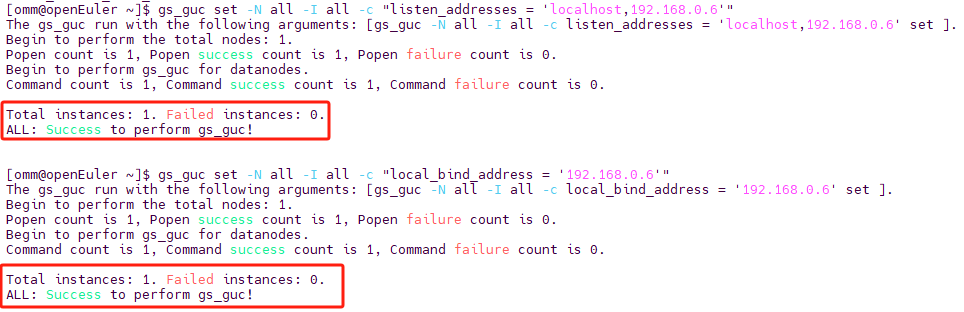
根据上图所示执行结果可知执行成功,重新启动数据库即可
最后修改时间:2023-10-20 22:39:44
「喜欢这篇文章,您的关注和赞赏是给作者最好的鼓励」
关注作者
【版权声明】本文为墨天轮用户原创内容,转载时必须标注文章的来源(墨天轮),文章链接,文章作者等基本信息,否则作者和墨天轮有权追究责任。如果您发现墨天轮中有涉嫌抄袭或者侵权的内容,欢迎发送邮件至:contact@modb.pro进行举报,并提供相关证据,一经查实,墨天轮将立刻删除相关内容。
