



点击上方蓝字【囧囧妹】一起学习,一起成长!
多线程死锁的概念
多线程死锁是多线程编程中的一种关键问题。它发生在多个线程试图获取一组资源(通常是锁或资源对象)时,导致彼此相互等待的情况。具体来说,当线程1持有资源A并等待资源B,而线程2持有资源B并等待资源A时,就可能发生死锁。
多线程死锁原理
为了更好地理解多线程死锁的原理,让我们考虑一个简单的示例。假设有两个资源A和B,以及两个线程(Thread 1和Thread 2)。线程1需要获取资源A和B,线程2需要获取资源B和A。如果线程1获取了资源A,而线程2获取了资源B,它们都无法继续,因为它们都需要对方持有的资源才能继续。这就是典型的死锁情况。
线程同时持有一个资源并等待另一个资源。 资源分配不当,线程没有按照相同的顺序获取资源。
排查多线程死锁
#include <stdio.h>#include <pthread.h>#include <stdlib.h>#include <unistd.h>#include <time.h>pthread_mutex_t mutex1 = PTHREAD_MUTEX_INITIALIZER;pthread_mutex_t mutex2 = PTHREAD_MUTEX_INITIALIZER;pthread_cond_t exit_condition = PTHREAD_COND_INITIALIZER;int should_exit = 0;void *thread1_function(void *arg) {while (1) {printf("Thread 1: Attempting to acquire mutex1...\n");pthread_mutex_lock(&mutex1);printf("Thread 1: Acquired mutex1.\n");printf("Thread 1: Attempting to acquire mutex2...\n");pthread_mutex_lock(&mutex2);printf("Thread 1: Acquired mutex2.\n");// 在此处检查是否应该退出if (should_exit) {pthread_mutex_unlock(&mutex2);pthread_mutex_unlock(&mutex1);break;}pthread_mutex_unlock(&mutex1);pthread_mutex_unlock(&mutex2);}printf("Thread 1 exit done!\n");pthread_exit(NULL);}void *thread2_function(void *arg) {sleep(5); // 让线程2休眠10秒钟printf("Thread 2: Attempting to acquire mutex2...\n");pthread_mutex_lock(&mutex2);printf("Thread 2: Acquired mutex2.\n");printf("Thread 2: Notifying Thread 1 to exit...\n");should_exit = 1;pthread_cond_signal(&exit_condition);//通过不释放该锁制造死锁pthread_mutex_unlock(&mutex2);printf("Thread 2 exit done!\n");//exit执行后不会再执行该函数后面部分pthread_exit(NULL);}int main() {pthread_t thread1, thread2;pthread_create(&thread1, NULL, thread1_function, NULL);pthread_create(&thread2, NULL, thread2_function, NULL);pthread_join(thread1, NULL);pthread_join(thread2, NULL);return 0;}
代码很简单,通过创建两个线程,线程1睡眠5s为mutex2加锁并通知线程1进行退出,之后线程2退出,线程1是个while循环,不停的对mutex1进行加解锁,并加锁后检测是否退出,退出则对mutex2进行加锁打印,然后释放mutex1、mutex2进行退出。
使用:gcc thread.c -g -lpthread -o thread编译,因为要gdb调试所以需要带上-g参数,正常现象会执行结束打印如下:
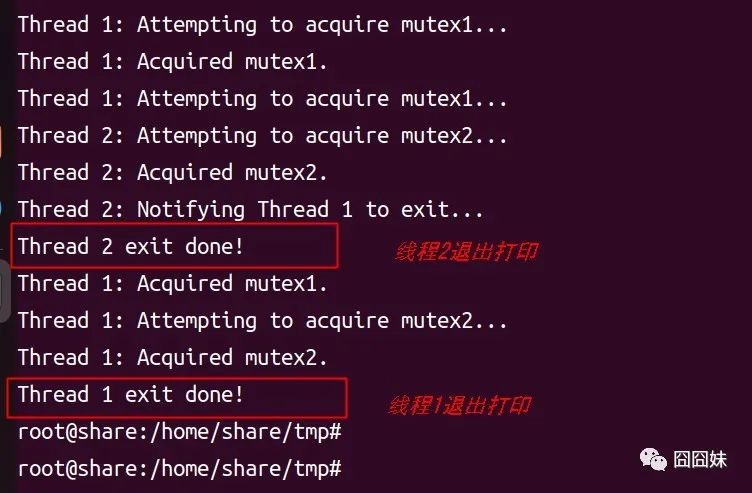
现在我们屏蔽掉线程2释放mutex2进行死锁调试:
void *thread2_function(void *arg) {sleep(5); // 让线程2休眠10秒钟printf("Thread 2: Attempting to acquire mutex2...\n");pthread_mutex_lock(&mutex2);printf("Thread 2: Acquired mutex2.\n");printf("Thread 2: Notifying Thread 1 to exit...\n");should_exit = 1;pthread_cond_signal(&exit_condition);//通过不释放该锁制造死锁//pthread_mutex_unlock(&mutex2);printf("Thread 2 exit done!\n");//exit执行后不会再执行该函数后面部分pthread_exit(NULL);}
实际环境中我们并不知道死锁发生,所以我们通过gdb先运行一次直到程序无法正常退出时,执行bt查看堆栈:
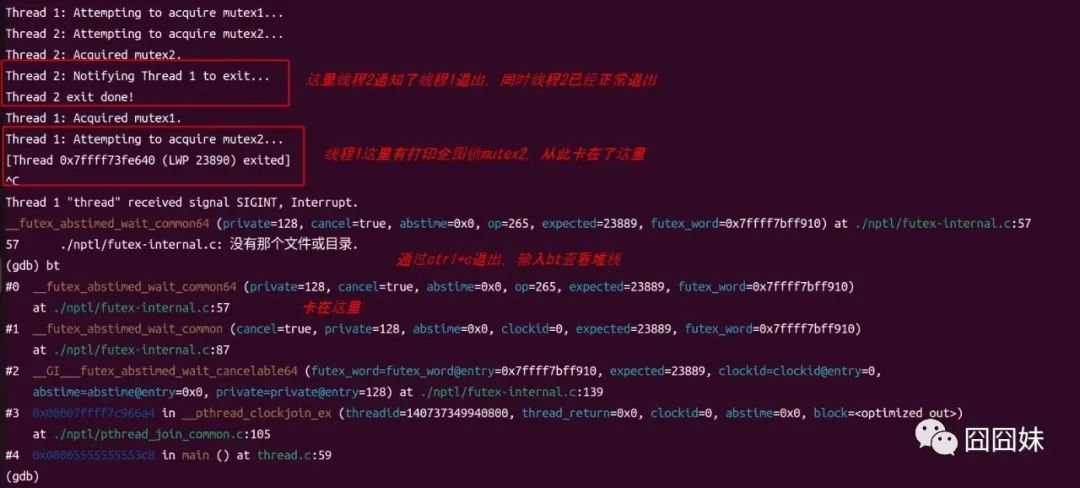
这里因为加了打印所以很快可以看到mutex2上锁那里卡住,实际环境会有很多线程运行,我们并不直到哪里会有问题,此时只能通过bt查看堆栈我们发现卡在函数__futex_abstimed_wait_common64,运行到./nptl/futex-internal.c文件第57行。
这里我们只需要知道该函数__futex_abstimed_wait_common64是Linux内核中用于处理互斥锁等待超时的一个内部函数即可。
此时可以断定代码存在死锁问题了,我们继续排查。
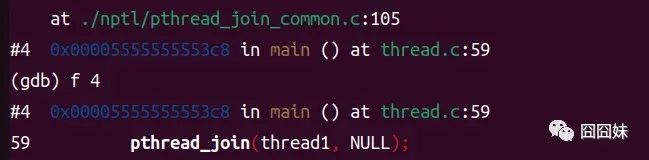
我们继续看bt信息,发现该等待是从
#4 0x00005555555553c8 in main () at thread.c:59调入的,因为前面是#4,所以使用f 4进入该函数。
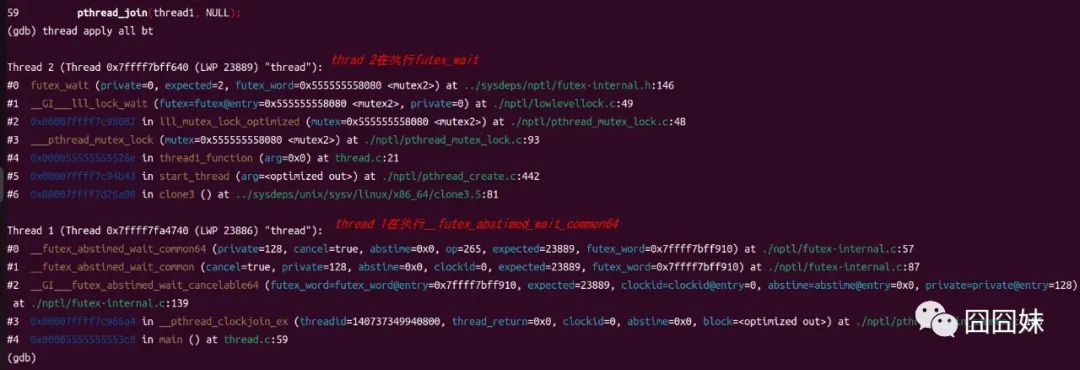
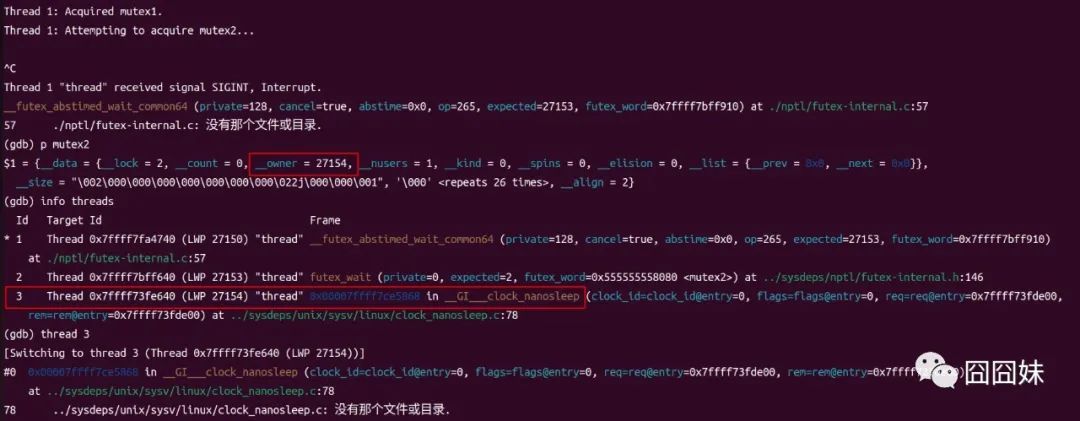
根据前面分析thread 1已经正常退出了,我们这里看到thread 2卡在futex_wait,根据上下文非常明显是在等待futex lock,再往下看我们发现锁mutex2,这里就是thread2在等待mutex2,那么mutex2被谁lock住没释放呢?我们通过p mutex2来查看owner即可知道该锁被谁拥有。

这里有个问题,是因为该代码恰巧thread 1退出等待join了,所以这里的23890是个内核线程,在持有着mutex2,实际环境中我们会看到owner大概会是info threads中的LWP,于是就可以定位到该锁被谁持有没有释放了,再分析代码即可。
我把thread 1再改下,不直接退出而是一直while(1)的形态来测试,此时再通过上述来查找mutex2被谁持有即可直观看到:
关注囧囧妹公众号,探索更多有关Linux、技术和编程的精彩内容!
欢迎留言分享你对命令行工具的使用经验和想法。如果你有任何问题,也可以在评论区提问,我会尽力为你解答。
