



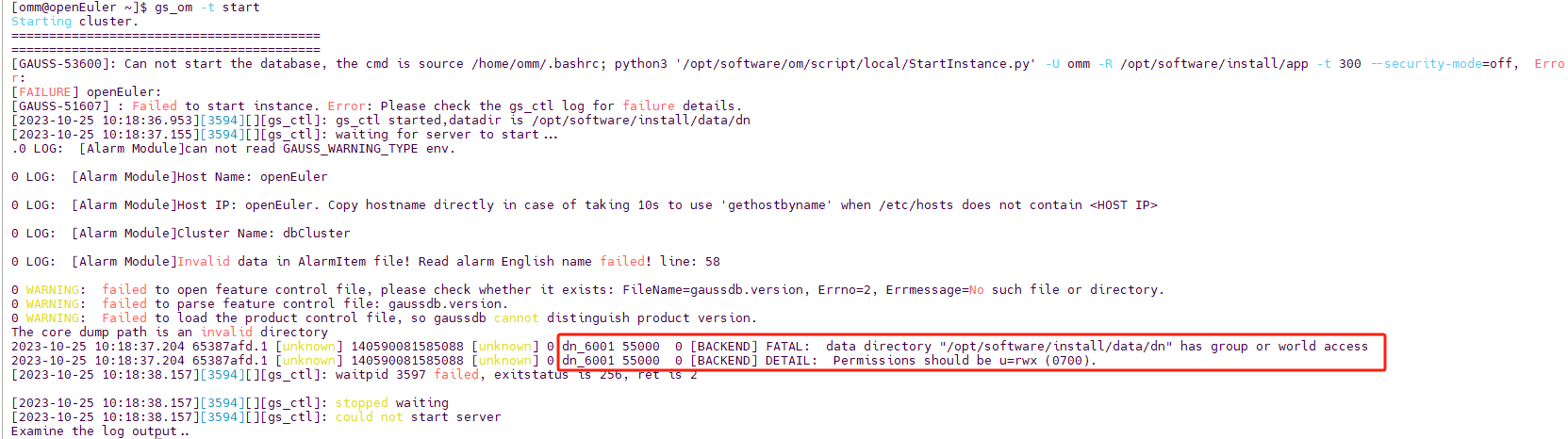
报错信息
[GAUSS-53600]: Can not start the database, the cmd is source /home/omm/.bashrc; python3 '/opt/software/om/script/local/StartInstance.py' -U omm -R /opt/software/install/app -t 300 --security-mode=off,  Error:
[FAILURE] openEuler:
[GAUSS-51607] : Failed to start instance. Error: Please check the gs_ctl log for failure details.
[2023-10-25 10:18:36.953][3594][][gs_ctl]: gs_ctl started,datadir is /opt/software/install/data/dn
[2023-10-25 10:18:37.155][3594][][gs_ctl]: waiting for server to start...
.0 LOG:  [Alarm Module]can not read GAUSS_WARNING_TYPE env.

0 LOG:  [Alarm Module]Host Name: openEuler

0 LOG:  [Alarm Module]Host IP: openEuler. Copy hostname directly in case of taking 10s to use 'gethostbyname' when /etc/hosts does not contain <HOST IP>

0 LOG:  [Alarm Module]Cluster Name: dbCluster

0 LOG:  [Alarm Module]Invalid data in AlarmItem file! Read alarm English name failed! line: 58

0 WARNING:  failed to open feature control file, please check whether it exists: FileName=gaussdb.version, Errno=2, Errmessage=No such file or directory.
0 WARNING:  failed to parse feature control file: gaussdb.version.
0 WARNING:  Failed to load the product control file, so gaussdb cannot distinguish product version.
The core dump path is an invalid directory
2023-10-25 10:18:37.204 65387afd.1 [unknown] 140590081585088 [unknown] 0 dn_6001 55000  0 [BACKEND] FATAL:  data directory "/opt/software/install/data/dn" has group or world access
2023-10-25 10:18:37.204 65387afd.1 [unknown] 140590081585088 [unknown] 0 dn_6001 55000  0 [BACKEND] DETAIL:  Permissions should be u=rwx (0700).
[2023-10-25 10:18:38.157][3594][][gs_ctl]: waitpid 3597 failed, exitstatus is 256, ret is 2

[2023-10-25 10:18:38.157][3594][][gs_ctl]: stopped waiting
[2023-10-25 10:18:38.157][3594][][gs_ctl]: could not start server
Examine the log output..
因为数据目录权限与数据库系统要求不一致,导致的报错,数据库实例的数据目录权限应该是700,即仅有所属用户拥有可读可写可执行的权限(请确保所属用户与用户组是初始用户与用户组,即执行 gs_preinstall 时 -U 和 -G 参数指定的)
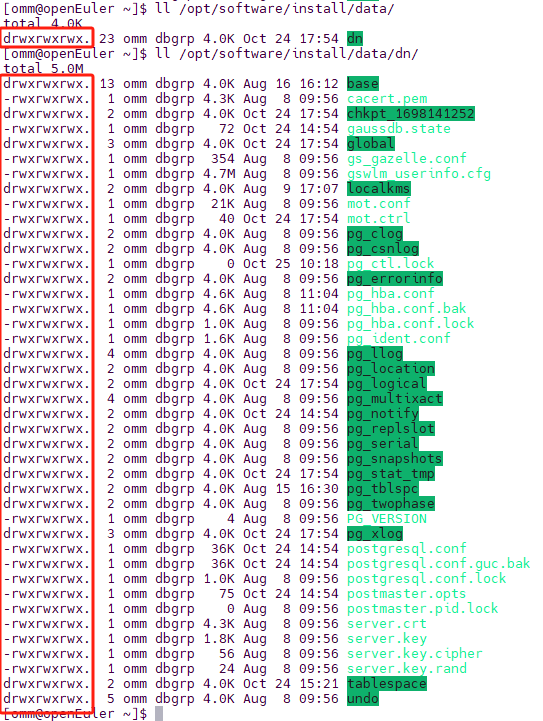
使用ls -l(缩写ll)命令可以查看目录、文件的详细信息包括权限信息、所属用户、用户组等信息
ll /opt/software/install/data/
ll /opt/software/install/data/dn/
解决办法
根据错误信息可以找到当前案例权限有问题的数据目录是:/opt/software/install/data/dn,如果所属用户与用户组不是初始用户使用以下命令进行更改,如果是可跳过
chown -R omm:dbgrp /opt/software/install
确保了所属用户与用户组问题后,将该目录及其子目录、文件的权限全部修改为700即可,执行以下命令实现权限更改
chmod -R 700 /opt/software/install/data/
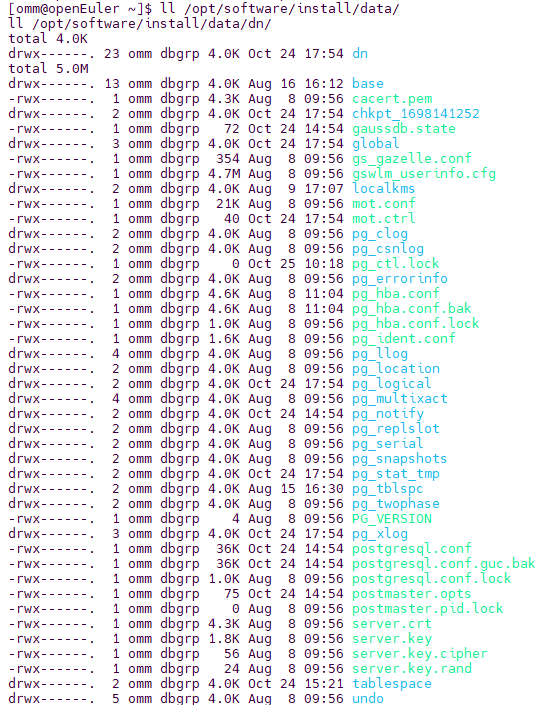
更改完后在使用查询命令查询当前权限信息,如下所示就可以正常启动数据库了
ll /opt/software/install/data/
ll /opt/software/install/data/dn/
最后修改时间:2023-10-25 10:43:25
「喜欢这篇文章,您的关注和赞赏是给作者最好的鼓励」
关注作者
【版权声明】本文为墨天轮用户原创内容,转载时必须标注文章的来源(墨天轮),文章链接,文章作者等基本信息,否则作者和墨天轮有权追究责任。如果您发现墨天轮中有涉嫌抄袭或者侵权的内容,欢迎发送邮件至:contact@modb.pro进行举报,并提供相关证据,一经查实,墨天轮将立刻删除相关内容。
