



MySQL的ENUM枚举类型
ENUM 是什么
在 MySQL 中,一个 ENUM 枚举类型是一个字符串的列表,它定义了一个列中允许的值,列的值只能是创建列时定义的允许值列表中的的一个
MySQL ENUM 枚举类型列适合存储状态和标识等有限数量的固定值的数据
MySQL ENUM 枚举类型具有以下优点:
- 列值的可读性更强。
- 紧凑的数据存储。MySQL 存储
ENUM时只存储枚举值对应的数字索引 (1,2,3, …)
细心的我们会发现MySQL系统数据字典里也是大量使用了ENUM枚举类型,比如user表的Select_priv、ssl_type字段等,如下:
[mysql@mysql8 ~]$ mysql -uroot -p
Enter password:
Welcome to the MySQL monitor.  Commands end with ; or \g.
Your MySQL connection id is 15
Server version: 8.0.35 MySQL Community Server - GPL

Copyright (c) 2000, 2023, Oracle and/or its affiliates.

Oracle is a registered trademark of Oracle Corporation and/or its
affiliates. Other names may be trademarks of their respective
owners.

Type 'help;' or '\h' for help. Type '\c' to clear the current input statement.

mysql> use mysql
Reading table information for completion of table and column names
You can turn off this feature to get a quicker startup with -A

Database changed
mysql> desc user;
+--------------------------+-----------------------------------+------+-----+-----------------------+-------+
| Field                    | Type                              | Null | Key | Default               | Extra |
+--------------------------+-----------------------------------+------+-----+-----------------------+-------+
| Host                     | char(255)                         | NO   | PRI |                       |       |
| User                     | char(32)                          | NO   | PRI |                       |       |
| Select_priv              | enum('N','Y')                     | NO   |     | N                     |       |
| Insert_priv              | enum('N','Y')                     | NO   |     | N                     |       |
| Update_priv              | enum('N','Y')                     | NO   |     | N                     |       |
| Delete_priv              | enum('N','Y')                     | NO   |     | N                     |       |
| Create_priv              | enum('N','Y')                     | NO   |     | N                     |       |
| Drop_priv                | enum('N','Y')                     | NO   |     | N                     |       |
| Reload_priv              | enum('N','Y')                     | NO   |     | N                     |       |
| Shutdown_priv            | enum('N','Y')                     | NO   |     | N                     |       |
| Process_priv             | enum('N','Y')                     | NO   |     | N                     |       |
| File_priv                | enum('N','Y')                     | NO   |     | N                     |       |
| Grant_priv               | enum('N','Y')                     | NO   |     | N                     |       |
| References_priv          | enum('N','Y')                     | NO   |     | N                     |       |
| Index_priv               | enum('N','Y')                     | NO   |     | N                     |       |
| Alter_priv               | enum('N','Y')                     | NO   |     | N                     |       |
| Show_db_priv             | enum('N','Y')                     | NO   |     | N                     |       |
| Super_priv               | enum('N','Y')                     | NO   |     | N                     |       |
| Create_tmp_table_priv    | enum('N','Y')                     | NO   |     | N                     |       |
| Lock_tables_priv         | enum('N','Y')                     | NO   |     | N                     |       |
| Execute_priv             | enum('N','Y')                     | NO   |     | N                     |       |
| Repl_slave_priv          | enum('N','Y')                     | NO   |     | N                     |       |
| Repl_client_priv         | enum('N','Y')                     | NO   |     | N                     |       |
| Create_view_priv         | enum('N','Y')                     | NO   |     | N                     |       |
| Show_view_priv           | enum('N','Y')                     | NO   |     | N                     |       |
| Create_routine_priv      | enum('N','Y')                     | NO   |     | N                     |       |
| Alter_routine_priv       | enum('N','Y')                     | NO   |     | N                     |       |
| Create_user_priv         | enum('N','Y')                     | NO   |     | N                     |       |
| Event_priv               | enum('N','Y')                     | NO   |     | N                     |       |
| Trigger_priv             | enum('N','Y')                     | NO   |     | N                     |       |
| Create_tablespace_priv   | enum('N','Y')                     | NO   |     | N                     |       |
| ssl_type                 | enum('','ANY','X509','SPECIFIED') | NO   |     |                       |       |
| ssl_cipher               | blob                              | NO   |     | NULL                  |       |
| x509_issuer              | blob                              | NO   |     | NULL                  |       |
| x509_subject             | blob                              | NO   |     | NULL                  |       |
| max_questions            | int unsigned                      | NO   |     | 0                     |       |
| max_updates              | int unsigned                      | NO   |     | 0                     |       |
| max_connections          | int unsigned                      | NO   |     | 0                     |       |
| max_user_connections     | int unsigned                      | NO   |     | 0                     |       |
| plugin                   | char(64)                          | NO   |     | caching_sha2_password |       |
| authentication_string    | text                              | YES  |     | NULL                  |       |
| password_expired         | enum('N','Y')                     | NO   |     | N                     |       |
| password_last_changed    | timestamp                         | YES  |     | NULL                  |       |
| password_lifetime        | smallint unsigned                 | YES  |     | NULL                  |       |
| account_locked           | enum('N','Y')                     | NO   |     | N                     |       |
| Create_role_priv         | enum('N','Y')                     | NO   |     | N                     |       |
| Drop_role_priv           | enum('N','Y')                     | NO   |     | N                     |       |
| Password_reuse_history   | smallint unsigned                 | YES  |     | NULL                  |       |
| Password_reuse_time      | smallint unsigned                 | YES  |     | NULL                  |       |
| Password_require_current | enum('N','Y')                     | YES  |     | NULL                  |       |
| User_attributes          | json                              | YES  |     | NULL                  |       |
+--------------------------+-----------------------------------+------+-----+-----------------------+-------+
51 rows in set (0.00 sec)

mysql>
下面我们用实战对MySQLENUM枚举类型进行一一分析
创建和使用 ENUM 枚举类型列
枚举值必须是带引号的字符串文字(注:最好不要用’1’,‘2’,'3’这样容易引起混淆下面我们会说为什么)。我们可用下面的SQL测试看看会发生什么
CREATE DATABASE testdb;
USE testdb;
CREATE TABLE sample (
    name VARCHAR(40),
    size ENUM('x-small', 'small', 'medium', 'large', 'x-large')
);
INSERT INTO sample (name, size) VALUES ('dress shirt','large'), ('t-shirt','medium'), ('polo shirt','small');
INSERT INTO sample (name, size) VALUES ('suit',5);
INSERT INTO sample (name, size) VALUES ('pants','x-small');
INSERT INTO sample (name, size) VALUES ('skirt','xxl');
INSERT INTO sample (name, size) VALUES ('hat',null);
SELECT name, size ,size + 0 FROM sample;
具体操作如下:
[mysql@mysql8 ~]$ mysql -uroot -p
Enter password:
Welcome to the MySQL monitor.  Commands end with ; or \g.
Your MySQL connection id is 13
Server version: 8.0.35 MySQL Community Server - GPL

Copyright (c) 2000, 2023, Oracle and/or its affiliates.

Oracle is a registered trademark of Oracle Corporation and/or its
affiliates. Other names may be trademarks of their respective
owners.

Type 'help;' or '\h' for help. Type '\c' to clear the current input statement.

mysql> CREATE DATABASE testdb;
Query OK, 1 row affected (0.00 sec)

mysql> USE testdb;
Database changed
mysql> CREATE TABLE sample (
    ->     name VARCHAR(40),
    ->     size ENUM('x-small', 'small', 'medium', 'large', 'x-large')
    -> );
Query OK, 0 rows affected (0.01 sec)

mysql> INSERT INTO sample (name, size) VALUES ('dress shirt','large'), ('t-shirt','medium'), ('polo shirt','small');
Query OK, 3 rows affected (0.00 sec)
Records: 3  Duplicates: 0  Warnings: 0

mysql> INSERT INTO sample (name, size) VALUES ('suit',5);
Query OK, 1 row affected (0.00 sec)

mysql> INSERT INTO sample (name, size) VALUES ('pants','x-small');
Query OK, 1 row affected (0.00 sec)

mysql> INSERT INTO sample (name, size) VALUES ('skirt','xxl');
ERROR 1265 (01000): Data truncated for column 'size' at row 1
mysql> INSERT INTO sample (name, size) VALUES ('hat',null);
Query OK, 1 row affected (0.00 sec)

mysql> SELECT name, size ,size + 0 FROM sample;
+-------------+---------+----------+
| name        | size    | size + 0 |
+-------------+---------+----------+
| dress shirt | large   |        4 |
| t-shirt     | medium  |        3 |
| polo shirt  | small   |        2 |
| suit        | x-large |        5 |
| pants       | x-small |        1 |
| hat         | NULL    |     NULL |
+-------------+---------+----------+
6 rows in set (0.00 sec)

mysql>
通过测试我们会发现如下特点:
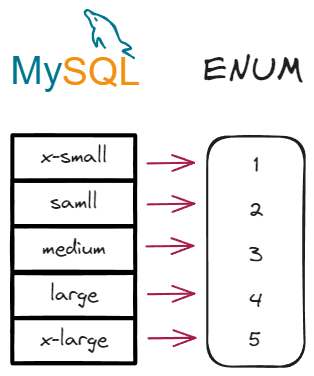
- 枚举类型底层实际上是一个整数,我们可以通过枚举字段+0来显示每一个字符串文字对应的整数。必须注意的是这个字段是从1开始的如图所示,这就是我们为什么不用’1’,‘2’,'3’这样的字符串文字作为枚举类型容易混淆。
-
枚举类型对用户数据的合法性进行了验证。比如插入一个size字段不在枚举类型列表里面的字符串文字’xxl’时候就是报错ERROR 1265 (01000): Data truncated for column ‘size’ at row 1的错误
-
枚举类型是可以插入
空或者NULL字符串文字的
ENUM类型的特点
枚举类型更省空间
如果将 100 万行插入到该sample表中, 'medium'需要 100 万字节的存储空间,而如果将实际字符串存储'medium'在 VARCHAR列中,则需要 600 万字节。
我们可以试验一下看看到底对不对
#创建t表有size枚举字段
CREATE TABLE t (size ENUM('x-small', 'small', 'medium', 'large', 'x-large'));
#插入一条medium记录
INSERT INTO t VALUES ('medium');
#创建t_noenum表是size字符串字段
CREATE TABLE t_noenum (size VARCHAR(200));
#插入一条medium记录
INSERT INTO t_noenum VALUES ('medium');
#查询两个表记录是否相同
select * from t;
select * from t_noenum;
#查看mysql数据目录
select @@datadir;
\q
#对比实际数据占用空间情况,进入mysql数据目录
cd /data/mysqldb/data/testdb/
#查看对应的ibd数据文件
ll
#使用hexdump命令查看t.ibd二进制文件内容
hexdump -C -v t.ibd | grep 00010050 -A 7
#使用hexdump命令查看t_noenum.ibd二进制文件内容
hexdump -C -v t_noenum.ibd | grep 00010050 -A 7
具体操作如下:
[mysql@mysql8 ~]$ mysql -uroot -p
Enter password:
Welcome to the MySQL monitor.  Commands end with ; or \g.
Your MySQL connection id is 17
Server version: 8.0.35 MySQL Community Server - GPL

Copyright (c) 2000, 2023, Oracle and/or its affiliates.

Oracle is a registered trademark of Oracle Corporation and/or its
affiliates. Other names may be trademarks of their respective
owners.

Type 'help;' or '\h' for help. Type '\c' to clear the current input statement.

mysql> use testdb;
Reading table information for completion of table and column names
You can turn off this feature to get a quicker startup with -A

Database changed
mysql> CREATE TABLE t (size ENUM('x-small', 'small', 'medium', 'large', 'x-large'));
Query OK, 0 rows affected (0.01 sec)

mysql> INSERT INTO t VALUES ('medium');
Query OK, 1 row affected (0.00 sec)

mysql> CREATE TABLE t_noenum (size VARCHAR(200));
Query OK, 0 rows affected (0.01 sec)

mysql> INSERT INTO t_noenum VALUES ('medium');
Query OK, 1 row affected (0.00 sec)

mysql> select * from t;
+--------+
| size   |
+--------+
| medium |
+--------+
1 row in set (0.00 sec)

mysql> select * from t_noenum;
+--------+
| size   |
+--------+
| medium |
+--------+
1 row in set (0.00 sec)

mysql> select @@datadir;
+---------------------+
| @@datadir           |
+---------------------+
| /data/mysqldb/data/ |
+---------------------+
1 row in set (0.00 sec)

mysql> \q
Bye
[mysql@mysql8 ~]$ cd /data/mysqldb/data/testdb/
[mysql@mysql8 testdb]$ ll
total 336
-rw-r----- 1 mysql mysql 114688 Oct 28 19:01 sample.ibd
-rw-r----- 1 mysql mysql 114688 Oct 28 20:04 t.ibd
-rw-r----- 1 mysql mysql 114688 Oct 28 20:05 t_noenum.ibd
[mysql@mysql8 testdb]$ hexdump -C -v t.ibd | grep 00010050 -A 7
00010050  00 02 02 72 00 00 00 18  00 00 00 02 01 b2 01 00  |...r............|
00010060  02 00 1b 69 6e 66 69 6d  75 6d 00 02 00 0b 00 00  |...infimum......|
00010070  73 75 70 72 65 6d 75 6d  00 00 00 10 ff f2 00 00  |supremum........|
00010080  00 03 61 06 00 00 00 06  33 01 81 00 00 00 ea 01  |..a.....3.......|
00010090  10 03 00 00 00 00 00 00  00 00 00 00 00 00 00 00  |................|
000100a0  00 00 00 00 00 00 00 00  00 00 00 00 00 00 00 00  |................|
000100b0  00 00 00 00 00 00 00 00  00 00 00 00 00 00 00 00  |................|
000100c0  00 00 00 00 00 00 00 00  00 00 00 00 00 00 00 00  |................|
[mysql@mysql8 testdb]$ hexdump -C -v t_noenum.ibd | grep 00010050 -A 7
00010050  00 02 02 72 00 00 00 19  00 00 00 02 01 b2 01 00  |...r............|
00010060  02 00 1c 69 6e 66 69 6d  75 6d 00 02 00 0b 00 00  |...infimum......|
00010070  73 75 70 72 65 6d 75 6d  06 00 00 00 10 ff f1 00  |supremum........|
00010080  00 00 03 61 07 00 00 00  06 33 0d 81 00 00 00 f2  |...a.....3......|
00010090  01 10 6d 65 64 69 75 6d  00 00 00 00 00 00 00 00  |..medium........|
000100a0  00 00 00 00 00 00 00 00  00 00 00 00 00 00 00 00  |................|
000100b0  00 00 00 00 00 00 00 00  00 00 00 00 00 00 00 00  |................|
000100c0  00 00 00 00 00 00 00 00  00 00 00 00 00 00 00 00  |................|
[mysql@mysql8 testdb]$
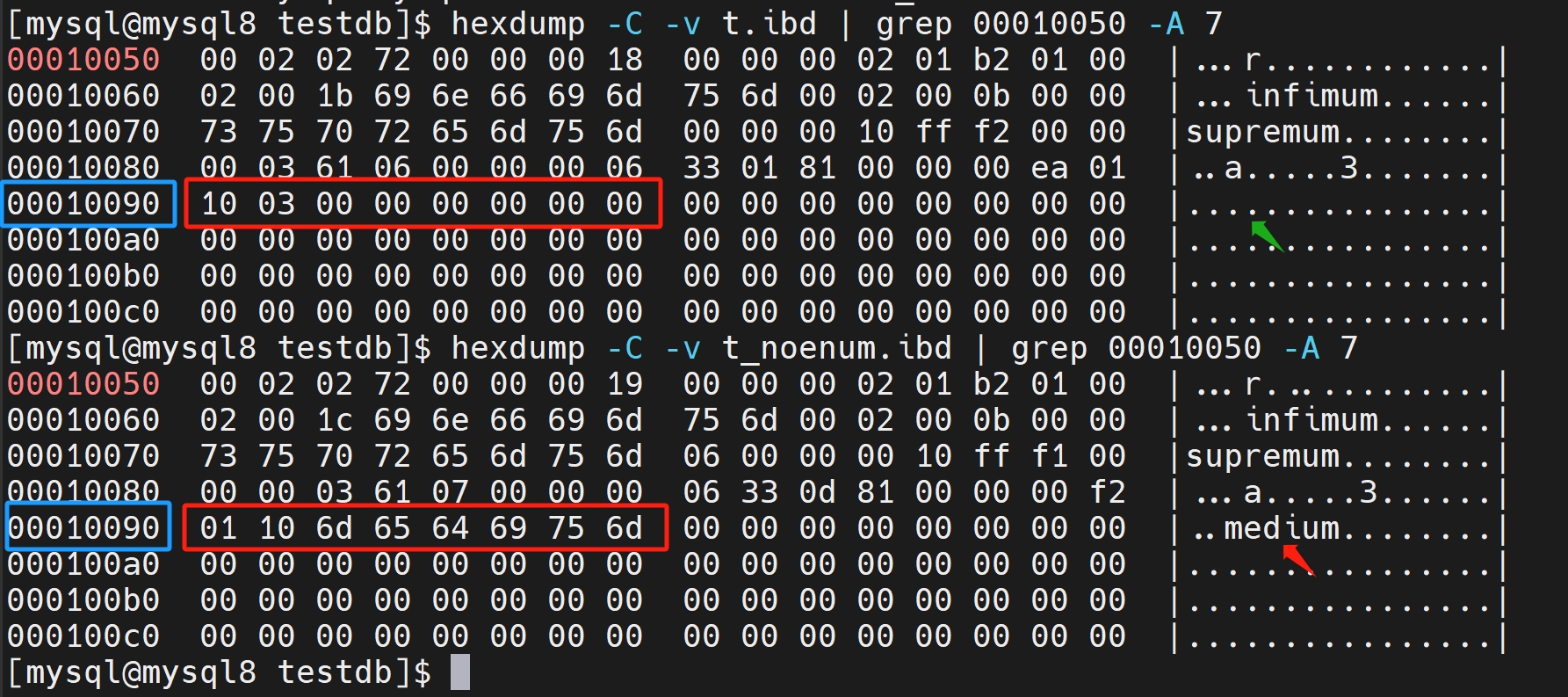
我们看到00010090这一行数据里都是显示同样的media字符串文字如下图所示,但是ENUM枚举字段和字符所占用的字节要少很多。这就是为什么ENUM枚举类型占用空间少的原因。
枚举类型的排序
枚举类型的排序是根据他底层的整数进行的。也就是创建好了ENUM枚举字段就意味着排序的规则也制定好了,但是MAX(ENUM)的结果却出人意料,下面我们来试验一下
#对size枚举字段进行从大到小的排序
SELECT name, size ,size + 0 FROM sample ORDER BY size DESC;
#取size枚举字段最大值
SELECT MAX(size) FROM sample;
操作如下:
[mysql@mysql8 testdb]$ mysql -uroot -p testdb
Enter password:
Reading table information for completion of table and column names
You can turn off this feature to get a quicker startup with -A

Welcome to the MySQL monitor.  Commands end with ; or \g.
Your MySQL connection id is 22
Server version: 8.0.35 MySQL Community Server - GPL

Copyright (c) 2000, 2023, Oracle and/or its affiliates.

Oracle is a registered trademark of Oracle Corporation and/or its
affiliates. Other names may be trademarks of their respective
owners.

Type 'help;' or '\h' for help. Type '\c' to clear the current input statement.

mysql> SELECT name, size ,size + 0 FROM sample ORDER BY size DESC;
+-------------+---------+----------+
| name        | size    | size + 0 |
+-------------+---------+----------+
| suit        | x-large |        5 |
| dress shirt | large   |        4 |
| t-shirt     | medium  |        3 |
| polo shirt  | small   |        2 |
| pants       | x-small |        1 |
| hat         | NULL    |     NULL |
+-------------+---------+----------+
6 rows in set (0.00 sec)

mysql> SELECT MAX(size) FROM sample;
+-----------+
| MAX(size) |
+-----------+
| x-small   |
+-----------+
1 row in set (0.00 sec)

mysql>
我们会发现在对ENUM枚举类型排序ORDER BY ENUM DESC的时候,实际是对底层存储的整数进行排序的,得到的最大值是x-large,但是如果取MAX(ENUM)最大值则是根据字符串排序的,得到的最大值是x-small。这是枚举类型特殊的地方
变更枚举类型的值
不建议改变ENUM枚举类型的值,尤其是在已经有数据的情况下。下面我试验一下
#干掉t表
DROP TABLE t;
#创建t表有size枚举字段
CREATE TABLE t (size ENUM('x-small', 'small', 'medium', 'large', 'x-large'));
#插入一条medium记录
INSERT INTO t VALUES ('medium');
#尝试修改t表枚举字段的值,将字符串全都改名
ALTER TABLE t CHANGE size size ENUM('x-s', 's',  'm', 'l', 'x-l');
#查看是否已经修改完成
DESC t;
#清除t表数据
TRUNCATE TABLE t;
#再次尝试修改t表枚举字段的值,将字符串全都改名
ALTER TABLE t CHANGE size size ENUM('x-s', 's',  'm', 'l', 'x-l');
#查看是否已经修改完成
DESC t;
#再次插入数据
INSERT INTO t VALUES (1),(2),(3),(4),(5);
#尝试修改t表枚举字段的值,增加一个字符串
ALTER TABLE t CHANGE size size ENUM('x-s', 's', 'm' , 'x-m', 'l', 'x-l');
#查看是否已经修改完成
DESC t;
#查询t表,发现底层的整数序号已经更新
SELECT size,size + 0 FROM t;
#尝试修改t表枚举字段的值,减少两个字符串
ALTER TABLE t CHANGE size size ENUM('x-s', 's', 'l', 'x-l');
#尝试删除有问题的记录
DELETE FROM t WHERE size = 3;
#再次尝试修改t表枚举字段的值,减少两个字符串
ALTER TABLE t CHANGE size size ENUM('x-s', 's', 'l', 'x-l');
#查看是否已经修改完成
DESC t;
#查询t表,发现底层的整数序号已经更新
SELECT size,size + 0 FROM t;
具体操作如下:
[mysql@mysql8 testdb]$ mysql -uroot -p testdb
Enter password:
Reading table information for completion of table and column names
You can turn off this feature to get a quicker startup with -A

Welcome to the MySQL monitor.  Commands end with ; or \g.
Your MySQL connection id is 25
Server version: 8.0.35 MySQL Community Server - GPL

Copyright (c) 2000, 2023, Oracle and/or its affiliates.

Oracle is a registered trademark of Oracle Corporation and/or its
affiliates. Other names may be trademarks of their respective
owners.

Type 'help;' or '\h' for help. Type '\c' to clear the current input statement.

mysql> DROP TABLE t;
Query OK, 0 rows affected (0.01 sec)

mysql> CREATE TABLE t (size ENUM('x-small', 'small', 'medium', 'large', 'x-large'));
Query OK, 0 rows affected (0.00 sec)

mysql> INSERT INTO t VALUES ('medium');
Query OK, 1 row affected (0.01 sec)

mysql> ALTER TABLE t CHANGE size size ENUM('x-s', 's',  'm', 'l', 'x-l');
ERROR 1265 (01000): Data truncated for column 'size' at row 1
mysql> DESC t;
+-------+----------------------------------------------------+------+-----+---------+-------+
| Field | Type                                               | Null | Key | Default | Extra |
+-------+----------------------------------------------------+------+-----+---------+-------+
| size  | enum('x-small','small','medium','large','x-large') | YES  |     | NULL    |       |
+-------+----------------------------------------------------+------+-----+---------+-------+
1 row in set (0.01 sec)

mysql> TRUNCATE TABLE t;
Query OK, 0 rows affected (0.00 sec)

mysql> ALTER TABLE t CHANGE size size ENUM('x-s', 's',  'm', 'l', 'x-l');
Query OK, 0 rows affected (0.02 sec)
Records: 0  Duplicates: 0  Warnings: 0

mysql> DESC t;
+-------+-------------------------------+------+-----+---------+-------+
| Field | Type                          | Null | Key | Default | Extra |
+-------+-------------------------------+------+-----+---------+-------+
| size  | enum('x-s','s','m','l','x-l') | YES  |     | NULL    |       |
+-------+-------------------------------+------+-----+---------+-------+
1 row in set (0.00 sec)

mysql> INSERT INTO t VALUES (1),(2),(3),(4),(5);
Query OK, 5 rows affected (0.00 sec)
Records: 5  Duplicates: 0  Warnings: 0

mysql> DESC t;
+-------+-------------------------------+------+-----+---------+-------+
| Field | Type                          | Null | Key | Default | Extra |
+-------+-------------------------------+------+-----+---------+-------+
| size  | enum('x-s','s','m','l','x-l') | YES  |     | NULL    |       |
+-------+-------------------------------+------+-----+---------+-------+
1 row in set (0.00 sec)

mysql> ALTER TABLE t CHANGE size size ENUM('x-s', 's', 'm' , 'x-m', 'l', 'x-l');
Query OK, 5 rows affected (0.01 sec)
Records: 5  Duplicates: 0  Warnings: 0

mysql> SELECT size,size + 0 FROM t;
+------+----------+
| size | size + 0 |
+------+----------+
| x-s  |        1 |
| s    |        2 |
| m    |        3 |
| l    |        5 |
| x-l  |        6 |
+------+----------+
5 rows in set (0.00 sec)

mysql> ALTER TABLE t CHANGE size size ENUM('x-s', 's', 'l', 'x-l');
ERROR 1265 (01000): Data truncated for column 'size' at row 3
mysql> DELETE FROM t WHERE size = 3;
Query OK, 1 row affected (0.00 sec)

mysql> ALTER TABLE t CHANGE size size ENUM('x-s', 's', 'l', 'x-l');
Query OK, 4 rows affected (0.01 sec)
Records: 4  Duplicates: 0  Warnings: 0

mysql> DESC t;
+-------+---------------------------+------+-----+---------+-------+
| Field | Type                      | Null | Key | Default | Extra |
+-------+---------------------------+------+-----+---------+-------+
| size  | enum('x-s','s','l','x-l') | YES  |     | NULL    |       |
+-------+---------------------------+------+-----+---------+-------+
1 row in set (0.01 sec)

mysql> SELECT size,size + 0 FROM t;
+------+----------+
| size | size + 0 |
+------+----------+
| x-s  |        1 |
| s    |        2 |
| l    |        3 |
| x-l  |        4 |
+------+----------+
4 rows in set (0.00 sec)

mysql>
如果ENUM枚举字段上有字符串和修改的字符串不符合的时候,就会报ERROR 1265 (01000): Data truncated for column ‘size’ at row 1的错误,除非把有字符串冲突的行清理后才可以对表的ENUM枚举字段重新定义。一般在ENUM`枚举类型的值更改后表中对应行的底层整数也会相应改变顺序值。
