



系统: CentOS 7.6 64bit
查看是否安装mysql和mariadb
[root@VM-4-12-centos local]# rpm -qa | grep mysql[root@VM-4-12-centos local]# rpm -qa | grep mariadbmariadb-libs-5.5.68-1.el7.x86_64[root@VM-4-12-centos local]# rpm -e --nodeps mariadb-libs-5.5.68-1.el7.x86_64
在https://downloads.mysql.com/archives/community/下载mysql-5.7.33-linux-glibc2.12-x86_64.tar.gz
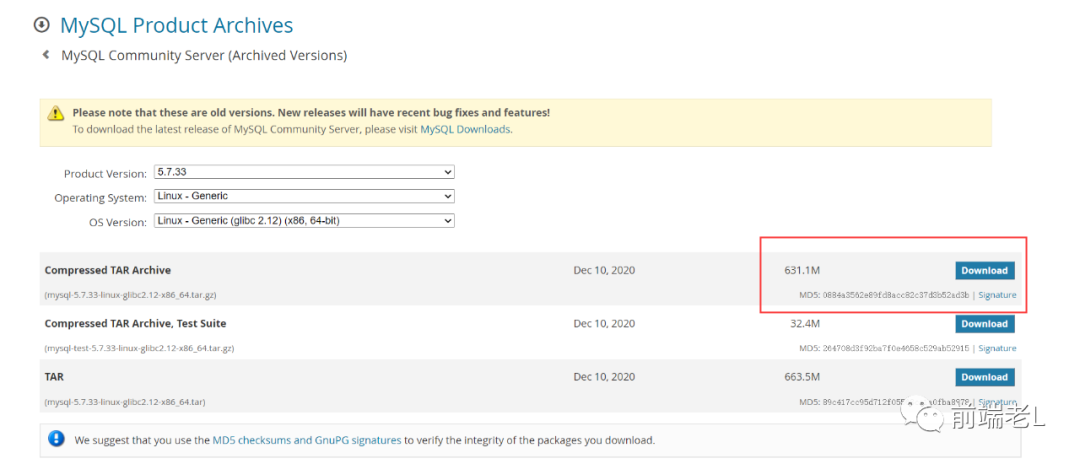
使用xftp将下载好的mysql-5.7.33-linux-glibc2.12-x86_64.tar.gz,上传的Linux中的/usr/local下
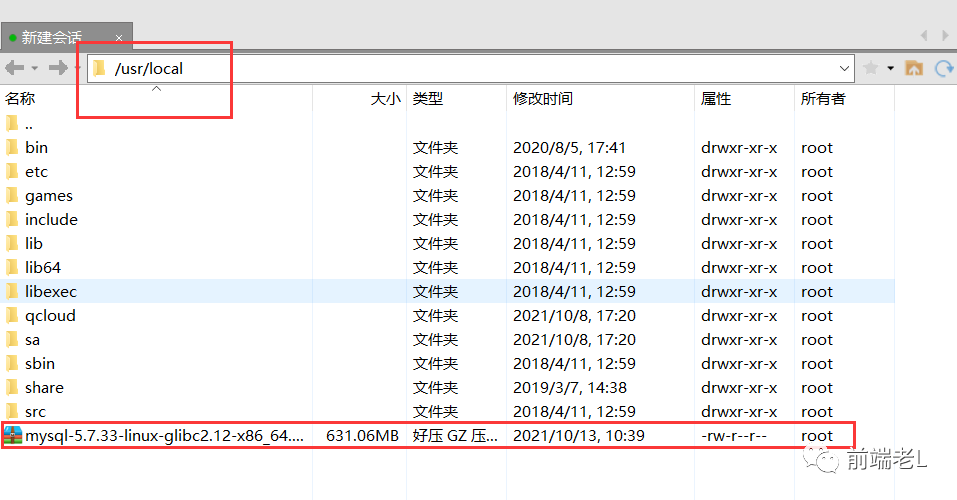
在 /usr/local 下进行解压
[root@VM-4-12-centos local]# tar -zxvf mysql-5.7.33-linux-glibc2.12-x86_64.tar.gz
重命名 mysql-5.7.33-linux-glibc2.12-x86_64
[root@VM-4-12-centos local]# mv mysql-5.7.33-linux-glibc2.12-x86_64 mysql
添加用户组
[root@VM-4-12-centos local]# groupadd mysql
添加用户mysql 到用户组mysql(使用-r参数表示mysql用户是一个系统用户,不能登录)
[root@VM-4-12-centos local]# useradd -r -g mysql mysql
添加完用下面命令测试,能看到mysql用户的信息
[root@VM-4-12-centos local]# id mysqluid=995(mysql) gid=1001(mysql) groups=1001(mysql)[root@VM-4-12-centos local]#
手动创建MySQL data目录
[root@VM-4-12-centos local]# cd mysql[root@VM-4-12-centos mysql]# mkdir data[root@VM-4-12-centos mysql]#
将mysql及其下所有的目录所有者和组均设为mysql
[root@VM-4-12-centos mysql]# chown -R mysql:mysql /usr/local/mysql/[root@VM-4-12-centos mysql]#
初始化mysql,默认没有密码
[root@VM-4-12-centos etc]# cd /usr/local/mysql[root@VM-4-12-centos mysql]# bin/mysqld --initialize --user=mysql --basedir=/usr/local/mysql --datadir=/usr/local/mysql/data2021-10-13T03:19:15.045123Z 0 [Warning] TIMESTAMP with implicit DEFAULT value is deprecated. Please use --explicit_defaults_for_timestamp server option (see documentation for more details).2021-10-13T03:19:15.350893Z 0 [Warning] InnoDB: New log files created, LSN=457902021-10-13T03:19:15.416334Z 0 [Warning] InnoDB: Creating foreign key constraint system tables.2021-10-13T03:19:15.483189Z 0 [Warning] No existing UUID has been found, so we assume that this is the first time that this server has been started. Generating a new UUID: 5838f58f-2bd4-11ec-89c6-525400ecafd4.2021-10-13T03:19:15.491237Z 0 [Warning] Gtid table is not ready to be used. Table 'mysql.gtid_executed' cannot be opened.2021-10-13T03:19:16.400373Z 0 [Warning] CA certificate ca.pem is self signed.2021-10-13T03:19:16.511231Z 1 [Note] A temporary password is generated for root@localhost: xxxxx[root@VM-4-12-centos mysql]#
xxxxx处为mysql的初始化密码,一定要记住,否则后续会很麻烦。
启动mysql
[root@VM-4-12-centos mysql]# cd /usr/local/mysql/support-files/[root@VM-4-12-centos support-files]# ./mysql.server startStarting MySQL.Logging to '/usr/local/mysql/data/VM-4-12-centos.err'.SUCCESS![root@VM-4-12-centos support-files]#
修改密码
[root@VM-4-12-centos support-files]# cd /usr/local/mysql/bin[root@VM-4-12-centos bin]# ./mysql -u root -pEnter password:Welcome to the MySQL monitor. Commands end with ; or \g.Your MySQL connection id is 2Server version: 5.7.33Copyright (c) 2000, 2021, Oracle and/or its affiliates.Oracle is a registered trademark of Oracle Corporation and/or itsaffiliates. Other names may be trademarks of their respectiveowners.Type 'help;' or '\h' for help. Type '\c' to clear the current input statement.mysql> update user set authentication_string=password("123456") where user="root";ERROR 1046 (3D000): No database selectedmysql> user mysql;ERROR 1064 (42000): You have an error in your SQL syntax; check the manual that corresponds to your MySQL server version for the right syntax to use near 'user mysql' at line 1mysql> use mysqlERROR 1820 (HY000): You must reset your password using ALTER USER statement before executing this statement.mysql> use mysql;ERROR 1820 (HY000): You must reset your password using ALTER USER statement before executing this statement.mysql> alter user user() identified by "123456";Query OK, 0 rows affected (0.00 sec)mysql> flush privileges;Query OK, 0 rows affected (0.00 sec)mysql> exitBye
测试登录
[root@VM-4-12-centos bin]# ./mysql -u root -pEnter password:Welcome to the MySQL monitor. Commands end with ; or \g.Your MySQL connection id is 3Server version: 5.7.33 MySQL Community Server (GPL)Copyright (c) 2000, 2021, Oracle and/or its affiliates.Oracle is a registered trademark of Oracle Corporation and/or itsaffiliates. Other names may be trademarks of their respectiveowners.Type 'help;' or '\h' for help. Type '\c' to clear the current input statement.mysql> show databases;+--------------------+| Database |+--------------------+| information_schema || mysql || performance_schema || sys |+--------------------+4 rows in set (0.00 sec)mysql> exitBye[root@VM-4-12-centos bin]#
设置外网可以访问
[root@VM-4-12-centos bin]# ./mysql -u root -pEnter password:Welcome to the MySQL monitor. Commands end with ; or \g.Your MySQL connection id is 4Server version: 5.7.33 MySQL Community Server (GPL)Copyright (c) 2000, 2021, Oracle and/or its affiliates.Oracle is a registered trademark of Oracle Corporation and/or itsaffiliates. Other names may be trademarks of their respectiveowners.Type 'help;' or '\h' for help. Type '\c' to clear the current input statement.mysql> use mysql;Reading table information for completion of table and column namesYou can turn off this feature to get a quicker startup with -ADatabase changedmysql> select host,user from user;+-----------+---------------+| host | user |+-----------+---------------+| localhost | mysql.session || localhost | mysql.sys || localhost | root |+-----------+---------------+3 rows in set (0.00 sec)mysql> update user set host='%' where user='root';Query OK, 1 row affected (0.00 sec)Rows matched: 1 Changed: 1 Warnings: 0mysql> flush privileges;Query OK, 0 rows affected (0.00 sec)mysql> exit;Bye[root@VM-4-12-centos bin]#
设置开机自启动服务
[root@VM-4-12-centos bin]# cp /usr/local/mysql/support-files/mysql.server /etc/rc.d/init.d/mysql[root@VM-4-12-centos bin]# chmod +x /etc/rc.d/init.d/mysql[root@VM-4-12-centos bin]# chkconfig --add mysql[root@VM-4-12-centos bin]# chkconfig --list mysqlNote: This output shows SysV services only and does not include nativesystemd services. SysV configuration data might be overridden by nativesystemd configuration.If you want to list systemd services use 'systemctl list-unit-files'.To see services enabled on particular target use'systemctl list-dependencies [target]'.mysql 0:off 1:off 2:on 3:on 4:on 5:on 6:off[root@VM-4-12-centos bin]# service mysql stopShutting down MySQL.... SUCCESS![root@VM-4-12-centos bin]# service mysql startStarting MySQL. SUCCESS![root@VM-4-12-centos bin]#
建立一个链接文件,这样就可以在任何地方直接使用mysql连接数据库了
[root@VM-4-12-centos bin]# ln -s /usr/local/mysql/bin/mysql /usr/bin[root@VM-4-12-centos bin]#
查看 mysql 的默认编码
[root@VM-4-12-centos bin]# mysql -uroot -pEnter password:Welcome to the MySQL monitor. Commands end with ; or \g.Your MySQL connection id is 3Server version: 5.7.33 MySQL Community Server (GPL)Copyright (c) 2000, 2021, Oracle and/or its affiliates.Oracle is a registered trademark of Oracle Corporation and/or itsaffiliates. Other names may be trademarks of their respectiveowners.Type 'help;' or '\h' for help. Type '\c' to clear the current input statement.mysql> show variables like 'character_set_%';+--------------------------+----------------------------------+| Variable_name | Value |+--------------------------+----------------------------------+| character_set_client | utf8 || character_set_connection | utf8 || character_set_database | latin1 || character_set_filesystem | binary || character_set_results | utf8 || character_set_server | latin1 || character_set_system | utf8 || character_sets_dir | /usr/local/mysql/share/charsets/ |+--------------------------+----------------------------------+8 rows in set (0.00 sec)mysql> exitBye
设置 mysql 的编码为utf8
[root@VM-4-12-centos bin]# vim /etc/my.cnf
将以下内容覆盖原内容 注意:复制粘贴时,第一个 # 会丢失,记得手动补上
# For advice on how to change settings please see# http://dev.mysql.com/doc/refman/5.6/en/server-configuration-defaults.html[mysqld]collation_server = utf8_general_cicharacter_set_server = utf8# Remove leading # and set to the amount of RAM for the most important data# cache in MySQL. Start at 70% of total RAM for dedicated server, else 10%.# innodb_buffer_pool_size = 128M# Remove leading # to turn on a very important data integrity option: logging# changes to the binary log between backups.# log_bin# These are commonly set, remove the # and set as required.# basedir = .....# datadir = .....# port = .....# server_id = .....# socket = .....# Remove leading # to set options mainly useful for reporting servers.# The server defaults are faster for transactions and fast SELECTs.# Adjust sizes as needed, experiment to find the optimal values.# join_buffer_size = 128M# sort_buffer_size = 2M# read_rnd_buffer_size = 2Msql_mode=NO_ENGINE_SUBSTITUTION,STRICT_TRANS_TABLES
重启
[root@VM-4-12-centos bin]# service mysql restartShutting down MySQL.. SUCCESS!Starting MySQL. SUCCESS![root@VM-4-12-centos bin]# mysql -uroot -pEnter password:Welcome to the MySQL monitor. Commands end with ; or \g.Your MySQL connection id is 2Server version: 5.7.33 MySQL Community Server (GPL)Copyright (c) 2000, 2021, Oracle and/or its affiliates.Oracle is a registered trademark of Oracle Corporation and/or itsaffiliates. Other names may be trademarks of their respectiveowners.Type 'help;' or '\h' for help. Type '\c' to clear the current input statement.mysql> show variables like 'character_set_%';+--------------------------+----------------------------------+| Variable_name | Value |+--------------------------+----------------------------------+| character_set_client | utf8 || character_set_connection | utf8 || character_set_database | utf8 || character_set_filesystem | binary || character_set_results | utf8 || character_set_server | utf8 || character_set_system | utf8 || character_sets_dir | /usr/local/mysql/share/charsets/ |+--------------------------+----------------------------------+8 rows in set (0.00 sec)mysql> exitBye[root@VM-4-12-centos bin]#
文章转载自前端老L,如果涉嫌侵权,请发送邮件至:contact@modb.pro进行举报,并提供相关证据,一经查实,墨天轮将立刻删除相关内容。
