



生产中Hadoop分布式集群中可能存在着单点故障问题,如果Namenode宕机或是软硬件升级,集群将无法使用,所以进行搭建高可用的来消除单点故障。
环境准备:
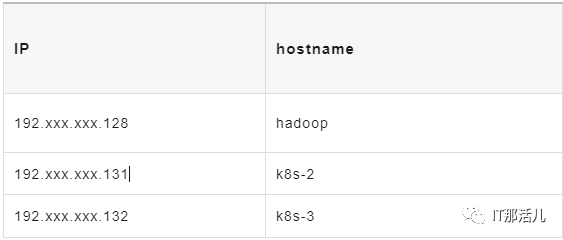
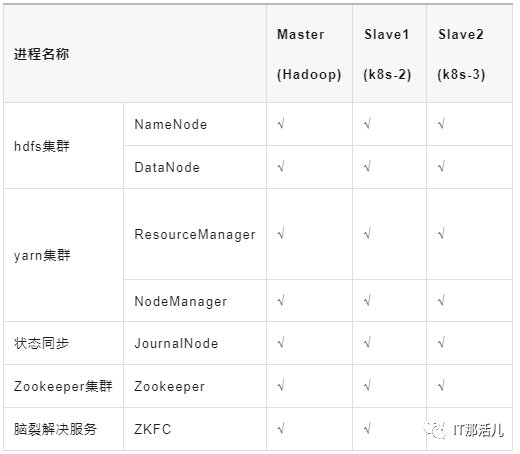
操作系统:centos8 内存:4G Java 版本:jdk8
3.1 下载hadoop安装包
3.2 hadoop.env
export JAVA_HOME=/usr/local/jdk #配置jdk路径
#添加两行
export HDFS_JOURNALNODE_USER=root
export HDFS_ZKFC_USER=root
3.3 core-site.xml
<?xml version="1.0" encoding="UTF-8"?>
<?xml-stylesheet type="text/xsl" href="configuration.xsl"?>
<!-- Put site-specific property overrides in this file. -->
<configuration>
<!-- hdfs分布式文件系统名字/地址 -->
<property>
<name>fs.defaultFS</name>
<value>hdfs://ns</value>
</property>
<!--存放namenode、datanode数据的根路径 -->
<property>
<name>hadoop.tmp.dir</name>
<value>/usr/local/hadoop/tmp</value>
</property>
<!-- 存放journalnode数据的地址 -->
<property>
<name>dfs.journalnode.edits.dir</name>
<value>/usr/local/hadoop/tmp/jn</value>
</property>
<!-- 列出运行 ZooKeeper 服务的主机端口对 -->
<property>
<name>ha.zookeeper.quorum</name>
<value>hadoop:2181,k8s-2:2181,k8s-3:2181</value>
</property>
</configuration>
3.4 hdfs-site.xml
<?xml version="1.0" encoding="UTF-8"?>
<?xml-stylesheet type="text/xsl" href="configuration.xsl"?>
<!--
  Licensed under the Apache License, Version 2.0 (the "License");
  you may not use this file except in compliance with the License.
  You may obtain a copy of the License at
    http://www.apache.org/licenses/LICENSE-2.0
  Unless required by applicable law or agreed to in writing, software
  distributed under the License is distributed on an "AS IS" BASIS,
  WITHOUT WARRANTIES OR CONDITIONS OF ANY KIND, either express or implied.
  See the License for the specific language governing permissions and
  limitations under the License. See accompanying LICENSE file.
-->
<configuration>
    <property>
        <name>dfs.replication</name>
        <value>3</value>
    </property>
    <property>
        <name>dfs.namenode.name.dir</name>
        <value>/usr/local/hadoop/dfs/name</value>
    </property>
    <property>
        <name>dfs.datanode.data.dir</name>
        <value>/usr/local/hadoop/dfs/data</value>
    </property>
    <property>
        <name>dfs.journalnode.edits.dir</name>
        <value>/usr/local/hadoop/dfs/journalnode</value>
        <description>The path where the JournalNode daemon will store its local state.</description>
    </property>
    <property>
        <name>dfs.nameservices</name>
        <value>ns</value>
        <description>The logical name for this new nameservice.</description>
    </property>
    <property>
        <name>dfs.ha.namenodes.ns</name>
        <value>nn1,nn2,nn3</value>
        <description>Unique identifiers for each NameNode in the nameservice.</description>
    </property>
    <property>
        <name>dfs.namenode.rpc-address.ns.nn1</name>
        <value>hadoop:8020</value>
        <description>The fully-qualified RPC address for nn1 to listen on.</description>
    </property>
    <property>
        <name>dfs.namenode.rpc-address.ns.nn2</name>
        <value>k8s-2:8020</value>
        <description>The fully-qualified RPC address for nn2 to listen on.</description>
    </property>
    <property>
        <name>dfs.namenode.rpc-address.ns.nn3</name>
        <value>k8s-3:8020</value>
        <description>The fully-qualified RPC address for nn3 to listen on.</description>
    </property>
    <property>
        <name>dfs.namenode.http-address.ns.nn1</name>
        <value>hadoop:9870</value>
        <description>The fully-qualified HTTP address for nn1 to listen on.</description>
    </property>
    <property>
        <name>dfs.namenode.http-address.ns.nn2</name>
        <value>k8s-2:9870</value>
        <description>The fully-qualified HTTP address for nn2 to listen on.</description>
    </property>
    <property>
        <name>dfs.namenode.http-address.ns.nn3</name>
        <value>k8s-3:9870</value>
        <description>The fully-qualified HTTP address for nn3 to listen on.</description>
    </property>
    <property>
        <name>dfs.namenode.shared.edits.dir</name>
        <value>qjournal://hadoop:8485;k8s-3:8485;k8s-2:8485/ns</value>
        <description>The URI which identifies the group of JNs where the NameNodes will write/read edits.</description>
    </property>
    <property>
        <name>dfs.client.failover.proxy.provider.ns</name>
<value>org.apache.hadoop.hdfs.server.namenode.ha.ConfiguredFailoverProxyProvider</value>
        <description>The Java class that HDFS clients use to contact the Active NameNode.</description>
    </property>
    <property>
        <name>dfs.ha.fencing.methods</name>
        <value>
            sshfence
            shell(/bin/true)
        </value>
        <description>
            A list of scripts or Java classes which will be used to fence the Active NameNode during a failover.
            sshfence - SSH to the Active NameNode and kill the process
            shell - run an arbitrary shell command to fence the Active NameNode
        </description>
    </property>
    <property>
        <name>dfs.ha.fencing.ssh.private-key-files</name>
        <value>/root/.ssh/id_rsa</value>
        <description>Set SSH private key file.</description>
    </property>
    <property>
        <name>dfs.ha.automatic-failover.enabled</name>
        <value>true</value>
        <description>Automatic failover.</description>
    </property>
</configuration>
3.5 mapred-site.xml
<?xml version="1.0"?>
<?xml-stylesheet type="text/xsl" href="configuration.xsl"?>
<!--
Licensed under the Apache License, Version 2.0 (the "License");
you may not use this file except in compliance with the License.
You may obtain a copy of the License at
http://www.apache.org/licenses/LICENSE-2.0
Unless required by applicable law or agreed to in writing, software
distributed under the License is distributed on an "AS IS" BASIS,
WITHOUT WARRANTIES OR CONDITIONS OF ANY KIND, either express or implied.
See the License for the specific language governing permissions and
limitations under the License. See accompanying LICENSE file.
-->
<!-- Put site-specific property overrides in this file. -->
<configuration>
<property>
<name>mapreduce.framework.name</name>
<value>yarn</value>
</property>
<property>
<name>yarn.app.mapreduce.am.env</name>
<value>HADOOP_MAPRED_HOME=/usr/local/hadoop</value>
</property>
<property>
<name>mapreduce.map.env</name>
<value>HADOOP_MAPRED_HOME=/usr/local/hadoop</value>
</property>
<property>
<name>mapreduce.reduce.env</name>
<value>HADOOP_MAPRED_HOME=/usr/local/hadoop</value>
</property>
</configuration>
3.6 yarn-site.xml
<?xml version="1.0"?>
<!--
  Licensed under the Apache License, Version 2.0 (the "License");
  you may not use this file except in compliance with the License.
  You may obtain a copy of the License at
    http://www.apache.org/licenses/LICENSE-2.0
  Unless required by applicable law or agreed to in writing, software
  distributed under the License is distributed on an "AS IS" BASIS,
  WITHOUT WARRANTIES OR CONDITIONS OF ANY KIND, either express or implied.
  See the License for the specific language governing permissions and
  limitations under the License. See accompanying LICENSE file.
-->
<configuration>
<property>
    <name>yarn.resourcemanager.ha.enabled</name>
    <value>true</value>
    <description>Enable RM HA.</description>
</property>
<property>
    <name>yarn.resourcemanager.cluster-id</name>
    <value>yrc</value>
    <description>Identifies the cluster.</description>
</property>
<property>
    <name>yarn.resourcemanager.ha.rm-ids</name>
    <value>rm1,rm2,rm3</value>
    <description>List of logical IDs for the RMs. e.g., "rm1,rm2".</description>
</property>
<property>
    <name>yarn.resourcemanager.hostname.rm1</name>
    <value>hadoop</value>
    <description>Set rm1 service addresses.</description>
</property>
<property>
    <name>yarn.resourcemanager.hostname.rm2</name>
    <value>k8s-2</value>
    <description>Set rm2 service addresses.</description>
</property>
<property>
    <name>yarn.resourcemanager.hostname.rm3</name>
    <value>k8s-3</value>
    <description>Set rm3 service addresses.</description>
</property>
<property>
    <name>yarn.resourcemanager.webapp.address.rm1</name>
    <value>hadoop:8088</value>
    <description>Set rm1 web application addresses.</description>
</property>
<property>
    <name>yarn.resourcemanager.webapp.address.rm2</name>
    <value>k8s-2:8088</value>
    <description>Set rm2 web application addresses.</description>
</property>
<property>
    <name>yarn.resourcemanager.webapp.address.rm3</name>
    <value>k8s-3:8088</value>
    <description>Set rm3 web application addresses.</description>
</property>
<property>
    <name>hadoop.zk.address</name>
    <value>hadoop:2181,k8s-2:2181,k8s-3:2181</value>
    <description>Address of the ZK-quorum.</description>
</property>
</configuration>
3.7 workers
hadoop
k8s-2
k8s-3
版本:zookeeper-3.6.4
echo "1" > data/zookeeperdata/myid #不同机器id不同
tickTime=2000
initLimit=10
syncLimit=5
dataDir=/data/zookeeperdata #数据目录
dataLogDir=/data/zookeeperdata/logs #日志目录
clientPort=2181 #端口
server.1=192.xxx.xxx.128:2888:3888
server.2=192.xxx.xxx.132:2888:3888
server.3=192.xxx.xxx.131:2888:3888
export JAVA_HOME=/usr/local/jdk
export HAD00P_HOME=/usr/local/hadoop
export PATH=$PATH:$HADOOP_HOME/bin
export HADOOP_CLASSPATH=`hadoop classpath`
source /etc/profile
$ZOOKEEPER_HOME/bin/zkServer.sh start # 开启Zookeeper进程(所有节点上执行)
$HADOOP_HOME/bin/hdfs --daemon start journalnode # 开启监控NameNode的管理日志的JournalNode进程(所有节点上执行)
$HADOOP_HOME/bin/hdfs namenode -format # 命令格式化NameNode(在master节点上执行)
scp -r /usr/local/hadoop/dfs k8s-2:/usr/local/hadoop  # 将格式化后的目录复制到slave1中(在master节点上执行)
scp -r /usr/local/hadoop/dfs k8s-3:/usr/local/hadoop   # 将格式化后的目录复制到slave2中(在master节点上执行)
$HADOOP_HOME/bin/hdfs zkfc -formatZK # 格式化Zookeeper Failover Controllers(在master节点上执行)
start-dfs.sh&&start-yarn.sh # 启动HDFS和Yarn集群(在master节点上执行)
$ZOOKEEPER_HOME/bin/zkServer.sh start    # 开启Zookeeper进程(所有节点上执行)
start-all.sh或者$HADOOP_HOME/sbin/start-dfs.sh && $HADOOP_HOME/sbin/start-yarn.sh # 启动HDFS和Yarn集群(在master节点上执行)
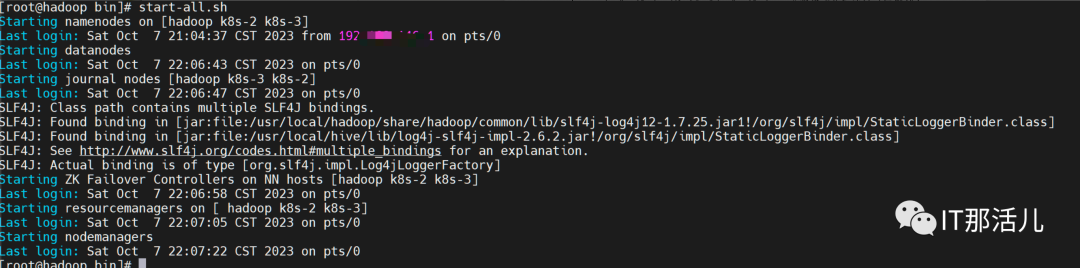
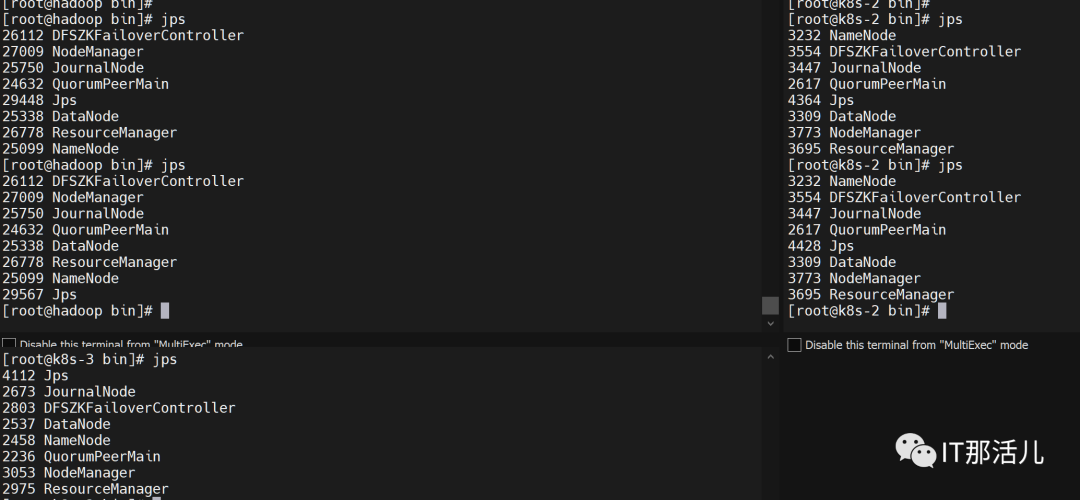
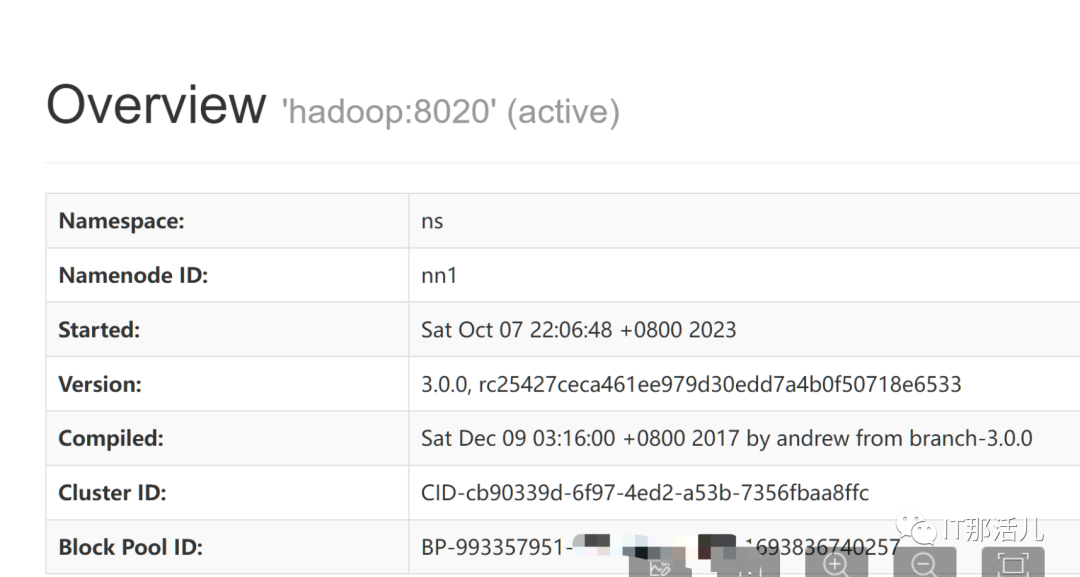
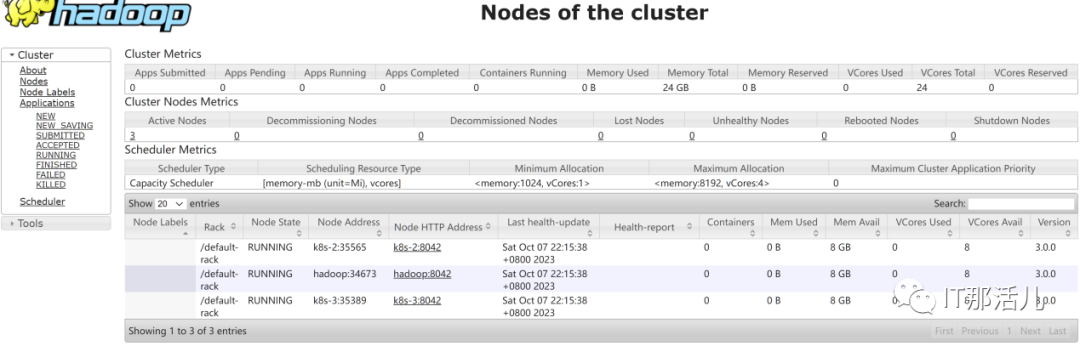
6.1 查看各个节点NameNode状态

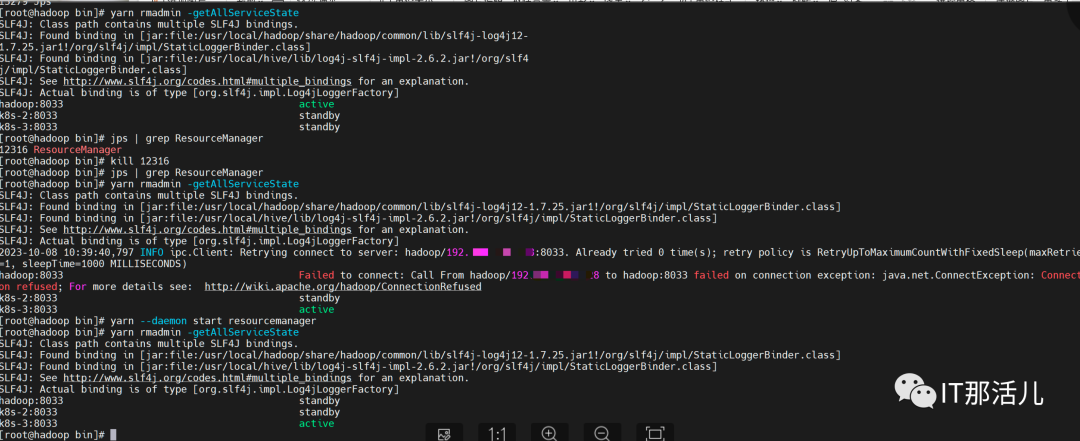
6.2 验证hdfs的高可用
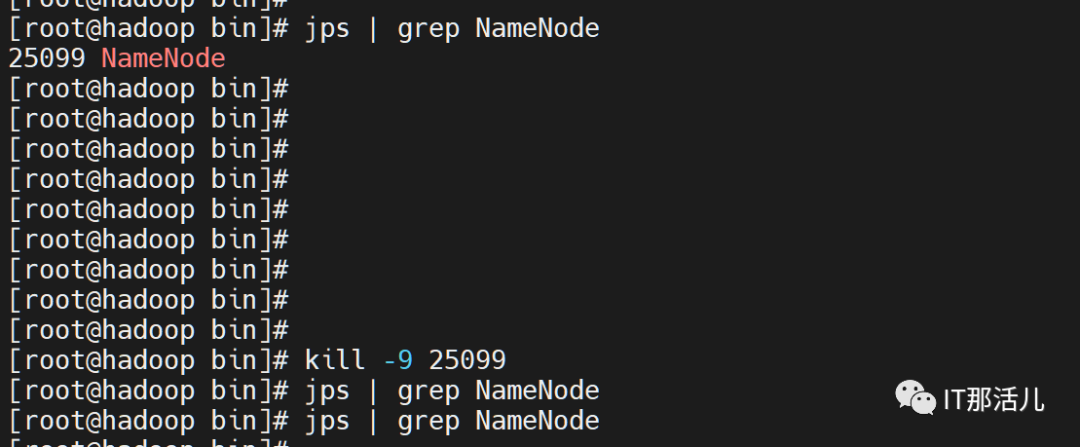

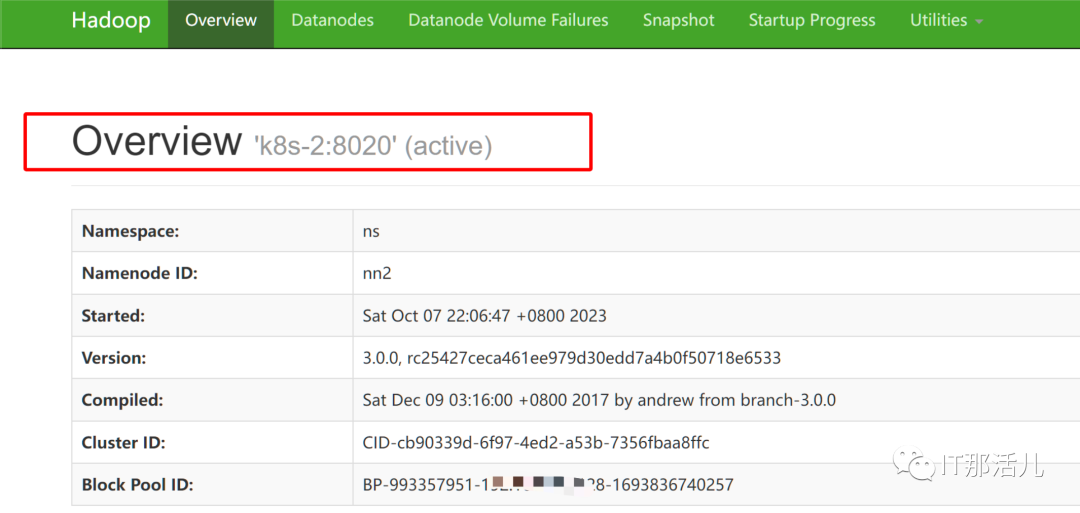


本文作者:事业二部(上海新炬中北团队)
本文来源:“IT那活儿”公众号

文章转载自IT那活儿,如果涉嫌侵权,请发送邮件至:contact@modb.pro进行举报,并提供相关证据,一经查实,墨天轮将立刻删除相关内容。
