



作为一款制造业和工业互联网(IIOT)高级分析软件,Seeq 支持在工艺制造组织中使用机器学习创新的新功能。这些功能使组织能够将自己或第三方机器学习算法部署到前线流程工程师和主题专家使用的高级分析应用程序,从而使单个数据科学家的努力扩展到许多前线员工。通过 TDengine Java connector,Seeq 可以轻松支持查询 TDengine 提供的时序数据,并提供数据展现、分析、预测等功能。本文将对此进行介绍。

01
查看 data 存储位置
sudo seeq config get Folders/Data
从 maven.org 下载 TDengine Java connector 包,目前最新版本为 3.2.7 (https://central.sonatype.com/artifact/com.taosdata.jdbc/taos-jdbcdriver?smo=true)。并拷贝至 data 存储位置的 plugins\lib 中。
重新启动 seeq server
sudo seeq restart
输入 License
02
场景介绍
数据 Schema
CREATE STABLE meters (ts TIMESTAMP, num INT, temperature FLOAT, goods INT) TAGS (device NCHAR(20));create table goods (ts1 timestamp, ts2 timestamp, goods float);
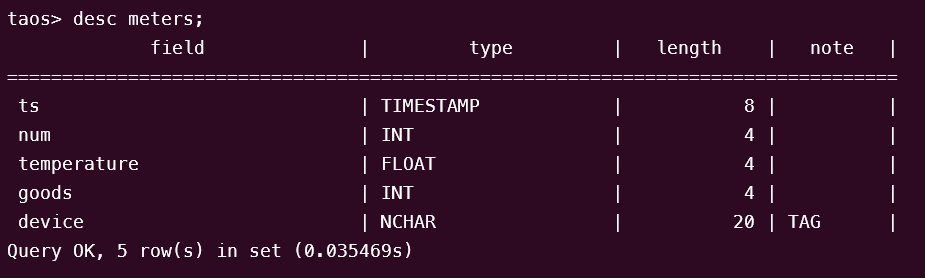
构造数据方法
python mockdata.pytaos -s "insert into power.goods select _wstart, _wstart + 10d, avg(goods) from power.meters interval(10d);"
源代码托管在 https://github.com/sangshuduo/td-forecasting。
使用 Seeq 进行数据分析
1
配置数据源(Data Source)
使用 Seeq 管理员角色的帐号登录,并新建数据源。
Power
{"QueryDefinitions": [{"Name": "PowerNum","Type": "SIGNAL","Sql": "SELECT ts, num FROM meters","Enabled": true,"TestMode": false,"TestQueriesDuringSync": true,"InProgressCapsulesEnabled": false,"Variables": null,"Properties": [{"Name": "Name","Value": "Num","Sql": null,"Uom": "string"},{"Name": "Interpolation Method","Value": "linear","Sql": null,"Uom": "string"},{"Name": "Maximum Interpolation","Value": "2day","Sql": null,"Uom": "string"}],"CapsuleProperties": null}],"Type": "GENERIC","Hostname": null,"Port": 0,"DatabaseName": null,"Username": "root","Password": "taosdata","InitialSql": null,"TimeZone": null,"PrintRows": false,"UseWindowsAuth": false,"SqlFetchBatchSize": 100000,"UseSSL": false,"JdbcProperties": null,"GenericDatabaseConfig": {"DatabaseJdbcUrl": "jdbc:TAOS-RS://127.0.0.1:6041/power?user=root&password=taosdata","SqlDriverClassName": "com.taosdata.jdbc.rs.RestfulDriver","ResolutionInNanoseconds": 1000,"ZonedColumnTypes": []}}
Goods
{"QueryDefinitions": [{"Name": "PowerGoods","Type": "CONDITION","Sql": "SELECT ts1, ts2, goods FROM power.goods","Enabled": true,"TestMode": false,"TestQueriesDuringSync": true,"InProgressCapsulesEnabled": false,"Variables": null,"Properties": [{"Name": "Name","Value": "Goods","Sql": null,"Uom": "string"},{"Name": "Maximum Duration","Value": "10days","Sql": null,"Uom": "string"}],"CapsuleProperties": [{"Name": "goods","Value": "${columnResult}","Column": "goods","Uom": "string"}]}],"Type": "GENERIC","Hostname": null,"Port": 0,"DatabaseName": null,"Username": "root","Password": "taosdata","InitialSql": null,"TimeZone": null,"PrintRows": false,"UseWindowsAuth": false,"SqlFetchBatchSize": 100000,"UseSSL": false,"JdbcProperties": null,"GenericDatabaseConfig": {"DatabaseJdbcUrl": "jdbc:TAOS-RS://127.0.0.1:6041/power?user=root&password=taosdata","SqlDriverClassName": "com.taosdata.jdbc.rs.RestfulDriver","ResolutionInNanoseconds": 1000,"ZonedColumnTypes": []}}
Temperature
{"QueryDefinitions": [{"Name": "PowerNum","Type": "SIGNAL","Sql": "SELECT ts, temperature FROM meters","Enabled": true,"TestMode": false,"TestQueriesDuringSync": true,"InProgressCapsulesEnabled": false,"Variables": null,"Properties": [{"Name": "Name","Value": "Temperature","Sql": null,"Uom": "string"},{"Name": "Interpolation Method","Value": "linear","Sql": null,"Uom": "string"},{"Name": "Maximum Interpolation","Value": "2day","Sql": null,"Uom": "string"}],"CapsuleProperties": null}],"Type": "GENERIC","Hostname": null,"Port": 0,"DatabaseName": null,"Username": "root","Password": "taosdata","InitialSql": null,"TimeZone": null,"PrintRows": false,"UseWindowsAuth": false,"SqlFetchBatchSize": 100000,"UseSSL": false,"JdbcProperties": null,"GenericDatabaseConfig": {"DatabaseJdbcUrl": "jdbc:TAOS-RS://127.0.0.1:6041/power?user=root&password=taosdata","SqlDriverClassName": "com.taosdata.jdbc.rs.RestfulDriver","ResolutionInNanoseconds": 1000,"ZonedColumnTypes": []}}
2
使用 Seeq Workbench
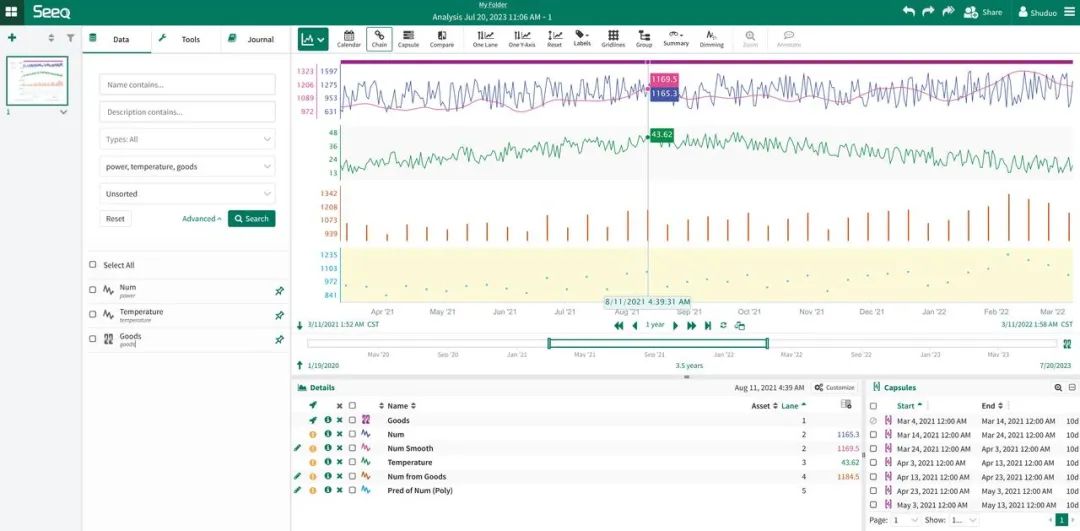
3
使用 Seeq Data Lab Server
进行进一步的数据分析
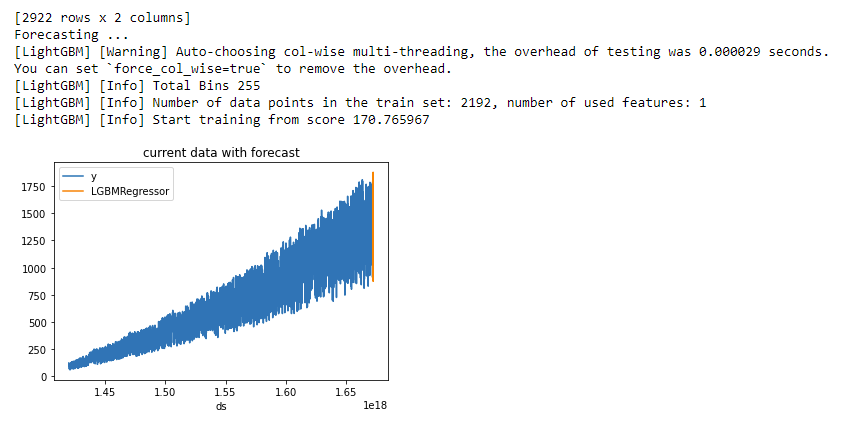
from seeq import spyspy.options.compatibility = 189import pandas as pdimport matplotlibimport matplotlib.pyplot as pltimport mlforecastimport lightgbm as lgbfrom mlforecast.target_transforms import Differencesfrom sklearn.linear_model import LinearRegressionds = spy.search({'ID': "8C91A9C7-B6C2-4E18-AAAF-XXXXXXXXX"})print(ds)sig = ds.loc[ds['Name'].isin(['Num'])]print(sig)data = spy.pull(sig, start='2015-01-01', end='2022-12-31', grid=None)print("data.info()")data.info()print(data)#data.plot()print("data[Num].info()")data['Num'].info()da = data['Num'].index.tolist()#print(da)li = data['Num'].tolist()#print(li)data2 = pd.DataFrame()data2['ds'] = daprint('1st data2 ds info()')data2['ds'].info()#data2['ds'] = pd.to_datetime(data2['ds']).to_timestamp()data2['ds'] = pd.to_datetime(data2['ds']).astype('int64')data2['y'] = liprint('2nd data2 ds info()')data2['ds'].info()print(data2)data2.insert(0, column = "unique_id", value="unique_id")print("Forecasting ...")forecast = mlforecast.MLForecast(models = lgb.LGBMRegressor(),freq = 1,lags=[365],target_transforms=[Differences([365])],)forecast.fit(data2)predicts = forecast.predict(365)pd.concat([data2, predicts]).set_index("ds").plot(title = "current data with forecast")plt.show()
03
往
期
推
荐

文章转载自TDengine,如果涉嫌侵权,请发送邮件至:contact@modb.pro进行举报,并提供相关证据,一经查实,墨天轮将立刻删除相关内容。
