



Table of Contents
#
#
#
前言
测试也是开发过程中非常重要一环,本教程主要介绍了 Specs2 的用法,为日后的 Play 应用开发做基础,开发环境采用 IntelliJ IDEA 集成开发环境。因此使用 IntelliJ 创建 Play 应用时缺省使用的测试包(基于Spec2)。
适用人群
Scala 测试工程师或应用开发工程师。
学习前提
学习本教程前,我们假定你已经有了一定的编程能力,并掌握 Scala 开发的基础。
鸣谢:http://www.imobilebbs.com/wordpress/archives/4997
版本信息
书中演示代码基于以下版本:
语言 | 版本信息 |
Scala | 2.11.0 |
1
简介
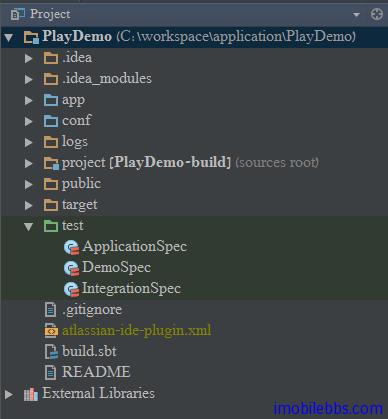
测试也是开发过程中非常重要一环,本博客介绍 Scala 开发的主要目的是为了日后的 Play 应用开发做基础,开发环境采用 IntelliJ IDEA 集成开发环境。因此使用 IntelliJ 创建 Play 应用时缺省使用的测试包(基于 Spec2)
图片 1.1 PIC
Play 应用缺省在 test 目录下创建了两个测试类: 为 ApplicationSpec 和 IntegrationSpec ,我们暂时不去管它们。以后在介绍 Play 开发时再说。
本系列博客介绍 Spec2 测试(其它测试使用的模板还可以是 scalatest, JUnit,TestNG),其测试的为通用的类(和 Play 特定的测试无关)。
Specs2 的测试规范分为两大类型:
- 单元测试规范: 这种测试规范和测试代码混合在一起,它通常用来测试单个类。
- 验收测试规范: 这种测试规范的为一个整体,与其测试代码分开,它通常用于熟悉集成或验收测试规范。
Specs2 测试为一种行为驱动测试方法,它的着重点在于使用可由人员的文字描述代码期望的一些行为,配合测试代码来验证所需要测试的代码符合期望的规范。
下面我们使用例子来说明一下两种风格的测试规范:
#
单元测试
单元测试规范派生于 org.specs2.mutable.Specification ,使用 should/in 的格式。
import org.specs2.mutable._
class HelloWorldUnitSpec extends Specification {
"HelloWorldUnit" should {
"contain 11 characters" in {
"Hello world" must have size(11)
}
"start with 'Hello'" in {
"Hello world" must startWith("Hello")
}
"end with 'world'" in {
"Hello world" must endWith("world")
}
}
}
#
验收测试规范
验收测试规范继承自 org.specs2.Specification ,并且定义 is 方法。
import org.specs2._
class HelloWorldAcceptanceSpec extends Specification { def is = s2"""
This is a specification to check the 'Hello world' string
The 'Hello world' string should
contain 11 characters $e1
start with 'Hello' $e2
end with 'world' $e3
"""
def e1 = "Hello world" must have size(11)
def e2 = "Hello world" must startWith("Hello")
def e3 = "Hello world" must endWith("world")
}
#
运行测试
运行测试的方法有很多种,在 Play 环境下,可以使用 play test 来运行,在 IntelliJ IDEA 可以通过菜单
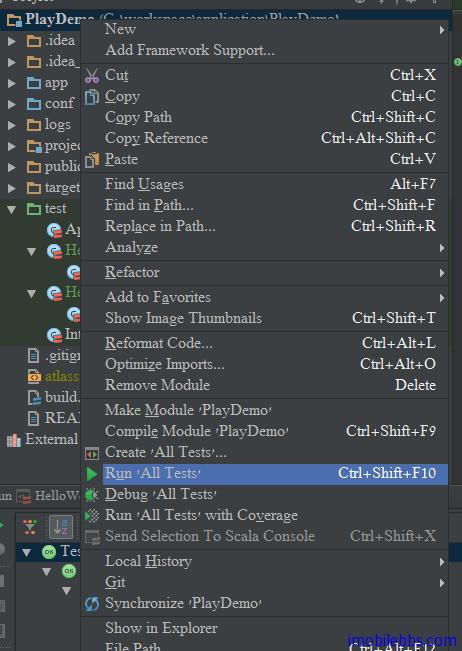
图片 1.2 PIC
如果需要运行或调试单个测试用例,可以在测试用例点击右键,选择
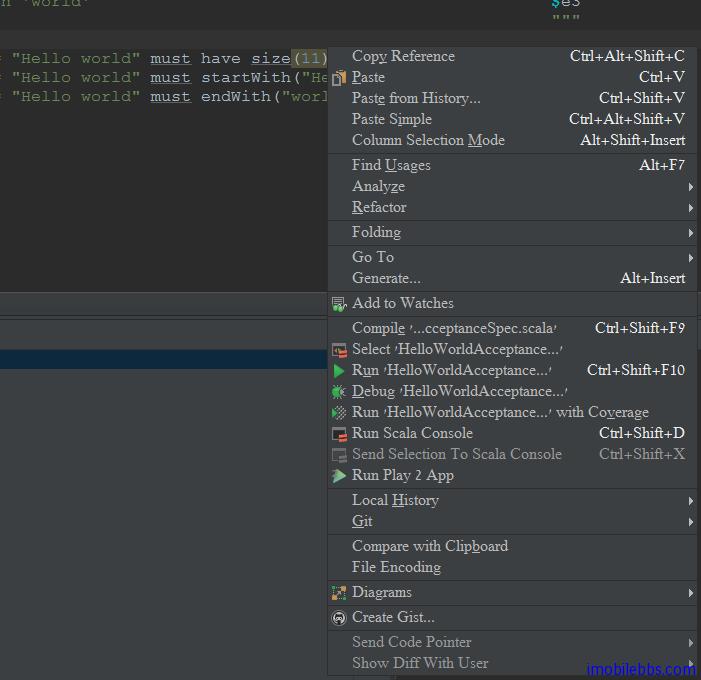
图片 1.3 PIC
2
Specs2 的设计思想
在详细介绍 Specs2 用法之前,我们先了解一下 Specs2 的设计思想:
#
结构
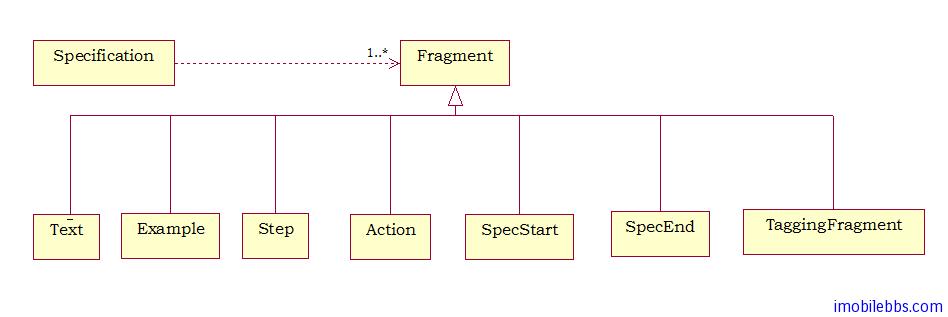
Specs2 的测试规范 Specification 的结构非常简单,它有多个 Fragment 构成,这个 Fragment 的列表由 SpecificationStructure Trait 的 is 方法来指明:
图片 2.1 PIC
其中:
- Text: 描述系统的任意文字。
- Example: 有文字和可返回此时结果的测试代码构成。
- Step/Action: 单系统抛出异常时才执行的动作。
- SpecStart/SpecEnd: 测试规范的分界符。 它也可用来分开包含的子规范。
- TaggingFragment: 可以包含其它 Framgent 的 Fragment 对象,这些 Fragment 集合可以包含或排除在需要运行的测试用例中。
#
创建 Fragment
Specs2 定义了一下隐含的转换用来创建 Fragment 对象(定义在 org.specs2.specification.FragmentsBuilder Trait 中).比如:
String => Text 由字符串创建 Text 对象 String ! Result => Example 创建一个 Example 对象 等等
一旦构造好这些对象,可以通过“^” 操作符来链接这些测试对象。 从而创建一个 Fragments 对象,它包含了一个 Seq[Fragment] 对象。
val fragments: Fragments =
"this text" ^
"is related to this Example" ! success
这个 Fragments 对象用来临时存放一个 Fragment 对象列表,用来保证这些 Fragment 对象执行时开始和结束于正确的 SpecStart 和 SpecEnd 位置。
#
可变的 Specification
在一个可变的 Specification 中,多个 Fragments 之间没有”可见“的链接,它们是通过所谓的“副作用(side effect)”关联(借助于 org.specs2.mutable 的增强版 FragmentsBuilder)。
// build an Example and add it to the specFragments variable
"this example must succeed" in { success }
"same thing here" in { success }
#
执行
测试的执行是由不同的 reports 对象来触发。分为下面五步:
- Selection:使用参数来过滤需要执行的 Fragment 对象。在这一步,几乎所有的 Example(少数除外)可以使用 only(“this example”) 来过滤掉,另外一种选择 Fragment 对象的方法是通过插入在 Specification 中插入 TaggingFragments 来实现。 如果 isolated 参数为 true 时,每个 Example 对象的执行体通过复制同一个 Specification 来避免局部变量可能带来的副作用。
- Sequencing:通过将 Fragments 分组排序来支持同一组中的 Fragment 可以同步运行。这也说明了 step 的由来。 假定一个 fragments 对象是:fragments1 ^ step ^ fragments2 ,那么所有的 fragments1 都会执行,然后执行 step,最后执行 fragments2。
- Execution:对于每个分组,缺省其中的 Fragment 对象的执行是同时的,执行的结果存放在一组 ExecutingFragments 中。 并且无需等所有 Fragments 都运行完成就可以给出报告。
- Storing:测试完成后,我们需要计算测试的统计结果,并把结果存放在一个文件中 specs2-reports/specs2.stats。
- Exporting:取决于 Exporter,ExecutedFragments 可以把报告输出到屏幕或是一个 HTML 文件中。
#
测试报告
所有的测试报告由一组 ExecutingFragment 对象构成,一个 Reducer 对象列表用来采集相关信息。
- 显示文字和结果
- 显示文字的等级(也就是缩进)
- 统计和执行时间
- 适用的参数等
3
测试结果 Results
在第一篇文章我们说过 Specs 可以有两种风格的测试规范:单元测试规范和验收测试规范,我们来看其中的一个例子:
def is = s2"""
this is my specification
and example 1 $e1
and example 2 $e2
"""
def e1 = success
def e2 = success
这段代码从 S2 字符串创建一组 Fragments(测试用例)对象,这个例子创建了一个 Text 对象和两个 Example 对象(它们都是 Fragment 的子类)。
在 Specs2 的 Example 对象为一个文字加上任意可以转换成 Result 对象(org.specs2.execute.Result)的对象,它可以是:
- 一个标准测试结果(Success,failure,pending 等)
- 一个Matcher(匹配)结果
- 一个布尔值
- 一个 ScalaCheck 属性
#
标准测试结果
最简单的 Result 值由 StandardResults Trait 定义,可以有如下几种值:
- success: 这个测试结果正常
- failure: 这个测试结果不满足预期
- anError: 测试出现异常
- skipped: 该测试被跳过(不满足某些条件)
- pending: 通常只这个测试用例还没实现
此外还有两种情况:
- done: 这个测试结果正常并显示 “DONE”
- todo: 测试用例还没实现显示“TODO”
#
匹配
通常 Example 定义体使用 Matcher 定义期望值:
def e1 = 1 must_== 1
Matcher 我们在后面继续详细介绍。
4
期望结果
书写测试用例一个步骤是书写测试的预期结果。
#
函数化
Spec2 中缺省 Specification Trait 是函数化的,也就是说 Example 的 Result 值为代码中的最后一条语句提供。比如下面的示例,永远不会失败,这是本例的第一个测试的结果给丢掉了。
"my example on strings" ! e1 // will never fail!
def e1 = {
"hello" must have size(10000) // because this expectation will not be returned,...
"hello" must startWith("hell")
}
因此正确的写法为:
"my example on strings" ! e1 // will fail
def e1 = "hello" must have size(10000) and
startWith("hell")
#
Thrown
上面的函数化需要仔细指明所有的期望,有时你可能觉得这样很麻烦,比如还是用什么的那个不会失败的例子:
import org.specs2._
class HelloWorldAcceptanceSpec extends Specification { def is = s2"""
This is a specification to check the 'Hello world' string
"my example on strings" $e1
"""
def e1 = {
"hello" must have size(10000) // because this expectation will not be returned,...
"hello" must startWith("hell")
}
}
这个例子来执行不会报失败,我们希望在执行“hello” must have size(10000)报错,不继续执行下面的测试,此时我们可以使用 org.specs2.matcher.ThrownExpectations,此时如果将这个 Trait 混合到定义的规范中,所有没有达到期望值的测试都会抛出 FailureException 异常,Example 之后的测试也不执行,比如修改后代码:
import org.specs2._
import org.specs2.matcher.ThrownExpectations
class HelloWorldAcceptanceSpec extends Specification with ThrownExpectations { def is = s2"""
This is a specification to check the 'Hello world' string
"my example on strings" $e1
"""
def e1 = {
"hello" must have size(10000) // because this expectation will not be returned,...
"hello" must startWith("hell")
}
}
这个测试的第一个检测“hello” must have size(10000)失败,整个 Example 失败,后续的测试也不会执行。
5
Fragments API 简介
前面的例子
import org.specs2._
class HelloWorldAcceptanceSpec extends Specification { def is = s2"""
This is a specification to check the 'Hello world' string
The 'Hello world' string should
contain 11 characters $e1
start with 'Hello' $e2
end with 'world' $e3
"""
def e1 = "Hello world" must have size(11)
def e2 = "Hello world" must startWith("Hello")
def e3 = "Hello world" must endWith("world")
}
实际上是使用 Fragment API,我们使用 Fragment API 重写什么例子,它是一系列 Fragment 对象通过^运算符连接而成:
import org.specs2._
class HelloWorldAcceptanceSpec extends Specification { def is =
"This is a specification to check the 'Hello world' string" ^
"The 'Hello world' string should" ^
"contain 11 characters" ! e1 ^
"start with 'Hello'" ! e2 ^
"end with 'world'" ! e3
def e1 = "Hello world" must have size(11)
def e2 = "Hello world" must startWith("Hello")
def e3 = "Hello world" must endWith("world")
}
其中的 Example 对象的格式为 “description” ! body. body 返回一个 Result 对象,当你直接使用 Fragment API 使用 ^ 运算符构建 Text 和 Example 对象时有些规则需要注意,这些规则影响到结果的显示格式。
#
规则
spec2 的结果显示的布局缺省情况是自动完成,其显示和源码显示类似。 其显示规则如下:
- 当一个 Example 跟在一个 Text 对象后面,它缩进显示。
- 两个连续的 Example 对象,缩进层次相同。
- 但一个 Text 对象跟在一个 Example 对象后面时,意味着你想显示一个“辅助文字(子文字)”,因此这个 Text 对象缩进一级。
比如下面的例子:
"this is some presentation text" ^
"and the first example" ! success^
"and the second example" ! success
}
显示如下:
this is some presentation text
+ and the first example
+ and the second example
如果你指定一个“子文字” ,则显示如下:
this is some presentation text
+ and the first example
+ and the second example
and in this specific context
+ one more example
6
Spec2 内置的 Matcher(匹配运算)
前面的两篇博客
Scala Specs2 测试入门教程(3):测试结果 Result 和 Scala Specs2 测试入门教程(4):期望结果简要介绍了 Spec 的预期结果,其中说明
在 Specs2 的 Example对象为一个文字加上任意可以转换成 Result 对象(org.specs2.execute.Result)的对象,它可以是:
- 一个标准测试结果(Success,failure,pending 等)
- 一个 Matcher(匹配)结果
- 一个布尔值
- 一一个 ScalaCheck 属性
#
标准测试结果
最简单的 Result 值由 StandardResults Trait 定义,可以有如下几种值:
- success:这个测试结果正常
- failure:这个测试结果不满足预期
- anError:测试出现异常
- skipped:该测试被跳过(不满足某些條件)
- pending:通常只这个测试用例还没实现
此外还有两种情况:
- done:这个测试结果正常显示「DONE」
- todo:测试结果还没实现显示」TODO」
其中 Matcher 是用来判断测试结果和預期的结果是否符合的主要方法.
本篇介绍 Spec2 内置的一些 Matcher 类型,它可以分为比较,选项,字元串比较,数字比较,捕获异常等种类。
#
Equalit
比较,该类最常用的 Matcher 为 beEqualTo 来测试是否相等
Matcher | 描述 |
1 must beEqualTo(1) | the normal way |
1 must be_==(1) | with a shorter matcher |
1 must_==1 | my favorite! |
1 mustEqual 1 | if you dislike underscores |
1 should_==1 | for should lovers |
1===1 | the ultimate shortcut |
1 must be equalTo(1) | with a literate style |
否定形式 |
1 must not be equalTo(2) |
1 must_!=2 |
1 mustNotEqual 2 |
1 must be_!=(2) |
1!==2 |
此外还有其它形式的比较:
Matcher | 说明 |
be_=== | same as be_== but can be used with some combinators like ^^^ or toSeq because the parameter type is kept |
be_==~ | checks if (a:A)==(b:A) when there is an implicit conversion from B (the type of b) to A (the type of a) |
beTheSameAs | checks if a eq b (a must be(b) also works) |
beTrue, beFalse | shortcuts for Boolean equality |
a ==== b | similar to a === b but will not typecheck if a and b don’t have the same type |
#
Any
下面的 Matcher 可以应用到 Scala 的 Any 类型的对象。
•beLike {case exp => ok }: to check if an object is like a given pattern (ok is a predefined value, ko is the opposite)
•beLike {case exp => exp must beXXX }: to check if an object is like a given pattern, and verifies a condition
•beNull
•beAsNullAs: when 2 objects must be null at the same time if one of them is null
•beOneOf(a, b, c): to check if an object is one of a given list
•haveClass: to check the class of an object
•haveSuperclass: to check if the class of an object as another class as one of its ancestors
•haveInterface: to check if an object is implementing a given interface
•beAssignableFrom: to check if a class is assignable from another
•beAnInstanceOf[T]: to check if an object is an instance of type T
Option/Either
下面的 Matcher 用来检查 Option 和 Either 类型:
•beSome checks if an element is Some(_)
•beSome(exp) checks if an element is Some(exp)
•beSome(matcher) checks if an element is Some(a) where a satisfies the matcher
•beSome(function: A =>AsResult[B]) checks if an element is Some(a) where function(a) returns a successful Result
(note that a Seq[A] is also a function Int=> A so if you want to check that a sequence is contained in Some you need to use a matcher: beSome(===(Seq(1)))
•beSome.which(function) checks if an element is Some(_) and satisfies a function returning a boolean
•beSome.like(partial function) checks if an element is Some(_) and satisfies a partial function returning a MatchResult
•beNone checks if an element is None
•beAsNoneAs checks if 2 values are equal to None at the same time
•beRight checks if an element is Right(_)
•beRight(exp) checks if an element is `Right(exp)
•beRight(matcher) checks if an element is Right(a) where a satisfies the matcher
•beRight(function: A =>AsResult[B]) checks if an element is Right(a) where function(a) returns a successful Result
(note that a Seq[A] is also a function Int=> A so if you want to check that a sequence is contained in Right you need to use a matcher: beRight(===(Seq(1)))
•beRight.like(partial function) checks if an element is Right(_) and satisfies a partial function returning a MatchResult
•beLeft checks if an element is Left(_)
•beLeft(exp) checks if an element is Left(exp)
•beLeft(matcher) checks if an element is Left(a) where a satisfies the matcher
•beLeft(function: A =>AsResult[B]) checks if an element is Left(a) where function(a) returns a successful Result
(note that a Seq[A] is also a function Int=> A so if you want to check that a sequence is contained in Left you need to use a matcher: beLeft(===(Seq(1)))
•beLeft.like(partial function) checks if an element is Left(_) and satisfies a partial function returning a MatchResult
#
Try
下面用来测试 Try 类型对象:
•beSuccessfulTry checks if an element is Success(_)
•beSuccessfulTry.withValue(exp) checks if an element is Success(_)
•beSuccessfulTry.withValue(matcher) checks if an element is Success(a) where a satisfies the matcher
•beSuccessfulTry.withValue(function: A =>AsResult[B]) checks if an element is Success(a) where function(a) returns a successful Result
(note that a Seq[A] is also a function Int=> A so if you want to check that a sequence is contained in Success you need to use a matcher: beSuccessfulTry.withValue(===(Seq(1)))
•beSuccessfulTry.which(function) checks if an element is Success(_) and satisfies a function returning a boolean
•beSuccessfulTry.like(partial function) checks if an element is Success(_) and satisfies a partial function returning a MatchResult
•beFailedTry checks if an element is Failure(_)
•beFailedTry.withThrowable[T] checks if an element is Failure(t: T)
•beFailedTry.withThrowable[T](pattern) checks if an element is Failure(t: T) and t.getMessage matches pattern
#
String
匹配字元串非常常见,下面为字元串匹配:
•beMatching (or be matching) checks if a string matches a regular expression
•=~(s) is a shortcut for beMatching("(.|\\s)*"+s+"(.|\\s)*")
•find(exp).withGroups(a, b, c) checks if some groups are found in a string
•have length checks the length of a string
•have size checks the size of a string (seen as an Iterable[Char])
•be empty checks if a string is empty
•beEqualTo(b).ignoreCase checks if 2 strings are equal regardless of casing
•beEqualTo(b).ignoreSpace checks if 2 strings are equal when you replaceAll("\\s","")
•beEqualTo(b).trimmed checks if 2 strings are equal when trimmed
•beEqualTo(b).ignoreSpace.ignoreCase you can compose them
•contain(b) checks if a string contains another one
•startWith(b) checks if a string starts with another one
•endWith(b) checks if a string ends with another one
#
Numeric
下面的用来测试数值:
•beLessThanOrEqualTo compares any Ordered type with <=
1 must be_<=(2)
1 must beLessThanOrEqualTo(2)
•beLessThan compares any Ordered type with <
1 must be_<(2)
1 must beLessThan(2)
•beGreaterThanOrEqualTo compares any Ordered type with >=
2 must be_>=(1)
2 must beGreaterThanOrEqualTo(1)
•beGreaterThan compares any Ordered type with >
2 must be_>(1)
2 must beGreaterThan(1)
•beCloseTo checks if 2 Numerics are close to each other
1.0 must beCloseTo(1,0.5)
4 must be ~(5+/- 2)
•beBetween checks if a value is between 2 others
5 must beBetween(3,6)
5 must beBetween(3,6).excludingEnd
5 must beBetween(4,6).excludingStart
5 must beBetween(4,6).excludingBounds
// with brackets notation
5 must (be[(4,7)])
#
Exception
下面用来检查是否拋出异常:
•throwA[ExceptionType] checks if a block of code throws an exception of the given type
•throwA[ExceptionType](message ="boom") additionally checks if the exception message is as expected
•throwA(exception) or throwAn(exception) checks if a block of code throws an exception of the same type, with the
same message
•throwA[ExceptionType].like {case e => e must matchSomething } or
throwA(exception).like {case e => e must matchSomething } allow to verify that the thrown exception satisfies a property
•throwA[ExceptionType](me.like {case e => e must matchSomething } or
throwA(exception).like {case e => e must matchSomething } allow to verify that the thrown exception satisfies a property
#
Traversable
下面的 Matcher 用来检查 Traversables 对象类型:
如果你想检查 Traversables 对象的大小:
•to check if it is empty
Seq() must be empty
Seq(1,2,3) must not be empty
•to check its size
Seq(1,2) must have size(2)
Seq(1,2) must have length(2) // equivalent to size
•to check its ordering (works with any type T which has an Ordering)
Seq(1,2,3) must beSorted
可以检查目标元素是否在 Traversables 对象中
•if a simple value is contained
Seq(1,2,3) must contain(2)
•if a value matching a specific matcher is contained
Seq(1,2,3) must contain(be_>=(2))
•if a value passing a function returning a Result is contained (MatchResult, ScalaCheck Prop,…)
Seq(1,2,3) must contain((i:Int)=> i must be_>=(2))
•note that a Seq[A] is also a function Int=> A so if you want to check that a sequence is contained in another you need to use a matcher
Seq(Seq(1)) must contain(===(Seq(1)))
•there are also 2 specialized matchers to check the string representation of the elements
Seq(1234,6237) must containMatch("23") // matches with ".*23.*"
Seq(1234,6234) must containPattern(".*234") // matches with !.*234"
检查符合要求的结果的次数
•Seq(1,2,3) must contain(be_>(0)).forall // this will stop after the first failure
•Seq(1,2,3) must contain(be_>(0)).foreach // this will report all failures
•Seq(1,2,3) must contain(be_>(0)).atLeastOnce
•Seq(1,2,3) must contain(be_>(2)).atMostOnce
•Seq(1,2,3) must contain(be_>(2)).exactly(1.times)
•Seq(1,2,3) must contain(be_>(2)).exactly(1)
•Seq(1,2,3) must contain(be_>(1)).between(1.times,2.times)
•Seq(1,2,3) must contain(be_>(1)).between(1,2)
Traversable 元素与其他元素比较(values, matchers, function returning a Result)
•with a set of values
Seq(1,2,3,4) must contain(2,4)
which is the same thing as
Seq(1,2,3,4) must contain(allOf(2,4))
•with a set of matchers
Seq(1,2,3,4) must contain(allOf(be_>(0), be_>(1)))
•checking that the order is satisfied
Seq(1,2,3,4) must contain(allOf(be_>(0), be_>(1)).inOrder)
Note that allOf tries to make each check at least successful once, even if that on the same value. If, on the other hand, you want to specify that each check must succeed on a differentvalue you should use onDistinctValues. For example this will fail:
Seq(1) must contain(allOf(1,1)).onDistinctValues
The eachOf method does the same thing (and this example will fail as well):
Seq(1) must contain(eachOf(1,1))
Another frequent use of Traversable matchers is to check if the Traversable have the right number of elements. For this you can use:
•atLeast, which is actually another name for allOf, where the traversable can contain more elements than required
Seq(1,2,3,4) must contain(atLeast(2,4))
•atMost where the traversable can not contain more elements than required
Seq(2,3) must contain(atMost(2,3,4))
•exactly where the traversable must contain exactly the specified number of elements
Seq(1,2) must contain(exactly(2,1))
The atLeast/atMost/exactly operators work on distinct values by default (because this is easier for counting the correspondance between actual values and expected ones). However you can use onDistinctValues(false) if you don’t care.
Finally, if you want to get the differences between 2 traversables:
Seq(2,4,1) must containTheSameElementsAs(Seq(1,4,2))
#
Map
下面为检查 Map 类型的对象:
•haveKey checks if a Map has a given key
Map(1->"1") must haveKey(1)
•haveKeys checks if a Map has several keys
Map(1->"1",2->"2") must haveKeys(1,2)
•haveValue checks if a Map has a given value
Map(1->"1") must haveValue("1")
•haveValues checks if a Map has several values
Map(1->"1",2->"2") must haveValue("1","2")
•havePair checks if a Map has a given pair of values
Map(1->"1") must havePair(1->"1")
•havePairs checks if a Map has some pairs of values
Map(1->"1",2->"2",3->"3") must havePairs(1->"1",2->"2")
但是, Map 也是偏函数,所以:
•beDefinedAt checks if a PartialFunction is defined for a given value
partial must beDefinedAt(1)
•beDefinedBy checks if a PartialFunction is defined for a given value
and returns another one
partial must beDefinedBy(1 -> true)
这些内置的 Matcher 具有下面的特点:
- 这些Matcher的一般形式为 a must matcher
- 你可以使用 should 代替 must
- 对于大部分的 Matcher 来说,如果使用 be,have 時,be 和 have 可以省略
- 你可以在 Matcher 前后使用 not 来反向匹配
比如
def e1 = "Hello world" must be size(11)
def e1 = "Hello world" must have size(11)
def e1 = "Hello world" must size(11)
是等效的。
7
Spec2 可选的 Matcher(匹配运算)
除了之前介绍的 Spec2 内置的 Matcher, 针对不同的功能,Spec2 还提供了一些可选的 Matcher,比如:
#
Result
如果你需要其它 Matcher 的结果:
// you need to extend the ResultMatchers trait
class MatchersSpec extends Specification with matcher.ResultMatchers { def is =
"beMatching is using a regexp" ! {
("Hello" must beMatching("h.*")) must beSuccessful
}
}
#
Xml
用于检测 XML 的 Matcher
beEqualToIgnoringSpace compares 2 Nodes, without considering spaces
<a><b/></a> must ==/(<a><b/></a>)
<a><b/></a> must beEqualToIgnoringSpace(<a><b/></a>)
beEqualToIgnoringSpace can also do an ordered comparison
must ==/().ordered
on the other hand beEqualToIgnoringSpace will not check attributes order
must ==/()
\ is an XPath-like matcher matching if a node is a direct child of another
must \("b")
You can also check attribute names
must \("b","name")
And attribute names and values as well (values are checked using a regular expression, use the quote method if you want an exact match)
must \("b","n"->"v","n2"->"v\d")
Or the content of a Text node
hello must \("a")\>"hello" (alias textIs)
hello must \("a")\>~"h.*" (alias textMatches)
The equivalent of \ for a “deep” match is simply \\
must \\("c")
#
Json
用来检测 Json 字符串的 Matcher
/(value) checks if a value is present at the root of the document. This can only be the case if that document is an Array
/(regex) checks if a value matching the regex is present at the root of the document. This can only be the case if that document is an Array
/(key -> value) checks if a pair is present at the root of the document. This can only be the case if that document is a Map
*/(value) checks if a value is present anywhere in the document, either as an entry in an Array, or as the value for a key in a Map
*/(key -> value) checks if a pair is present anywhere in a Map of the document
/#(i) selects the ith element in a 0-based indexed Array or a Map and allow further checks on that element
Now the interesting part comes from the fact that those matchers can be chained to search specific paths in the Json document. For example, for the following document:
// taken from an example in the Lift project
val person ="""{
"person": {
"name": "Joe",
"age": 35,
"spouse": {
"person": {
"name": "Marilyn",
"age": 33
}
}
}
}
"""
You can use these combinations:
person must /("person")*/("person") /("age"->33.0)// by default numbers are parsed as Doubles
You can as well use regular expressions or String matchers instead of values to verify the presence of keys or elements. For example:
person must /("p.*".r)*/".*on".r /("age"->"\\d+\\.\\d".r)
person must /("p.*".r)*/".*on".r /("age"-> startWith("3"))
person must /("p.*".r)*/".*on".r /("age"->(be_>(30)^^((_:String).toInt)))
Finally you can access some records by their index:
person must /("person")/# 2 / "person"
#
File
检测文件或是路径
beEqualToIgnoringSep checks if 2 paths are the same regardless of their separators
"c:\temp\hello" must beEqualToIgnoringSep("c:/temp/hello")
beAnExistingPath checks if a path exists
beAReadablePath checks if a path is readable
beAWritablePath checks if a path is writable
beAnAbsolutePath checks if a path is absolute
beAHiddenPath checks if a path is hidden
beAFilePath checks if a path is a file
beADirectoryPath checks if a path is a directory
havePathName checks if a path has a given name
haveAsAbsolutePath checks if a path has a given absolute path
haveAsCanonicalPath checks if a path has a given canonical path
haveParentPath checks if a path has a given parent path
listPaths checks if a path has a given list of children
exist checks if a file exists
beReadable checks if a file is readable
beWritable checks if a file is writable
beAbsolute checks if a file is absolute
beHidden checks if a file is hidden
beAFile checks if a file is a file
beADirectory checks if a file is a directory
haveName checks if a file has a given name
haveAbsolutePath checks if a file has a given absolute path
haveCanonicalPath checks if afile has a given canonical path
haveParent checks if a file has a given parent path
haveList checks if a file has a given list of children
等等,如果 Spec2 内置或是可选的 Matcher 还是不满足你的要求,你还是自定义 Matcher,本系列就不介绍了。


更多信息请访问

