



IvorySQL数据库安装与Oracle兼容性测试

概述
IvorySQL是一款以PostgreSQL为基础进行开发,并且兼容Oracle的开源数据库。
IvorySQL社区始终承诺与PostgreSQL数据库保持100%兼容,并且可以直接替换最新版本的PostgreSQL。
IvorySQL增加了一个名为 ivorysql.compatible_mode 的GUC参数用以控制IvorySQL的兼容模式,该参数有 oracle 和 pg 两种值。在初始化数据目录的时候,通过指定 -m 参数来指定数据目录的兼容模式,-m pg 则数据目录为PostgreSQL模式,该模式下 ivorysql.compatible_mode 参数将会失效,-m oracle 或者不指定 -m 参数则数据目录为兼容Oracle模式,该模式下 ivorysql.compatible_mode 参数初始值为 oracle 并且不支持部分PostgreSQL的语法,通过 set ivorysql.compatible_mode to pg 就可以使得数据库100%支持PostgreSQL的语法及功能。
IvorySQL的亮点之一是PL/iSQL过程语言,它支持Oracle的PL/SQL语法。同时,IvorySQL通过增加与内核绑定的插件 ivorysql_ora 来实现兼容Oracle的功能,目前实现的功能包括内置函数、数据类型、系统视图、merge以及GUC参数的增加,未来将会继续以绑定内核的插件的形式来实现新的兼容功能。
IvorySQL项目是在Apache 2.0许可证下发布的,社区鼓励且欢迎所有类型的贡献和参与。
安装部署
本文介绍 Ivorysql 在Linux平台(以CentOS 7为例)的安装过程及注意事项。本文主要演示数据库在Centos 7环境下源码安装步骤。
资源介绍
| 操作系统 | CPU | 内存 | 存储 |
|---|---|---|---|
| CentOS 7.9 | 4核心 | 4GB | SSD 60GB |
查看操作系统
cat /proc/version
cat /etc/redhat-release
操作如下
[root@ivorysql ~]# cat /proc/version
Linux version 3.10.0-1160.71.1.el7.x86_64 (mockbuild@kbuilder.bsys.centos.org) (gcc version 4.8.5 20150623 (Red Hat 4.8.5-44) (GCC) ) #1 SMP Tue Jun 28 15:37:28 UTC 2022
[root@ivorysql ~]# cat /etc/redhat-release
CentOS Linux release 7.9.2009 (Core)
[root@ivorysql ~]#
查看内核参数
uname -r
操作如下
[root@ivorysql ~]# uname -r
3.10.0-1160.71.1.el7.x86_64
[root@ivorysql ~]#
查看内存,清理缓存
free -g
echo 3 > /proc/sys/vm/drop_caches
操作如下
[root@ivorysql ~]# free -g
              total        used        free      shared  buff/cache   available
Mem:              3           0           3           0           0           3
Swap:             3           0           3
[root@ivorysql ~]# echo 3 > /proc/sys/vm/drop_caches
[root@ivorysql ~]#
获取源代码
git clone https://github.com/IvorySQL/IvorySQL.git
操作如下
[root@ivorysql ~]# git clone https://github.com/IvorySQL/IvorySQL.git
Cloning into 'IvorySQL'...
remote: Enumerating objects: 919698, done.
remote: Counting objects: 100% (35656/35656), done.
remote: Compressing objects: 100% (8778/8778), done.
remote: Total 919698 (delta 26897), reused 34847 (delta 26627), pack-reused 884042
Receiving objects: 100% (919698/919698), 264.06 MiB | 16.19 MiB/s, done.
Resolving deltas: 100% (789433/789433), done.
[root@ivorysql ~]#
安装依赖包
sudo yum install -y bison-devel readline-devel zlib-devel openssl-devel wget
sudo yum groupinstall -y 'Development Tools'
操作如下
[root@ivorysql ~]# sudo yum install -y bison-devel readline-devel zlib-devel openssl-devel wget
Loaded plugins: fastestmirror, langpacks
Loading mirror speeds from cached hostfile
Package wget-1.14-18.el7_6.1.x86_64 already installed and latest version
Resolving Dependencies
--> Running transaction check
---> Package bison-devel.x86_64 0:3.0.4-2.el7 will be installed
---> Package openssl-devel.x86_64 1:1.0.2k-26.el7_9 will be installed
--> Processing Dependency: openssl-libs(x86-64) = 1:1.0.2k-26.el7_9 for package: 1:openssl-devel-1.0.2k-26.el7_9.x86_64
--> Processing Dependency: krb5-devel(x86-64) for package: 1:openssl-devel-1.0.2k-26.el7_9.x86_64
---> Package readline-devel.x86_64 0:6.2-11.el7 will be installed
--> Processing Dependency: ncurses-devel for package: readline-devel-6.2-11.el7.x86_64
---> Package zlib-devel.x86_64 0:1.2.7-21.el7_9 will be installed
--> Processing Dependency: zlib = 1.2.7-21.el7_9 for package: zlib-devel-1.2.7-21.el7_9.x86_64
--> Running transaction check
---> Package krb5-devel.x86_64 0:1.15.1-55.el7_9 will be installed
--> Processing Dependency: libkadm5(x86-64) = 1.15.1-55.el7_9 for package: krb5-devel-1.15.1-55.el7_9.x86_64
--> Processing Dependency: krb5-libs(x86-64) = 1.15.1-55.el7_9 for package: krb5-devel-1.15.1-55.el7_9.x86_64
--> Processing Dependency: libverto-devel for package: krb5-devel-1.15.1-55.el7_9.x86_64
--> Processing Dependency: libselinux-devel for package: krb5-devel-1.15.1-55.el7_9.x86_64
--> Processing Dependency: libcom_err-devel for package: krb5-devel-1.15.1-55.el7_9.x86_64
--> Processing Dependency: keyutils-libs-devel for package: krb5-devel-1.15.1-55.el7_9.x86_64
---> Package ncurses-devel.x86_64 0:5.9-14.20130511.el7_4 will be installed
---> Package openssl-libs.x86_64 1:1.0.2k-25.el7_9 will be updated
--> Processing Dependency: openssl-libs(x86-64) = 1:1.0.2k-25.el7_9 for package: 1:openssl-1.0.2k-25.el7_9.x86_64
---> Package openssl-libs.x86_64 1:1.0.2k-26.el7_9 will be an update
---> Package zlib.x86_64 0:1.2.7-20.el7_9 will be updated
---> Package zlib.x86_64 0:1.2.7-21.el7_9 will be an update
--> Running transaction check
---> Package keyutils-libs-devel.x86_64 0:1.5.8-3.el7 will be installed
---> Package krb5-libs.x86_64 0:1.15.1-54.el7_9 will be updated
---> Package krb5-libs.x86_64 0:1.15.1-55.el7_9 will be an update
---> Package libcom_err-devel.x86_64 0:1.42.9-19.el7 will be installed
---> Package libkadm5.x86_64 0:1.15.1-55.el7_9 will be installed
---> Package libselinux-devel.x86_64 0:2.5-15.el7 will be installed
--> Processing Dependency: libsepol-devel(x86-64) >= 2.5-10 for package: libselinux-devel-2.5-15.el7.x86_64
--> Processing Dependency: pkgconfig(libsepol) for package: libselinux-devel-2.5-15.el7.x86_64
--> Processing Dependency: pkgconfig(libpcre) for package: libselinux-devel-2.5-15.el7.x86_64
---> Package libverto-devel.x86_64 0:0.2.5-4.el7 will be installed
---> Package openssl.x86_64 1:1.0.2k-25.el7_9 will be updated
---> Package openssl.x86_64 1:1.0.2k-26.el7_9 will be an update
--> Running transaction check
---> Package libsepol-devel.x86_64 0:2.5-10.el7 will be installed
---> Package pcre-devel.x86_64 0:8.32-17.el7 will be installed
--> Finished Dependency Resolution

Dependencies Resolved

略...

Installed:
  bison-devel.x86_64 0:3.0.4-2.el7                                   openssl-devel.x86_64 1:1.0.2k-26.el7_9                                   readline-devel.x86_64 0:6.2-11.el7                                   zlib-devel.x86_64 0:1.2.7-21.el7_9

Dependency Installed:
  keyutils-libs-devel.x86_64 0:1.5.8-3.el7       krb5-devel.x86_64 0:1.15.1-55.el7_9   libcom_err-devel.x86_64 0:1.42.9-19.el7   libkadm5.x86_64 0:1.15.1-55.el7_9   libselinux-devel.x86_64 0:2.5-15.el7   libsepol-devel.x86_64 0:2.5-10.el7   libverto-devel.x86_64 0:0.2.5-4.el7
  ncurses-devel.x86_64 0:5.9-14.20130511.el7_4   pcre-devel.x86_64 0:8.32-17.el7

Dependency Updated:
  krb5-libs.x86_64 0:1.15.1-55.el7_9                                     openssl.x86_64 1:1.0.2k-26.el7_9                                     openssl-libs.x86_64 1:1.0.2k-26.el7_9                                     zlib.x86_64 0:1.2.7-21.el7_9

Complete!
[root@ivorysql ~]# sudo yum groupinstall -y 'Development Tools'
Loaded plugins: fastestmirror, langpacks
There is no installed groups file.
Maybe run: yum groups mark convert (see man yum)
Loading mirror speeds from cached hostfile
Resolving Dependencies
--> Running transaction check
---> Package autoconf.noarch 0:2.69-11.el7 will be installed
--> Processing Dependency: m4 >= 1.4.14 for package: autoconf-2.69-11.el7.noarch
---> Package automake.noarch 0:1.13.4-3.el7 will be installed
--> Processing Dependency: perl(Thread::Queue) for package: automake-1.13.4-3.el7.noarch
--> Processing Dependency: perl(TAP::Parser) for package: automake-1.13.4-3.el7.noarch
---> Package bison.x86_64 0:3.0.4-2.el7 will be installed
---> Package byacc.x86_64 0:1.9.20130304-3.el7 will be installed
---> Package cscope.x86_64 0:15.8-10.el7 will be installed
---> Package ctags.x86_64 0:5.8-13.el7 will be installed
---> Package diffstat.x86_64 0:1.57-4.el7 will be installed
---> Package doxygen.x86_64 1:1.8.5-4.el7 will be installed
---> Package flex.x86_64 0:2.5.37-6.el7 will be installed
---> Package gcc.x86_64 0:4.8.5-44.el7 will be installed
--> Processing Dependency: cpp = 4.8.5-44.el7 for package: gcc-4.8.5-44.el7.x86_64
--> Processing Dependency: glibc-devel >= 2.2.90-12 for package: gcc-4.8.5-44.el7.x86_64
---> Package gcc-c++.x86_64 0:4.8.5-44.el7 will be installed
--> Processing Dependency: libstdc++-devel = 4.8.5-44.el7 for package: gcc-c++-4.8.5-44.el7.x86_64
---> Package gcc-gfortran.x86_64 0:4.8.5-44.el7 will be installed
--> Processing Dependency: libquadmath-devel = 4.8.5-44.el7 for package: gcc-gfortran-4.8.5-44.el7.x86_64
--> Processing Dependency: libquadmath = 4.8.5-44.el7 for package: gcc-gfortran-4.8.5-44.el7.x86_64
--> Processing Dependency: libgfortran = 4.8.5-44.el7 for package: gcc-gfortran-4.8.5-44.el7.x86_64
--> Processing Dependency: libgfortran.so.3()(64bit) for package: gcc-gfortran-4.8.5-44.el7.x86_64
---> Package indent.x86_64 0:2.2.11-13.el7 will be installed
---> Package intltool.noarch 0:0.50.2-7.el7 will be installed
--> Processing Dependency: perl(XML::Parser) for package: intltool-0.50.2-7.el7.noarch
--> Processing Dependency: gettext-devel for package: intltool-0.50.2-7.el7.noarch
---> Package libtool.x86_64 0:2.4.2-22.el7_3 will be installed
---> Package patch.x86_64 0:2.7.1-12.el7_7 will be installed
---> Package patchutils.x86_64 0:0.3.3-5.el7_9 will be installed
---> Package rcs.x86_64 0:5.9.0-7.el7 will be installed
---> Package redhat-rpm-config.noarch 0:9.1.0-88.el7.centos will be installed
--> Processing Dependency: dwz >= 0.4 for package: redhat-rpm-config-9.1.0-88.el7.centos.noarch
--> Processing Dependency: python-srpm-macros for package: redhat-rpm-config-9.1.0-88.el7.centos.noarch
--> Processing Dependency: perl-srpm-macros for package: redhat-rpm-config-9.1.0-88.el7.centos.noarch
---> Package rpm-build.x86_64 0:4.11.3-48.el7_9 will be installed
---> Package rpm-sign.x86_64 0:4.11.3-48.el7_9 will be installed
---> Package subversion.x86_64 0:1.7.14-16.el7 will be installed
--> Processing Dependency: subversion-libs(x86-64) = 1.7.14-16.el7 for package: subversion-1.7.14-16.el7.x86_64
--> Processing Dependency: libsvn_wc-1.so.0()(64bit) for package: subversion-1.7.14-16.el7.x86_64
--> Processing Dependency: libsvn_subr-1.so.0()(64bit) for package: subversion-1.7.14-16.el7.x86_64
--> Processing Dependency: libsvn_repos-1.so.0()(64bit) for package: subversion-1.7.14-16.el7.x86_64
--> Processing Dependency: libsvn_ra_svn-1.so.0()(64bit) for package: subversion-1.7.14-16.el7.x86_64
--> Processing Dependency: libsvn_ra_neon-1.so.0()(64bit) for package: subversion-1.7.14-16.el7.x86_64
--> Processing Dependency: libsvn_ra_local-1.so.0()(64bit) for package: subversion-1.7.14-16.el7.x86_64
--> Processing Dependency: libsvn_ra-1.so.0()(64bit) for package: subversion-1.7.14-16.el7.x86_64
--> Processing Dependency: libsvn_fs_util-1.so.0()(64bit) for package: subversion-1.7.14-16.el7.x86_64
--> Processing Dependency: libsvn_fs_fs-1.so.0()(64bit) for package: subversion-1.7.14-16.el7.x86_64
--> Processing Dependency: libsvn_fs_base-1.so.0()(64bit) for package: subversion-1.7.14-16.el7.x86_64
--> Processing Dependency: libsvn_fs-1.so.0()(64bit) for package: subversion-1.7.14-16.el7.x86_64
--> Processing Dependency: libsvn_diff-1.so.0()(64bit) for package: subversion-1.7.14-16.el7.x86_64
--> Processing Dependency: libsvn_delta-1.so.0()(64bit) for package: subversion-1.7.14-16.el7.x86_64
--> Processing Dependency: libsvn_client-1.so.0()(64bit) for package: subversion-1.7.14-16.el7.x86_64
--> Processing Dependency: libaprutil-1.so.0()(64bit) for package: subversion-1.7.14-16.el7.x86_64
--> Processing Dependency: libapr-1.so.0()(64bit) for package: subversion-1.7.14-16.el7.x86_64
---> Package swig.x86_64 0:2.0.10-5.el7 will be installed
---> Package systemtap.x86_64 0:4.0-13.el7 will be installed
--> Processing Dependency: systemtap-devel = 4.0-13.el7 for package: systemtap-4.0-13.el7.x86_64
--> Processing Dependency: systemtap-client = 4.0-13.el7 for package: systemtap-4.0-13.el7.x86_64
--> Running transaction check
---> Package apr.x86_64 0:1.4.8-7.el7 will be installed
---> Package apr-util.x86_64 0:1.5.2-6.el7_9.1 will be installed
---> Package cpp.x86_64 0:4.8.5-44.el7 will be installed
---> Package dwz.x86_64 0:0.11-3.el7 will be installed
---> Package gettext-devel.x86_64 0:0.19.8.1-3.el7 will be installed
--> Processing Dependency: gettext-common-devel = 0.19.8.1-3.el7 for package: gettext-devel-0.19.8.1-3.el7.x86_64
---> Package glibc-devel.x86_64 0:2.17-326.el7_9 will be installed
--> Processing Dependency: glibc-headers = 2.17-326.el7_9 for package: glibc-devel-2.17-326.el7_9.x86_64
--> Processing Dependency: glibc-headers for package: glibc-devel-2.17-326.el7_9.x86_64
---> Package libgfortran.x86_64 0:4.8.5-44.el7 will be installed
---> Package libquadmath.x86_64 0:4.8.5-44.el7 will be installed
---> Package libquadmath-devel.x86_64 0:4.8.5-44.el7 will be installed
---> Package libstdc++-devel.x86_64 0:4.8.5-44.el7 will be installed
---> Package m4.x86_64 0:1.4.16-10.el7 will be installed
---> Package perl-Test-Harness.noarch 0:3.28-3.el7 will be installed
---> Package perl-Thread-Queue.noarch 0:3.02-2.el7 will be installed
---> Package perl-XML-Parser.x86_64 0:2.41-10.el7 will be installed
---> Package perl-srpm-macros.noarch 0:1-8.el7 will be installed
---> Package python-srpm-macros.noarch 0:3-34.el7 will be installed
---> Package subversion-libs.x86_64 0:1.7.14-16.el7 will be installed
---> Package systemtap-client.x86_64 0:4.0-13.el7 will be installed
---> Package systemtap-devel.x86_64 0:4.0-13.el7 will be installed
--> Processing Dependency: kernel-devel-uname-r for package: systemtap-devel-4.0-13.el7.x86_64
--> Running transaction check
---> Package gettext-common-devel.noarch 0:0.19.8.1-3.el7 will be installed
---> Package glibc-headers.x86_64 0:2.17-326.el7_9 will be installed
--> Processing Dependency: kernel-headers >= 2.2.1 for package: glibc-headers-2.17-326.el7_9.x86_64
--> Processing Dependency: kernel-headers for package: glibc-headers-2.17-326.el7_9.x86_64
---> Package kernel-debug-devel.x86_64 0:3.10.0-1160.102.1.el7 will be installed
--> Running transaction check
---> Package kernel-headers.x86_64 0:3.10.0-1160.102.1.el7 will be installed
--> Finished Dependency Resolution

Dependencies Resolved

略...

Installed:
  autoconf.noarch 0:2.69-11.el7     automake.noarch 0:1.13.4-3.el7 bison.x86_64 0:3.0.4-2.el7                     byacc.x86_64 0:1.9.20130304-3.el7  cscope.x86_64 0:15.8-10.el7       ctags.x86_64 0:5.8-13.el7         diffstat.x86_64 0:1.57-4.el7    doxygen.x86_64 1:1.8.5-4.el7
  flex.x86_64 0:2.5.37-6.el7        gcc.x86_64 0:4.8.5-44.el7      gcc-c++.x86_64 0:4.8.5-44.el7                  gcc-gfortran.x86_64 0:4.8.5-44.el7 indent.x86_64 0:2.2.11-13.el7     intltool.noarch 0:0.50.2-7.el7    libtool.x86_64 0:2.4.2-22.el7_3 patch.x86_64 0:2.7.1-12.el7_7
  patchutils.x86_64 0:0.3.3-5.el7_9 rcs.x86_64 0:5.9.0-7.el7       redhat-rpm-config.noarch 0:9.1.0-88.el7.centos rpm-build.x86_64 0:4.11.3-48.el7_9 rpm-sign.x86_64 0:4.11.3-48.el7_9 subversion.x86_64 0:1.7.14-16.el7 swig.x86_64 0:2.0.10-5.el7      systemtap.x86_64 0:4.0-13.el7

Dependency Installed:
  apr.x86_64 0:1.4.8-7.el7                   apr-util.x86_64 0:1.5.2-6.el7_9.1        cpp.x86_64 0:4.8.5-44.el7                            dwz.x86_64 0:0.11-3.el7                          gettext-common-devel.noarch 0:0.19.8.1-3.el7    gettext-devel.x86_64 0:0.19.8.1-3.el7
  glibc-devel.x86_64 0:2.17-326.el7_9        glibc-headers.x86_64 0:2.17-326.el7_9    kernel-debug-devel.x86_64 0:3.10.0-1160.102.1.el7    kernel-headers.x86_64 0:3.10.0-1160.102.1.el7    libgfortran.x86_64 0:4.8.5-44.el7               libquadmath.x86_64 0:4.8.5-44.el7
  libquadmath-devel.x86_64 0:4.8.5-44.el7    libstdc++-devel.x86_64 0:4.8.5-44.el7    m4.x86_64 0:1.4.16-10.el7                            perl-Test-Harness.noarch 0:3.28-3.el7            perl-Thread-Queue.noarch 0:3.02-2.el7           perl-XML-Parser.x86_64 0:2.41-10.el7
  perl-srpm-macros.noarch 0:1-8.el7          python-srpm-macros.noarch 0:3-34.el7     subversion-libs.x86_64 0:1.7.14-16.el7               systemtap-client.x86_64 0:4.0-13.el7             systemtap-devel.x86_64 0:4.0-13.el7

Complete!
[root@ivorysql ~]#
编译安装
cd IvorySQL/
yum install libicu-devel -y
./configure --prefix=/usr/local/ivorysql/ivorysql-3
make
sudo make install
注意默认这里会报错
checking for icu-uc icu-i18n… no
configure: error: ICU library not found
If you have ICU already installed, see config.log for details on the
failure. It is possible the compiler isn’t looking in the proper directory.
Use --without-icu to disable ICU support.因为需要安装libicu-devel包依赖
操作如下
[root@ivorysql ~]# cd IvorySQL/
[root@ivorysql IvorySQL]# ./configure --prefix=/usr/local/ivorysql/ivorysql-3
checking build system type... x86_64-pc-linux-gnu
checking host system type... x86_64-pc-linux-gnu
checking which template to use... linux
checking whether NLS is wanted... no
checking for default port number... 5432
checking for default port number in oracle compatible mode... 1521
checking for block size... 8kB
checking for segment size... 1GB
checking for WAL block size... 8kB
checking for maximum number of arguments to a function... 100
checking for gcc... gcc
checking whether the C compiler works... yes
checking for C compiler default output file name... a.out
checking for suffix of executables...
checking whether we are cross compiling... no
checking for suffix of object files... o
checking whether we are using the GNU C compiler... yes
checking whether gcc accepts -g... yes
checking for gcc option to accept ISO C89... none needed
checking for gcc option to accept ISO C99... -std=gnu99
checking for g++... g++
略...
checking whether gcc -std=gnu99 supports -ftree-vectorize, for CFLAGS_VECTORIZE... yes
checking whether gcc -std=gnu99 supports -Wunused-command-line-argument, for NOT_THE_CFLAGS... no
checking whether gcc -std=gnu99 supports -Wcompound-token-split-by-macro, for NOT_THE_CFLAGS... no
checking whether gcc -std=gnu99 supports -Wformat-truncation, for NOT_THE_CFLAGS... no
checking whether gcc -std=gnu99 supports -Wstringop-truncation, for NOT_THE_CFLAGS... no
checking whether gcc -std=gnu99 supports -Wcast-function-type-strict, for NOT_THE_CFLAGS... no
checking whether gcc -std=gnu99 supports -fvisibility=hidden, for CFLAGS_SL_MODULE... yes
checking whether g++ supports -fvisibility=hidden, for CXXFLAGS_SL_MODULE... yes
checking whether g++ supports -fvisibility-inlines-hidden, for CXXFLAGS_SL_MODULE... yes
checking whether the C compiler still works... yes
checking how to run the C preprocessor... gcc -std=gnu99 -E
checking for pkg-config... /usr/bin/pkg-config
checking pkg-config is at least version 0.9.0... yes
checking allow thread-safe client libraries... yes
checking whether to build with ICU support... yes
checking for icu-uc icu-i18n... no
configure: error: ICU library not found
If you have ICU already installed, see config.log for details on the
failure.  It is possible the compiler isn't looking in the proper directory.
Use --without-icu to disable ICU support.
[root@ivorysql IvorySQL]# yum install libicu-devel -y
Loaded plugins: fastestmirror, langpacks
Loading mirror speeds from cached hostfile
Resolving Dependencies
--> Running transaction check
---> Package libicu-devel.x86_64 0:50.2-4.el7_7 will be installed
--> Finished Dependency Resolution

Dependencies Resolved

=========================================================================================================================================================================================================================================================================================
 Package                                                                 Arch                                                              Version                                                                 Repository                                                       Size
=========================================================================================================================================================================================================================================================================================
Installing:
 libicu-devel                                                            x86_64                                                            50.2-4.el7_7                                                            base                                                            703 k

Transaction Summary
=========================================================================================================================================================================================================================================================================================
Install  1 Package

Total download size: 703 k
Installed size: 3.9 M
Downloading packages:
libicu-devel-50.2-4.el7_7.x86_64.rpm                                                                                                                                                                                                                              | 703 kB  00:00:00
Running transaction check
Running transaction test
Transaction test succeeded
Running transaction
  Installing : libicu-devel-50.2-4.el7_7.x86_64                                                                                                                                                                                                                                      1/1
  Verifying  : libicu-devel-50.2-4.el7_7.x86_64                                                                                                                                                                                                                                      1/1

Installed:
  libicu-devel.x86_64 0:50.2-4.el7_7

Complete!
[root@ivorysql IvorySQL]# ./configure --prefix=/usr/local/ivorysql/ivorysql-3
checking build system type... x86_64-pc-linux-gnu
checking host system type... x86_64-pc-linux-gnu
checking which template to use... linux
checking whether NLS is wanted... no
checking for default port number... 5432
checking for default port number in oracle compatible mode... 1521
checking for block size... 8kB
checking for segment size... 1GB
checking for WAL block size... 8kB
checking for maximum number of arguments to a function... 100
checking for gcc... gcc
checking whether the C compiler works... yes
checking for C compiler default output file name... a.out
checking for suffix of executables...
checking whether we are cross compiling... no
checking for suffix of object files... o
checking whether we are using the GNU C compiler... yes
checking whether gcc accepts -g... yes
checking for gcc option to accept ISO C89... none needed
checking for gcc option to accept ISO C99... -std=gnu99
checking for g++... g++
checking whether we are using the GNU C++ compiler... yes
checking whether g++ accepts -g... yes
checking for gawk... gawk
checking whether gcc -std=gnu99 supports -Wdeclaration-after-statement, for CFLAGS... yes
checking whether gcc -std=gnu99 supports -Werror=vla, for CFLAGS... yes
checking whether gcc -std=gnu99 supports -Werror=unguarded-availability-new, for CFLAGS... no
checking whether g++ supports -Werror=unguarded-availability-new, for CXXFLAGS... no
略...
checking for fop... no
checking for dbtoepub... no
checking whether gcc -std=gnu99 supports -Wl,--as-needed, for LDFLAGS... yes
checking whether gcc -std=gnu99 supports -Wl,--export-dynamic, for LDFLAGS_EX_BE... yes
configure: using compiler=gcc (GCC) 4.8.5 20150623 (Red Hat 4.8.5-44)
configure: using CFLAGS=-Wall -Wmissing-prototypes -Wpointer-arith -Wdeclaration-after-statement -Werror=vla -Wendif-labels -Wmissing-format-attribute -Wformat-security -fno-strict-aliasing -fwrapv -fexcess-precision=standard -O2
configure: using CPPFLAGS= -D_GNU_SOURCE
configure: using LDFLAGS=  -Wl,--as-needed
configure: creating ./config.status
config.status: creating GNUmakefile
config.status: creating src/Makefile.global
config.status: creating src/include/pg_config.h
config.status: creating src/include/pg_config_ext.h
config.status: creating src/interfaces/ecpg/include/ecpg_config.h
config.status: linking src/backend/port/tas/dummy.s to src/backend/port/tas.s
config.status: linking src/backend/port/posix_sema.c to src/backend/port/pg_sema.c
config.status: linking src/backend/port/sysv_shmem.c to src/backend/port/pg_shmem.c
config.status: linking src/include/port/linux.h to src/include/pg_config_os.h
config.status: linking src/makefiles/Makefile.linux to src/Makefile.port
[root@ivorysql IvorySQL]# make
make -C ./src/backend generated-headers
make[1]: Entering directory `/root/IvorySQL/src/backend'
make -C catalog distprep generated-header-symlinks
make[2]: Entering directory `/root/IvorySQL/src/backend/catalog'
'/usr/bin/perl' genbki.pl -M pg --include-path=../../../src/include/ \
        --set-version=16 ../../../src/include/catalog/pg_proc.h ../../../src/include/catalog/pg_type.h ../../../src/include/catalog/pg_attribute.h ../../../src/include/catalog/pg_class.h ../../../src/include/catalog/pg_attrdef.h ../../../src/include/catalog/pg_constraint.h ../../../src/include/catalog/pg_inherits.h ../../../src/include/catalog/pg_index.h ../../../src/include/catalog/pg_operator.h ../../../src/include/catalog/pg_opfamily.h ../../../src/include/catalog/pg_opclass.h ../../../src/include/catalog/pg_am.h ../../../src/include/catalog/pg_amop.h ../../../src/include/catalog/pg_amproc.h ../../../src/include/catalog/pg_language.h ../../../src/include/catalog/pg_largeobject_metadata.h ../../../src/include/catalog/pg_largeobject.h ../../../src/include/catalog/pg_aggregate.h ../../../src/include/catalog/pg_statistic.h ../../../src/include/catalog/pg_statistic_ext.h ../../../src/include/catalog/pg_statistic_ext_data.h ../../../src/include/catalog/pg_rewrite.h ../../../src/include/catalog/pg_trigger.h ../../../src/include/catalog/pg_event_trigger.h ../../../src/include/catalog/pg_description.h ../../../src/include/catalog/pg_cast.h ../../../src/include/catalog/pg_enum.h ../../../src/include/catalog/pg_namespace.h ../../../src/include/catalog/pg_conversion.h ../../../src/include/catalog/pg_depend.h ../../../src/include/catalog/pg_database.h ../../../src/include/catalog/pg_db_role_setting.h ../../../src/include/catalog/pg_tablespace.h ../../../src/include/catalog/pg_authid.h ../../../src/include/catalog/pg_auth_members.h ../../../src/include/catalog/pg_shdepend.h ../../../src/include/catalog/pg_shdescription.h ../../../src/include/catalog/pg_ts_config.h ../../../src/include/catalog/pg_ts_config_map.h ../../../src/include/catalog/pg_ts_dict.h ../../../src/include/catalog/pg_ts_parser.h ../../../src/include/catalog/pg_ts_template.h ../../../src/include/catalog/pg_extension.h ../../../src/include/catalog/pg_foreign_data_wrapper.h ../../../src/include/catalog/pg_foreign_server.h ../../../src/include/catalog/pg_user_mapping.h ../../../src/include/catalog/pg_foreign_table.h ../../../src/include/catalog/pg_policy.h ../../../src/include/catalog/pg_replication_origin.h ../../../src/include/catalog/pg_default_acl.h ../../../src/include/catalog/pg_init_privs.h ../../../src/include/catalog/pg_seclabel.h ../../../src/include/catalog/pg_shseclabel.h ../../../src/include/catalog/pg_collation.h ../../../src/include/catalog/pg_parameter_acl.h ../../../src/include/catalog/pg_partitioned_table.h ../../../src/include/catalog/pg_range.h ../../../src/include/catalog/pg_transform.h ../../../src/include/catalog/pg_sequence.h ../../../src/include/catalog/pg_publication.h ../../../src/include/catalog/pg_publication_namespace.h ../../../src/include/catalog/pg_publication_rel.h ../../../src/include/catalog/pg_subscription.h ../../../src/include/catalog/pg_subscription_rel.h

略...

make[1]: Leaving directory `/root/IvorySQL/contrib/ora_btree_gist'
make -C contrib/ora_btree_gin all
make[1]: Entering directory `/root/IvorySQL/contrib/ora_btree_gin'
gcc -std=gnu99 -Wall -Wmissing-prototypes -Wpointer-arith -Wdeclaration-after-statement -Werror=vla -Wendif-labels -Wmissing-format-attribute -Wformat-security -fno-strict-aliasing -fwrapv -fexcess-precision=standard -O2 -fPIC -fvisibility=hidden -I. -I. -I../../src/include  -D_GNU_SOURCE   -c -o ora_btree_gin.o ora_btree_gin.c
gcc -std=gnu99 -Wall -Wmissing-prototypes -Wpointer-arith -Wdeclaration-after-statement -Werror=vla -Wendif-labels -Wmissing-format-attribute -Wformat-security -fno-strict-aliasing -fwrapv -fexcess-precision=standard -O2 -fPIC -fvisibility=hidden -shared -o ora_btree_gin.so  ora_btree_gin.o -L../../src/port -L../../src/common    -Wl,--as-needed -Wl,-rpath,'/usr/local/ivorysql/ivorysql-3/lib',--enable-new-dtags  -fvisibility=hidden
make[1]: Leaving directory `/root/IvorySQL/contrib/ora_btree_gin'
[root@ivorysql IvorySQL]# make install
make -C ./src/backend generated-headers
make[1]: Entering directory `/root/IvorySQL/src/backend'
make -C catalog distprep generated-header-symlinks
make[2]: Entering directory `/root/IvorySQL/src/backend/catalog'
make[2]: Nothing to be done for `distprep'.
make[2]: Nothing to be done for `generated-header-symlinks'.
make[2]: Leaving directory `/root/IvorySQL/src/backend/catalog'
make -C nodes distprep generated-header-symlinks
make[2]: Entering directory `/root/IvorySQL/src/backend/nodes'
make[2]: Nothing to be done for `distprep'.
make[2]: Nothing to be done for `generated-header-symlinks'.
make[2]: Leaving directory `/root/IvorySQL/src/backend/nodes'
make -C utils distprep generated-header-symlinks
make[2]: Entering directory `/root/IvorySQL/src/backend/utils'
make[2]: Nothing to be done for `distprep'.
make[2]: Nothing to be done for `generated-header-symlinks'.
make[2]: Leaving directory `/root/IvorySQL/src/backend/utils'
make[1]: Leaving directory `/root/IvorySQL/src/backend'
make -C src install
make[1]: Entering directory `/root/IvorySQL/src'
make -C common install
make[2]: Entering directory `/root/IvorySQL/src/common'
/usr/bin/mkdir -p '/usr/local/ivorysql/ivorysql-3/lib'
/usr/bin/install -c -m 644  libpgcommon.a '/usr/local/ivorysql/ivorysql-3/lib/libpgcommon.a'
/usr/bin/install -c -m 644  libpgcommon_shlib.a '/usr/local/ivorysql/ivorysql-3/lib/libpgcommon_shlib.a'
make[2]: Leaving directory `/root/IvorySQL/src/common'

略...

make[1]: Leaving directory `/root/IvorySQL/config'
make -C contrib/ivorysql_ora install
make[1]: Entering directory `/root/IvorySQL/contrib/ivorysql_ora'
'/usr/bin/perl' gensql.pl gcc_build  1.0
/usr/bin/mkdir -p '/usr/local/ivorysql/ivorysql-3/lib/postgresql'
/usr/bin/mkdir -p '/usr/local/ivorysql/ivorysql-3/share/postgresql/extension'
/usr/bin/mkdir -p '/usr/local/ivorysql/ivorysql-3/share/postgresql/extension'
/usr/bin/install -c -m 755  ivorysql_ora.so '/usr/local/ivorysql/ivorysql-3/lib/postgresql/ivorysql_ora.so'
/usr/bin/install -c -m 644 ./ivorysql_ora.control '/usr/local/ivorysql/ivorysql-3/share/postgresql/extension/'
/usr/bin/install -c -m 644 ./ivorysql_ora--1.0.sql  '/usr/local/ivorysql/ivorysql-3/share/postgresql/extension/'
make[1]: Leaving directory `/root/IvorySQL/contrib/ivorysql_ora'
make -C contrib/ora_btree_gist install
make[1]: Entering directory `/root/IvorySQL/contrib/ora_btree_gist'
/usr/bin/mkdir -p '/usr/local/ivorysql/ivorysql-3/lib/postgresql'
/usr/bin/mkdir -p '/usr/local/ivorysql/ivorysql-3/share/postgresql/extension'
/usr/bin/mkdir -p '/usr/local/ivorysql/ivorysql-3/share/postgresql/extension'
/usr/bin/install -c -m 755  ora_btree_gist.so '/usr/local/ivorysql/ivorysql-3/lib/postgresql/ora_btree_gist.so'
/usr/bin/install -c -m 644 ./ora_btree_gist.control '/usr/local/ivorysql/ivorysql-3/share/postgresql/extension/'
/usr/bin/install -c -m 644 ./ora_btree_gist--1.0.sql  '/usr/local/ivorysql/ivorysql-3/share/postgresql/extension/'
make[1]: Leaving directory `/root/IvorySQL/contrib/ora_btree_gist'
make -C contrib/ora_btree_gin install
make[1]: Entering directory `/root/IvorySQL/contrib/ora_btree_gin'
/usr/bin/mkdir -p '/usr/local/ivorysql/ivorysql-3/lib/postgresql'
/usr/bin/mkdir -p '/usr/local/ivorysql/ivorysql-3/share/postgresql/extension'
/usr/bin/mkdir -p '/usr/local/ivorysql/ivorysql-3/share/postgresql/extension'
/usr/bin/install -c -m 755  ora_btree_gin.so '/usr/local/ivorysql/ivorysql-3/lib/postgresql/ora_btree_gin.so'
/usr/bin/install -c -m 644 ./ora_btree_gin.control '/usr/local/ivorysql/ivorysql-3/share/postgresql/extension/'
/usr/bin/install -c -m 644 ./ora_btree_gin--1.0.sql  '/usr/local/ivorysql/ivorysql-3/share/postgresql/extension/'
make[1]: Leaving directory `/root/IvorySQL/contrib/ora_btree_gin'
[root@ivorysql IvorySQL]#
使用 RPM 包安装 IvorySql 数据库
wget https://github.com/IvorySQL/IvorySQL/releases/download/IvorySQL_3.0/ivorysql3-3.0-1.rhel7.x86_64.rpm
wget https://github.com/IvorySQL/IvorySQL/releases/download/IvorySQL_3.0/ivorysql3-contrib-3.0-1.rhel7.x86_64.rpm
wget https://github.com/IvorySQL/IvorySQL/releases/download/IvorySQL_3.0/ivorysql3-devel-3.0-1.rhel7.x86_64.rpm
wget https://github.com/IvorySQL/IvorySQL/releases/download/IvorySQL_3.0/ivorysql3-docs-3.0-1.rhel7.x86_64.rpm
wget https://github.com/IvorySQL/IvorySQL/releases/download/IvorySQL_3.0/ivorysql3-libs-3.0-1.rhel7.x86_64.rpm
wget https://github.com/IvorySQL/IvorySQL/releases/download/IvorySQL_3.0/ivorysql3-llvmjit-3.0-1.rhel7.x86_64.rpm
wget https://github.com/IvorySQL/IvorySQL/releases/download/IvorySQL_3.0/ivorysql3-plperl-3.0-1.rhel7.x86_64.rpm
wget https://github.com/IvorySQL/IvorySQL/releases/download/IvorySQL_3.0/ivorysql3-plpython3-3.0-1.rhel7.x86_64.rpm
wget https://github.com/IvorySQL/IvorySQL/releases/download/IvorySQL_3.0/ivorysql3-pltcl-3.0-1.rhel7.x86_64.rpm
wget https://github.com/IvorySQL/IvorySQL/releases/download/IvorySQL_3.0/ivorysql3-server-3.0-1.rhel7.x86_64.rpm
wget https://github.com/IvorySQL/IvorySQL/releases/download/IvorySQL_3.0/ivorysql3-test-3.0-1.rhel7.x86_64.rpm
ls -l *.rpm
yum install -y libicu libxslt python3
rpm -ivh *.rpm --nodeps
创建操作系统用户
/usr/sbin/groupadd ivorysql
/usr/sbin/useradd -g ivorysql ivorysql -c "IvorySQL3.0 Server"
passwd ivorysql
chown -R ivorysql.ivorysql /usr/local/ivorysql/
操作如下
[root@ivorysql IvorySQL]# /usr/sbin/groupadd ivorysql
[root@ivorysql IvorySQL]# /usr/sbin/useradd -g ivorysql ivorysql -c "IvorySQL3.0 Server"
[root@ivorysql IvorySQL]# passwd ivorysql
Changing password for user ivorysql.
New password:
BAD PASSWORD: The password contains the user name in some form
Retype new password:
passwd: all authentication tokens updated successfully.
[root@ivorysql IvorySQL]# chown -R ivorysql.ivorysql /usr/local/ivorysql/
[root@ivorysql IvorySQL]#
环境变量
su - ivorysql
vim .bash_profile
cat .bash_profile
mkdir -p /usr/local/ivorysql/ivorysql-3/data
source .bash_profile
操作如下
[root@ivorysql IvorySQL]# su - ivorysql
[ivorysql@ivorysql ~]$ vim .bash_profile
[ivorysql@ivorysql ~]$ cat .bash_profile
# .bash_profile

# Get the aliases and functions
if [ -f ~/.bashrc ]; then
        . ~/.bashrc
fi

# User specific environment and startup programs

PATH=$PATH:$HOME/.local/bin:$HOME/bin

export PATH

umask 022
export LD_LIBRARY_PATH=/usr/local/ivorysql/ivorysql-3/lib:$LD_LIBRARY_PATH
export PATH=/usr/local/ivorysql/ivorysql-3/bin:$PATH
export PGDATA=/usr/local/ivorysql/ivorysql-3/data
[ivorysql@ivorysql ~]$ mkdir -p /usr/local/ivorysql/ivorysql-3/data
[ivorysql@ivorysql ~]$ source .bash_profile
[ivorysql@ivorysql ~]$
初始化,启动数据库,查看数据库状态
#注意这里要加上-m oracle来兼容oracle
initdb -D /usr/local/ivorysql/ivorysql-3/data -U ivorysql -m oracle
pg_ctl start
pg_ctl status
#查看端口
lsof -i:5432
lsof -i:1521
操作如下
[ivorysql@ivorysql ~]$ initdb -D /usr/local/ivorysql/ivorysql-3/data -U ivorysql -m oracle
The files belonging to this database system will be owned by user "ivorysql".
This user must also own the server process.

The database cluster will be initialized with locale "en_US.UTF-8".
The default database encoding has accordingly been set to "UTF8".
The default text search configuration will be set to "english".

Data page checksums are disabled.

fixing permissions on existing directory /usr/local/ivorysql/ivorysql-3/data ... ok
creating subdirectories ... ok
selecting dynamic shared memory implementation ... posix
selecting default max_connections ... 100
selecting default shared_buffers ... 128MB
selecting default time zone ... Asia/Shanghai
creating configuration files ... ok
running bootstrap script ... ok
performing post-bootstrap initialization ... ok
syncing data to disk ... ok

initdb: warning: enabling "trust" authentication for local connections
initdb: hint: You can change this by editing pg_hba.conf or using the option -A, or --auth-local and --auth-host, the next time you run initdb.

Success. You can now start the database server using:

    pg_ctl -D /usr/local/ivorysql/ivorysql-3/data -l logfile start

[ivorysql@ivorysql ~]$ pg_ctl start
waiting for server to start....2023-11-20 21:01:10.026 CST [83806] LOG:  starting PostgreSQL 16.0 (IvorySQL 3.0) on x86_64-pc-linux-gnu, compiled by gcc (GCC) 4.8.5 20150623 (Red Hat 4.8.5-44), 64-bit
2023-11-20 21:01:10.027 CST [83806] LOG:  listening on IPv4 address "127.0.0.1", port 5432
2023-11-20 21:01:10.028 CST [83806] LOG:  could not create IPv6 socket for address "::1": Address family not supported by protocol
2023-11-20 21:01:10.028 CST [83806] LOG:  listening on IPv4 address "127.0.0.1", port 1521
2023-11-20 21:01:10.029 CST [83806] LOG:  could not create IPv6 socket for address "::1": Address family not supported by protocol
2023-11-20 21:01:10.029 CST [83806] LOG:  listening on Unix socket "/tmp/.s.PGSQL.5432"
2023-11-20 21:01:10.030 CST [83806] LOG:  listening on Unix socket "/tmp/.s.PGSQL.1521"
2023-11-20 21:01:10.031 CST [83817] LOG:  database system was shut down at 2023-11-20 21:00:59 CST
2023-11-20 21:01:10.032 CST [83806] LOG:  database system is ready to accept connections
 done
server started
[ivorysql@ivorysql ~]$ pg_ctl status
pg_ctl: server is running (PID: 83806)
/usr/local/ivorysql/ivorysql-3/bin/postgres
[ivorysql@ivorysql data]$ lsof -i:5432
COMMAND    PID     USER   FD   TYPE DEVICE SIZE/OFF NODE NAME
postgres 84048 ivorysql    6u  IPv4 111592      0t0  TCP *:postgres (LISTEN)
[ivorysql@ivorysql data]$ lsof -i:1521
COMMAND    PID     USER   FD   TYPE DEVICE SIZE/OFF NODE NAME
postgres 84048 ivorysql    7u  IPv4 115065      0t0  TCP localhost:ncube-lm (LISTEN)
[ivorysql@ivorysql data]$
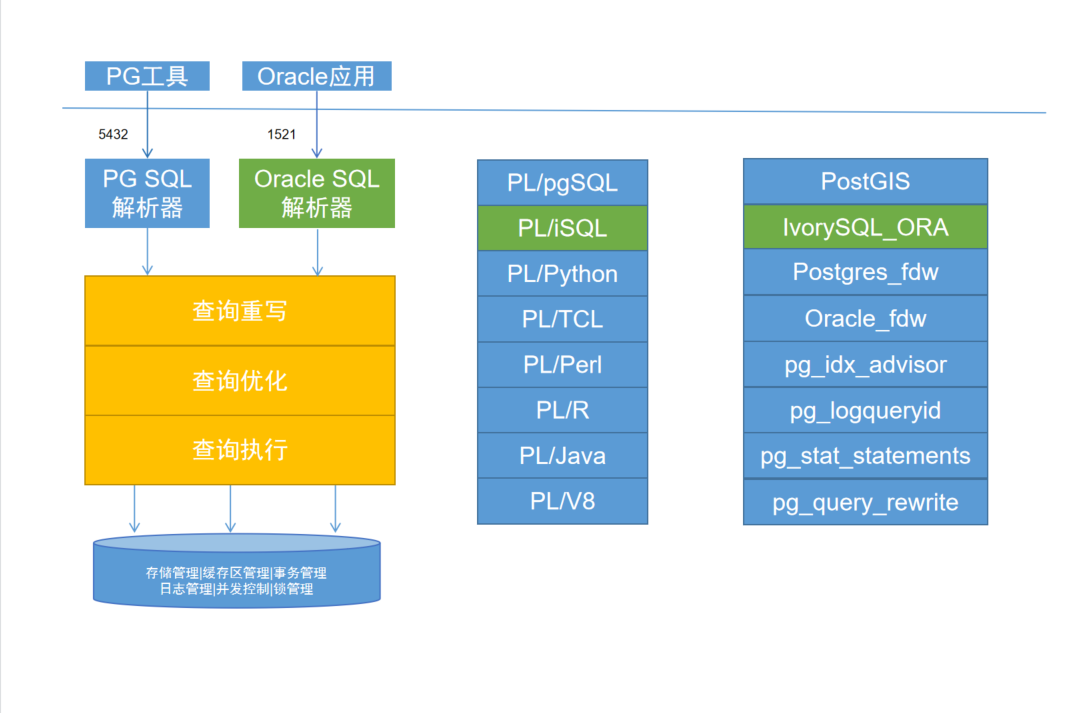
在启动信息中我们可以看到Ivorysql框架设计,双端口设计,同时也可以看到Ivorysql3.0是基于PostgreSQL 16版本的
兼容Oracle相关测试
createdb testdb
psql -d testdb
show ivorysql.compatible_mode;
set ivorysql.compatible_mode = 'oracle';
#测试有oracle特性的SQL
select sysdate from dual;
create table t (id number,name varchar2(30));
insert into t values(1,'zhangshan'),(2,'lisi'),(3,'wangwu');
select * from t;
CREATE or replace FUNCTION ora_func RETURN integer AS
BEGIN
    RETURN 1;
END;
select ora_func() from dual;
操作如下
[ivorysql@ivorysql data]$ createdb testdb
[ivorysql@ivorysql data]$ psql -d testdb
psql (16.0)
Type "help" for help.

testdb=# show ivorysql.compatible_mode;
 ivorysql.compatible_mode
--------------------------
 pg
(1 row)

testdb=# set ivorysql.compatible_mode = 'oracle';
SET
testdb=# select sysdate from dual;
  sysdate
------------
 2023-11-20
(1 row)

testdb=# create table t (id number,name varchar2(30));
CREATE TABLE
testdb=# insert into t values(1,'zhangshan'),(2,'lisi'),(3,'wangwu');
INSERT 0 3
testdb=# select * from t;
 id |   name
----+-----------
 1  | zhangshan
 2  | lisi
 3  | wangwu
(3 rows)

testdb=# CREATE or replace FUNCTION ora_func RETURN integer AS
testdb-# BEGIN
testdb-#     RETURN 1;
testdb-# END;
CREATE FUNCTION
testdb=# select ora_func() from dual;
 ora_func
----------
        1
(1 row)

testdb=#
在测试过程中包体、存储过程等一直有语法的错误,不知道是安装的问题还是什么其他原因造成。有哪位能留言指点一下,先感谢了。
总结
简单测试了一下IvorySql数据库,毕竟是PostgreSQL 研发的,而且紧跟最新版本16。还拥有Oracle的兼容性,方便去O企业。
