




Amoro 是一个构建在 Apache Iceberg 等开放数据湖表格之上的湖仓管理系统,由网易杭研大数据团队发起开源。Amoro 提供了一套可插拔的数据自优化机制和管理服务,旨在为用户带来开箱即用的湖仓使用体验。本文来自思科 Software Engineer、Amoro Committer 白旭,分享了 Amoro 在思科云原生湖仓场景的实践。
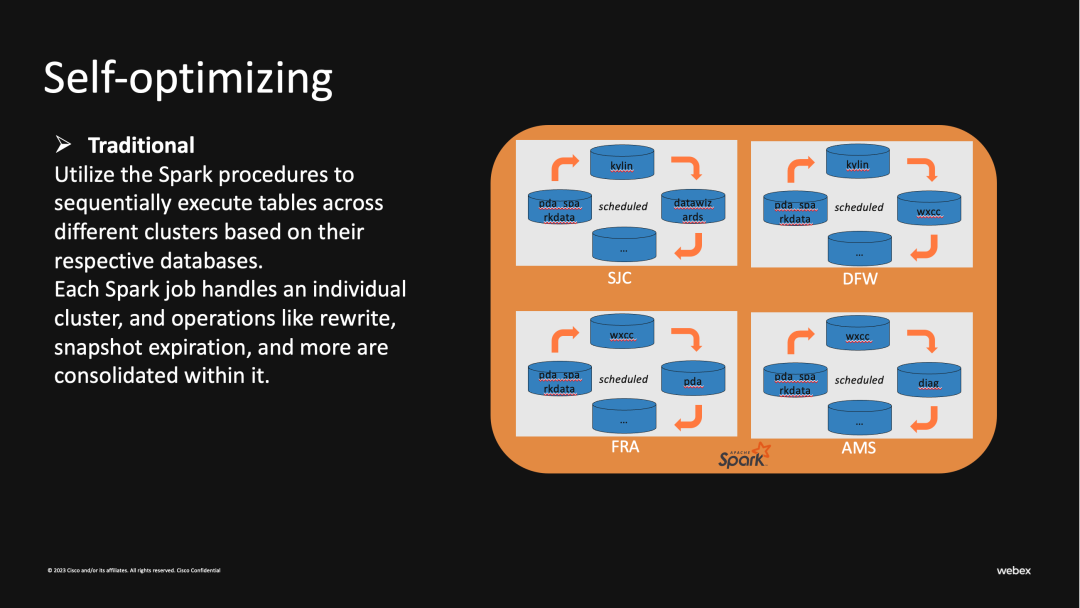
● 高资源占用:每个Spark job可能会超过40core和300GB的内存
● 执行时间长:每个环境有诸多Iceberg表需要合并,并且当合并数据量大的表时会阻塞其他表,这使得每个Pocedure执行时间都过长
● 低容错:一个合并任务可能包含多个Iceberg表,当某个表出现错误时会导致整个Job的失败
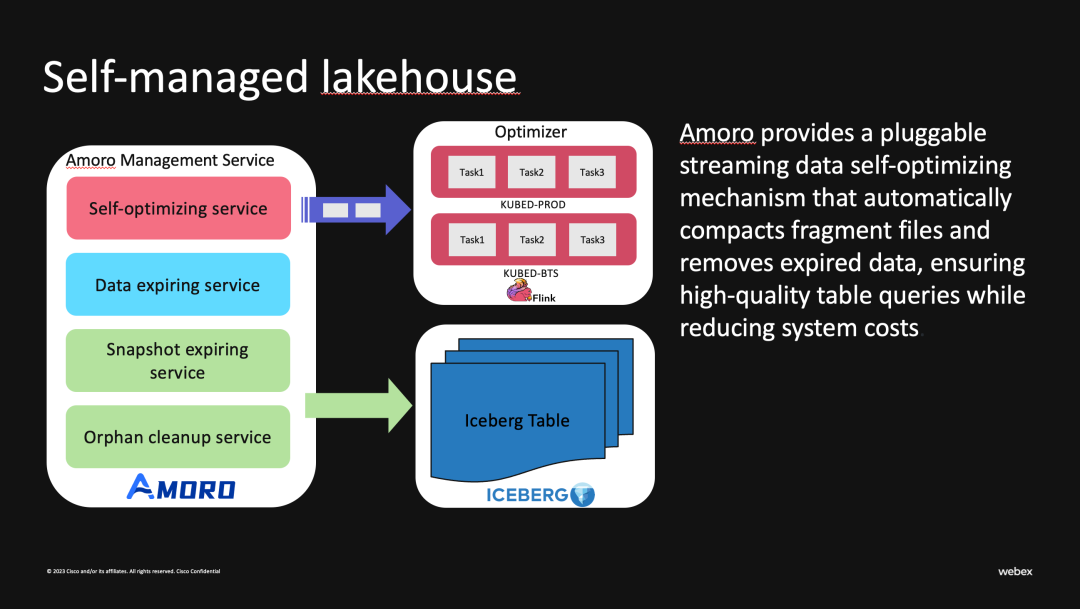
使用情况
Iceberg AWS Integrations
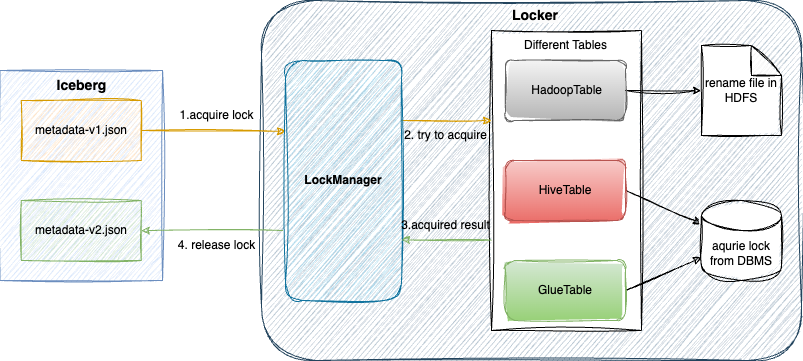
LockManager
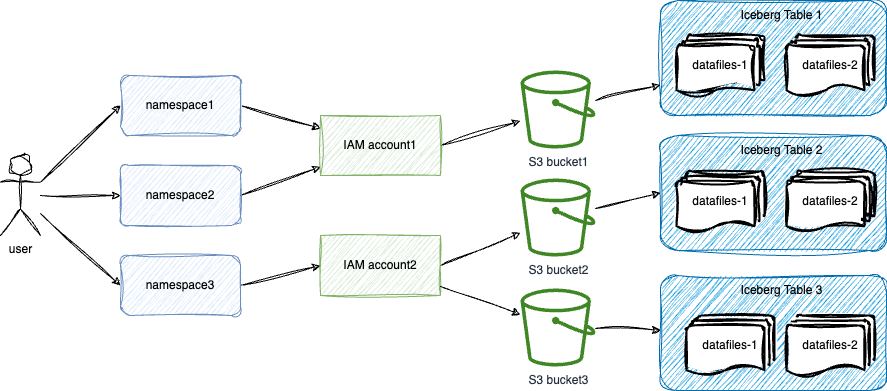
权限控制
S3 Intelligent-Tiering
Amazon S3 Intelligent-Tiering 存储类旨在通过当访问模式改变时自动将数据移动到最具成本效益的访问层来优化存储成本。S3 Intelligent-Tiering 存储类自动将对象存储在三个访问层中:一个针对频繁访问进行了优化的层,一个针对不频繁访问进行了优化的更低成本的层,以及一个针对很少访问的数据优化的极低成本层。每月只需支付少量的对象监控和自动化费用,S3 Intelligent-Tiering 即可将连续 30 天未访问的对象移动到不频繁访问层,实现 40% 的节省,并在 90 天未访问之后,将其移动到归档即时访问层,实现 68% 的节省。
AMS AWS Adaptions
apiVersion: apps/v1kind: Deploymentmetadata: labels: app.kubernetes.io/name: ams name: amsspec: ... template: metadata: labels: app.kubernetes.io/name: ams spec: ... containers: - env: - name: AWS_ACCESS_KEY_ID value: AKIXXXXXXXXXXXXXXXX - name: AWS_SECRET_ACCESS_KEY value: fjHyrM1wTJ8CLP13+GU1bCGG1RGlL1xT1lXyBb11
03 部署实践
打包镜像
手动打包:
mvn clean install -DskipTests -am -e -pl dist
docker build docker/ams/ --platform amd64 -t xxx/amoro && docker push xxx/amoro
打包好的 docker image 会在下述 Deployment 资源中引用并部署。
编写 Helm chart
● _helpers.tpl 模版,与预定义了镜像,label 等基础信息
{{- define "udp.amoro.image.fullname" -}}{{ .Values.image.repository }}/{{ .Values.image.component }}:{{ .Values.image.tag | default .Chart.AppVersion }}{{- end -}}{{- define "udp.amoro.common.labels" -}}app.kubernetes.io/instance: {{ .Release.Name }}app.kubernetes.io/managed-by: {{ .Release.Service }}{{- end -}}{{- define "amoro.home" -}}{{ .Values.amoroHome | default "/usr/local/amoro" }}{{- end -}}
{{- define "amoro.pod.container.mounts" }}- name: logsmountPath: {{ include "amoro.home" . }}/logs- name: confmountPath: {{ include "amoro.home" . }}/conf/config.yamlreadOnly: truesubPath: "config.yaml"{{- if or .Values.amoroConf.log4j2 }}{{- /* log4j2.yaml from config-map*/ -}}- name: confmountPath: {{ include "amoro.home" . }}/conf/log4j2.xmlreadOnly: truesubPath: "log4j2.xml"{{- end }}{{- if or .Values.jvmOptions }}- name: confmountPath: {{ include "amoro.home" . }}/conf/jvm.propertiesreadOnly: truesubPath: "jvm.properties"{{- end -}}{{- end -}}{{- /* define amoro.pod.container.mounts end */ -}}{{/* defined volumes for pod */}}{{- define "amoro.pod.volumes" -}}- name: confconfigMap:name: config.yaml- name: logsemptyDir: {}{{- end -}}{{- /* define "amoro.pod.volumes" end */ -}}
与社区不同的是,我们通过IRSA或IAM认证放入环境变量中的方式进行进行统一管理和更新;另外Optimizer采用的是external模式,更关注AMS和Optimizer之间的连通性,所以把livenessProbe探针改为optimizing的TCP端口。
apiVersion: apps/v1kind: Deploymentmetadata:labels:app.kubernetes.io/name: amsname: amsspec:replicas: {{ .Values.replicas }}selector:matchLabels:app.kubernetes.io/name: amsstrategy:type: {{ .Values.strategy.type | quote }}rollingUpdate:maxSurge: {{ .Values.strategy.rollingUpdate.maxSurge | quote }}maxUnavailable: {{ .Values.strategy.rollingUpdate.maxUnavailable | quote }}template:metadata:labels:app.kubernetes.io/name: amsspec:{{- if .Values.affinity }}affinity:{{- toYaml .Values.affinity | nindent 8 }}{{- end }}{{- if .Values.nodeSelector }}nodeSelector:{{- toYaml .Values.nodeSelector | nindent 8 }}{{- end }}{{- if .Values.tolerations }}tolerations:{{- toYaml .Values.tolerations | nindent 8 }}{{- end }}{{- if .Values.image.pullSecret }}imagePullSecrets:- name: {{ .Values.image.pullSecret }}{{- end }}serviceAccountName: {{ .Values.serviceAccount.name }}containers:- env:- name: AMS_DATABASE_PASSWORDvalueFrom:secretKeyRef:name: udp-amoro-externaldb-secretkey: database-password-udpimage: {{ include "udp.amoro.image.fullname" .}}imagePullPolicy: {{ .Values.image.pullPolicy }}name: amsports:- containerPort: {{ .Values.ports.amoroServer }}name: "amoro-server"- containerPort: {{ .Values.ports.optimizing }}name: "optimizing"- containerPort: {{ .Values.ports.jmxExporter }}name: "jmx-exporter"{{- if .Values.livenessProbe.enabled }}livenessProbe:tcpSocket:port: {{ .Values.ports.optimizing }}initialDelaySeconds: {{ .Values.livenessProbe.initialDelaySeconds }}periodSeconds: {{ .Values.livenessProbe.periodSeconds }}timeoutSeconds: {{ .Values.livenessProbe.timeoutSeconds }}failureThreshold: {{ .Values.livenessProbe.failureThreshold }}successThreshold: {{ .Values.livenessProbe.successThreshold }}{{- end }}{{- if .Values.readinessProbe.enabled }}readinessProbe:httpGet:path: /versionInfoport: amoro-serverinitialDelaySeconds: {{ .Values.readinessProbe.initialDelaySeconds }}periodSeconds: {{ .Values.readinessProbe.periodSeconds }}timeoutSeconds: {{ .Values.readinessProbe.timeoutSeconds }}failureThreshold: {{ .Values.readinessProbe.failureThreshold }}successThreshold: {{ .Values.readinessProbe.successThreshold }}{{- end }}resources:{{- toYaml .Values.resources | nindent 12 }}volumeMounts:{{- include "amoro.pod.container.mounts" . | nindent 12}}securityContext:{{- toYaml .Values.podSecurityContext | nindent 12 }}dnsPolicy: ClusterFirstrestartPolicy: {{ .Values.image.restartPolicy }}schedulerName: default-schedulerterminationGracePeriodSeconds: 30volumes:{{- include "amoro.pod.volumes" . | nindent 8}}
定义Amoro Pod访问的端口
apiVersion: v1kind: Servicemetadata:labels:{{- include "udp.amoro.labels" . | nindent 4 }}name: amsspec:ports:- name: amoro-serverport: {{ .Values.ports.amoroServer }}protocol: TCP- name: optimizingport: {{ .Values.ports.optimizing }}protocol: TCP- name: jmx-exporterport: {{ .Values.ports.jmxExporter }}protocol: TCPselector:{{- include "udp.amoro.labels" . | nindent 4 }}
{{- if .Values.serviceAccount.create -}}apiVersion: v1kind: ServiceAccountmetadata:name: {{ .Values.serviceAccount.name }}labels:{{- include "udp.amoro.labels" . | nindent 4 }}annotations:eks.amazonaws.com/role-arn: {{ .Values.serviceAccount.iamRoleARN }}{{- end -}}
我们结合 SecertStore,ExternalSecret 管理敏感信息,将其存储在外部系统(如 Vault,Azure Key Vault 等)中,并通过引用这些外部密钥和凭据将其注入 Kubernetes 的 Secert 对象中。
Ingress 管理 Kubernetes 集群内部的 HTTP,HTTPS 路由,将外部流量路由到集群内部的服务,所以配置 Ingress 后我们可以通过 host 的方式访问其 WebUI
{{- if .Values.ingress.enabled -}}apiVersion: networking.k8s.io/v1kind: Ingressmetadata:name: amorolabels:{{- include "udp.amoro.labels" . | nindent 4 }}{{- with .Values.ingress.annotations }}annotations:{{- toYaml . | nindent 4 }}{{- end }}spec:rules:- host: {{ .Values.ingress.host }}http:paths:- path: {{ .Values.ingress.path }}pathType: {{ .Values.ingress.pathType }}backend:service:name: amsport:number: {{ .Values.ports.amoroServer }}{{- end }}
为了方便监控 AMS 的状态,我们在 Docker 镜像中配置 Prometheus 并暴露 jmx exporter 端口,以便收集和存储与 Amoro Pod 相关的度量指标。
apiVersion: monitoring.coreos.com/v1kind: PodMonitormetadata:labels:app.kubernetes.io/name: amoro-monitorname: amoro-monitorspec:namespaceSelector:any: truepodMetricsEndpoints:- interval: 60sport: jmx-exporterselector:matchLabels:app.kubernetes.io/name: ams
-- 安装/升级amoro helmhelm upgrade -install amoro ./ --namespace amoro
注册 GlueCatalog
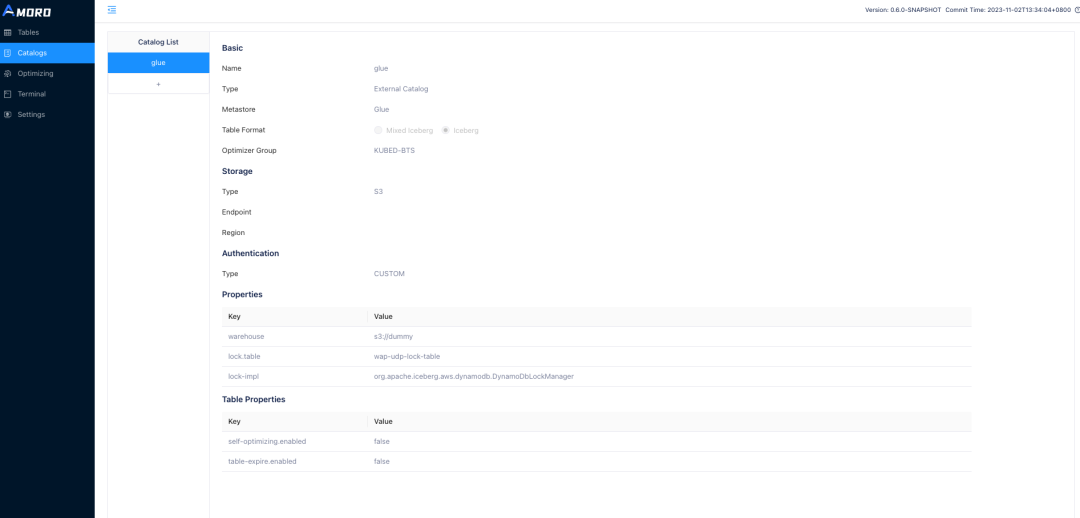
● warehouse 为必填项,指定数据仓库根目录,当然你也可以使用简易的 warehouse 地址作为占位
● 在生产环境中配置建议配置 lock-impl 和 lock.table 用于保证 metadata.json 文件的修改原子性
● 对于使用 IRSA 认证的 AMS,需要设置参数 client.credentials-provider 为 software.amazon.awssdk.auth.credentials.WebIdentityTokenFileCredentialsProvider 来获取正确的认证信息
04 未来规划
1. 增量 SORT/ZORDER SORT:Data skipping 对于 Iceberg 的查询效率提升是显著的,尤其是对于查询条件相对固定的报表。此外更高效的文件跳过也可以减少读取表时对文件的 IO,降低外部访问 S3 时造成的流量开销。Clustering 的优化方式也让针对不同表的智能优化成为可能。
2. 完善监控告警:当前会基于 Amoro 的相关记录和指标做监控,例如 optimizing/pending/committing 超时告警,pod 状态监控等。除了这些还需要基于表本身的状态做健康状态的监控,提前预报表的读/写放大。
作者简介:白旭,来自思科 WebEx 数据平台的 Software Engineer,主要负责数据湖仓一体的研发与优化,Amoro Committer。
