



点击上方“IT那活儿”公众号--专注于企业全栈运维技术分享,不管IT什么活儿,干就完了!!!
1.1 安装软件
antdb使用官网包安装后,默认安装了python3.9,除此之外还需要安装以下包。
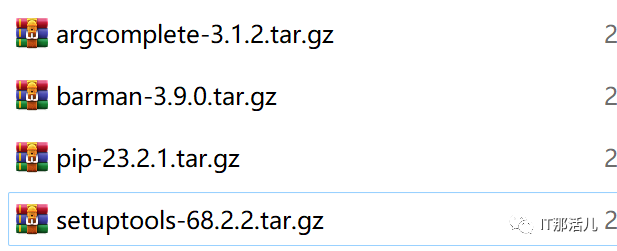
上传所有安装包,解压所有安装包执行以下进行安装:
python  setup.py build
python  setup.py install
安装成功显示如下:
[antdb@ant1 barman-3.9.0]$ barman -v
3.9.0 Barman by EnterpriseDB (www.enterprisedb.com)
[antdb@ant1 barman-3.9.0]$
安装工具包:
yum install -y rsync
1.2 备份服务器与备份节点间互信(节点上都做同时对自己互信)
ssh-keygen -t rsa
ssh-copy-id -i .ssh/id_rsa.pub antdb@
ssh-copy-id -i .ssh/id_rsa.pub antdb@
1.3 数据库节点相关参数修改
vi postgresql.conf
listen_addresses = '*'
wal_level = replica
archive_mode = on
archive_command = 'rsync -a %p antdb@ :/backup/antdb/barman/data/ant1/incoming/%f'
pg_ctl restart -D antdb/app/antdb/data/ (reload也可以)
以上归档的路径在barman服务器show-server命令中可查看到:
incoming_wals_directory: backup/antdb/barman/data/ant1/incoming
vi pg_hba.conf
host all all  /24 trust
pg_ctl reload -D /antdb/app/antdb/data/
2.1 服务器配置
配置创建配置目录:
mkdir -p /backup/antdb/barman/{bin,conf,log,data}
[root@ant1 ~]# mkdir -p /backup/antdb/barman/{bin,conf,log,data}
[root@ant1 ~]# chown -R antdb:antdb /backup/
配置全局参数文件:
barman_user = antdb
configuration_files_directory = /backup/antdb/barman/conf
barman_home = /backup/antdb/barman/data
log_file = /backup/antdb/barman/log/barman.log
compression = gzip
parallel_jobs = 3
minimum_redundancy = 1
retention_policy = RECOVERY WINDOW OF 1 WEEKS
配置需要备份节点参数文件:
[antdb@barman conf]$ cat ant1.conf
[ant1]
description = "ant1"
ssh_command = ssh antdb@ -q
conninfo = host= port=6655 user=antdb dbname=postgres
backup_method = rsync
backup_options = exclusive_backup
parallel_jobs = 3
archiver = on
archiver_batch_size = 50
[antdb@barman conf]$
2.2 相关场景
场景1 检查数据备份节点配置是否满足备份要求,并在data下生成ant1目录
[antdb@barman conf]$ barman -c /barman/barman-3.9.0/doc/barman.conf check ant1
Server ant1:
PostgreSQL: OK
superuser or standard user with backup privileges: OK
wal_level: OK
directories: OK
retention policy settings: OK
backup maximum age: OK (no last_backup_maximum_age provided)
backup minimum size: OK (0 B)
wal maximum age: OK (no last_wal_maximum_age provided)
wal size: OK (0 B)
compression settings: OK
failed backups: OK (there are 0 failed backups)
minimum redundancy requirements: OK (have 0 backups, expected at least 0)
ssh: OK (PostgreSQL server)
not in recovery: OK
exclusive backup supported: OK
systemid coherence: OK (no system Id stored on disk)
archive_mode: OK
archive_command: OK
continuous archiving: OK
archiver errors: OK
场景2 查看数据库备份节点相关信息
barman -c /barman/barman-3.9.0/doc/barman.conf show-server ant1
[antdb@barman conf]$ barman -c /barman/barman-3.9.0/doc/barman.conf show-server ant1
Server ant1:
        active: True
        archive_command: test ! -f /data/arch/%f && cp %p /data/arch/%f
        archive_mode: on
        archive_timeout: 0
        archived_count: 1
        archiver: True
        archiver_batch_size: 50
        autogenerate_manifest: False
        aws_profile: None
        aws_region: None
        azure_credential: None
        azure_resource_group: None
        azure_subscription_id: None
        backup_compression: None
        backup_compression_format: None
        backup_compression_level: None
        backup_compression_location: None
        backup_compression_workers: None
        backup_directory: /backup/antdb/barman/data/ant1
        backup_method: rsync
        backup_options: BackupOptions({'exclusive_backup'})
        bandwidth_limit: None
        barman_home: /backup/antdb/barman/data
        barman_lock_directory: /backup/antdb/barman/data
        basebackup_retry_sleep: 30
        basebackup_retry_times: 0
        basebackups_directory: /backup/antdb/barman/data/ant1/base
        check_timeout: 30
        checkpoint_timeout: 300
        compression: gzip
        config_file: /antdb/app/antdb/data/postgresql.conf
        conninfo: host= port=6655 user=antdb dbname=postgres
        create_slot: manual
        current_archived_wals_per_second: 0.0002566494492878868
        current_lsn: 0/2000148
        current_size: 37464444
        current_xlog: 000000010000000000000002
        custom_compression_filter: None
        custom_compression_magic: None
        custom_decompression_filter: None
        data_checksums: off
        data_directory: /antdb/app/antdb/data
        description: ant1
        disabled: False
        errors_directory: /backup/antdb/barman/data/ant1/errors
        failed_count: 0
        forward_config_path: False
        gcp_project: None
        gcp_zone: None
        has_backup_privileges: True
        hba_file: /antdb/app/antdb/data/pg_hba.conf
        hot_standby: on
        ident_file: /antdb/app/antdb/data/pg_ident.conf
        immediate_checkpoint: False
        incoming_wals_directory: /backup/antdb/barman/data/ant1/incoming
        is_archiving: True
        is_in_recovery: False
        is_superuser: True
        last_archived_time: 2023-10-11 07:10:58.269677-04:00
        last_archived_wal: 000000010000000000000001
        last_backup_maximum_age: None
        last_backup_minimum_size: None
        last_failed_time: None
        last_failed_wal: None
        last_wal_maximum_age: None
        max_incoming_wals_queue: None
        max_replication_slots: 10
        max_wal_senders: 10
        minimum_redundancy: 0
        msg_list: []
        name: ant1
        network_compression: False
        parallel_jobs: 3
        parallel_jobs_start_batch_period: 1
        parallel_jobs_start_batch_size: 10
        passive_node: False
        path_prefix: None
        post_archive_retry_script: None
        post_archive_script: None
        post_backup_retry_script: None
        post_backup_script: None
        post_delete_retry_script: None
        post_delete_script: None
        post_recovery_retry_script: None
        post_recovery_script: None
        post_wal_delete_retry_script: None
        post_wal_delete_script: None
        postgres_systemid: 7288644852645003097
        pre_archive_retry_script: None
        pre_archive_script: None
        pre_backup_retry_script: None
        pre_backup_script: None
        pre_delete_retry_script: None
        pre_delete_script: None
        pre_recovery_retry_script: None
        pre_recovery_script: None
        pre_wal_delete_retry_script: None
        pre_wal_delete_script: None
        primary_checkpoint_timeout: 0
        primary_conninfo: None
        primary_ssh_command: None
        recovery_options: RecoveryOptions()
        recovery_staging_path: None
        replication_slot: None
        replication_slot_support: True
        retention_policy: RECOVERY WINDOW OF 1 WEEKS
        retention_policy_mode: auto
        reuse_backup: None
        server_txt_version: 13.3
        slot_name: None
        snapshot_disks: None
        snapshot_gcp_project: None
        snapshot_instance: None
        snapshot_provider: None
        snapshot_zone: None
        ssh_command: ssh antdb@82.221.4.82 -q
        stats_reset: 2023-10-11 06:24:33.164439-04:00
        streaming_archiver: False
        streaming_archiver_batch_size: 0
        streaming_archiver_name: barman_receive_wal
        streaming_backup_name: barman_streaming_backup
        streaming_conninfo: host=82.221.4.82 port=6655 user=antdb dbname=postgres
        streaming_wals_directory: /backup/antdb/barman/data/ant1/streaming
        synchronous_standby_names: ['']
        tablespace_bandwidth_limit: None
        version_supported: True
        wal_compression: off
        wal_keep_size: 0
        wal_level: replica
        wal_retention_policy: MAIN
        wals_directory: /backup/antdb/barman/data/ant1/wals
        xlog_segment_size: 16777216
场景3 手动通过barman执行日志切换
[antdb@barman 0000000100000000]$ barman -c  /barman/barman-3.9.0/doc/barman.conf  switch-xlog --force --archive ant1
The WAL file 000000010000000000000003 has been closed on server 'ant1'
Waiting for the WAL file 000000010000000000000003 from server 'ant1' (max: 30 seconds)
Processing xlog segments from file archival for ant1
000000010000000000000003
[antdb@barman 0000000100000000]$ ls
000000010000000000000002  000000010000000000000003
场景4 barman 备份
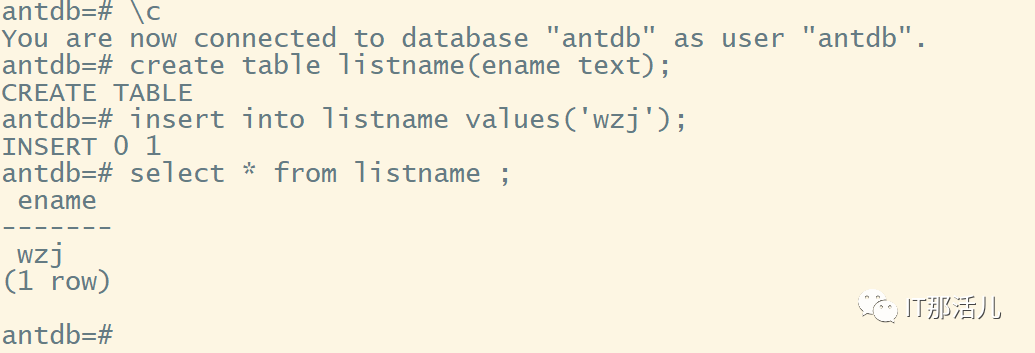
1)创建测试表进行恢复
2)执行备份命令
barman -c /barman/barman-3.9.0/doc/barman.conf backup ant1

[antdb@barman base]$ barman -c /barman/barman-3.9.0/doc/barman.conf backup ant1
Starting backup using rsync-exclusive method for server ant1 in /backup/antdb/barman/data/ant1/base/20231011T085220
Backup start at LSN: 0/7000028 (000000010000000000000007, 00000028)
This is the first backup for server ant1
WAL segments preceding the current backup have been found:
000000010000000000000005 from server ant1 has been removed
000000010000000000000005.00000028.backup from server ant1 has been removed
Starting backup copy via rsync/SSH for 20231011T085220 (3 jobs)
Copy done (time: 20 seconds)
This is the first backup for server ant1
Asking PostgreSQL server to finalize the backup.
Backup size: 35.5 MiB
Backup end at LSN: 0/7000138 (000000010000000000000007, 00000138)
Backup completed (start time: 2023-10-11 08:52:20.646388, elapsed time: 1 minute, 2 seconds)
Processing xlog segments from file archival for ant1
00000001000000000000000
000000010000000000000007
000000010000000000000007.00000028.backup
3)查看备份
barman -c /barman/barman-3.9.0/doc/barman.conf list-backup ant1
[antdb@barman 0000000100000000]$ barman -c /barman/barman-3.9.0/doc/barman.conf list-backup ant1
ant1 20231011T085220 - Wed Oct 11 08:53:01 2023 - Size: 35.5 MiB - WAL Size: 0 B
ant1 20231011T083736 – FAILED
4)查看备份详细信息
barman -c /barman/barman-3.9.0/doc/barman.conf show-backup ant1 20231011T085220
[antdb@barman 0000000100000000]$ barman -c /barman/barman-3.9.0/doc/barman.conf show-backup ant1 20231011T085220
Backup 20231011T085220:
Server Name            : ant1
System Id              : 7288644852645003097
Status                 : DONE
PostgreSQL Version     : 130003
PGDATA directory       : /antdb/app/antdb/data

Base backup information:
Disk usage           : 35.5 MiB (35.5 MiB with WALs)
Incremental size     : 35.5 MiB (-0.00%)
Timeline : 1
Begin WAL : 000000010000000000000007
End WAL : 000000010000000000000007
WAL number           : 1
WAL compression ratio: 99.90%
Begin time           : 2023-10-11 08:52:20.273476-04:00
End time             : 2023-10-11 08:53:01.763870-04:00
Copy time            : 20 seconds + 20 seconds startup
Estimated throughput : 1.7 MiB/s (3 jobs)
Begin Offset         : 40
End Offset           : 312
Begin LSN : 0/7000028
End LSN : 0/7000138

WAL information:
No of files : 0
Disk usage           : 0 B
Last available : 000000010000000000000007

Catalog information:
Retention Policy     : VALID
Previous Backup      : - (this is the oldest base backup)
Next Backup          : - (this is the latest base backup)
5)查看实时备份情况
[antdb@barman 0000000100000000]$ barman -c /barman/barman-3.9.0/doc/barman.conf status ant1
Server ant1:
Description: ant1
Active: True
Disabled: False
PostgreSQL version: 13.3
Cluster state: in production
Current data size: 35.8 MiB
PostgreSQL Data directory: /antdb/app/antdb/data
Current WAL segment: 000000010000000000000008
PostgreSQL 'archive_command' setting: rsync -a %p antdb@:/backup/antdb/barman/data/ant1/incoming/%f
Last archived WAL: 000000010000000000000007.00000028.backup, at Wed Oct 11 08:53:22 2023
Failures of WAL archiver: 0
Server WAL archiving rate: 2.99/hour
Passive node: False
Retention policies: enforced (mode: auto, retention: RECOVERY WINDOW OF 1 WEEKS, WAL retention: MAIN)
No. of available backups: 1
First available backup: 20231011T085220
Last available backup: 20231011T085220
Minimum redundancy requirements: satisfied (1/0)
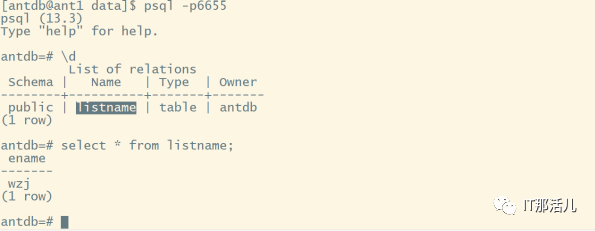
6)删除数据库中的测试表进行恢复测试
antdb=# drop table listname ;

DROP TABLE

antdb=# \d

Did not find any relations.
7)恢复
恢复到某个指定的备份,
[antdb@barman ant1]$ barman -c /barman/barman-3.9.0/doc/barman.conf recover ant1 20231011T085220 /antdb/app/antdb/data --remote-ssh-command "ssh antdb@"
Starting remote restore for server ant1 using backup 20231011T085220
Destination directory: /antdb/app/antdb/data
Remote command: ssh antdb@
Using safe horizon time for smart rsync copy: 2023-10-11 08:52:20.273476-04:00
Copying the base backup.
Copying required WAL segments.
Generating archive status files
Identify dangerous settings in destination directory.
IMPORTANT
These settings have been modified to prevent data losses
postgresql.conf line 237: archive_command = false
Recovery completed (start time: 2023-10-11 10:56:47.224308-04:00, elapsed time: 2 minutes, 34 seconds)
Your PostgreSQL server has been successfully prepared for recovery!
8)登录数据库服务器执行
pg_ctl start -D /antdb/app/antdb/data/ 开启数据库进行恢复
与此同时服务器打印日志,参数文件被修改,归档命令被注释需要在所有节点恢复完成取数据确认无误后集群开始正式运行之后重新配置归档命令。
[antdb@ant1 data]$ cat postgresql.conf|grep archive_command
#BARMAN#archive_command = 'rsync -a %p antdb@:/backup/antdb/barman/data/ant1/incoming/%f'            # command to use to archive a logfile segment
archive_command = false
进入数据库查看该表已恢复:
报错:
check是都满足barman备份时两个报错:
1)WAL archive: FAILED (please make sure WAL shipping is setup)
手动执行运行维护任务Run maintenance tasks (global command)
barman -c /barman/barman-3.9.0/doc/barman.conf cron
2)minimum redundancy requirements: FAILED (have 0 backups, expected at least 1)
修改参数minimum redundancy=0

本文作者:事业二部(上海新炬中北团队)
本文来源:“IT那活儿”公众号

