



大家好,本篇是上一篇Doris 基础安装的延续篇。
我们把公司内现有的技术架构做一个整合: 业务系统纯OLTP(mysql MGR 8.0.20) + Binlog日志流处理(flinkCDC connector) + 新型数仓平台(Doris 2.0.2)
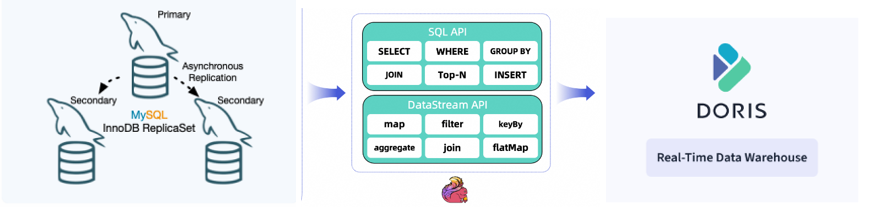
关于Doris的安装可以参考: https://www.modb.pro/db/1729406010585587712
关于源端mysql MGR 3节点的安装,这里不做过多介绍,国内的mysql生态应该是全球第一的。
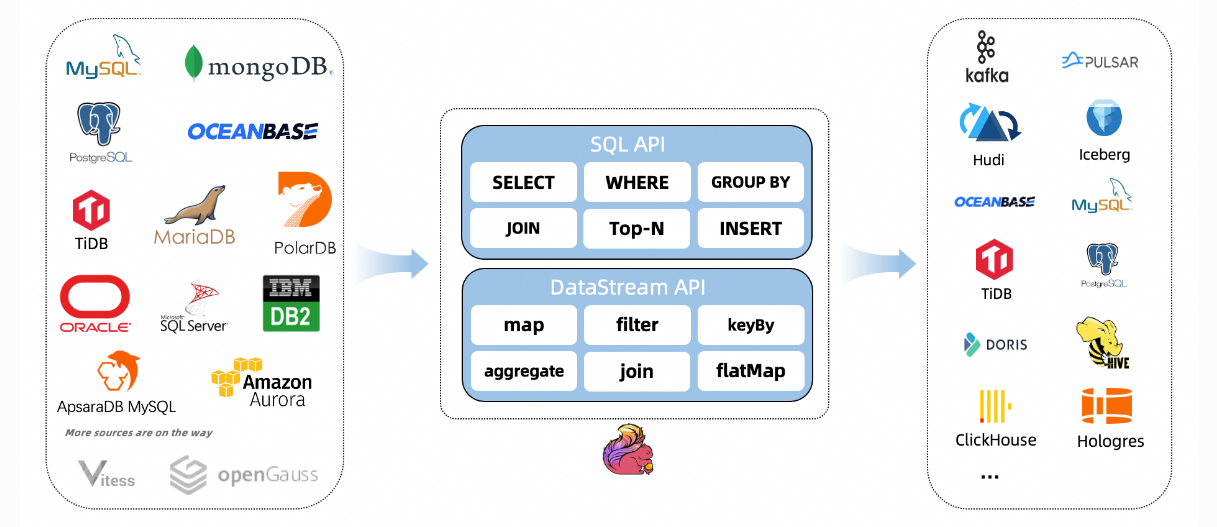
我们先访问一下Flink CDC connector的主页: https://ververica.github.io/flink-cdc-connectors/release-2.4/content/about.html
我们可以看到Flink CDC 起到了 sourceDB 和 TargetDB 之间的桥梁作用。
在安装之前我们需要注意JDK的版本和flink 之间的兼容性。(从flink1.15版本开始需要JDK11版本)
https://nightlies.apache.org/flink/flink-docs-master/zh/release-notes/flink-1.15/

Flink 1.7.2 下载:
我们从官网上下载一个1.7.2的版本: https://flink.apache.org/downloads/

wget https://dlcdn.apache.org/flink/flink-1.17.2/flink-1.17.2-bin-scala_2.12.tgz
我们再来看看Flink CDC connector 和 Flink的版本兼容关系:https://ververica.github.io/flink-cdc-connectors/release-2.4/content/about.html
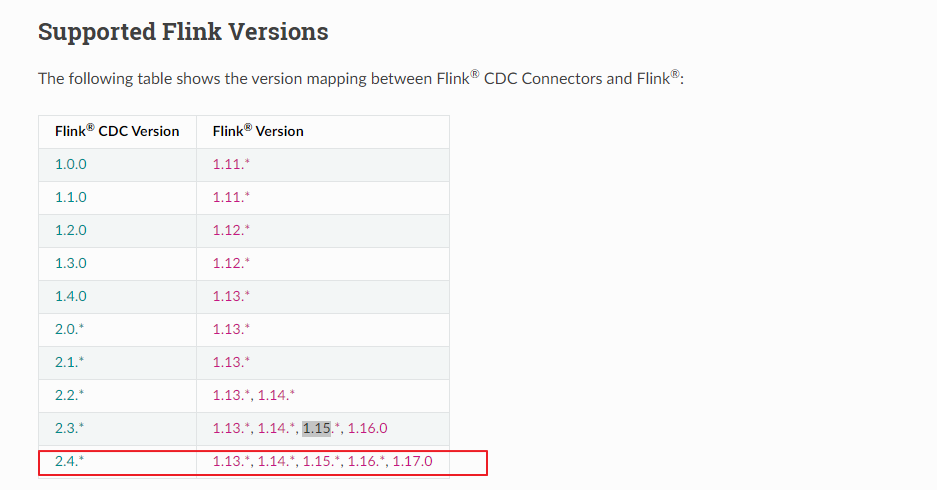
根据我们的Flink版本1.7.2,我们需要下载一个2.4.* 版本的 Flink CDC connector : https://github.com/ververica/flink-cdc-connectors/releases
我们下载版本为 2.4.2
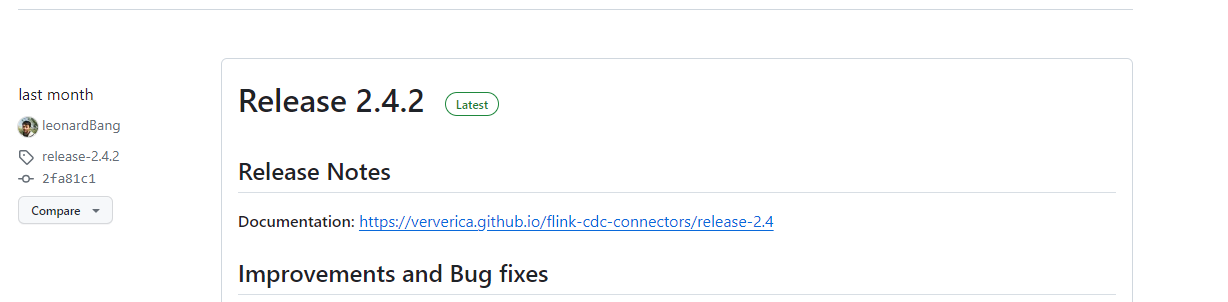
wget https://github.com/ververica/flink-cdc-connectors/archive/refs/tags/release-2.4.2.tar.gz
这里我们下载是源码版本,需要编译成JAR包,放到flink_home/lib下面:
这里我们的JDK版本是11
INFRA [flinkCDC@ljzdccapp006 ~]# java -version
java version "11.0.21" 2023-10-17 LTS
Java(TM) SE Runtime Environment 18.9 (build 11.0.21+9-LTS-193)
Java HotSpot(TM) 64-Bit Server VM 18.9 (build 11.0.21+9-LTS-193, mixed mode)
下载和配置maven:
wget https://repo.huaweicloud.com/apache/maven/maven-3/3.8.1/binaries/apache-maven-3.8.1-bin.tar.gz
配置环境变量:
vi .bash_profile

# .bash_profile


# Get the aliases and functions
if [ -f ~/.bashrc ]; then
        . ~/.bashrc
fi


# User specific environment and startup programs
JAVA_HOME=/home/flinkCDC/jdk-11.0.21
MAVEN_HOME=/home/flinkCDC/apache-maven-3.8.1
PATH=$JAVA_HOME/bin:$PATH:$HOME/.local/bin:$HOME/bin:$MAVEN_HOME/bin


export PATH

INFRA [flinkCDC@ljzdccapp006 ~]# source .bash_profile
INFRA [flinkCDC@ljzdccapp006 ~]# mvn -version
Apache Maven 3.8.1 (05c21c65bdfed0f71a2f2ada8b84da59348c4c5d)
Maven home: /home/flinkCDC/apache-maven-3.8.1
Java version: 11.0.21, vendor: Oracle Corporation, runtime: /home/flinkCDC/jdk-11.0.21
Default locale: en_US, platform encoding: UTF-8
OS name: "linux", version: "5.4.17-2102.203.6.el7uek.x86_64", arch: "amd64", family: "unix"
编译flinkCDC connector source code : 由于需要从MAVEN仓库下载依赖的JAR 这一步的时间比较长
cd flink-cdc-connectors
mvn clean install -DskipTests
除了源码编译的编译的方式, 我们这里采取直接下载(flink-sql-connector-mysql-cdc)Jar包的方式:
wget https://repo1.maven.org/maven2/com/ververica/flink-sql-connector-mysql-cdc/2.4.0/flink-sql-connector-mysql-cdc-2.4.0.jar
下载完成后拷贝这个JAR包直接拷贝到 ${flink_home}/lib下面
mv flink-sql-connector-mysql-cdc-2.4.0.jar ./flink-1.17.2/lib/
我们再来下载一下目标端 flink doris connector的驱动jar包: https://doris.apache.org/zh-CN/docs/ecosystem/flink-doris-connector/
wget https://repo.maven.apache.org/maven2/org/apache/doris/flink-doris-connector-1.17/1.4.0/flink-doris-connector-1.17-1.4.0.jar
同样,下载完成后拷贝这个JAR包直接拷贝到 ${flink_home}/lib下面
mv flink-doris-connector-1.17-1.4.0.jar ./flink-1.17.2/lib/
目前为止,我们需要的flink 软件以及依赖的驱动包(flink CDC connector)已经配置完成。
下一步,我们登陆源端数据库 mysql 8.0 进行CDC同步账户的创建:3节点MGR(mysql 8.0.20)
select * from replication_group_members
--------------


+---------------------------+--------------------------------------+--------------+-------------+--------------+-------------+----------------+
| CHANNEL_NAME              | MEMBER_ID                            | MEMBER_HOST  | MEMBER_PORT | MEMBER_STATE | MEMBER_ROLE | MEMBER_VERSION |
+---------------------------+--------------------------------------+--------------+-------------+--------------+-------------+----------------+
| group_replication_applier | db000000-0010-0067-0208-000000000072 | 10.67.208.72 |        3310 | ONLINE       | SECONDARY   | 8.0.20         |
| group_replication_applier | db000000-0010-0067-0208-000000000073 | 10.67.208.73 |        3310 | ONLINE       | PRIMARY     | 8.0.20         |
| group_replication_applier | db000000-0010-0067-0208-000000000074 | 10.67.208.74 |        3310 | ONLINE       | SECONDARY   | 8.0.20         |
+---------------------------+--------------------------------------+--------------+-------------+--------------+-------------+----------------+
3 rows in set (0.00 sec)

root@localhost:mysql_sitDB.sock [performance_schema]> create user jason_cdc@'10.%' identified by "12345678_XbB";
--------------
create user jason_cdc@'10.%' identified by "12345678_XbB"
--------------


Query OK, 0 rows affected (0.01 sec)


root@localhost:mysql_sitDB.sock [performance_schema]>  GRANT SELECT, SHOW DATABASES, REPLICATION SLAVE, REPLICATION CLIENT ON *.* TO jason_cdc@'10.%';
--------------
GRANT SELECT, SHOW DATABASES, REPLICATION SLAVE, REPLICATION CLIENT ON *.* TO jason_cdc@'10.%'
--------------


Query OK, 0 rows affected (0.01 sec)
登陆目标端 Doris的 FE节点: 创建同步账户:
mysql> create user doris_cdc@'10.%' identified by "123456" ;
Query OK, 0 rows affected (0.01 sec)

mysql> GRANT ALL ON *.* to doris_cdc@'10.%';
Query OK, 0 rows affected (0.02 sec)
我们配置完源端和目标端之后我们尝试本地模式启动flink:
启动之前我们尝试修改conf文件,外部浏览器可以访问UI界面8081
vi flink-conf.yaml
# The address that the REST & web server binds to
# By default, this is localhost, which prevents the REST & web server from
# being able to communicate outside of the machine/container it is running on.
#
# To enable this, set the bind address to one that has access to outside-facing
# network interface, such as 0.0.0.0.
#
rest.bind-address: 0.0.0.0
启动flink: local模式
INFRA [flinkCDC@ljzdccapp006 bin]# ./start-cluster.sh
Starting cluster.
Starting standalonesession daemon on host ljzdccapp006.cn.infra.
Starting taskexecutor daemon on host ljzdccapp006.cn.infra.

INFRA [flinkCDC@ljzdccapp006 bin]# jps
75585 Jps
75444 TaskManagerRunner
75117 StandaloneSessionClusterEntrypoint
我们来提交任务: 我们可以看到 Job has been submitted with JobID e008da67ab0d09aa0498ec707f12ce34
INFRA [flinkCDC@ljzdccapp006 flink-1.17.2]# bin/flink run \
>     -Dexecution.checkpointing.interval=10s \
>     -Dparallelism.default=1 \
>     -c org.apache.doris.flink.tools.cdc.CdcTools \
>     lib/flink-doris-connector-1.17-1.4.0.jar \
>     mysql-sync-database \
>     --database test_db \
>     --mysql-conf hostname=10.67.208.73 \
>     --mysql-conf port=3310 \
>     --mysql-conf username=jason_cdc \
>     --mysql-conf password=******** \
>     --mysql-conf database-name=test_db \
>     --including-tables "t_test" \
>     --sink-conf fenodes=10.67.38.170:8030 \
>     --sink-conf username=doris_cdc \
>     --sink-conf password=******* \
>     --sink-conf jdbc-url=jdbc:mysql://10.67.38.170:9030 \
>     --sink-conf sink.label-prefix=label \
>     --table-conf replication_num=1


WARNING: An illegal reflective access operation has occurred
WARNING: Illegal reflective access by org.apache.flink.api.java.ClosureCleaner (file:/home/flinkCDC/flink-1.17.2/lib/flink-dist-1.17.2.jar) to field java.lang.String.value
WARNING: Please consider reporting this to the maintainers of org.apache.flink.api.java.ClosureCleaner
WARNING: Use --illegal-access=warn to enable warnings of further illegal reflective access operations
WARNING: All illegal access operations will be denied in a future release
Job has been submitted with JobID e008da67ab0d09aa0498ec707f12ce34
我们访问web UI界面: http://10.67.38.170:8081/#/overview
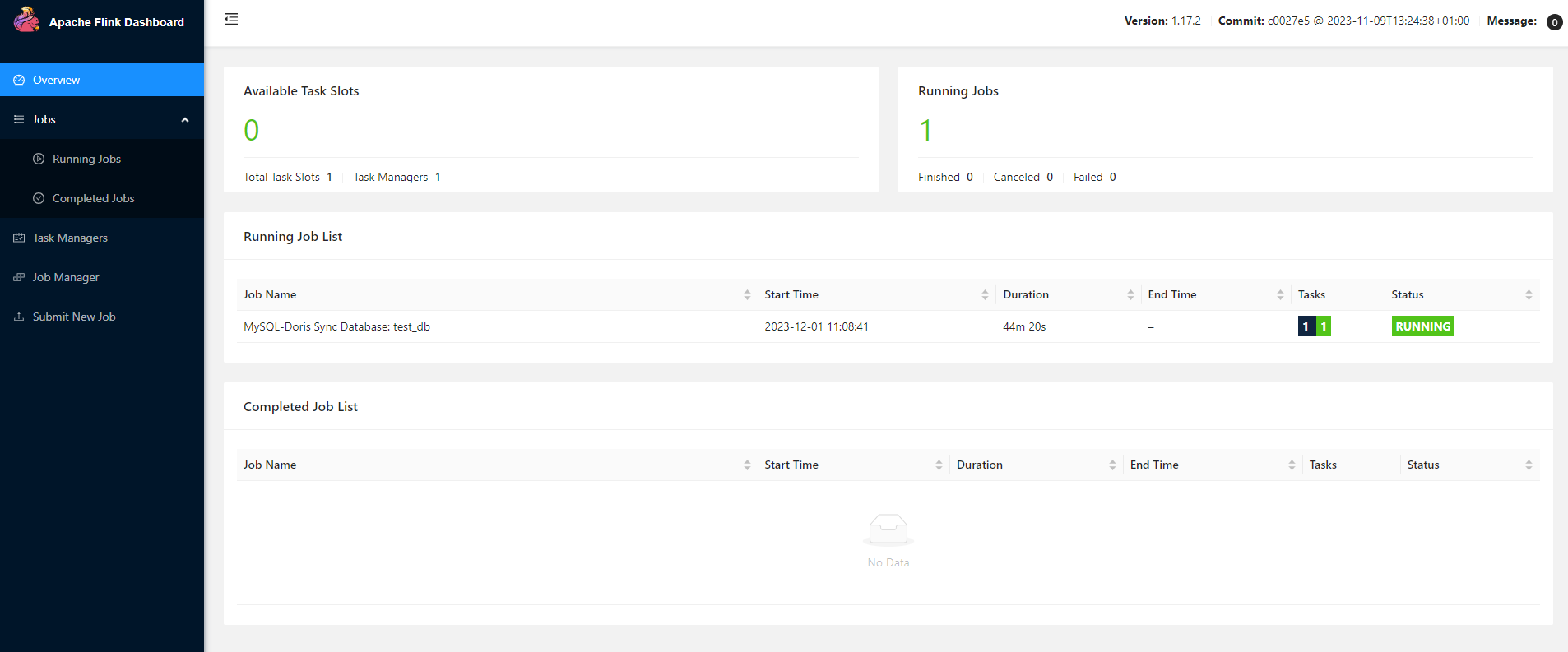
我们尝试从源端mysql 插入一条数据:
root@localhost:mysql_sitDB.sock [test_db]> insert into t_test select 1, 'jason';
--------------
insert into t_test select 1, 'jason'
--------------


Query OK, 1 row affected (0.01 sec)
Records: 1  Duplicates: 0  Warnings: 0
我们查看目标端 doris: 数据已经同步过来了
mysql> select * from t_test;
+------+-------+
| id   | name  |
+------+-------+
|    1 | jason |
+------+-------+
1 row in set (0.04 sec)
我们再次尝试更新源端mysql的数据:
root@localhost:mysql_sitDB.sock [test_db]> update t_test set name = 'jason_new' where id =1;
--------------
update t_test set name = 'jason_new' where id =1
--------------


Query OK, 1 row affected (0.00 sec)
Rows matched: 1  Changed: 1  Warnings: 0
再次查看目标端Doris的变化:
mysql> select * from t_test;
+------+-----------+
| id   | name      |
+------+-----------+
|    1 | jason_new |
+------+-----------+
1 row in set (0.02 sec)
本文属于基础整合篇,下一篇会带来mysql和Doris上的查询性能对比。
Have a fun 😃 !
