



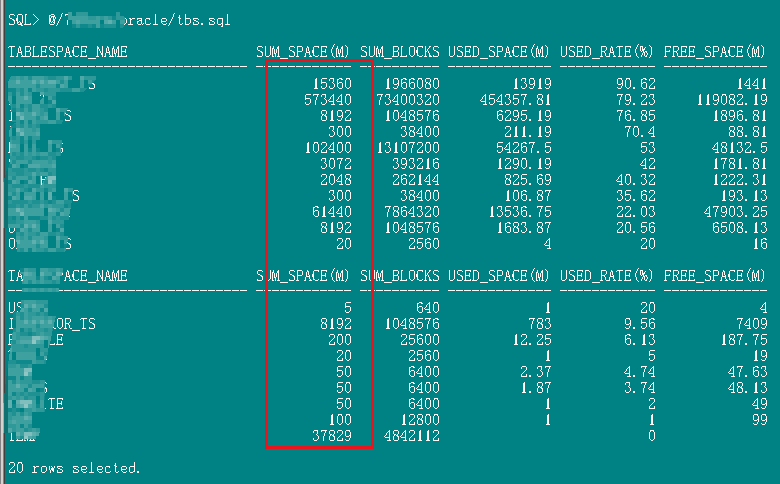


数据库大小:802G
实际使用:535G
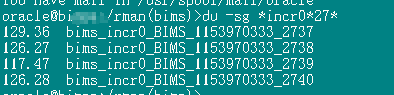
数据库0级备份集大小:500G
1级增量备份大小:29G
备份集个数17个
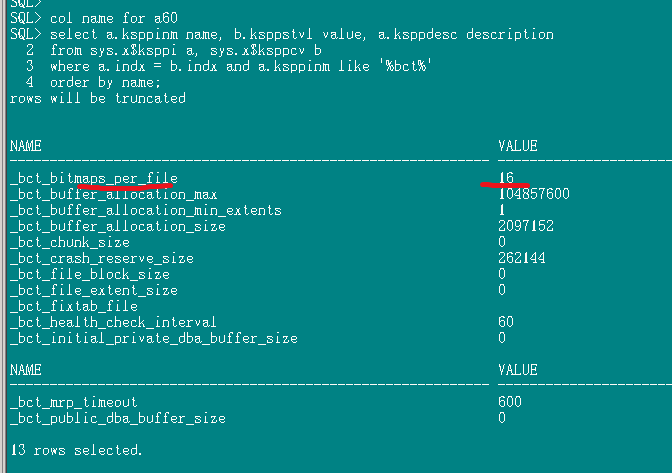
alter system set "_bct_bitmaps_per_file"=16 scope=both sid='*';
CONFIGURE RETENTION POLICY TO REDUNDANCY 3;
预估bct大小:
=1*(17+2)*(821260/250000)=62.4M
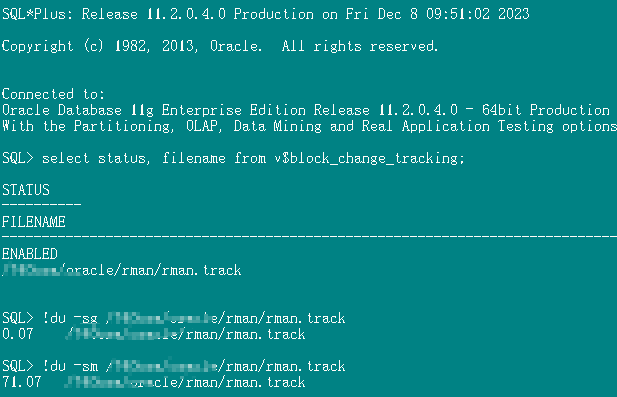
实际大小观察:
bct文件大小为:72M 相差10M
RMAN 10g : How To Size the Block Change Tracking File (Doc ID 306112.1)
This is a clarification of the documentation for sizing the disk space for the Block Change Tracking File.

The actual size of the Block Change Tracking File is determined by Oracle and cannot be changed by the end user.
The size of the block change tracking file can increase and decrease as the database changes.
The size is not related to the frequency of updates to the database.

Block Change Tracking is used to optimize incremental backups.
A new file is introduced:

- Changed blocks are tracked by the CTWR background process as redo is generated
- Database backups automatically use the change tracking file


Sizing of this file is important, and even though you can use V$BLOCK_CHANGE_TRACKING view
to monitor the usage, it may in some cases not be easy to change the size, ie when using raw devices.

SOLUTION
The formula is:

<size of change tracking file> = <# of redo threads> * (# of old backups + 2) * (size of db/250000)


Let’s take an example of a 500 GB database, with only one thread, and having eight backups kept
in RMAN. The repository for this will require a block change tracking file of 20 MB.

Threads * (number of old backups+2) * (database size in bytes/250000) = 20 MB

The amount of data that each bit in the change tracking file covers is 32KB. That's 262144 bits.
That is where the 1/250000 figure comes from. This is the ratio of the size of *one bitmap* in the
change tracking file, to the size of the database data that the bitmap covers. And, because we
keep up to 8 levels of bitmap history in the file, plus the current bitmap, that reduces the ratio
to about 1/30000, per enabled thread.

Dividing 1TB by 30000, you get 30 MB, per TB, per enabled thread.

So the parameters we use to determine the block change tracking file are:
- Database size
- Number of enabled threads
- Number of old backups. (The block change tracking file keeps a record of all changes between previous backups, up to eight in total)

Additional Information found in 12c Documentation
http://docs.oracle.com/database/121/BRADV/rcmbckba.htm#BRADV8125
Database Backup and Recovery User's Guide
.
9 Backing Up the Database

...
Using Block Change Tracking to Improve Incremental Backup Performance
...

Size of the Block Change Tracking File

The size of the block change tracking file is proportional to the size of the database and the number of enabled threads of redo. The size of the block change tracking file can increase and decrease as the database changes. The size is not related to the frequency of updates to the database.

Typically, the space required for block change tracking for a single instance is approximately 1/30,000 the size of the data blocks to be tracked. For an Oracle RAC environment, it is 1/30,000 of the size of the database, times the number of enabled threads.

The following factors that may cause the file to be larger than this estimate suggests:

To avoid the overhead of allocating space as your database grows, the block change tracking file size starts at 10 megabytes. New space is allocated in 10 MB increments.Thus, for any database up to approximately 300 gigabytes, the file size is no smaller than 10 MB, for up to approximately 600 gigabytes the file size is no smaller than 20 megabytes, and so on.
For each data file, a minimum of 320 kilobytes of space is allocated in the block change tracking file, regardless of the size of the data file. Thus, if you have a large number of relatively small data files, the change tracking file is larger than for databases with a smaller number of larger data files containing the same data.

set lines 180 pages 200
COL INPUT_TYPE FORMAT a20
COL STATUS FORMAT a20
COL minutes FORMAT 999.999
COL Input_mb FORMAT 99,999.99
COL Output_mb FORMAT 99,999.99

SELECT SESSION_KEY, INPUT_TYPE, STATUS,
TO_CHAR(START_TIME,'yyyy-mm-dd hh24:mi') start_time,
TO_CHAR(END_TIME,'yyyy-mm-dd hh24:mi') end_time,
INPUT_BYTES/1024/1024 Input_mb,
OUTPUT_BYTES/1024/1024 Output_mb,
ELAPSED_SECONDS/60 minutes
FROM V$RMAN_BACKUP_JOB_DETAILS
ORDER BY SESSION_KEY;

============================
 INPUT_BYTES
 NUMBER
 Sum of all input file sizes backed up by this job
 OUTPUT_BYTES
 NUMBER
 Output size of all pieces generated by this job

INPUT_BYTES 实际上就是指备份时读取的文件大小,而 OUTPUT_BYTES 指的是备份实际备份出来的文件大小
最后修改时间:2023-12-10 17:37:58
「喜欢这篇文章,您的关注和赞赏是给作者最好的鼓励」
关注作者
【版权声明】本文为墨天轮用户原创内容,转载时必须标注文章的来源(墨天轮),文章链接,文章作者等基本信息,否则作者和墨天轮有权追究责任。如果您发现墨天轮中有涉嫌抄袭或者侵权的内容,欢迎发送邮件至:contact@modb.pro进行举报,并提供相关证据,一经查实,墨天轮将立刻删除相关内容。
