



| 数据类型 | 别名 | 说明 |
|---|---|---|
| json | 文本 JSON 数据 | |
| jsonb | 二进制 JSON 数据,分解 |
- json是对输入的完整拷贝,使用时再去解析,所以它会保留输入的空格,重复键以及顺序等,存储快,使用慢;
- jsonb是解析输入后保存的二进制,它在解析时会删除不必要的空格和重复的键,顺序和输入可能也不相同。使用时不用再次解析,jsonb类型存储稍慢,使用较快;
- 键值对的键必须使用双引号;
SELECT '{"bar": "baz", "balance":      7.77, "active":false}'::json;

SELECT '{"bar": "baz", "balance":      7.77, "active":false}'::jsonb;

create table api(jdoc jsonb);

insert into api values('{
"guid": "9c36adc1-7fb5-4d5b-83b4-90356a46061a",
"name": "Angela Barton",
"is_active": true,
"company": "Magnafone",
"address": "178 Howard Place, Gulf, Washington, 702",
"registered": "2009-11-07T08:53:22 +08:00",
"latitude": 19.793713,
"longitude": 86.513373,
"tags": [
"enim",
"aliquip",
"qui"
]}');

SELECT jdoc->'guid', jdoc->'name' FROM api WHERE jdoc @> '{"company": "Magnafone"}';

JSON类型的输入与输出
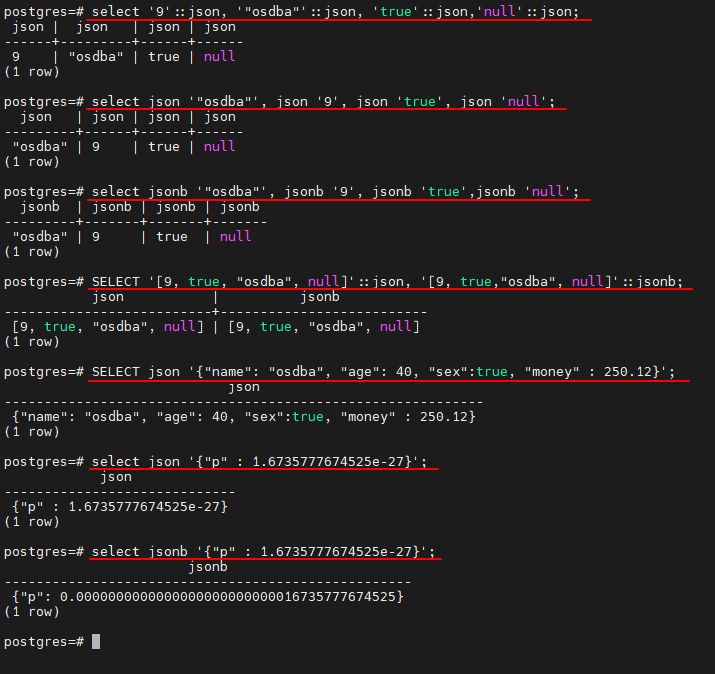
# 单个值
select '9'::json, '"osdba"'::json, 'true'::json,'null'::json;

# 把类型名放在单引号的字符串前面
select json '"osdba"', json '9', json 'true', json 'null';

# 使用JSONB类型
select jsonb '"osdba"', jsonb '9', jsonb 'true',jsonb 'null';

# 使用数组
SELECT '[9, true, "osdba", null]'::json, '[9, true,"osdba", null]'::jsonb;

# 使用字典
SELECT json '{"name": "osdba", "age": 40, "sex":true, "money" : 250.12}';

# 小数点
select json '{"p" : 1.6735777674525e-27}';

select jsonb '{"p" : 1.6735777674525e-27}';
# JSONB类型内部存储的是numeric类型,而不再是浮点数。
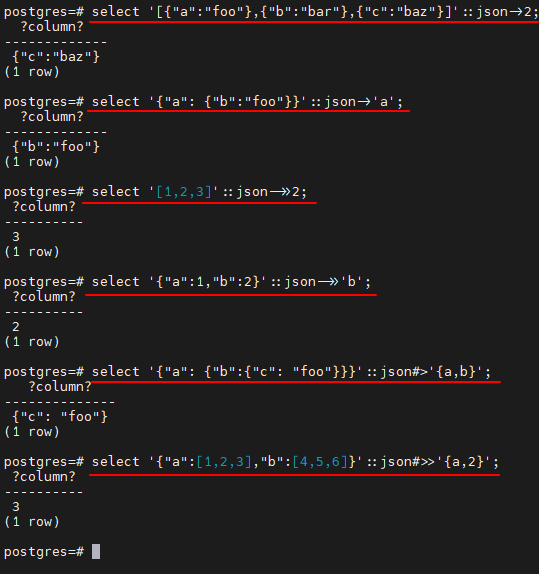
JSON类型和JSONB类型支持的操作符
| 操作符 | 右操作数类型 | 描述 | 示例 | 结果 |
|---|---|---|---|---|
| -> | int | 获取JSON数组元素(索引从0开始) | select ‘[{“a”:“foo”},{“b”:“bar”},{“c”:“baz”}]’::json->2; | {“c”:“baz”} |
| -> | text | 通过键获取值 | select ‘{“a”: {“b”:“foo”}}’::json->‘a’; | {“b”:“foo”} |
| ->> | int | 获取JSON数组元素为 text | select ‘[1,2,3]’::json->>2; | 3 |
| ->> | text | 通过键获取值为text | select ‘{“a”:1,“b”:2}’::json->>‘b’; | 2 |
| #> | text[] | 在指定的路径获取JSON对象 | select ‘{“a”: {“b”:{“c”: “foo”}}}’::json#>’{a,b}’; | {“c”: “foo”} |
| #>> | text[] | 在指定的路径获取JSON对象为 text | select ‘{“a”:[1,2,3],“b”:[4,5,6]}’::json#>>’{a,2}’; | 3 |
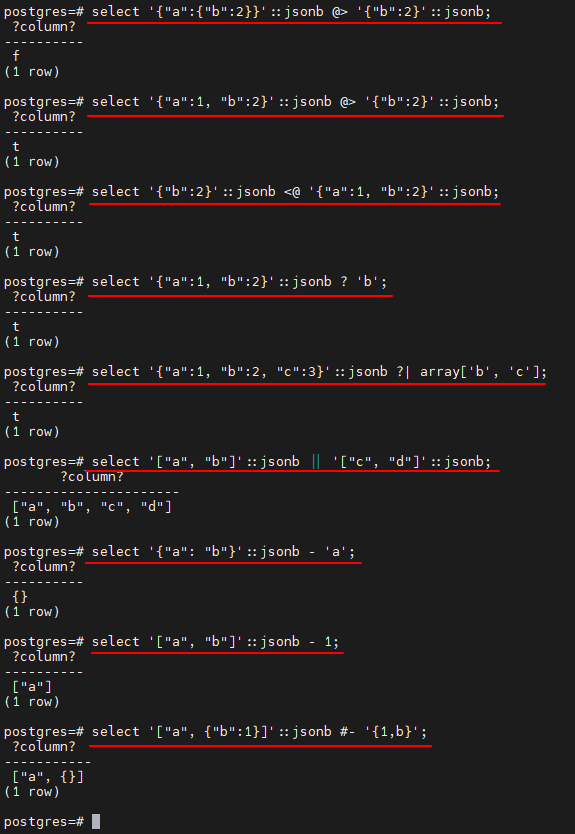
适用于JSONB类型的操作符
| 操作符 | 右操作数类型 | 描述 | 示例 | 结果 |
|---|---|---|---|---|
| @> | jsonb | 左侧json最上层的值是否包含右边json对象 | select ‘{“a”:{“b”:2}}’::jsonb @> ‘{“b”:2}’::jsonb; select ‘{“a”:1, “b”:2}’::jsonb @> ‘{“b”:2}’::jsonb; |
f t |
| <@ | jsonb | 左侧json对象是否包含于右侧json最上层的值内 | select ‘{“b”:2}’::jsonb <@ ‘{“a”:1, “b”:2}’::jsonb; | t |
| ? | text | text是否作为左侧Json对象最上层的键 | select ‘{“a”:1, “b”:2}’::jsonb ? ‘b’; | t |
| ?| | text[] | text[]中的任一元素是否作为左侧Json对象最上层的键 | select ‘{“a”:1, “b”:2, “c”:3}’::jsonb ?| array[‘b’, ‘c’]; | t |
| ?& | text[] | text[]中的所有元素是否作为左侧Json对象最上层的键 | select ‘[“a”, “b”]’::jsonb ?& array[‘a’, ‘b’]; | t |
| || | jsonb | 连接两个json对象,组成一个新的json对象 | select ‘[“a”, “b”]’::jsonb || ‘[“c”, “d”]’::jsonb; | [“a”, “b”, “c”, “d”] |
| - | text | 删除左侧json对象中键为text的键值对 | select ‘{“a”: “b”}’::jsonb - ‘a’; | {} |
| - | integer | 删除数组指定索引处的元素,如果索引值为负数,则从右边计算索引值。 如果最上层容器内不是数组,则抛出错误。 |
select ‘[“a”, “b”]’::jsonb - 1; | [“a”] |
| #- | text[] | 删除指定路径下的域或元素(如果是json数组,且整数值是负的,则索引值从右边算起) | select ‘[“a”, {“b”:1}]’::jsonb #- ‘{1,b}’; | [“a”, {}] |
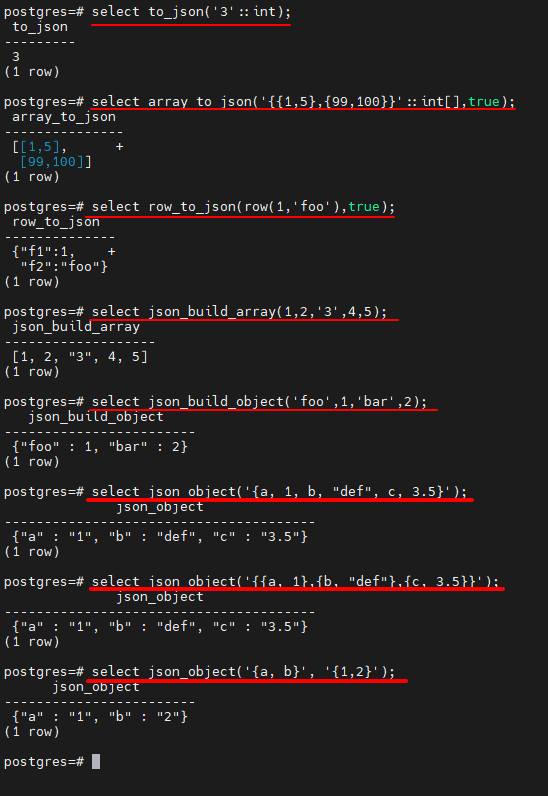
JSON类型的函数
创建函数
| 函数 | 描述 | 示例 | 结果 |
|---|---|---|---|
| to_json(anyelement) to_jsonb(anyelement) |
返回json或jsonb类型的值。数组和复合被转换(递归)成数组和对象。另外除数字、布尔、NULL值(直接使用NULL抛出错误)外,其他标量必须有类型转换。 | select to_json(‘3’::int); | 3 |
| array_to_json(anyarray[, pretty_bool]) | 以JSON数组返回该数组。PostgreSQL多维数组变成JSON数组中的数组。 如果pretty_bool 为真,则在维度1元素之间添加换行。 |
select array_to_json(’{{1,5},{99,100}}’::int[],true); | [[1,5], +[99,100]] |
| row_to_json(record [, pretty_bool]) | 以JSON对象返回行。如果pretty_bool 为真,则在级别1元素之间添加换行。 | select row_to_json(row(1,‘foo’),true); | {“f1”:1, +“f2”:“foo”} |
| json_build_array(VARIADIC “any”) jsonb_build_array(VARIADIC “any”) |
建立一个由可变参数列表组成的不同类型的JSON数组 | select json_build_array(1,2,‘3’,4,5); | [1, 2, “3”, 4, 5] |
| json_build_object(VARIADIC “any”) jsonb_build_object(VARIADIC “any”) |
建立一个由可变参数列表组成的JSON对象。参数列表参数交替转换为键和值。 | select json_build_object(‘foo’,1,‘bar’,2); | {“foo” : 1, “bar” : 2} |
| json_object(text[]) jsonb_object(text[]) |
根据text[]数组建立一个json对象,如果是一维数组,则必须有偶数个元素,元素交替组成键和值。如果是二维数组,则每个元素必须有2个元素,可以组成键值对。 | select json_object(’{a, 1, b, “def”, c, 3.5}’); select json_object(’{{a, 1},{b, “def”},{c, 3.5}}’); |
{“a” : “1”, “b” : “def”, “c” : “3.5”} |
| json_object(keys text[], values text[]) jsonb_object(keys text[], values text[]) |
分别从两组text[]中获取键和值,与一维数组类似。 | select json_object(’{a, b}’, ‘{1,2}’); | {“a” : “1”, “b” : “2”} |
处理函数
# 数据准备
create table tbl_test(a bigint,b character varying(32),c character varying(32));
| 函数 | 返回类型 | 描述 | 示例 | 结果 |
|---|---|---|---|---|
| json_array_length(json) jsonb_array_length(jsonb) |
int | 返回Json数组最外层元素个数 | select json_array_length(’[1,2,3,{“f1”:1,“f2”:[5,6]},4]’); | 5 |
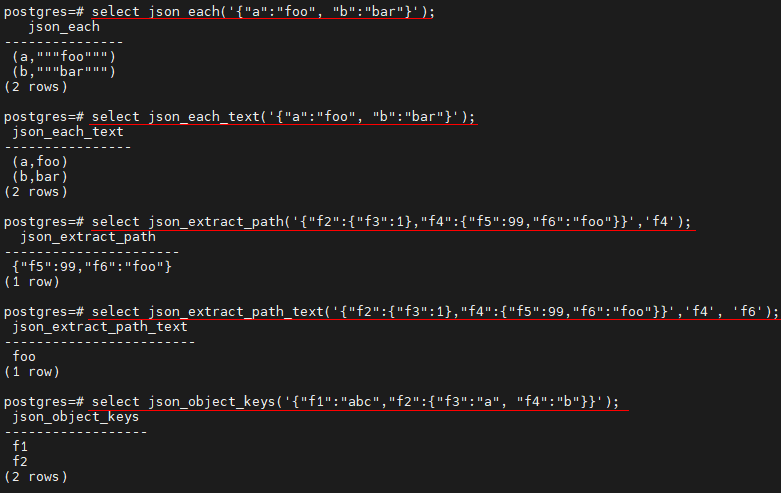
| json_each(json) jsonb_each(jsonb) |
setof key text, value json setof key text, value jsonb |
将最外层Json对象转换为键值对集合 | select json_each(’{“a”:“foo”, “b”:“bar”}’); | (a,""“foo”"") (b,""“bar”"") |
| json_each_text(json) jsonb_each_text(jsonb) |
setof key text, value text | 将最外层Json对象转换为键值对集合,且value为text类型 | select json_each_text(’{“a”:“foo”, “b”:“bar”}’); | (a,foo) (b,bar) |
| json_extract_path(from_json json,VARIADIC path_elems text[]) jsonb_extract_path(from_json jsonb,VARIADIC path_elems text[]) |
json jsonb |
返回path_elems指向的value,同操作符#> | select json_extract_path(’{“f2”:{“f3”:1},“f4”:{“f5”:99,“f6”:“foo”}}’,‘f4’); | {“f5”:99,“f6”:“foo”} |
| json_extract_path_text(from_json json,VARIADIC path_elems text[]) jsonb_extract_path_text(from_json jsonb,VARIADIC path_elems text[]) |
text | 返回path_elems指向的value,并转为text类型,同操作符#>> | select json_extract_path_text(’{“f2”:{“f3”:1},“f4”:{“f5”:99,“f6”:“foo”}}’,‘f4’, ‘f6’); | foo |
| json_object_keys(json) jsonb_object_keys(jsonb) |
setof text | 返回json对象最外层的key | select json_object_keys(’{“f1”:“abc”,“f2”:{“f3”:“a”, “f4”:“b”}}’); | f1 f2 |
| json_populate_record(base anyelement,from_json json) jsonb_populate_record(base anyelement,from_json jsonb) |
anyelement | 将json对象的value以base定义的行类型返回,如果行类型字段比json对象键值少,则多出的键值将被抛弃;如果行类型字段多,则多出的字段自动填充NULL。 | select * from json_populate_record(null::tbl_test, ‘{“a”:1,“b”:2}’); | a | b | c —±–±----- 1 | 2 | NULL |
| json_populate_recordset(base anyelement,from_json json) jsonb_populate_recordset(base anyelement,from_json jsonb) |
setof anyelement | 将json对象最外层数组以base定义的行类型返回 | select * from json_populate_recordset(null::tbl_test, ‘[{“a”:1,“b”:2},{“a”:3,“b”:4}]’); | a | b | c —±–±----- 1 | 2 | NULL 3 | 4 | NULL |
| json_array_elements(json) jsonb_array_elements(jsonb) |
setof json setof jsonb |
将json数组转换成json对象value的集合 | select json_array_elements(’[1,true, [2,false]]’); | 1 true [2,false] |
| json_array_elements_text(json) jsonb_array_elements_text(jsonb) |
setof text | 将json数组转换成text的value集合 | select json_array_elements_text(’[“foo”, “bar”]’); | foo bar |
| json_typeof(json) jsonb_typeof(jsonb) |
text | 返回json最外层value的数据类型,可能的类型有 object, array, string, number, boolean, 和null. | select json_typeof(’-123.4’) ; | number |
| json_to_record(json) jsonb_to_record(jsonb) |
record | 根据json对象创建一个record类型记录,所有的函数都返回record类型,所以必须使用as明确定义record的结构。 | select * from json_to_record(’{“a”:1,“b”:[1,2,3],“c”:“bar”}’) as x(a int, b text, d text); | a | b | d —±--------±----- 1 | [1,2,3] | NULL |
| json_to_recordset(json) jsonb_to_recordset(jsonb) |
setof record | 根据json数组创建一个record类型记录,所有的函数都返回record类型,所以必须使用as明确定义record的结构。 | select * from json_to_recordset(’[{“a”:1,“b”:“foo”},{“a”:“2”,“c”:“bar”}]’) as x(a int, b text); | a | b —±----- 1 | foo 2 | NULL |
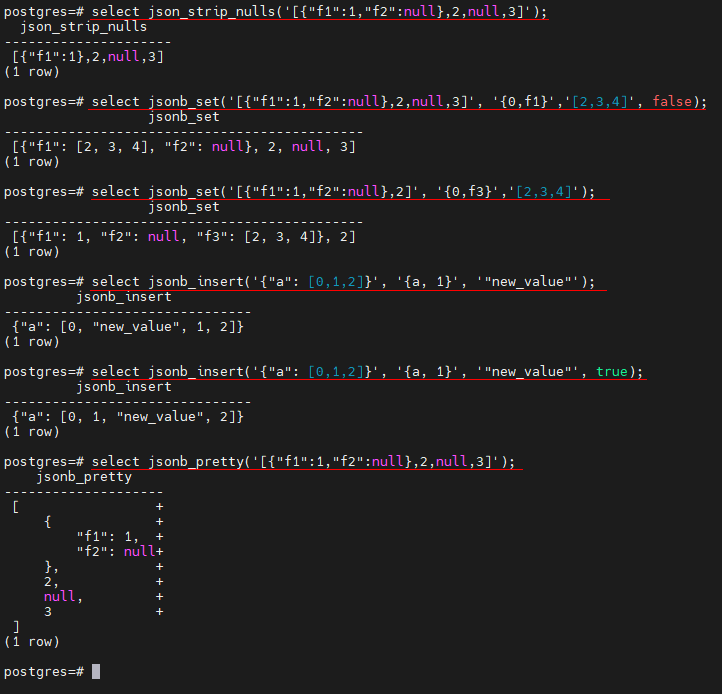
| json_strip_nulls(from_json json) jsonb_strip_nulls(from_json jsonb) |
json jsonb |
返回json对象中所有非null的数据,其他的null保留。 | select json_strip_nulls(’[{“f1”:1,“f2”:null},2,null,3]’); | [{“f1”:1},2,null,3] |
| jsonb_set(target jsonb, path text[],new_value jsonb[,create_missing boolean]) | jsonb | 如果create_missing为true,则将在target的path处追加新的jsonb;如果为false,则替换path处的value。 | select jsonb_set(’[{“f1”:1,“f2”:null},2,null,3]’, ‘{0,f1}’,’[2,3,4]’, false); select jsonb_set(’[{“f1”:1,“f2”:null},2]’, ‘{0,f3}’,’[2,3,4]’); |
[{“f1”: [2, 3, 4], “f2”: null}, 2, null, 3] [{“f1”: 1, “f2”: null, “f3”: [2, 3, 4]}, 2] |
| jsonb_insert(target jsonb, path text[],new_value jsonb, [insert_after boolean]) | jsonb | 如果insert_after是true,则在target的path后面插入新的value,否则在path之前插入。 | select jsonb_insert(’{“a”: [0,1,2]}’, ‘{a, 1}’, ‘“new_value”’); select jsonb_insert(’{“a”: [0,1,2]}’, ‘{a, 1}’, ‘“new_value”’, true); |
{“a”: [0, “new_value”, 1, 2]} {“a”: [0, 1, “new_value”, 2]} |
| jsonb_pretty(from_json jsonb) | text | 以缩进的格式更容易阅读的方式返回json对象 | select jsonb_pretty(’[{“f1”:1,“f2”:null},2,null,3]’); | [ { “f1”: 1, “f2”: null }, 2, null, 3 ] |

「喜欢这篇文章,您的关注和赞赏是给作者最好的鼓励」
关注作者
【版权声明】本文为墨天轮用户原创内容,转载时必须标注文章的来源(墨天轮),文章链接,文章作者等基本信息,否则作者和墨天轮有权追究责任。如果您发现墨天轮中有涉嫌抄袭或者侵权的内容,欢迎发送邮件至:contact@modb.pro进行举报,并提供相关证据,一经查实,墨天轮将立刻删除相关内容。
