



故障现象:
服务器端为:oracle 19.18 rac+oracle linux7.9
19c客户端使用创建的service连接long字段表程序报错,而用11g的客户端连接正常。
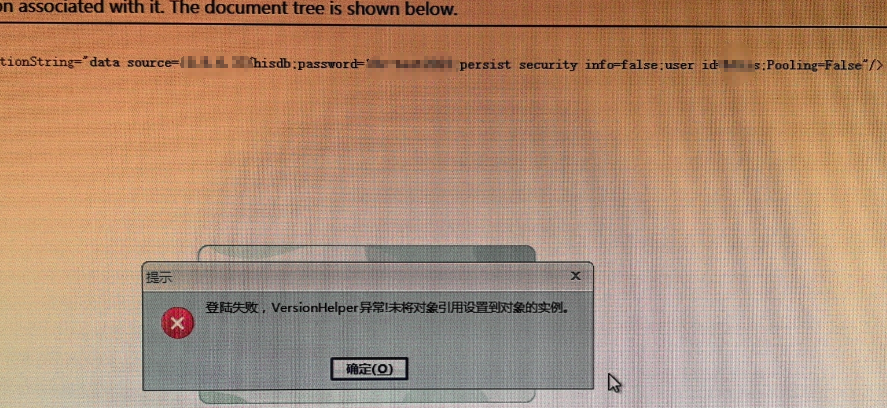

如果直接连接pdb名称,11g和19c客户端均连接正常。
故障分析:
baidu,bing,google,metalink都没有找到任何ora-10847的参考文档。
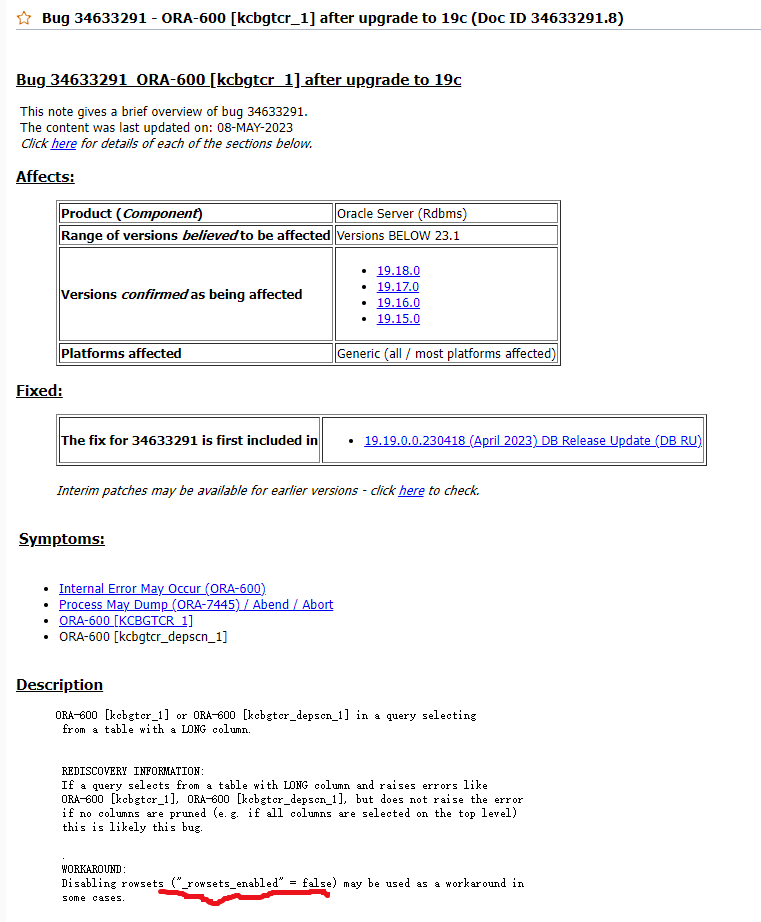
一开始报错的时候,怀疑可能遇到了如下bug,但验证后排除:(在alert日志没有报任何ORA-600错误)
alter system set "_rowsets_enabled"=FALSE scope=both sid='*';
于是继续了解之前rac service服务的创建方式,
1操作(当时工程师使用了这种创建方法)
srvctl add service -db dw -pdb dbcenter -service hisdb -preferred dw1,dw2 -notification TRUE -commit_outcome TRUE -retention 86400 -drain_timeout 300 -stopoption IMMEDIATE -replay_init_time 600 -failover_restore AUTO -failovertype AUTO
尝试删掉原服务,按2操作不带参数重建

2操作(不带任何参数,测试结果正常)
srvctl add service -db dw -pdb dbcenter -service hisdb -preferred dw1,dw2
操作过程:
[grid@rac1 ~]$ srvctl add service -db dw -pdb dbcenter -service hisdb -preferred dw1,dw2
PRCD-1288 : User is not authorized to create service hisdb for database dw
PRKH-1014 : Current user "grid" is not the oracle owner user "oracle" of oracle home "/oracle/app/oracle/product/19c/dbhome_1"
必须用oracle用户添加服务:
srvctl remove service -db dw -service hisdb
srvctl add service -db dw -pdb dbcenter -service hisdb -preferred dw1,dw2
srvctl start service -db dw -service hisdb
srvctl config service -db dw
sqlplus jyc/jyc@192.168.52.185:1521/hisdb
srvctl stop service -db dw -service hisdb


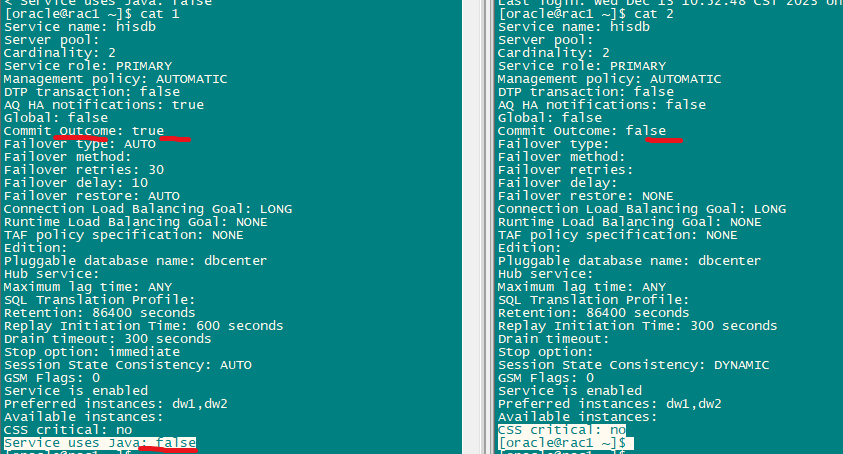
两种建完的区别:(最可疑是commit_outcome参数,由于现场条件不允许,无法继续测试,所以没有明确是哪个参数引起,有机会再验证。)
[oracle@rac1 ~]$ diff 1 2
7c7
< AQ HA notifications: true
---
> AQ HA notifications: false
9,10c9,10
< Commit Outcome: true
< Failover type: AUTO
---
> Commit Outcome: false
> Failover type:
12,14c12,14
< Failover retries: 30
< Failover delay: 10
< Failover restore: AUTO
---
> Failover retries:
> Failover delay:
> Failover restore: NONE
24,27c24,27
< Replay Initiation Time: 600 seconds
< Drain timeout: 300 seconds
< Stop option: immediate
< Session State Consistency: AUTO
---
> Replay Initiation Time: 300 seconds
> Drain timeout:
> Stop option:
> Session State Consistency: DYNAMIC
33d32
< Service uses Java: false
[oracle@rac1 ~]$ srvctl add service -db dw -pdb dbcenter -service hisdb -preferred dw1,dw2 -h

Adds a service configuration to the Oracle Clusterware.

Usage: srvctl add service -db <db_unique_name> -service "<service_name_list>"
       {-preferred "<preferred_list>" [-available "<available_list>"] [-tafpolicy {BASIC | NONE | PRECONNECT}] | -serverpool <pool_name> [-cardinality {UNIFORM | SINGLETON}] }
       [-netnum <network_number>] [-role "[PRIMARY][,PHYSICAL_STANDBY][,LOGICAL_STANDBY][,SNAPSHOT_STANDBY]"] [-policy {AUTOMATIC | MANUAL}]
       [-notification {TRUE | FALSE}] [-dtp {TRUE | FALSE}] [-clbgoal {SHORT | LONG}] [-rlbgoal {NONE | SERVICE_TIME | THROUGHPUT}]
       [-failovertype {NONE | SESSION | SELECT | TRANSACTION | AUTO}] [-failovermethod {NONE | BASIC}] [-failoverretry <failover_retries>] [-failoverdelay <failover_delay>] [-failover_restore {NONE | LEVEL1}] [-failback {YES | NO}]
       [-edition <edition>] [-pdb <pluggable_database>] [-global {TRUE | FALSE}] [-maxlag <max_lag_time>] [-sql_translation_profile <sql_translation_profile>]
       [-commit_outcome {TRUE | FALSE}] [-retention <retention>] [-replay_init_time <replay_initiation_time>] [-session_state {STATIC | DYNAMIC}]
       [-pqservice <pq_service>] [-pqpool "<pq_pool_list>"] [-gsmflags <gsm_flags>] [-tablefamilyid <table_family_id>] [-drain_timeout <drain_timeout>] [-stopoption <stop_option>] [-css_critical {YES | NO}] [-rfpool <pool_name> -hubsvc <hub_service>]
       [-force] [-eval] [-verbose]
    -db <db_unique_name>           Unique name for the database
    -service "<serv,...>"          Comma separated service names
    -preferred "<preferred_list>"  Comma separated list of preferred instances
    -available "<available_list>"  Comma separated list of available instances
    -serverpool <pool_name>        Server pool name
    -cardinality                   (UNIFORM | SINGLETON) Service runs on every active server in the server pool hosting this service (UNIFORM) or just one server (SINGLETON)
    -netnum  <network_number>      Network number (default number is 1)
    -tafpolicy                     (NONE | BASIC | PRECONNECT)        TAF policy specification
    -role <role>                   Role of the service (primary, physical_standby, logical_standby, snapshot_standby)
    -policy <policy>               Management policy for the service (AUTOMATIC or MANUAL)
    -failovertype                  (NONE | SESSION | SELECT | TRANSACTION | AUTO)      Failover type
    -failovermethod                (NONE | BASIC)     Failover method
    -failoverdelay <failover_delay> Failover delay (in seconds)
    -failoverretry <failover_retries> Number of attempts to retry connection
    -failover_restore <failover_restore>  Option to restore initial environment for Application Continuity and TAF (NONE or LEVEL1)
    -failback                      (YES|NO) Failback to a preferred instance for a administrator-managed database
    -edition <edition>             Edition (or "" for empty edition value)
    -pdb <pluggable_database>      Pluggable database name
    -maxlag <max_lag_time>         Maximum replication lag time in seconds (Non-negative integer, default value is 'ANY')
    -clbgoal                       (SHORT | LONG)                   Connection Load Balancing Goal. Default is LONG.
    -rlbgoal                       (SERVICE_TIME | THROUGHPUT | NONE)     Runtime Load Balancing Goal
    -dtp                           (TRUE | FALSE)  Distributed Transaction Processing
    -notification                  (TRUE | FALSE)  Enable Fast Application Notification (FAN) for OCI connections
    -global <global>               Global attribute (TRUE or FALSE)
    -sql_translation_profile <sql_translation_profile> Specify a database object for SQL translation profile
    -commit_outcome                (TRUE | FALSE)          Commit outcome
    -retention <retention>         Specifies the number of seconds the commit outcome is retained
    -replay_init_time <replay_initiation_time> Seconds after which replay will not be initiated
    -session_state <session_state> Session state consistency (STATIC or DYNAMIC)
    -pqservice <pq_service>        Parallel query service name
    -pqpool "<pq_pool_list>"       Comma separated list of parallel query server pool names
    -gsmflags <gsm_flags>          Set locality and region failover values
    -tablefamilyid <table_family_id> Set table family ID for a given service
    -drain_timeout <drain_timeout> Service drain timeout specified in seconds
    -stopoption <stop_options>     Options to stop service (e.g. TRANSACTIONAL or IMMEDIATE)
    -css_critical {YES | NO}          Define whether the database or service is CSS critical
    -rfpool <pool_name>            Reader farm server pool name
    -hubsvc <hub_service>            Hub service used by Reader Farm service
    -eval                          Evaluates the effects of event without making any changes to the system
Usage: srvctl add service -db <db_unique_name> -service "<service_name_list>" -update {-preferred "<new_pref_inst>" | -available "<new_avail_inst>"} [-force] [-verbose]
    -db <db_unique_name>           Unique name for the database
    -service "<serv,...>"          Comma separated service names
    -update                        Add a new instance to service configuration
    -preferred <new_pref_inst>     Name of new preferred instance
    -available <new_avail_inst>    Name of new available instance
    -force                         Force the add operation even though a listener is not configured for a network
    -verbose                       Verbose output
    -help                          Print usage
相关参考:
https://docs.oracle.com/en/database/oracle/oracle-database/19/adfns/transaction-guard.html#GUID-6C5880E5-C45F-4858-A069-A28BB25FD1DB
https://mp.weixin.qq.com/s/2dB6nJeR63fgeUTqxPquuw
最后修改时间:2023-12-14 09:59:51
「喜欢这篇文章,您的关注和赞赏是给作者最好的鼓励」
关注作者
【版权声明】本文为墨天轮用户原创内容,转载时必须标注文章的来源(墨天轮),文章链接,文章作者等基本信息,否则作者和墨天轮有权追究责任。如果您发现墨天轮中有涉嫌抄袭或者侵权的内容,欢迎发送邮件至:contact@modb.pro进行举报,并提供相关证据,一经查实,墨天轮将立刻删除相关内容。
