




PostgreSQL支持表的字段使用定长或可变长度的一维或多维数组,数组的类型可以是任何数据库内建的类型、用户自定义的类型、枚举类型及组合类型。
数组类型的声明
CREATE TABLE testtab04(id int, col1 int[], col2 int[10],col3 text[][]);
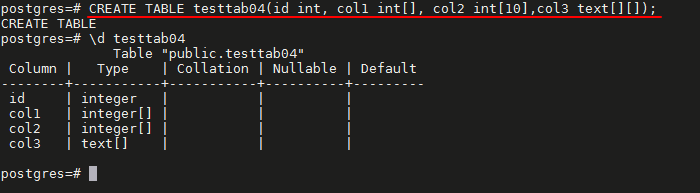
- 通过在数组元素类型名后面附加方括号“[]”来实现;
- 方括号中可以给一个长度数字,也可以不给,同时也可以定义多维数组;
- 多维数组是通过加多对方括号来实现;
输入数组值
create table testtab05(id int, col1 int[]);

insert into testtab05 values(1,'{1,2,3}');

insert into testtab05 values(2,'{4,5,6}');

select * from testtab05;
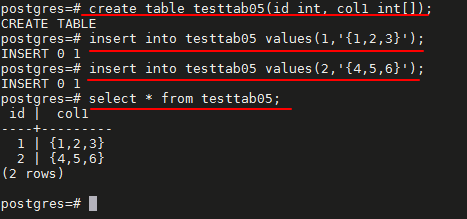
- 数组的输入值是使用单引号加大括号来表示的;
- 各个元素值之间是用逗号分隔的;
- 是否使用逗号分隔各个元素值与元素类型有关;
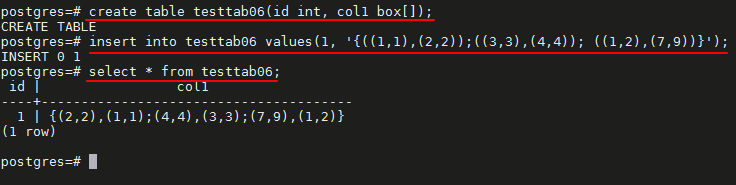
- 在PostgreSQL中,除了box类型的分隔符为分号以外,其他的类型基本上都使用逗号作为分隔符;
create table testtab06(id int, col1 box[]);

insert into testtab06 values(1, '{((1,1),(2,2));((3,3),(4,4)); ((1,2),(7,9))}');
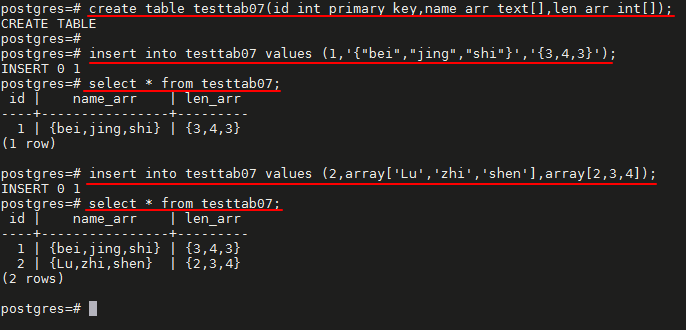
create table testtab07(id int primary key,name_arr text[],len_arr int[]);

# 使用花括号输入
# 数组元素放在花括号中,一般用逗号隔开,对于字符类型值要用双引号引用,整个花括号元素用单引号引用。

insert into testtab07 values (1,'{"bei","jing","shi"}','{3,4,3}');

select * from testtab07;

# 使用关键字 array 构造器语法输入

insert into testtab07 values (2,array['Lu','zhi','shen'],array[2,3,4]);

select * from testtab07;
访问数组
create table testtab08(id int, col1 text[]);

insert into testtab08 values(1,'{aa,bb,cc,dd}');

insert into testtab08 values(2,'{ee,ff,gg,hh}');

select * from testtab08;

select id, col1[1] from testtab08;

# 使用数组切片

select id, col1[1:2] from testtab08;

# 创建从0(实际可以是任意数字)开始的数组

create table test02(id int[]);

insert into test02 values('[0:2]={1,2,3}');

select id[0],id[1],id[2] from test02;
- 访问数组中的元素时在方括号内加数字下标;
- 数组的下标默认是从1开始;

# 二维数组

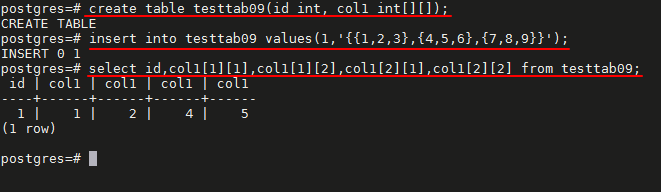
create table testtab09(id int, col1 int[][]);

insert into testtab09 values(1,'{{1,2,3},{4,5,6},{7,8,9}}');

select id,col1[1][1],col1[1][2],col1[2][1],col1[2][2] from testtab09;
数组的添加、删除、更新
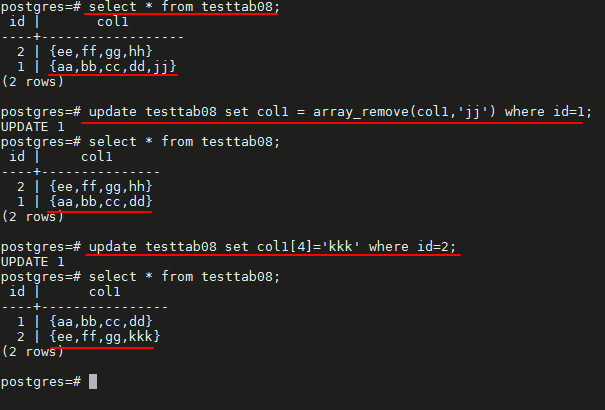
select * from testtab08;

# 添加

update testtab08 set col1=array_append(col1,'jj') where id=1;

select * from testtab08;

# 删除
update testtab08 set col1 = array_remove(col1,'jj') where id=1;

select * from testtab08;

# 更新

update testtab08 set col1[4]='kkk' where id=2;

select * from testtab08;

数组操作符
| 操作符 | 描述 | 例子 | 结果 |
|---|---|---|---|
| = | 等于 | select ARRAY[1.1,2.1,3.1]::int[] = ARRAY[1,2,3]; | t |
| <> | 不等于 | select ARRAY[1,2,3] <> ARRAY[1,2,4]; | t |
| < | 小于 | select ARRAY[1,2,3] < ARRAY[1,2,4]; | t |
| > | 大于 | select ARRAY[1,4,3] > ARRAY[1,2,4]; | t |
| <= | 小于或等于 | select ARRAY[1,2,3] <= ARRAY[1,2,3]; | t |
| >= | 大于或等于 | select ARRAY[1,4,3] >= ARRAY[1,4,3]; | t |
| @> | 包含 | select ARRAY[1,4,3] @> ARRAY[3,1]; | t |
| <@ | 被包含于 | select ARRAY[2,7] <@ ARRAY[1,7,4,2,6]; | t |
| && | 重叠(有共同元素) | select ARRAY[1,4,3] && ARRAY[2,1]; | t |
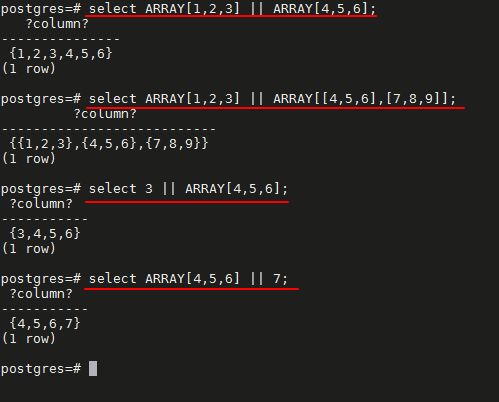
| || | 数组与数组连接 | select ARRAY[1,2,3] || ARRAY[4,5,6]; | {1,2,3,4,5,6} |
| || | 数组与数组连接 | select ARRAY[1,2,3] || ARRAY[[4,5,6],[7,8,9]]; | {{1,2,3},{4,5,6},{7,8,9}} |
| || | 元素与数组连接 | select 3 || ARRAY[4,5,6]; | {3,4,5,6} |
| || | 数组与元素连接 | select ARRAY[4,5,6] || 7; | {4,5,6,7} |

数组函数
# 数组添加元素或删除元素

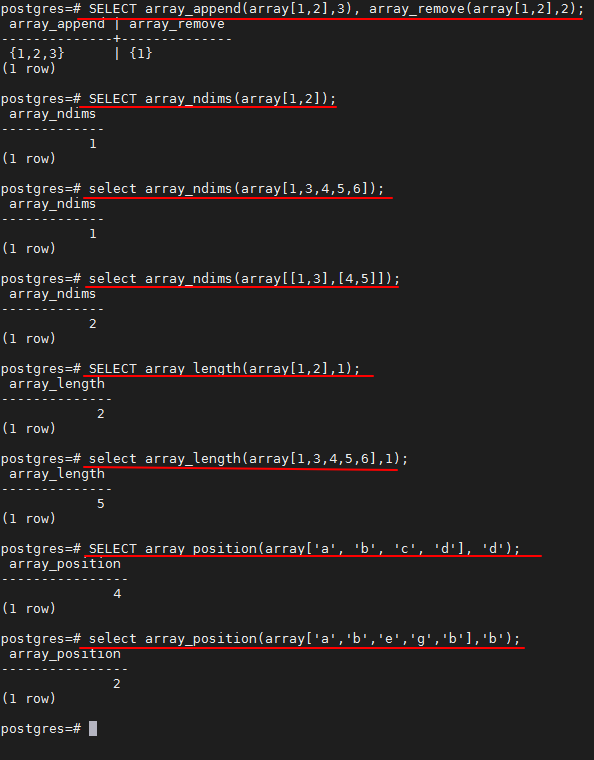
SELECT array_append(array[1,2],3), array_remove(array[1,2],2);

#  获取数组维度

SELECT array_ndims(array[1,2]);

select array_ndims(array[1,3,4,5,6]);

select array_ndims(array[[1,3],[4,5]]);

# 获取数组长度

SELECT array_length(array[1,2],1);

select array_length(array[1,3,4,5,6],1);

# 返回数组中某个数组元素第一次出现的位置

SELECT array_position(array['a', 'b', 'c', 'd'], 'd');

select array_position(array['a','b','e','g','b'],'b');

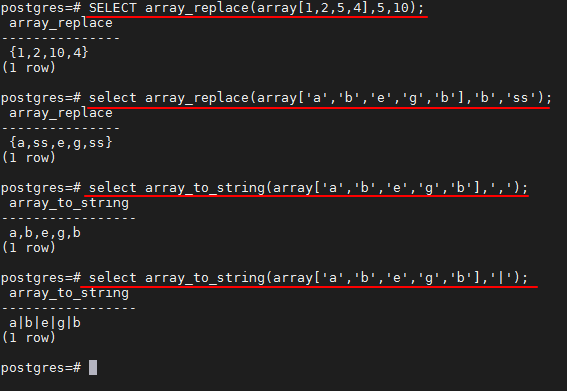
# 数组元素替换

SELECT array_replace(array[1,2,5,4],5,10);

select array_replace(array['a','b','e','g','b'],'b','ss');
# 函数返回值类型为anyarray,使用第二个anyelement替换数组中的相同数组元素

# 将数组元素输出到字符串

select array_to_string(array['a','b','e','g','b'],',');

select array_to_string(array['a','b','e','g','b'],'|');
函数返回值类型为text,第一个text参数指分隔符,第二个text表示将值为NULL的元素使用这个字符串替换
「喜欢这篇文章,您的关注和赞赏是给作者最好的鼓励」
关注作者
【版权声明】本文为墨天轮用户原创内容,转载时必须标注文章的来源(墨天轮),文章链接,文章作者等基本信息,否则作者和墨天轮有权追究责任。如果您发现墨天轮中有涉嫌抄袭或者侵权的内容,欢迎发送邮件至:contact@modb.pro进行举报,并提供相关证据,一经查实,墨天轮将立刻删除相关内容。
