



什么是DuckDB
DuckDB是一个进程内 SQL OLAP 数据库管理系统
DuckDB特性
DuckDB是一个高性能分析数据库管理系统,具有以下主要特性:
进程内:与作为单独进程运行的传统数据库系统不同,DuckDB 与您的应用程序在同一进程中运行。这提供了多种好处,包括:
- 更快的性能:通过消除进程间通信的需要,DuckDB 可以实现比传统数据库更快的查询执行时间。
- 简化部署:无需安装或管理单独的数据库服务器。
- 更低的内存占用:DuckDB 所需的内存比传统数据库少得多,因此非常适合资源受限的环境。
SQL OLAP:DuckDB 专为分析工作负载而设计,也称为在线分析处理 (OLAP)。这意味着它针对查询大型数据集和执行复杂计算进行了优化。 DuckDB 支持广泛的 SQL 功能,包括:
- 聚合:SUM、AVG、MIN、MAX、COUNT 等。
- 窗口函数:ROW_NUMBER()、RANK()、PERCENTILE_CONT()等。
- 连接:INNER JOIN、LEFT JOIN、RIGHT JOIN、FULL JOIN 等。
- 用户定义函数:您可以用 C++ 或 Python 编写自己的函数。
其他特性:
- 跨平台:DuckDB 可在 Windows、macOS、Linux 和 Android 上运行。
- 可嵌入:DuckDB 可以轻松嵌入到您的应用程序中,使其成为数据驱动应用程序的理想选择。
- 开源:DuckDB 可以免费使用,并且在 Apache 2.0 许可证下开源。
DuckDB示例
以下是如何使用 DuckDB 的一些具体示例:
- 分析财务数据:DuckDB 可用于计算财务比率、跟踪趋势并识别异常。
- 分析日志数据:DuckDB 可用于识别日志数据中的模式、解决问题并跟踪用户行为。
- 分析科学数据:DuckDB 可用于对科学数据执行复杂的计算、生成可视化并构建预测模型。
总体而言,DuckDB 是一个功能强大且多功能的分析数据库管理系统,非常适合各种应用程序。其进程内架构、SQL OLAP 支持和丰富的功能集使其成为需要对大型数据集执行快速高效分析的开发人员和数据分析师的理想选择。
环境准备一台2c2g配置的虚拟机,下面我们就来体验一下DuckDB
| 主机名 | IP | 操作系统 | 数据库版本 |
|---|---|---|---|
| DuckDB | 192.168.17.38 | Rocky Linux 9.3 | DuckDB v0.9.2 |
安装
DuckDB的安装部署是非常的简单。可以选择二进制或者源码。也可以直接使用最简单官网的现场演示。
源码安装
--查看操作系统版本
[root@DuckDB ~]# cat /etc/redhat-release
Rocky Linux release 9.3 (Blue Onyx)
--关闭防火墙
[root@DuckDB ~]# systemctl stop firewalld.service
[root@DuckDB ~]# systemctl disable firewalld.service
Removed "/etc/systemd/system/multi-user.target.wants/firewalld.service".
Removed "/etc/systemd/system/dbus-org.fedoraproject.FirewallD1.service".
[root@DuckDB ~]# setenforce 0
[root@DuckDB ~]# sed -i 's#SELINUX=enforcing#SELINUX=disabled#g' /etc/selinux/config
--源码安装依赖包
[root@DuckDB ~]# yum -y install gcc gcc-c++ make cmake
Last metadata expiration check: 0:33:51 ago on Mon 11 Dec 2023 08:18:41 PM CST.
Dependencies resolved.
====================================================================================================================================================================================================================================================================================
Package Architecture Version Repository Size
====================================================================================================================================================================================================================================================================================
Installing:
cmake x86_64 3.20.2-8.el9 appstream 6.7 M
gcc x86_64 11.4.1-2.1.el9 appstream 32 M
gcc-c++ x86_64 11.4.1-2.1.el9 appstream 13 M
make x86_64 1:4.3-7.el9 baseos 530 k
Installing dependencies:
cmake-data noarch 3.20.2-8.el9 appstream 1.5 M
cmake-filesystem x86_64 3.20.2-8.el9 appstream 11 k
cmake-rpm-macros noarch 3.20.2-8.el9 appstream 11 k
glibc-devel x86_64 2.34-83.el9.7 appstream 50 k
glibc-headers x86_64 2.34-83.el9.7 appstream 450 k
kernel-headers x86_64 5.14.0-362.8.1.el9_3 appstream 6.5 M
libstdc++-devel x86_64 11.4.1-2.1.el9 appstream 2.2 M
libxcrypt-devel x86_64 4.4.18-3.el9 appstream 28 k
Transaction Summary
====================================================================================================================================================================================================================================================================================
Install 12 Packages
Total download size: 63 M
Installed size: 173 M
Downloading Packages:
(1/12): cmake-rpm-macros-3.20.2-8.el9.noarch.rpm 268 kB/s | 11 kB 00:00
(2/12): cmake-filesystem-3.20.2-8.el9.x86_64.rpm 281 kB/s | 11 kB 00:00
(3/12): cmake-data-3.20.2-8.el9.noarch.rpm 18 MB/s | 1.5 MB 00:00
(4/12): libxcrypt-devel-4.4.18-3.el9.x86_64.rpm 1.7 MB/s | 28 kB 00:00
(5/12): make-4.3-7.el9.x86_64.rpm 3.2 MB/s | 530 kB 00:00
(6/12): cmake-3.20.2-8.el9.x86_64.rpm 31 MB/s | 6.7 MB 00:00
(7/12): kernel-headers-5.14.0-362.8.1.el9_3.x86_64.rpm 48 MB/s | 6.5 MB 00:00
(8/12): libstdc++-devel-11.4.1-2.1.el9.x86_64.rpm 17 MB/s | 2.2 MB 00:00
(9/12): glibc-headers-2.34-83.el9.7.x86_64.rpm 7.2 MB/s | 450 kB 00:00
(10/12): glibc-devel-2.34-83.el9.7.x86_64.rpm 2.7 MB/s | 50 kB 00:00
(11/12): gcc-c++-11.4.1-2.1.el9.x86_64.rpm 20 MB/s | 13 MB 00:00
(12/12): gcc-11.4.1-2.1.el9.x86_64.rpm 44 MB/s | 32 MB 00:00
------------------------------------------------------------------------------------------------------------------------------------------------------------------------------------------------------------------------------------------------------------------------------------
Total 17 MB/s | 63 MB 00:03
Running transaction check
Transaction check succeeded.
Running transaction test
Transaction test succeeded.
Running transaction
Preparing : 1/1
Installing : cmake-filesystem-3.20.2-8.el9.x86_64 1/12
Installing : cmake-rpm-macros-3.20.2-8.el9.noarch 2/12
Installing : make-1:4.3-7.el9.x86_64 3/12
Installing : cmake-data-3.20.2-8.el9.noarch 4/12
Installing : cmake-3.20.2-8.el9.x86_64 5/12
Installing : glibc-headers-2.34-83.el9.7.x86_64 6/12
Installing : libstdc++-devel-11.4.1-2.1.el9.x86_64 7/12
Installing : kernel-headers-5.14.0-362.8.1.el9_3.x86_64 8/12
Installing : glibc-devel-2.34-83.el9.7.x86_64 9/12
Installing : libxcrypt-devel-4.4.18-3.el9.x86_64 10/12
Installing : gcc-11.4.1-2.1.el9.x86_64 11/12
Installing : gcc-c++-11.4.1-2.1.el9.x86_64 12/12
Running scriptlet: gcc-c++-11.4.1-2.1.el9.x86_64 12/12
Verifying : make-1:4.3-7.el9.x86_64 1/12
Verifying : cmake-rpm-macros-3.20.2-8.el9.noarch 2/12
Verifying : cmake-filesystem-3.20.2-8.el9.x86_64 3/12
Verifying : cmake-data-3.20.2-8.el9.noarch 4/12
Verifying : cmake-3.20.2-8.el9.x86_64 5/12
Verifying : libxcrypt-devel-4.4.18-3.el9.x86_64 6/12
Verifying : kernel-headers-5.14.0-362.8.1.el9_3.x86_64 7/12
Verifying : libstdc++-devel-11.4.1-2.1.el9.x86_64 8/12
Verifying : gcc-c++-11.4.1-2.1.el9.x86_64 9/12
Verifying : gcc-11.4.1-2.1.el9.x86_64 10/12
Verifying : glibc-headers-2.34-83.el9.7.x86_64 11/12
Verifying : glibc-devel-2.34-83.el9.7.x86_64 12/12
Installed:
cmake-3.20.2-8.el9.x86_64 cmake-data-3.20.2-8.el9.noarch cmake-filesystem-3.20.2-8.el9.x86_64 cmake-rpm-macros-3.20.2-8.el9.noarch gcc-11.4.1-2.1.el9.x86_64 gcc-c++-11.4.1-2.1.el9.x86_64 glibc-devel-2.34-83.el9.7.x86_64
glibc-headers-2.34-83.el9.7.x86_64 kernel-headers-5.14.0-362.8.1.el9_3.x86_64 libstdc++-devel-11.4.1-2.1.el9.x86_64 libxcrypt-devel-4.4.18-3.el9.x86_64 make-1:4.3-7.el9.x86_64
Complete!
--设置git代理科学上网
[root@DuckDB ~]# git config --global https.proxy https://192.168.17.1:10809
--git clone 源码
[root@DuckDB ~]# git clone https://github.com/duckdb/duckdb.git
Cloning into 'duckdb'...
remote: Enumerating objects: 446215, done.
remote: Counting objects: 100% (84756/84756), done.
remote: Compressing objects: 100% (2487/2487), done.
remote: Total 446215 (delta 82716), reused 82272 (delta 82269), pack-reused 361459
Receiving objects: 100% (446215/446215), 225.93 MiB | 12.76 MiB/s, done.
Resolving deltas: 100% (370478/370478), done.
Updating files: 100% (10665/10665), done.
[root@DuckDB ~]# cd duckdb
--编译
[root@DuckDB duckdb]# make -j8
mkdir -p ./build/release && \
cd build/release && \
cmake -DENABLE_EXTENSION_AUTOLOADING= -DENABLE_EXTENSION_AUTOINSTALL= -DCMAKE_BUILD_TYPE=Release ../.. && \
cmake --build . --config Release
-- The C compiler identification is GNU 11.4.1
-- The CXX compiler identification is GNU 11.4.1
-- Detecting C compiler ABI info
-- Detecting C compiler ABI info - done
-- Check for working C compiler: /usr/bin/cc - skipped
-- Detecting C compile features
-- Detecting C compile features - done
-- Detecting CXX compiler ABI info
-- Detecting CXX compiler ABI info - done
-- Check for working CXX compiler: /usr/bin/c++ - skipped
-- Detecting CXX compile features
-- Detecting CXX compile features - done
-- Looking for pthread.h
-- Looking for pthread.h - found
-- Performing Test CMAKE_HAVE_LIBC_PTHREAD
-- Performing Test CMAKE_HAVE_LIBC_PTHREAD - Success
-- Found Threads: TRUE
-- Found Git: /usr/bin/git (found version "2.39.3")
-- git hash e117c34a62, version v0.9.3-dev1257
-- Load extension 'parquet' from '/root/duckdb/extensions'
-- Load extension 'jemalloc' from '/root/duckdb/extensions'
-- Extensions linked into DuckDB: [parquet, jemalloc]
-- Configuring done
-- Generating done
-- Build files have been written to: /root/duckdb/build/release
gmake[1]: warning: jobserver unavailable: using -j1. Add '+' to parent make rule.
gmake[1]: Entering directory '/root/duckdb/build/release'
gmake[2]: Entering directory '/root/duckdb/build/release'
gmake[3]: Entering directory '/root/duckdb/build/release'
gmake[3]: Leaving directory '/root/duckdb/build/release'
gmake[3]: Entering directory '/root/duckdb/build/release'
[ 0%] Building CXX object third_party/fsst/CMakeFiles/duckdb_fsst.dir/libfsst.cpp.o
[ 0%] Building CXX object third_party/fsst/CMakeFiles/duckdb_fsst.dir/fsst_avx512.cpp.o
[ 1%] Linking CXX static library libduckdb_fsst.a
gmake[3]: Leaving directory '/root/duckdb/build/release'
[ 1%] Built target duckdb_fsst
gmake[3]: Entering directory '/root/duckdb/build/release'
gmake[3]: Leaving directory '/root/duckdb/build/release'
gmake[3]: Entering directory '/root/duckdb/build/release'
。。。略
[ 98%] Linking CXX shared library loadable_extension_optimizer_demo.duckdb_extension
gmake[3]: Leaving directory '/root/duckdb/build/release'
[ 98%] Built target loadable_extension_optimizer_demo_loadable_extension
gmake[3]: Entering directory '/root/duckdb/build/release'
gmake[3]: Leaving directory '/root/duckdb/build/release'
gmake[3]: Entering directory '/root/duckdb/build/release'
[ 98%] Building CXX object test/extension/CMakeFiles/loadable_extension_demo_loadable_extension.dir/loadable_extension_demo.cpp.o
[ 99%] Linking CXX shared library loadable_extension_demo.duckdb_extension
gmake[3]: Leaving directory '/root/duckdb/build/release'
[ 99%] Built target loadable_extension_demo_loadable_extension
gmake[3]: Entering directory '/root/duckdb/build/release'
gmake[3]: Leaving directory '/root/duckdb/build/release'
gmake[3]: Entering directory '/root/duckdb/build/release'
[100%] Building CXX object third_party/imdb/CMakeFiles/imdb.dir/imdb.cpp.o
[100%] Linking CXX static library libimdb.a
gmake[3]: Leaving directory '/root/duckdb/build/release'
[100%] Built target imdb
gmake[2]: Leaving directory '/root/duckdb/build/release'
gmake[1]: Leaving directory '/root/duckdb/build/release'
--测试
[root@DuckDB duckdb]# build/release/duckdb
v0.9.3-dev1257 e117c34a62
Enter ".help" for usage hints.
Connected to a transient in-memory database.
Use ".open FILENAME" to reopen on a persistent database.
D .quit
[root@DuckDB duckdb]#
二进制安装
--查看操作系统版本
[root@DuckDB ~]# cat /etc/redhat-release
Rocky Linux release 9.3 (Blue Onyx)
--关闭防火墙
[root@DuckDB ~]# systemctl stop firewalld.service
[root@DuckDB ~]# systemctl disable firewalld.service
Removed "/etc/systemd/system/multi-user.target.wants/firewalld.service".
Removed "/etc/systemd/system/dbus-org.fedoraproject.FirewallD1.service".
[root@DuckDB ~]# setenforce 0
[root@DuckDB ~]# sed -i 's#SELINUX=enforcing#SELINUX=disabled#g' /etc/selinux/config
[root@DuckDB ~]# yum install -y wget
Last metadata expiration check: 1:22:40 ago on Mon 11 Dec 2023 08:18:41 PM CST.
Package wget-1.21.1-7.el9.x86_64 is already installed.
Dependencies resolved.
Nothing to do.
Complete!
--设置代理科学上网
[root@DuckDB ~]# export https_proxy=192.168.17.1:10809
--下载duckdb for linux的二进制文件
[root@DuckDB ~]# wget https://github.com/duckdb/duckdb/releases/download/v0.9.2/duckdb_cli-linux-amd64.zip
--2023-12-11 21:47:19--  https://github.com/duckdb/duckdb/releases/download/v0.9.2/duckdb_cli-linux-amd64.zip
Connecting to 192.168.17.1:10809... connected.
Proxy request sent, awaiting response... 302 Found
Location: https://objects.githubusercontent.com/github-production-release-asset-2e65be/138754790/58e4194b-256a-4132-a050-ab1dc8d8b34c?X-Amz-Algorithm=AWS4-HMAC-SHA256&X-Amz-Credential=AKIAIWNJYAX4CSVEH53A%2F20231211%2Fus-east-1%2Fs3%2Faws4_request&X-Amz-Date=20231211T134720Z&X-Amz-Expires=300&X-Amz-Signature=12a69608cb934fd4a378525aa741db3bf40de93313cb6bebc2034ddfad6c3480&X-Amz-SignedHeaders=host&actor_id=0&key_id=0&repo_id=138754790&response-content-disposition=attachment%3B%20filename%3Dduckdb_cli-linux-amd64.zip&response-content-type=application%2Foctet-stream [following]
--2023-12-11 21:47:20--  https://objects.githubusercontent.com/github-production-release-asset-2e65be/138754790/58e4194b-256a-4132-a050-ab1dc8d8b34c?X-Amz-Algorithm=AWS4-HMAC-SHA256&X-Amz-Credential=AKIAIWNJYAX4CSVEH53A%2F20231211%2Fus-east-1%2Fs3%2Faws4_request&X-Amz-Date=20231211T134720Z&X-Amz-Expires=300&X-Amz-Signature=12a69608cb934fd4a378525aa741db3bf40de93313cb6bebc2034ddfad6c3480&X-Amz-SignedHeaders=host&actor_id=0&key_id=0&repo_id=138754790&response-content-disposition=attachment%3B%20filename%3Dduckdb_cli-linux-amd64.zip&response-content-type=application%2Foctet-stream
Connecting to 192.168.17.1:10809... connected.
Proxy request sent, awaiting response... 200 OK
Length: 13613182 (13M) [application/octet-stream]
Saving to: ‘duckdb_cli-linux-amd64.zip’

duckdb_cli-linux-amd64.zip                                           100%[======================================================================================================================================================================>]  12.98M  8.33MB/s    in 1.6s

2023-12-11 21:47:22 (8.33 MB/s) - ‘duckdb_cli-linux-amd64.zip’ saved [13613182/13613182]

--解压
[root@DuckDB ~]# unzip duckdb_cli-linux-amd64.zip
Archive:  duckdb_cli-linux-amd64.zip
  inflating: duckdb
[root@DuckDB ~]# ll
total 52988
-rw-------. 1 root root     1490 Dec 11 19:44 anaconda-ks.cfg
-rwxr-xr-x. 1 root root 40638152 Nov 14 16:35 duckdb
-rw-r--r--. 1 root root 13613182 Nov 14 16:35 duckdb_cli-linux-amd64.zip
--测试
[root@DuckDB ~]# ./duckdb
v0.9.2 3c695d7ba9
Enter ".help" for usage hints.
Connected to a transient in-memory database.
Use ".open FILENAME" to reopen on a persistent database.
D .quit
[root@DuckDB ~]#
使用DuckDB CLI
使用./duckdb可以直接快速登录,不过所有数据都保存在内存中,也可以通过.open FILENAME保存到磁盘,通过.help来快速查找所需的命令
[root@DuckDB ~]# ./duckdb
v0.9.2 3c695d7ba9
Enter ".help" for usage hints.
Connected to a transient in-memory database.
Use ".open FILENAME" to reopen on a persistent database.
D SHOW DATABASES;
┌───────────────┐
│ database_name │
│    varchar    │
├───────────────┤
│ memory        │
└───────────────┘
D .open my.db
D .help
.bail on|off             Stop after hitting an error.  Default OFF
.binary on|off           Turn binary output on or off.  Default OFF
.cd DIRECTORY            Change the working directory to DIRECTORY
.changes on|off          Show number of rows changed by SQL
.check GLOB              Fail if output since .testcase does not match
.columns                 Column-wise rendering of query results
.constant ?COLOR?        Sets the syntax highlighting color used for constant values
.constantcode ?CODE?     Sets the syntax highlighting terminal code used for constant values
.databases               List names and files of attached databases
.dump ?TABLE?            Render database content as SQL
.echo on|off             Turn command echo on or off
.excel                   Display the output of next command in spreadsheet
.exit ?CODE?             Exit this program with return-code CODE
.explain ?on|off|auto?   Change the EXPLAIN formatting mode.  Default: auto
.fullschema ?--indent?   Show schema and the content of sqlite_stat tables
.headers on|off          Turn display of headers on or off
.help ?-all? ?PATTERN?   Show help text for PATTERN
.highlight [on|off]      Toggle syntax highlighting in the shell on/off
.import FILE TABLE       Import data from FILE into TABLE
.indexes ?TABLE?         Show names of indexes
.keyword ?COLOR?         Sets the syntax highlighting color used for keywords
.keywordcode ?CODE?      Sets the syntax highlighting terminal code used for keywords
.lint OPTIONS            Report potential schema issues.
.log FILE|off            Turn logging on or off.  FILE can be stderr/stdout
.maxrows COUNT           Sets the maximum number of rows for display (default: 40). Only for duckbox mode.
.maxwidth COUNT          Sets the maximum width in characters. 0 defaults to terminal width. Only for duckbox mode.
.mode MODE ?TABLE?       Set output mode
.nullvalue STRING        Use STRING in place of NULL values
.once ?OPTIONS? ?FILE?   Output for the next SQL command only to FILE
.open ?OPTIONS? ?FILE?   Close existing database and reopen FILE
.output ?FILE?           Send output to FILE or stdout if FILE is omitted
.parameter CMD ...       Manage SQL parameter bindings
.print STRING...         Print literal STRING
.prompt MAIN CONTINUE    Replace the standard prompts
.quit                    Exit this program
.read FILE               Read input from FILE
.rows                    Row-wise rendering of query results (default)
.schema ?PATTERN?        Show the CREATE statements matching PATTERN
.separator COL ?ROW?     Change the column and row separators
.sha3sum ...             Compute a SHA3 hash of database content
.shell CMD ARGS...       Run CMD ARGS... in a system shell
.show                    Show the current values for various settings
.system CMD ARGS...      Run CMD ARGS... in a system shell
.tables ?TABLE?          List names of tables matching LIKE pattern TABLE
.testcase NAME           Begin redirecting output to 'testcase-out.txt'
.timer on|off            Turn SQL timer on or off
.width NUM1 NUM2 ...     Set minimum column widths for columnar output
D
D .quit
[root@DuckDB ~]# ls -l
total 53000
-rw-------. 1 root root     1490 Dec 11 19:44 anaconda-ks.cfg
-rwxr-xr-x. 1 root root 40638152 Nov 14 16:35 duckdb
-rw-r--r--. 1 root root 13613182 Nov 14 16:35 duckdb_cli-linux-amd64.zip
-rw-r--r--. 1 root root    12288 Dec 12 13:37 my.db
[root@DuckDB ~]#
数据导入
DuckDB提供了多种强大的数据导入选项,可满足不同的需求和格式。以下是主要方法的细分:
数据文件
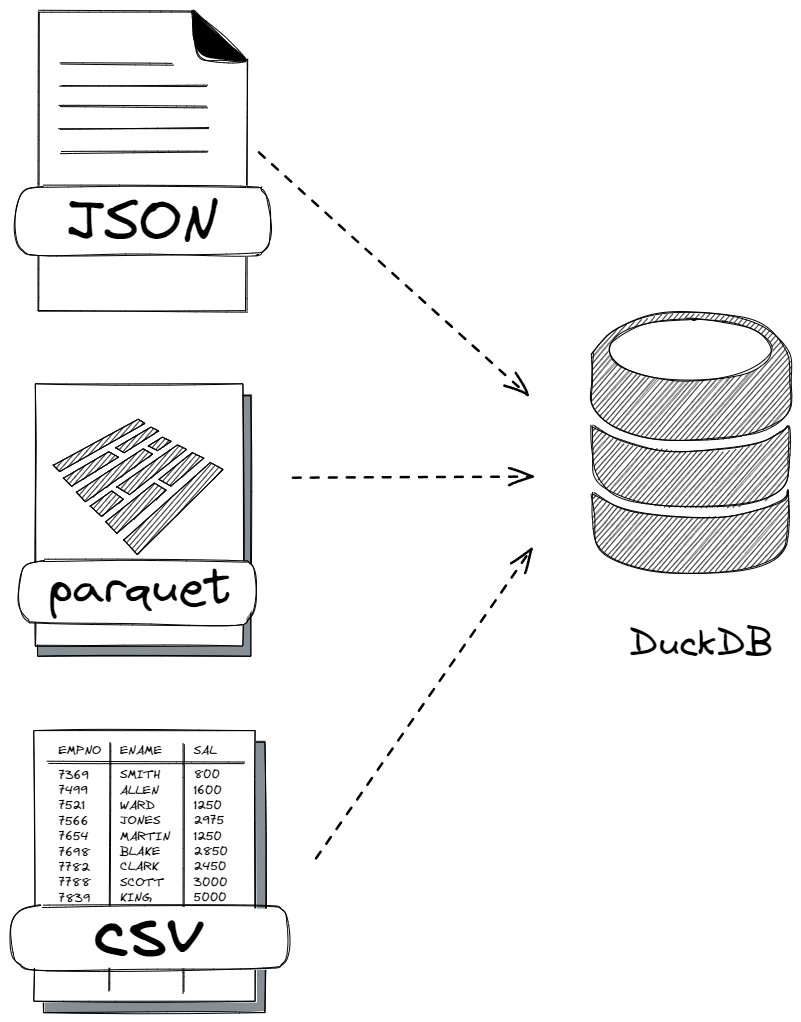
CSV
DuckDB 无缝导入 CSV 文件,自动检测配置和标头。对于结构化数据,使用带有 header=TRUE 选项的 COPY 语句。
[root@DuckDB ~]# echo "first_name,last_name,age" > test.csv; \
echo "Zhang,San,57" >> test.csv; \
echo "Li,Si,48" >> test.csv; \
echo "Wang,Wu,23" >> test.csv
[root@DuckDB ~]# cat test.csv
first_name,last_name,age
Zhang,San,57
Li,Si,48
Wang,Wu,23
[root@DuckDB ~]# ./duckdb my.db
v0.9.2 3c695d7ba9
Enter ".help" for usage hints.
D SELECT * FROM read_csv_auto('test.csv');
┌────────────┬───────────┬───────┐
│ first_name │ last_name │  age  │
│  varchar   │  varchar  │ int64 │
├────────────┼───────────┼───────┤
│ Zhang      │ San       │    57 │
│ Li         │ Si        │    48 │
│ Wang       │ Wu        │    23 │
└────────────┴───────────┴───────┘
D SELECT * FROM 'test.csv';
┌────────────┬───────────┬───────┐
│ first_name │ last_name │  age  │
│  varchar   │  varchar  │ int64 │
├────────────┼───────────┼───────┤
│ Zhang      │ San       │    57 │
│ Li         │ Si        │    48 │
│ Wang       │ Wu        │    23 │
└────────────┴───────────┴───────┘
D SELECT * FROM read_csv('test.csv', delim=',', header=true, columns={'first_name': 'VARCHAR', 'last_name': 'VARCHAR','age':'INT'});
┌────────────┬───────────┬───────┐
│ first_name │ last_name │  age  │
│  varchar   │  varchar  │ int32 │
├────────────┼───────────┼───────┤
│ Zhang      │ San       │    57 │
│ Li         │ Si        │    48 │
│ Wang       │ Wu        │    23 │
└────────────┴───────────┴───────┘
D CREATE TABLE test_csv (first_name VARCHAR, last_name VARCHAR, age INT);
D COPY test_csv FROM 'test.csv' (AUTO_DETECT true);
D SELECT * from test_csv;
┌────────────┬───────────┬───────┐
│ first_name │ last_name │  age  │
│  varchar   │  varchar  │ int32 │
├────────────┼───────────┼───────┤
│ Zhang      │ San       │    57 │
│ Li         │ Si        │    48 │
│ Wang       │ Wu        │    23 │
└────────────┴───────────┴───────┘
D
Parquet
用于数据压缩和查询性能的高效列格式。
[root@DuckDB ~]# yum install -y python3 python3-pip
Last metadata expiration check: 1:38:02 ago on Sun 17 Dec 2023 10:54:05 AM CST.
Package python3-3.9.18-1.el9_3.x86_64 is already installed.
Dependencies resolved.
====================================================================================================================================================================================================================================================================================
 Package                                                             Architecture                                                   Version                                                                 Repository                                                         Size
====================================================================================================================================================================================================================================================================================
Installing:
 python3-pip                                                         noarch                                                         21.2.3-7.el9                                                            appstream                                                         1.7 M

Transaction Summary
====================================================================================================================================================================================================================================================================================
Install  1 Package

Total download size: 1.7 M
Installed size: 8.7 M
Downloading Packages:
python3-pip-21.2.3-7.el9.noarch.rpm                                                                                                                                                                                                                 6.8 MB/s | 1.7 MB     00:00
------------------------------------------------------------------------------------------------------------------------------------------------------------------------------------------------------------------------------------------------------------------------------------
Total                                                                                                                                                                                                                                               671 kB/s | 1.7 MB     00:02
Running transaction check
Transaction check succeeded.
Running transaction test
Transaction test succeeded.
Running transaction
  Preparing        :                                                                                                                                                                                                                                                            1/1
  Installing       : python3-pip-21.2.3-7.el9.noarch                                                                                                                                                                                                                            1/1
  Running scriptlet: python3-pip-21.2.3-7.el9.noarch                                                                                                                                                                                                                            1/1
  Verifying        : python3-pip-21.2.3-7.el9.noarch                                                                                                                                                                                                                            1/1

Installed:
  python3-pip-21.2.3-7.el9.noarch

Complete!
[root@DuckDB ~]# pip install pandas
Collecting pandas
  Downloading pandas-2.1.4-cp39-cp39-manylinux_2_17_x86_64.manylinux2014_x86_64.whl (12.3 MB)
     |████████████████████████████████| 12.3 MB 4.3 MB/s
Collecting numpy<2,>=1.22.4
  Downloading numpy-1.26.2-cp39-cp39-manylinux_2_17_x86_64.manylinux2014_x86_64.whl (18.2 MB)
     |████████████████████████████████| 18.2 MB 99 kB/s
Collecting tzdata>=2022.1
  Downloading tzdata-2023.3-py2.py3-none-any.whl (341 kB)
     |████████████████████████████████| 341 kB 11.0 MB/s
Collecting pytz>=2020.1
  Downloading pytz-2023.3.post1-py2.py3-none-any.whl (502 kB)
     |████████████████████████████████| 502 kB 11.9 MB/s
Collecting python-dateutil>=2.8.2
  Downloading python_dateutil-2.8.2-py2.py3-none-any.whl (247 kB)
     |████████████████████████████████| 247 kB 11.2 MB/s
Requirement already satisfied: six>=1.5 in /usr/lib/python3.9/site-packages (from python-dateutil>=2.8.2->pandas) (1.15.0)
Installing collected packages: tzdata, pytz, python-dateutil, numpy, pandas
Successfully installed numpy-1.26.2 pandas-2.1.4 python-dateutil-2.8.2 pytz-2023.3.post1 tzdata-2023.3
WARNING: Running pip as the 'root' user can result in broken permissions and conflicting behaviour with the system package manager. It is recommended to use a virtual environment instead: https://pip.pypa.io/warnings/venv
[root@DuckDB ~]# pip install pyarrow
Collecting pyarrow
  Downloading pyarrow-14.0.1-cp39-cp39-manylinux_2_28_x86_64.whl (38.0 MB)
     |████████████████████████████████| 38.0 MB 2.1 MB/s
Requirement already satisfied: numpy>=1.16.6 in /usr/local/lib64/python3.9/site-packages (from pyarrow) (1.26.2)
Installing collected packages: pyarrow
Successfully installed pyarrow-14.0.1
WARNING: Running pip as the 'root' user can result in broken permissions and conflicting behaviour with the system package manager. It is recommended to use a virtual environment instead: https://pip.pypa.io/warnings/venv
[root@DuckDB ~]# pip install fastparquet
Collecting fastparquet
  Downloading fastparquet-2023.10.1-cp39-cp39-manylinux_2_17_x86_64.manylinux2014_x86_64.whl (1.7 MB)
     |████████████████████████████████| 1.7 MB 383 kB/s
Requirement already satisfied: pandas>=1.5.0 in /usr/local/lib64/python3.9/site-packages (from fastparquet) (2.1.4)
Collecting fsspec
  Downloading fsspec-2023.12.2-py3-none-any.whl (168 kB)
     |████████████████████████████████| 168 kB 18.3 MB/s
Collecting cramjam>=2.3
  Downloading cramjam-2.7.0-cp39-cp39-manylinux_2_17_x86_64.manylinux2014_x86_64.whl (1.6 MB)
     |████████████████████████████████| 1.6 MB 17.7 MB/s
Requirement already satisfied: numpy>=1.20.3 in /usr/local/lib64/python3.9/site-packages (from fastparquet) (1.26.2)
Collecting packaging
  Downloading packaging-23.2-py3-none-any.whl (53 kB)
     |████████████████████████████████| 53 kB 5.5 MB/s
Requirement already satisfied: tzdata>=2022.1 in /usr/local/lib/python3.9/site-packages (from pandas>=1.5.0->fastparquet) (2023.3)
Requirement already satisfied: pytz>=2020.1 in /usr/local/lib/python3.9/site-packages (from pandas>=1.5.0->fastparquet) (2023.3.post1)
Requirement already satisfied: python-dateutil>=2.8.2 in /usr/local/lib/python3.9/site-packages (from pandas>=1.5.0->fastparquet) (2.8.2)
Requirement already satisfied: six>=1.5 in /usr/lib/python3.9/site-packages (from python-dateutil>=2.8.2->pandas>=1.5.0->fastparquet) (1.15.0)
Installing collected packages: packaging, fsspec, cramjam, fastparquet
Successfully installed cramjam-2.7.0 fastparquet-2023.10.1 fsspec-2023.12.2 packaging-23.2
WARNING: Running pip as the 'root' user can result in broken permissions and conflicting behaviour with the system package manager. It is recommended to use a virtual environment instead: https://pip.pypa.io/warnings/venv
[root@DuckDB ~]# python
Python 3.9.18 (main, Sep  7 2023, 00:00:00)
[GCC 11.4.1 20230605 (Red Hat 11.4.1-2)] on linux
Type "help", "copyright", "credits" or "license" for more information.
>>> import pandas as pd
>>> df = pd.read_csv('test.csv')
>>> df.to_parquet('test.parquet')
>>> quit()
[root@DuckDB ~]# ls -l test*
-rw-r--r-- 1 root root   58 Dec 16 20:06 test.csv
-rw-r--r-- 1 root root 2859 Dec 17 12:41 test.parquet
[root@DuckDB ~]# ./duckdb my.db
v0.9.2 3c695d7ba9
Enter ".help" for usage hints.
D SELECT * FROM 'test.parquet';
┌────────────┬───────────┬───────┐
│ first_name │ last_name │  age  │
│  varchar   │  varchar  │ int64 │
├────────────┼───────────┼───────┤
│ Zhang      │ San       │    57 │
│ Li         │ Si        │    48 │
│ Wang       │ Wu        │    23 │
└────────────┴───────────┴───────┘
D SELECT * FROM read_parquet('test.parquet');
┌────────────┬───────────┬───────┐
│ first_name │ last_name │  age  │
│  varchar   │  varchar  │ int64 │
├────────────┼───────────┼───────┤
│ Zhang      │ San       │    57 │
│ Li         │ Si        │    48 │
│ Wang       │ Wu        │    23 │
└────────────┴───────────┴───────┘
D DESCRIBE SELECT * FROM 'test.parquet';
┌─────────────┬─────────────┬─────────┬─────────┬─────────┬─────────┐
│ column_name │ column_type │  null   │   key   │ default │  extra  │
│   varchar   │   varchar   │ varchar │ varchar │ varchar │ varchar │
├─────────────┼─────────────┼─────────┼─────────┼─────────┼─────────┤
│ first_name  │ VARCHAR     │ YES     │         │         │         │
│ last_name   │ VARCHAR     │ YES     │         │         │         │
│ age         │ BIGINT      │ YES     │         │         │         │
└─────────────┴─────────────┴─────────┴─────────┴─────────┴─────────┘
D SELECT * FROM parquet_metadata('test.parquet');
┌──────────────┬──────────────┬────────────────────┬──────────────────────┬─────────────────┬───────────┬─────────────┬───┬─────────────┬──────────────────────┬───────────────────┬──────────────────────┬──────────────────┬──────────────────────┬──────────────────────┐
│  file_name   │ row_group_id │ row_group_num_rows │ row_group_num_colu…  │ row_group_bytes │ column_id │ file_offset │ … │ compression │      encodings       │ index_page_offset │ dictionary_page_of…  │ data_page_offset │ total_compressed_s…  │ total_uncompressed…  │
│   varchar    │    int64     │       int64        │        int64         │      int64      │   int64   │    int64    │   │   varchar   │       varchar        │       int64       │        int64         │      int64       │        int64         │        int64         │
├──────────────┼──────────────┼────────────────────┼──────────────────────┼─────────────────┼───────────┼─────────────┼───┼─────────────┼──────────────────────┼───────────────────┼──────────────────────┼──────────────────┼──────────────────────┼──────────────────────┤
│ test.parquet │            0 │                  3 │                    3 │             261 │         0 │          87 │ … │ SNAPPY      │ PLAIN, RLE, RLE_DI…  │                   │                    4 │               43 │                   83 │                   79 │
│ test.parquet │            0 │                  3 │                    3 │             261 │         1 │         235 │ … │ SNAPPY      │ PLAIN, RLE, RLE_DI…  │                   │                  158 │              193 │                   77 │                   73 │
│ test.parquet │            0 │                  3 │                    3 │             261 │         2 │         415 │ … │ SNAPPY      │ PLAIN, RLE, RLE_DI…  │                   │                  305 │              342 │                  110 │                  109 │
├──────────────┴──────────────┴────────────────────┴──────────────────────┴─────────────────┴───────────┴─────────────┴───┴─────────────┴──────────────────────┴───────────────────┴──────────────────────┴──────────────────┴──────────────────────┴──────────────────────┤
│ 3 rows                                                                                                                                                                                                                                             23 columns (14 shown) │
└──────────────────────────────────────────────────────────────────────────────────────────────────────────────────────────────────────────────────────────────────────────────────────────────────────────────────────────────────────────────────────────────────────────┘
D SELECT * FROM parquet_schema('test.parquet');
┌──────────────┬────────────┬────────────┬─────────────┬─────────────────┬──────────────┬────────────────┬───────┬───────────┬──────────┬──────────────┐
│  file_name   │    name    │    type    │ type_length │ repetition_type │ num_children │ converted_type │ scale │ precision │ field_id │ logical_type │
│   varchar    │  varchar   │  varchar   │   varchar   │     varchar     │    int64     │    varchar     │ int64 │   int64   │  int64   │   varchar    │
├──────────────┼────────────┼────────────┼─────────────┼─────────────────┼──────────────┼────────────────┼───────┼───────────┼──────────┼──────────────┤
│ test.parquet │ schema     │            │             │ REQUIRED        │            3 │                │       │           │          │              │
│ test.parquet │ first_name │ BYTE_ARRAY │             │ OPTIONAL        │              │ UTF8           │       │           │          │ StringType() │
│ test.parquet │ last_name  │ BYTE_ARRAY │             │ OPTIONAL        │              │ UTF8           │       │           │          │ StringType() │
│ test.parquet │ age        │ INT64      │             │ OPTIONAL        │              │                │       │           │          │              │
└──────────────┴────────────┴────────────┴─────────────┴─────────────────┴──────────────┴────────────────┴───────┴───────────┴──────────┴──────────────┘
D
JSON
是一种开放标准文件格式和数据交换格式,DuckDB JSON 阅读器可以通过分析 JSON 文件自动推断要使用哪些配置标志。
[root@DuckDB ~]# cat > test.json << "EOF"
[
{"first_name":"Zhang","last_name":"San","age":"57"},
{"first_name":"Li","last_name":"Si","age":"48"},
{"first_name":"Wang","last_name":"Wu","age":"23"}
]
EOF
[root@DuckDB ~]# cat test.json
[
{"first_name":"Zhang","last_name":"San","age":"57"},
{"first_name":"Li","last_name":"Si","age":"48"},
{"first_name":"Wang","last_name":"Wu","age":"23"}
]
[root@DuckDB ~]# ./duckdb my.db
v0.9.2 3c695d7ba9
Enter ".help" for usage hints.
D SELECT * FROM 'test.json';
┌────────────┬───────────┬───────┐
│ first_name │ last_name │  age  │
│  varchar   │  varchar  │ int64 │
├────────────┼───────────┼───────┤
│ Zhang      │ San       │    57 │
│ Li         │ Si        │    48 │
│ Wang       │ Wu        │    23 │
└────────────┴───────────┴───────┘
D SELECT * FROM read_json('test.json');
Error: Binder Error: read_json requires columns to be specified through the "columns" parameter.
 Use read_json_auto or set auto_detect=true to automatically guess columns.
D SELECT * FROM read_json('test.json', auto_detect=true);
┌────────────┬───────────┬───────┐
│ first_name │ last_name │  age  │
│  varchar   │  varchar  │ int64 │
├────────────┼───────────┼───────┤
│ Zhang      │ San       │    57 │
│ Li         │ Si        │    48 │
│ Wang       │ Wu        │    23 │
└────────────┴───────────┴───────┘
D SELECT * FROM read_json_auto('test.json');
┌────────────┬───────────┬───────┐
│ first_name │ last_name │  age  │
│  varchar   │  varchar  │ int64 │
├────────────┼───────────┼───────┤
│ Zhang      │ San       │    57 │
│ Li         │ Si        │    48 │
│ Wang       │ Wu        │    23 │
└────────────┴───────────┴───────┘
D SELECT * FROM read_json_auto('test.json', format='array');
┌────────────┬───────────┬───────┐
│ first_name │ last_name │  age  │
│  varchar   │  varchar  │ int64 │
├────────────┼───────────┼───────┤
│ Zhang      │ San       │    57 │
│ Li         │ Si        │    48 │
│ Wang       │ Wu        │    23 │
└────────────┴───────────┴───────┘
D SELECT * FROM read_json_auto('test.json', format='unstructured');
┌────────────────────────────────────────────────────────────────────────────────────────────────────────────────────────────────────────────────────────┐
│                                                                          json                                                                          │
│                                              struct(first_name varchar, last_name varchar, age bigint)[]                                               │
├────────────────────────────────────────────────────────────────────────────────────────────────────────────────────────────────────────────────────────┤
│ [{'first_name': Zhang, 'last_name': San, 'age': 57}, {'first_name': Li, 'last_name': Si, 'age': 48}, {'first_name': Wang, 'last_name': Wu, 'age': 23}] │
└────────────────────────────────────────────────────────────────────────────────────────────────────────────────────────────────────────────────────────┘
D SELECT * FROM read_json_auto('test.json', records=true);
┌────────────┬───────────┬───────┐
│ first_name │ last_name │  age  │
│  varchar   │  varchar  │ int64 │
├────────────┼───────────┼───────┤
│ Zhang      │ San       │    57 │
│ Li         │ Si        │    48 │
│ Wang       │ Wu        │    23 │
└────────────┴───────────┴───────┘
D SELECT * FROM read_json_auto('test.json', records=false);
┌───────────────────────────────────────────────────────────┐
│                           json                            │
│ struct(first_name varchar, last_name varchar, age bigint) │
├───────────────────────────────────────────────────────────┤
│ {'first_name': Zhang, 'last_name': San, 'age': 57}        │
│ {'first_name': Li, 'last_name': Si, 'age': 48}            │
│ {'first_name': Wang, 'last_name': Wu, 'age': 23}          │
└───────────────────────────────────────────────────────────┘
D
插入语句
[root@DuckDB ~]# ./duckdb my.db
v0.9.2 3c695d7ba9
Enter ".help" for usage hints.
D CREATE TABLE test_sql (first_name VARCHAR, last_name VARCHAR, age INT);
D INSERT INTO test_sql values('Zhang','San',57);
D INSERT INTO test_sql values('Li','Si',48);
D INSERT INTO test_sql values('Wang','Wu',23);
D SELECT * FROM test_sql;
┌────────────┬───────────┬───────┐
│ first_name │ last_name │  age  │
│  varchar   │  varchar  │ int32 │
├────────────┼───────────┼───────┤
│ Zhang      │ San       │    57 │
│ Li         │ Si        │    48 │
│ Wang       │ Wu        │    23 │
└────────────┴───────────┴───────┘
D
附加器
在 C++ 和 Java 中,附加器可以用作批量数据加载的替代方法。该类可用于高效地向数据库系统添加行,而无需使用SQL。
客户端API
DuckDB 有多种客户端 API
我们测试Python的API
[root@DuckDB ~]# pip install duckdb
Collecting duckdb
  Downloading duckdb-0.9.2-cp39-cp39-manylinux_2_17_x86_64.manylinux2014_x86_64.whl (16.5 MB)
     |████████████████████████████████| 16.5 MB 20.8 MB/s
Installing collected packages: duckdb
Successfully installed duckdb-0.9.2
WARNING: Running pip as the 'root' user can result in broken permissions and conflicting behaviour with the system package manager. It is recommended to use a virtual environment instead: https://pip.pypa.io/warnings/venv
[root@DuckDB ~]# cat > test_pyapi.py << "EOF"
import duckdb
con = duckdb.connect()
con.sql("SELECT * FROM 'test.csv'").show()
con.close()
EOF
[root@DuckDB ~]# cat test_pyapi.py
import duckdb
con = duckdb.connect()
con.sql("SELECT * FROM 'test.csv'").show()
con.close()
[root@DuckDB ~]# python test_pyapi.py
┌────────────┬───────────┬───────┐
│ first_name │ last_name │  age  │
│  varchar   │  varchar  │ int64 │
├────────────┼───────────┼───────┤
│ Zhang      │ San       │    57 │
│ Li         │ Si        │    48 │
│ Wang       │ Wu        │    23 │
└────────────┴───────────┴───────┘

[root@DuckDB ~]#
SQL
这里我们概述了如何在 SQL 中执行简单的操作。下载weather.csv文件,登录DuckDB CLI界面,附加数据库my.db,创建weather表插入数据,从CSV文件中COPY数据到表weather中,创建test_json测试表,从test.json的JSON文件中COPY到test_json表中,导出整个my数据库到my目录下。
--设置科学上网
[root@DuckDB ~]# export https_proxy=192.168.17.1:10809
[root@DuckDB ~]# wget https://duckdb.org/data/weather.csv
--2023-12-17 21:41:02--  https://duckdb.org/data/weather.csv
Connecting to 192.168.17.1:10809... connected.
Proxy request sent, awaiting response... 200 OK
Length: 97 [text/csv]
Saving to: ‘weather.csv’

weather.csv                                                          100%[======================================================================================================================================================================>]      97  --.-KB/s    in 0s

2023-12-17 21:41:03 (4.42 MB/s) - ‘weather.csv’ saved [97/97]

[root@DuckDB ~]# ll weather.csv
-rw-r--r-- 1 root root 97 Dec 14 04:15 weather.csv
[root@DuckDB ~]# ./duckdb
v0.9.2 3c695d7ba9
Enter ".help" for usage hints.
Connected to a transient in-memory database.
Use ".open FILENAME" to reopen on a persistent database.
D ATTACH 'my.db';
D SHOW DATABASES;
┌───────────────┐
│ database_name │
│    varchar    │
├───────────────┤
│ memory        │
│ my            │
└───────────────┘
D USE my;
D CREATE TABLE weather (
>     city    VARCHAR,
>     temp_lo INTEGER, -- minimum temperature on a day
>     temp_hi INTEGER, -- maximum temperature on a day
>     prcp    REAL,
>     date    DATE
> );
D DESCRIBE weather;
┌─────────────┬─────────────┬─────────┬─────────┬─────────┬───────┐
│ column_name │ column_type │  null   │   key   │ default │ extra │
│   varchar   │   varchar   │ varchar │ varchar │ varchar │ int32 │
├─────────────┼─────────────┼─────────┼─────────┼─────────┼───────┤
│ city        │ VARCHAR     │ YES     │         │         │       │
│ temp_lo     │ INTEGER     │ YES     │         │         │       │
│ temp_hi     │ INTEGER     │ YES     │         │         │       │
│ prcp        │ FLOAT       │ YES     │         │         │       │
│ date        │ DATE        │ YES     │         │         │       │
└─────────────┴─────────────┴─────────┴─────────┴─────────┴───────┘
D INSERT INTO weather (city, temp_lo, temp_hi, prcp, date)
> VALUES ('San Francisco', 43, 57, 0.0, '1994-11-29');
D COPY weather
> FROM 'weather.csv';
D SELECT *
> FROM weather;
┌───────────────┬─────────┬─────────┬───────┬────────────┐
│     city      │ temp_lo │ temp_hi │ prcp  │    date    │
│    varchar    │  int32  │  int32  │ float │    date    │
├───────────────┼─────────┼─────────┼───────┼────────────┤
│ San Francisco │      43 │      57 │   0.0 │ 1994-11-29 │
│ San Francisco │      46 │      50 │  0.25 │ 1994-11-27 │
│ San Francisco │      43 │      57 │   0.0 │ 1994-11-29 │
│ Hayward       │      37 │      54 │       │ 1994-11-29 │
└───────────────┴─────────┴─────────┴───────┴────────────┘
D CREATE TABLE test_json (first_name VARCHAR, last_name VARCHAR, age INT);
D COPY test_json FROM 'test.json' (FORMAT JSON, ARRAY true);
D SELECT * FROM test_json;
┌────────────┬───────────┬───────┐
│ first_name │ last_name │  age  │
│  varchar   │  varchar  │ int32 │
├────────────┼───────────┼───────┤
│ Zhang      │ San       │    57 │
│ Li         │ Si        │    48 │
│ Wang       │ Wu        │    23 │
└────────────┴───────────┴───────┘
D EXPORT DATABASE 'my';
D .quit
[root@DuckDB ~]# ll
total 54044
-rw-------. 1 root root     1490 Dec 11 19:44 anaconda-ks.cfg
-rwxr-xr-x. 1 root root 40638152 Nov 14 16:35 duckdb
-rw-r--r--. 1 root root 13613182 Nov 14 16:35 duckdb_cli-linux-amd64.zip
drwxr-xr-x  2 root root      120 Dec 17 21:49 my
-rw-r--r--. 1 root root  1060864 Dec 17 21:49 my.db
-rw-r--r--  1 root root       58 Dec 16 20:06 test.csv
-rw-r--r--  1 root root      156 Dec 17 16:07 test.json
-rw-r--r--  1 root root     2859 Dec 17 12:41 test.parquet
-rw-r--r--  1 root root       92 Dec 17 17:10 test_pyapi.py
-rw-r--r--  1 root root       97 Dec 14 04:15 weather.csv
[root@DuckDB ~]# cd my/
[root@DuckDB my]# ll
total 24
-rw-r--r-- 1 root root 356 Dec 17 21:49 load.sql
-rw-r--r-- 1 root root 326 Dec 17 21:49 schema.sql
-rw-r--r-- 1 root root  58 Dec 17 21:49 test_csv.csv
-rw-r--r-- 1 root root  58 Dec 17 21:49 test_json.csv
-rw-r--r-- 1 root root  58 Dec 17 21:49 test_sql.csv
-rw-r--r-- 1 root root 163 Dec 17 21:49 weather.csv
[root@DuckDB my]#
扩展
DuckDB具有灵活的扩展机制,允许动态加载扩展。这些可以通过提供对其他文件格式的支持、引入新类型和特定于域的功能来扩展 DuckDB 的功能。是FROM duckdb_extensions();命令查看扩展清单,比如json扩展能直接查询json格式类型的文件,也可以安装httpfs扩展来访问 HTTP(S)或者 S3 API。
[root@DuckDB ~]# ./duckdb
v0.9.2 3c695d7ba9
Enter ".help" for usage hints.
Connected to a transient in-memory database.
Use ".open FILENAME" to reopen on a persistent database.
D FROM duckdb_extensions();
┌──────────────────┬─────────┬───────────┬──────────────────────────────────────────────────────────────────────────┬────────────────────────────────────────────────────────────────────────────────────┬───────────────────┐
│  extension_name  │ loaded  │ installed │                               install_path                               │                                    description                                     │      aliases      │
│     varchar      │ boolean │  boolean  │                                 varchar                                  │                                      varchar                                       │     varchar[]     │
├──────────────────┼─────────┼───────────┼──────────────────────────────────────────────────────────────────────────┼────────────────────────────────────────────────────────────────────────────────────┼───────────────────┤
│ arrow            │ false   │ false     │                                                                          │ A zero-copy data integration between Apache Arrow and DuckDB                       │ []                │
│ autocomplete     │ true    │ true      │ (BUILT-IN)                                                               │ Adds support for autocomplete in the shell                                         │ []                │
│ aws              │ false   │ false     │                                                                          │ Provides features that depend on the AWS SDK                                       │ []                │
│ azure            │ false   │ false     │                                                                          │ Adds a filesystem abstraction for Azure blob storage to DuckDB                     │ []                │
│ excel            │ true    │ true      │ (BUILT-IN)                                                               │ Adds support for Excel-like format strings                                         │ []                │
│ fts              │ true    │ true      │ (BUILT-IN)                                                               │ Adds support for Full-Text Search Indexes                                          │ []                │
│ httpfs           │ false   │ true      │ /root/.duckdb/extensions/v0.9.2/linux_amd64_gcc4/httpfs.duckdb_extension │ Adds support for reading and writing files over a HTTP(S) connection               │ [http, https, s3] │
│ iceberg          │ false   │ false     │                                                                          │ Adds support for Apache Iceberg                                                    │ []                │
│ icu              │ true    │ true      │ (BUILT-IN)                                                               │ Adds support for time zones and collations using the ICU library                   │ []                │
│ inet             │ true    │           │                                                                          │ Adds support for IP-related data types and functions                               │ []                │
│ jemalloc         │ true    │ true      │ (BUILT-IN)                                                               │ Overwrites system allocator with JEMalloc                                          │ []                │
│ json             │ true    │ true      │ (BUILT-IN)                                                               │ Adds support for JSON operations                                                   │ []                │
│ motherduck       │ false   │ false     │                                                                          │ Enables motherduck integration with the system                                     │ [md]              │
│ mysql_scanner    │ false   │ false     │                                                                          │ Adds support for connecting to a MySQL database                                    │ [mysql]           │
│ parquet          │ true    │ true      │ (BUILT-IN)                                                               │ Adds support for reading and writing parquet files                                 │ []                │
│ postgres_scanner │ false   │ false     │                                                                          │ Adds support for connecting to a Postgres database                                 │ [postgres]        │
│ spatial          │ false   │ false     │                                                                          │ Geospatial extension that adds support for working with spatial data and functions │ []                │
│ sqlite_scanner   │ false   │ false     │                                                                          │ Adds support for reading and writing SQLite database files                         │ [sqlite, sqlite3] │
│ substrait        │ false   │ false     │                                                                          │ Adds support for the Substrait integration                                         │ []                │
│ tpcds            │ false   │ false     │                                                                          │ Adds TPC-DS data generation and query support                                      │ []                │
│ tpch             │ true    │ true      │ (BUILT-IN)                                                               │ Adds TPC-H data generation and query support                                       │ []                │
│ visualizer       │ false   │ false     │                                                                          │ Creates an HTML-based visualization of the query plan                              │ []                │
├──────────────────┴─────────┴───────────┴──────────────────────────────────────────────────────────────────────────┴────────────────────────────────────────────────────────────────────────────────────┴───────────────────┤
│ 22 rows                                                                                                                                                                                                          6 columns │
└────────────────────────────────────────────────────────────────────────────────────────────────────────────────────────────────────────────────────────────────────────────────────────────────────────────────────────────┘
D SELECT * FROM 'test.json';
┌────────────┬───────────┬───────┐
│ first_name │ last_name │  age  │
│  varchar   │  varchar  │ int64 │
├────────────┼───────────┼───────┤
│ Zhang      │ San       │    57 │
│ Li         │ Si        │    48 │
│ Wang       │ Wu        │    23 │
└────────────┴───────────┴───────┘
D INSTALL httpfs;
D LOAD httpfs;
D SELECT * FROM 'http://47.109.93.25:9000/test/flights.csv';
┌────────────┬───────────────┬────────────────┬─────────────────┐
│ FlightDate │ UniqueCarrier │ OriginCityName │  DestCityName   │
│    date    │    varchar    │    varchar     │     varchar     │
├────────────┼───────────────┼────────────────┼─────────────────┤
│ 1988-01-01 │ AA            │ New York, NY   │ Los Angeles, CA │
│ 1988-01-02 │ AA            │ New York, NY   │ Los Angeles, CA │
│ 1988-01-03 │ AA            │ New York, NY   │ Los Angeles, CA │
└────────────┴───────────────┴────────────────┴─────────────────┘
D SET s3_url_style='path';
D SET s3_use_ssl = false;
D SET s3_endpoint='47.109.93.25:9000';
D SELECT * FROM read_csv_auto('s3://test/flights.csv');
┌────────────┬───────────────┬────────────────┬─────────────────┐
│ FlightDate │ UniqueCarrier │ OriginCityName │  DestCityName   │
│    date    │    varchar    │    varchar     │     varchar     │
├────────────┼───────────────┼────────────────┼─────────────────┤
│ 1988-01-01 │ AA            │ New York, NY   │ Los Angeles, CA │
│ 1988-01-02 │ AA            │ New York, NY   │ Los Angeles, CA │
│ 1988-01-03 │ AA            │ New York, NY   │ Los Angeles, CA │
└────────────┴───────────────┴────────────────┴─────────────────┘
D
以上就是一些DuckDB:duck:的入门操作。提供给小伙伴们参考:smile:
