



前言
在生产环境中有时候会出现由于网络或者人为删除等原因,导致主库的archivelog文件还没有传到备库,产生Gaps。那么我们有没有办法不重建备库来恢复DataGuard环境那?答案是当然的,Oracle官网的Oracle Data Guard Concepts and Administration文档中记录着在这种情况下,您可以使用RMAN的增量备份前滚物理备用数据库。下面我们就来演练一下
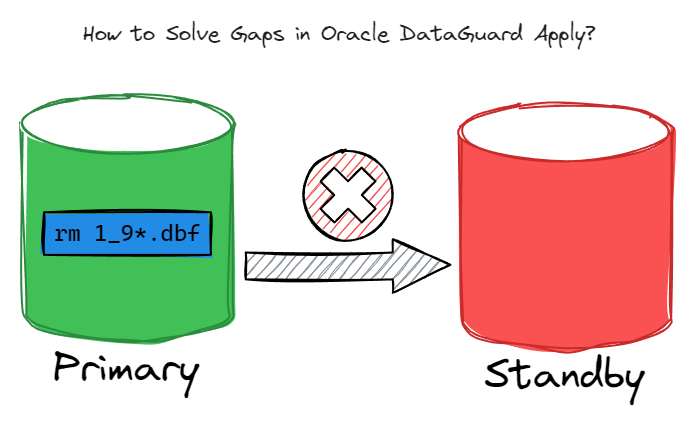
环境准备
准备两台已经配置好DataGuard环境的虚拟机
| 主机名 | IP地址 | 操作系统 | 数据库版本 | SID |
|---|---|---|---|---|
| 11g-primary | 192.168.17.91 | CentOS 7.9 | Oracle 11.2.0.4 | orcl |
| 11g-standby | 192.168.17.92 | CentOS 7.9 | Oracle 11.2.0.4 | orcldg |
主库
[oracle@11g-primary ~]$ sqlplus / as sysdba

SQL*Plus: Release 11.2.0.4.0 Production on Sat Dec 23 22:56:11 2023

Copyright (c) 1982, 2013, Oracle.  All rights reserved.


Connected to:
Oracle Database 11g Enterprise Edition Release 11.2.0.4.0 - 64bit Production
With the Partitioning, OLAP, Data Mining and Real Application Testing options

SQL> archive log list
Database log mode              Archive Mode
Automatic archival             Enabled
Archive destination            /arch/
Oldest online log sequence     85
Next log sequence to archive   87
Current log sequence           87
SQL> select database_role,protection_mode,open_mode from v$database;

DATABASE_ROLE    PROTECTION_MODE      OPEN_MODE
---------------- -------------------- --------------------
PRIMARY          MAXIMUM PERFORMANCE  READ WRITE

SQL> select count(1) from sunying.t;

  COUNT(1)
----------
   1280000

SQL>
备库
Disconnected from Oracle Database 11g Enterprise Edition Release 11.2.0.4.0 - 64bit Production
With the Partitioning, OLAP, Data Mining and Real Application Testing options
[oracle@11g-standby ~]$ sqlplus / as sysdba

SQL*Plus: Release 11.2.0.4.0 Production on Sat Dec 23 22:57:06 2023

Copyright (c) 1982, 2013, Oracle.  All rights reserved.


Connected to:
Oracle Database 11g Enterprise Edition Release 11.2.0.4.0 - 64bit Production
With the Partitioning, OLAP, Data Mining and Real Application Testing options

SQL> archive log list
Database log mode              Archive Mode
Automatic archival             Enabled
Archive destination            /arch/
Oldest online log sequence     85
Next log sequence to archive   0
Current log sequence           87
SQL> select database_role,protection_mode,open_mode from v$database;

DATABASE_ROLE    PROTECTION_MODE      OPEN_MODE
---------------- -------------------- --------------------
PHYSICAL STANDBY MAXIMUM PERFORMANCE  READ ONLY WITH APPLY

SQL> select count(1) from sunying.t;

  COUNT(1)
----------
   1280000

SQL>
模拟主库丢失归档的情况
--在主库操作
SQL> set linesize 200
SQL> select * from v$log;

    GROUP#    THREAD#  SEQUENCE#      BYTES  BLOCKSIZE    MEMBERS ARC STATUS           FIRST_CHANGE# FIRST_TIME          NEXT_CHANGE# NEXT_TIME
---------- ---------- ---------- ---------- ---------- ---------- --- ---------------- ------------- ------------------- ------------ -------------------
         1          1         85   52428800        512          1 YES INACTIVE                907056 2023-12-23 22:54:47       907128 2023-12-23 22:54:50
         2          1         86   52428800        512          1 YES INACTIVE                907128 2023-12-23 22:54:50       907209 2023-12-23 22:54:53
         3          1         87   52428800        512          1 NO  CURRENT                 907209 2023-12-23 22:54:53   2.8147E+14

SQL> alter system set log_archive_dest_state_2 = 'defer';

System altered.

SQL> insert into sunying.t select * from sunying.t;

1280000 rows created.

SQL> commit;

Commit complete.

SQL> select count(1) from sunying.t;

  COUNT(1)
----------
   2560000

SQL> alter system switch logfile;

System altered.

SQL> /

System altered.

SQL> /

System altered.

SQL> !
[oracle@11g-primary ~]$ cd /arch
[oracle@11g-primary arch]$ ll
total 1008684
-rw-r----- 1 oracle oinstall 45707264 Dec 23 20:18 1_71_1156360815.dbf
-rw-r----- 1 oracle oinstall 40260608 Dec 23 20:21 1_72_1156360815.dbf
-rw-r----- 1 oracle oinstall 43447296 Dec 23 20:23 1_73_1156360815.dbf
-rw-r----- 1 oracle oinstall 40251392 Dec 23 20:24 1_74_1156360815.dbf
-rw-r----- 1 oracle oinstall 41733120 Dec 23 20:25 1_75_1156360815.dbf
-rw-r----- 1 oracle oinstall 22571520 Dec 23 20:56 1_76_1156360815.dbf
-rw-r----- 1 oracle oinstall     1024 Dec 23 20:58 1_77_1156360815.dbf
-rw-r----- 1 oracle oinstall     1536 Dec 23 20:58 1_78_1156360815.dbf
-rw-r----- 1 oracle oinstall 46794240 Dec 23 22:54 1_79_1156360815.dbf
-rw-r----- 1 oracle oinstall 46794240 Dec 23 22:54 1_80_1156360815.dbf
-rw-r----- 1 oracle oinstall 46794240 Dec 23 22:54 1_81_1156360815.dbf
-rw-r----- 1 oracle oinstall 49025536 Dec 23 22:54 1_82_1156360815.dbf
-rw-r----- 1 oracle oinstall 46794240 Dec 23 22:54 1_83_1156360815.dbf
-rw-r----- 1 oracle oinstall 46798848 Dec 23 22:54 1_84_1156360815.dbf
-rw-r----- 1 oracle oinstall 46794240 Dec 23 22:54 1_85_1156360815.dbf
-rw-r----- 1 oracle oinstall 46794240 Dec 23 22:54 1_86_1156360815.dbf
-rw-r----- 1 oracle oinstall 46794240 Dec 23 23:03 1_87_1156360815.dbf
-rw-r----- 1 oracle oinstall 46794240 Dec 23 23:03 1_88_1156360815.dbf
-rw-r----- 1 oracle oinstall 48705536 Dec 23 23:03 1_89_1156360815.dbf
-rw-r----- 1 oracle oinstall 46833664 Dec 23 23:03 1_90_1156360815.dbf
-rw-r----- 1 oracle oinstall 46794240 Dec 23 23:03 1_91_1156360815.dbf
-rw-r----- 1 oracle oinstall 46794240 Dec 23 23:03 1_92_1156360815.dbf
-rw-r----- 1 oracle oinstall 46833664 Dec 23 23:03 1_93_1156360815.dbf
-rw-r----- 1 oracle oinstall 47984128 Dec 23 23:03 1_94_1156360815.dbf
-rw-r----- 1 oracle oinstall 44584960 Dec 23 23:03 1_95_1156360815.dbf
-rw-r----- 1 oracle oinstall   116736 Dec 23 23:04 1_96_1156360815.dbf
-rw-r----- 1 oracle oinstall    38400 Dec 23 23:04 1_97_1156360815.dbf
-rw-r----- 1 oracle oinstall     2560 Dec 23 23:04 1_98_1156360815.dbf
[oracle@11g-primary arch]$ rm 1_9*.dbf
[oracle@11g-primary arch]$ exit
exit

SQL> delete from sunying.t where rownum<10000;

9999 rows deleted.

SQL> commit;

Commit complete.

SQL> alter system switch logfile;

System altered.

SQL> alter system set log_archive_dest_state_2 = 'enable';

System altered.

SQL>


--备库操作
[oracle@11g-standby ~]$ cd /u01/app/oracle/diag/rdbms/orcldg/orcldg/trace/
[oracle@11g-standby trace]$ tail -f alert_orcldg.log
  Mem# 0: /u01/app/oracle/oradata/orcldg/standby02.log
RFS[2]: Selected log 4 for thread 1 sequence 87 dbid 1684141551 branch 1156360815
Archived Log entry 11 added for thread 1 sequence 86 ID 0x6461b6ef dest 1:
Media Recovery Waiting for thread 1 sequence 87 (in transit)
Recovery of Online Redo Log: Thread 1 Group 4 Seq 87 Reading mem 0
  Mem# 0: /u01/app/oracle/oradata/orcldg/standby01.log
Sat Dec 23 23:03:14 2023
Archived Log entry 12 added for thread 1 sequence 87 ID 0x6461b6ef dest 1:
Sat Dec 23 23:03:14 2023
Media Recovery Waiting for thread 1 sequence 88
Sat Dec 23 23:10:16 2023
Fetching gap sequence in thread 1, gap sequence 88-88
FAL[client]: Error fetching gap sequence, no FAL server specified
Sat Dec 23 23:10:16 2023
RFS[4]: Assigned to RFS process 82281
RFS[4]: Opened log for thread 1 sequence 99 dbid 1684141551 branch 1156360815
Sat Dec 23 23:10:16 2023
RFS[5]: Assigned to RFS process 82285
RFS[5]: Opened log for thread 1 sequence 88 dbid 1684141551 branch 1156360815
Sat Dec 23 23:10:16 2023
RFS[6]: Assigned to RFS process 82287
RFS[6]: Opened log for thread 1 sequence 89 dbid 1684141551 branch 1156360815
Archived Log entry 13 added for thread 1 sequence 99 rlc 1156360815 ID 0x6461b6ef dest 2:
Archived Log entry 14 added for thread 1 sequence 88 rlc 1156360815 ID 0x6461b6ef dest 2:
Archived Log entry 15 added for thread 1 sequence 89 rlc 1156360815 ID 0x6461b6ef dest 2:
Media Recovery Log /arch/1_88_1156360815.dbf
Media Recovery Log /arch/1_89_1156360815.dbf
Media Recovery Waiting for thread 1 sequence 90
Fetching gap sequence in thread 1, gap sequence 90-98
FAL[client]: Error fetching gap sequence, no FAL server specified
RFS[6]: Selected log 4 for thread 1 sequence 100 dbid 1684141551 branch 1156360815
Sat Dec 23 23:10:18 2023
Archived Log entry 16 added for thread 1 sequence 100 ID 0x6461b6ef dest 1:
Sat Dec 23 23:10:18 2023
Primary database is in MAXIMUM PERFORMANCE mode
RFS[7]: Assigned to RFS process 82295
RFS[7]: Selected log 4 for thread 1 sequence 101 dbid 1684141551 branch 1156360815
FAL[client]: Error fetching gap sequence, no FAL server specified
Sat Dec 23 23:10:29 2023
FAL[client]: Error fetching gap sequence, no FAL server specified
Sat Dec 23 23:10:39 2023
FAL[client]: Error fetching gap sequence, no FAL server specified
Sat Dec 23 23:10:49 2023
FAL[client]: Error fetching gap sequence, no FAL server specified
Sat Dec 23 23:10:59 2023
FAL[client]: Error fetching gap sequence, no FAL server specified
Sat Dec 23 23:11:09 2023
FAL[client]: Error fetching gap sequence, no FAL server specified
Sat Dec 23 23:11:19 2023
FAL[client]: Error fetching gap sequence, no FAL server specified
Sat Dec 23 23:11:29 2023
FAL[client]: Error fetching gap sequence, no FAL server specified
Sat Dec 23 23:11:39 2023
FAL[client]: Error fetching gap sequence, no FAL server specified
Sat Dec 23 23:11:49 2023
FAL[client]: Error fetching gap sequence, no FAL server specified
Sat Dec 23 23:11:59 2023
FAL[client]: Failed to request gap sequence
 GAP - thread 1 sequence 90-98
 DBID 1684141551 branch 1156360815
FAL[client]: All defined FAL servers have been attempted.
------------------------------------------------------------
Check that the CONTROL_FILE_RECORD_KEEP_TIME initialization
parameter is defined to a value that's sufficiently large
enough to maintain adequate log switch information to resolve
archivelog gaps.
------------------------------------------------------------
^C

[oracle@11g-standby trace]$ sqlplus / as sysdba

SQL*Plus: Release 11.2.0.4.0 Production on Sat Dec 23 23:13:26 2023

Copyright (c) 1982, 2013, Oracle.  All rights reserved.


Connected to:
Oracle Database 11g Enterprise Edition Release 11.2.0.4.0 - 64bit Production
With the Partitioning, OLAP, Data Mining and Real Application Testing options

SQL> select * from v$archive_gap;

   THREAD# LOW_SEQUENCE# HIGH_SEQUENCE#
---------- ------------- --------------
         1            90             98

SQL>
恢复DataGuard
通过RMAN增量备份来恢复
停止redo应用备库
[oracle@11g-standby trace]$ sqlplus / as sysdba

SQL*Plus: Release 11.2.0.4.0 Production on Sat Dec 23 23:18:55 2023

Copyright (c) 1982, 2013, Oracle.  All rights reserved.


Connected to:
Oracle Database 11g Enterprise Edition Release 11.2.0.4.0 - 64bit Production
With the Partitioning, OLAP, Data Mining and Real Application Testing options

SQL> alter database recover managed standby database cancel;

Database altered.

SQL>
查询备库当前SCN
SQL> select current_scn from v$database;

CURRENT_SCN
-----------
     908139

SQL>
RMAN增量备份
主库做RMAN的增量备份,注意scn号就是备库当前scn号
[oracle@11g-primary ~]$ rman target /

Recovery Manager: Release 11.2.0.4.0 - Production on Sat Dec 23 23:26:42 2023

Copyright (c) 1982, 2011, Oracle and/or its affiliates.  All rights reserved.

connected to target database: ORCL (DBID=1684141551)

RMAN> backup incremental from scn 908139 database format '/tmp/forstandby_%U' tag 'forstandby';

Starting backup at 2023-12-23 23:30:01
using target database control file instead of recovery catalog
allocated channel: ORA_DISK_1
channel ORA_DISK_1: SID=199 device type=DISK
channel ORA_DISK_1: starting full datafile backup set
channel ORA_DISK_1: specifying datafile(s) in backup set
input datafile file number=00003 name=/u01/app/oracle/oradata/orcl/undotbs01.dbf
input datafile file number=00001 name=/u01/app/oracle/oradata/orcl/system01.dbf
input datafile file number=00002 name=/u01/app/oracle/oradata/orcl/sysaux01.dbf
input datafile file number=00004 name=/u01/app/oracle/oradata/orcl/users01.dbf
channel ORA_DISK_1: starting piece 1 at 2023-12-23 23:30:01
channel ORA_DISK_1: finished piece 1 at 2023-12-23 23:30:04
piece handle=/tmp/forstandby_0c2epp7p_1_1 tag=FORSTANDBY comment=NONE
channel ORA_DISK_1: backup set complete, elapsed time: 00:00:03
channel ORA_DISK_1: starting full datafile backup set
channel ORA_DISK_1: specifying datafile(s) in backup set
including current control file in backup set
channel ORA_DISK_1: starting piece 1 at 2023-12-23 23:30:05
channel ORA_DISK_1: finished piece 1 at 2023-12-23 23:30:06
piece handle=/tmp/forstandby_0d2epp7s_1_1 tag=FORSTANDBY comment=NONE
channel ORA_DISK_1: backup set complete, elapsed time: 00:00:01
Finished backup at 2023-12-23 23:30:06

RMAN> exit


Recovery Manager complete.
[oracle@11g-primary ~]$
复制备份文件到备库
[oracle@11g-primary ~]$ cd /tmp
[oracle@11g-primary tmp]$ ll forstandby*
-rw-r----- 1 oracle oinstall 133521408 Dec 23 23:30 forstandby_0c2epp7p_1_1
-rw-r----- 1 oracle oinstall  10092544 Dec 23 23:30 forstandby_0d2epp7s_1_1
[oracle@11g-primary tmp]$ scp forstandby* 192.168.17.92:/tmp
oracle@192.168.17.92's password:
forstandby_0c2epp7p_1_1                                                                                                                                                                                                                           100%  127MB 165.7MB/s   00:00
forstandby_0d2epp7s_1_1                                                                                                                                                                                                                           100% 9856KB 160.0MB/s   00:00
[oracle@11g-primary tmp]$
备库RMAN从增量恢复
[oracle@11g-standby trace]$ rman target /

Recovery Manager: Release 11.2.0.4.0 - Production on Sat Dec 23 23:36:25 2023

Copyright (c) 1982, 2011, Oracle and/or its affiliates.  All rights reserved.

connected to target database: ORCL (DBID=1684141551)

RMAN> startup force nomount;

Oracle instance started

Total System Global Area    1653518336 bytes

Fixed Size                     2253784 bytes
Variable Size               1023413288 bytes
Database Buffers             620756992 bytes
Redo Buffers                   7094272 bytes

RMAN> restore standby controlfile from '/tmp/forstandby_0d2epp7s_1_1';

Starting restore at 2023-12-23 23:44:14
allocated channel: ORA_DISK_1
channel ORA_DISK_1: SID=63 device type=DISK

channel ORA_DISK_1: restoring control file
channel ORA_DISK_1: restore complete, elapsed time: 00:00:01
output file name=/u01/app/oracle/oradata/orcldg/control01.ctl
output file name=/u01/app/oracle/fast_recovery_area/orcldg/control02.ctl
Finished restore at 2023-12-23 23:44:15

RMAN> alter database mount;

database mounted
released channel: ORA_DISK_1

RMAN> catalog start with '/tmp/forstandby';

Starting implicit crosscheck backup at 2023-12-23 23:44:45
allocated channel: ORA_DISK_1
channel ORA_DISK_1: SID=8 device type=DISK
Finished implicit crosscheck backup at 2023-12-23 23:44:46

Starting implicit crosscheck copy at 2023-12-23 23:44:46
using channel ORA_DISK_1
Finished implicit crosscheck copy at 2023-12-23 23:44:46

searching for all files in the recovery area
cataloging files...
no files cataloged

searching for all files that match the pattern /tmp/forstandby

List of Files Unknown to the Database
=====================================
File Name: /tmp/forstandby_0c2epp7p_1_1
File Name: /tmp/forstandby_0d2epp7s_1_1

Do you really want to catalog the above files (enter YES or NO)? yes
cataloging files...
cataloging done

List of Cataloged Files
=======================
File Name: /tmp/forstandby_0c2epp7p_1_1
File Name: /tmp/forstandby_0d2epp7s_1_1

RMAN> recover database noredo;

Starting recover at 2023-12-23 23:45:10
using channel ORA_DISK_1
channel ORA_DISK_1: starting incremental datafile backup set restore
channel ORA_DISK_1: specifying datafile(s) to restore from backup set
destination for restore of datafile 00001: /u01/app/oracle/oradata/orcldg/system01.dbf
destination for restore of datafile 00002: /u01/app/oracle/oradata/orcldg/sysaux01.dbf
destination for restore of datafile 00003: /u01/app/oracle/oradata/orcldg/undotbs01.dbf
destination for restore of datafile 00004: /u01/app/oracle/oradata/orcldg/users01.dbf
channel ORA_DISK_1: reading from backup piece /tmp/forstandby_0c2epp7p_1_1
channel ORA_DISK_1: piece handle=/tmp/forstandby_0c2epp7p_1_1 tag=FORSTANDBY
channel ORA_DISK_1: restored backup piece 1
channel ORA_DISK_1: restore complete, elapsed time: 00:00:01

Finished recover at 2023-12-23 23:45:12

RMAN> exit


Recovery Manager complete.
[oracle@11g-standby trace]$
启动MRP进程应用日志
[oracle@11g-standby trace]$ sqlplus / as sysdba

SQL*Plus: Release 11.2.0.4.0 Production on Sat Dec 23 23:46:35 2023

Copyright (c) 1982, 2013, Oracle.  All rights reserved.


Connected to:
Oracle Database 11g Enterprise Edition Release 11.2.0.4.0 - 64bit Production
With the Partitioning, OLAP, Data Mining and Real Application Testing options

SQL> alter database recover managed standby database using current logfile disconnect from session;

Database altered.

SQL> alter database recover managed standby database cancel;

Database altered.

SQL> alter database open read only;

Database altered.

SQL> alter database recover managed standby database using current logfile disconnect from session;

Database altered.

SQL>
验证恢复正常
主库
查询操作后的表记录
[oracle@11g-primary tmp]$ sqlplus / as sysdba

SQL*Plus: Release 11.2.0.4.0 Production on Sat Dec 23 23:48:58 2023

Copyright (c) 1982, 2013, Oracle.  All rights reserved.


Connected to:
Oracle Database 11g Enterprise Edition Release 11.2.0.4.0 - 64bit Production
With the Partitioning, OLAP, Data Mining and Real Application Testing options

SQL> select count(1) from sunying.t;

  COUNT(1)
----------
   2550001

SQL>
备库
查询对应主库表记录,和gaps记录
[oracle@11g-standby trace]$ sqlplus / as sysdba

SQL*Plus: Release 11.2.0.4.0 Production on Sun Dec 24 00:02:04 2023

Copyright (c) 1982, 2013, Oracle.  All rights reserved.


Connected to:
Oracle Database 11g Enterprise Edition Release 11.2.0.4.0 - 64bit Production
With the Partitioning, OLAP, Data Mining and Real Application Testing options

SQL> select count(1) from sunying.t;

  COUNT(1)
----------
   2550001

SQL> select * from v$archive_gap;

no rows selected

SQL>
查询备库告警文件,DataGuard环境恢复正常
[oracle@11g-standby trace]$ tail -100f alert_orcldg.log
Sat Dec 23 23:44:26 2023
ARC1 started with pid=23, OS id=85471
Sat Dec 23 23:44:26 2023
ARC2 started with pid=24, OS id=85475
Sat Dec 23 23:44:26 2023
ARC3 started with pid=25, OS id=85479
ARC1: Archival started
ARC2: Archival started
ARC1: Becoming the 'no FAL' ARCH
ARC2: Becoming the heartbeat ARCH
ARC2: Becoming the active heartbeat ARCH
Completed: alter database mount
ARC3: Archival started
ARC0: STARTING ARCH PROCESSES COMPLETE
Sat Dec 23 23:44:45 2023
Using STANDBY_ARCHIVE_DEST parameter default value as /arch/
Sat Dec 23 23:44:45 2023
SRL log 4 needs clearing because log has not been created
SRL log 5 needs clearing because log has not been created
RFS[1]: Assigned to RFS process 85526
RFS[1]: Selected log 6 for thread 1 sequence 101 dbid 1684141551 branch 1156360815
Sat Dec 23 23:44:45 2023
Archived Log entry 1 added for thread 1 sequence 101 ID 0x6461b6ef dest 1:
Sat Dec 23 23:44:45 2023
Primary database is in MAXIMUM PERFORMANCE mode
SRL log 4 needs clearing because log has not been created
SRL log 5 needs clearing because log has not been created
RFS[2]: Assigned to RFS process 85541
RFS[2]: Selected log 6 for thread 1 sequence 102 dbid 1684141551 branch 1156360815
Sat Dec 23 23:45:11 2023
Incremental restore complete of datafile 4 /u01/app/oracle/oradata/orcldg/users01.dbf
  checkpoint is 910448
Incremental restore complete of datafile 2 /u01/app/oracle/oradata/orcldg/sysaux01.dbf
  checkpoint is 910448
Incremental restore complete of datafile 1 /u01/app/oracle/oradata/orcldg/system01.dbf
  checkpoint is 910448
Incremental restore complete of datafile 3 /u01/app/oracle/oradata/orcldg/undotbs01.dbf
  checkpoint is 910448
Sat Dec 23 23:46:52 2023
alter database recover managed standby database using current logfile disconnect from session
Attempt to start background Managed Standby Recovery process (orcldg)
Sat Dec 23 23:46:52 2023
MRP0 started with pid=20, OS id=85721
MRP0: Background Managed Standby Recovery process started (orcldg)
 started logmerger process
Sat Dec 23 23:46:57 2023
Managed Standby Recovery starting Real Time Apply
Parallel Media Recovery started with 4 slaves
Waiting for all non-current ORLs to be archived...
All non-current ORLs have been archived.
Media Recovery Log /arch/1_101_1156360815.dbf
Media Recovery Waiting for thread 1 sequence 102 (in transit)
Recovery of Online Redo Log: Thread 1 Group 6 Seq 102 Reading mem 0
  Mem# 0: /u01/app/oracle/oradata/orcldg/standby03.log
Completed: alter database recover managed standby database using current logfile disconnect from session
Sat Dec 23 23:48:11 2023
alter database recover managed standby database cancel
Sat Dec 23 23:48:11 2023
MRP0: Background Media Recovery cancelled with status 16037
Errors in file /u01/app/oracle/diag/rdbms/orcldg/orcldg/trace/orcldg_pr00_85731.trc:
ORA-16037: user requested cancel of managed recovery operation
Managed Standby Recovery not using Real Time Apply
Recovery interrupted!
Recovered data files to a consistent state at change 911586
Sat Dec 23 23:48:11 2023
MRP0: Background Media Recovery process shutdown (orcldg)
Managed Standby Recovery Canceled (orcldg)
Completed: alter database recover managed standby database cancel
alter database open read only
AUDIT_TRAIL initialization parameter is changed to OS, as DB is NOT compatible for database opened with read-only access
Sat Dec 23 23:48:18 2023
SMON: enabling cache recovery
Dictionary check beginning
Dictionary check complete
Database Characterset is ZHS16GBK
No Resource Manager plan active
replication_dependency_tracking turned off (no async multimaster replication found)
Physical standby database opened for read only access.
Completed: alter database open read only
Sat Dec 23 23:48:18 2023
db_recovery_file_dest_size of 20480 MB is 0.00% used. This is a
user-specified limit on the amount of space that will be used by this
database for recovery-related files, and does not reflect the amount of
space available in the underlying filesystem or ASM diskgroup.
Sat Dec 23 23:48:23 2023
alter database recover managed standby database using current logfile disconnect from session
Attempt to start background Managed Standby Recovery process (orcldg)
Sat Dec 23 23:48:23 2023
MRP0 started with pid=20, OS id=85867
MRP0: Background Managed Standby Recovery process started (orcldg)
 started logmerger process
Sat Dec 23 23:48:28 2023
Managed Standby Recovery starting Real Time Apply
Parallel Media Recovery started with 4 slaves
Waiting for all non-current ORLs to be archived...
All non-current ORLs have been archived.
Media Recovery Waiting for thread 1 sequence 102 (in transit)
Recovery of Online Redo Log: Thread 1 Group 6 Seq 102 Reading mem 0
  Mem# 0: /u01/app/oracle/oradata/orcldg/standby03.log
Completed: alter database recover managed standby database using current logfile disconnect from session
^C
[oracle@11g-standby trace]$
至此已经完成一个主库丢失archivelog文件使用RMAN增量恢复备库DataGuard的全过程。希望给各位小伙伴们一点帮助😄
最后修改时间:2023-12-25 10:48:09
「喜欢这篇文章,您的关注和赞赏是给作者最好的鼓励」
关注作者
【版权声明】本文为墨天轮用户原创内容,转载时必须标注文章的来源(墨天轮),文章链接,文章作者等基本信息,否则作者和墨天轮有权追究责任。如果您发现墨天轮中有涉嫌抄袭或者侵权的内容,欢迎发送邮件至:contact@modb.pro进行举报,并提供相关证据,一经查实,墨天轮将立刻删除相关内容。
