



前言
我们在日常运维PostgreSQL中经常会碰到开发人员误删数据,或者某个时间段突然产生大量WAL日志。那这些问题该如何快速高效的解决那?今天就聊一下用WalMiner工具解决这些问题。
什么是WalMiner
Walminer是PostgreSQL预写式日志(WAL)的解析工具。可以解析所有的DML语句与部分重要的DDL语句,并能生成对应的UNDO SQL语句从而可以提供数据恢复支持。4.0版本摒弃插件模式改为bin模式,现已脱离对目标数据库的编译依赖和安装依赖,一个walminer工具可以解析PG10~PG16的WAL日志。 现已实现的功能为wal2sql、fosync、pgto、waldump。
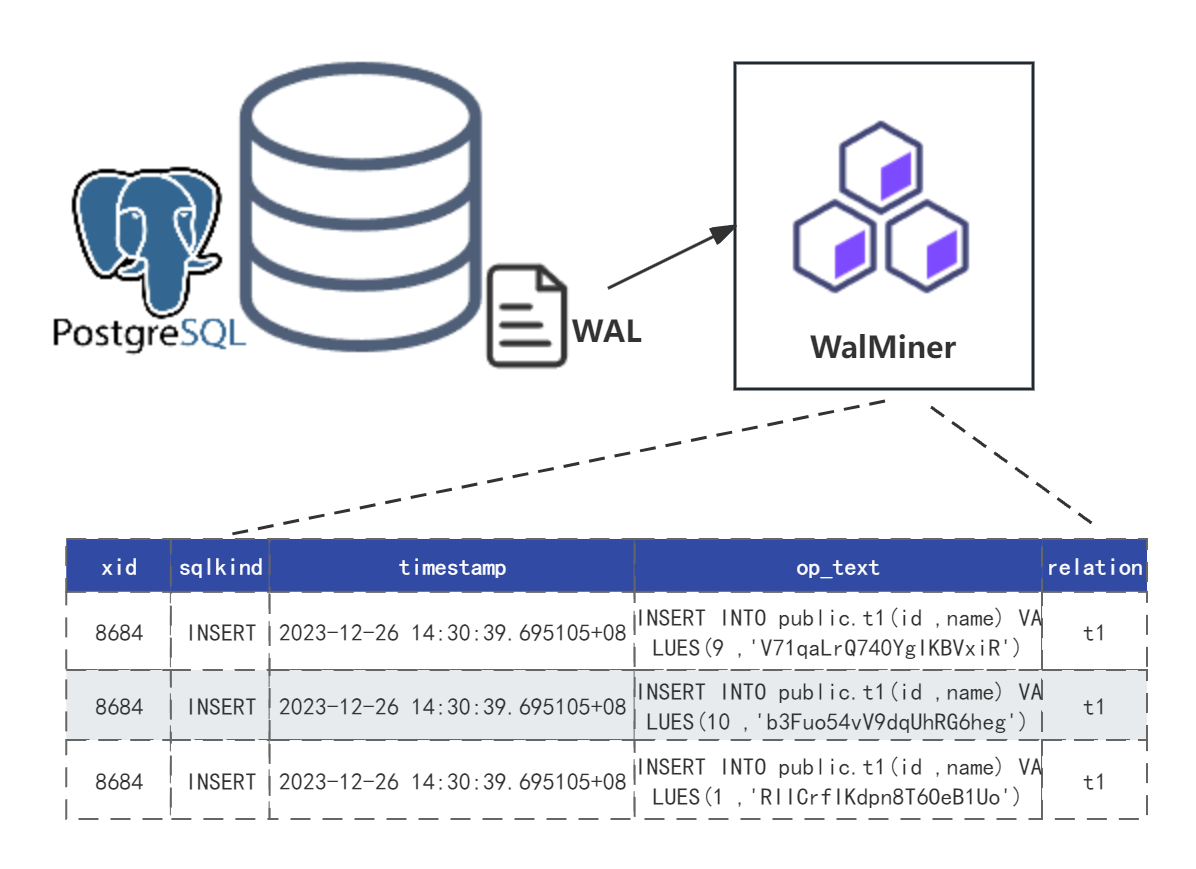
下面我们来简单实战演练一下walminer4.0的功能。
walminer4.0版本需要问作者购买license,支持一下国人软件制作不易。
环境准备
一台2c4g的虚拟机环境,安装PostgreSQL16版本
| 主机名 | IP地址 | 操作系统 | 数据库版本 | WalMiner版本 |
|---|---|---|---|---|
| pg16 | 192.168.17.16 | Rocky Linux 9.3 | PostgreSQL 16.1 | walminer4.5.0 |
下载安装
执行walminer help,如果可以正常打印help信息,则证明安装部署成功。
#查看操作系统版本
[root@pg16 ~]# cat /etc/redhat-release
Rocky Linux release 9.3 (Blue Onyx)
#查看数据库状态
[root@pg16 ~]# systemctl status postgres.service
● postgres.service - PostgreSQL database server
     Loaded: loaded (/usr/lib/systemd/system/postgres.service; disabled; preset: disabled)
     Active: active (running) since Mon 2023-12-25 19:35:01 CST; 14h ago
    Process: 1776 ExecStart=/opt/pgsql/bin/pg_ctl start -D $PGDATA (code=exited, status=0/SUCCESS)
   Main PID: 1778 (postgres)
      Tasks: 8 (limit: 24395)
     Memory: 114.3M
        CPU: 19.345s
     CGroup: /system.slice/postgres.service
             ├─1778 /opt/pg16/bin/postgres -D /opt/pgdata
             ├─1779 "postgres: logger "
             ├─1780 "postgres: checkpointer "
             ├─1781 "postgres: background writer "
             ├─1783 "postgres: walwriter "
             ├─1784 "postgres: autovacuum launcher "
             ├─1785 "postgres: archiver last was 000000010000000000000001"
             └─1786 "postgres: logical replication launcher "

Dec 25 19:35:00 pg16 systemd[1]: Starting PostgreSQL database server...
Dec 25 19:35:01 pg16 pg_ctl[1776]: waiting for server to start....
Dec 25 19:35:01 pg16 pg_ctl[1778]: 2023-12-25 19:35:01.208 CST [1778] LOG:  redirecting log output to logging collector process
Dec 25 19:35:01 pg16 pg_ctl[1778]: 2023-12-25 19:35:01.208 CST [1778] HINT:  Future log output will appear in directory "log".
Dec 25 19:35:01 pg16 pg_ctl[1776]:  done
Dec 25 19:35:01 pg16 pg_ctl[1776]: server started
Dec 25 19:35:01 pg16 systemd[1]: Started PostgreSQL database server.
#下载walminer4.5
[root@pg16 ~]# wget https://gitee.com/movead/XLogMiner/releases/download/walminer_dev_4.5.0_20231224/walminer_x86_64_centos_v4.5.0.tar.gz
--2023-12-26 10:05:41--  https://gitee.com/movead/XLogMiner/releases/download/walminer_dev_4.5.0_20231224/walminer_x86_64_centos_v4.5.0.tar.gz
Resolving gitee.com (gitee.com)... 180.76.198.77
Connecting to gitee.com (gitee.com)|180.76.198.77|:443... connected.
HTTP request sent, awaiting response... 302 Found
Location: https://gitee.com/movead/XLogMiner/attach_files/1623370/download/walminer_x86_64_centos_v4.5.0.tar.gz [following]
--2023-12-26 10:05:41--  https://gitee.com/movead/XLogMiner/attach_files/1623370/download/walminer_x86_64_centos_v4.5.0.tar.gz
Reusing existing connection to gitee.com:443.
HTTP request sent, awaiting response... 302 Found
Location: https://foruda.gitee.com/attach_file/1703429533764562565/walminer_x86_64_centos_v4.5.0.tar.gz?token=9b2570c5f405245232dd8561d8a57d4d&ts=1703556341&attname=walminer_x86_64_centos_v4.5.0.tar.gz [following]
--2023-12-26 10:05:41--  https://foruda.gitee.com/attach_file/1703429533764562565/walminer_x86_64_centos_v4.5.0.tar.gz?token=9b2570c5f405245232dd8561d8a57d4d&ts=1703556341&attname=walminer_x86_64_centos_v4.5.0.tar.gz
Resolving foruda.gitee.com (foruda.gitee.com)... 180.76.198.77
Connecting to foruda.gitee.com (foruda.gitee.com)|180.76.198.77|:443... connected.
HTTP request sent, awaiting response... 200 OK
Length: 3839308 (3.7M) [application/gzip]
Saving to: ‘walminer_x86_64_centos_v4.5.0.tar.gz’

walminer_x86_64_centos_v4.5.0.tar.gz                                 100%[======================================================================================================================================================================>]   3.66M   532KB/s    in 7.1s

2023-12-26 10:05:49 (531 KB/s) - ‘walminer_x86_64_centos_v4.5.0.tar.gz’ saved [3839308/3839308]

#解压
[root@pg16 ~]# tar -zxf walminer_x86_64_centos_v4.5.0.tar.gz
#注意软件目录最好放在/usr/local/walminer下面或者$HOME下面也可以,不然读不到license文件
[root@pg16 ~]# mv walminer_x86_64_centos_v4.5.0 walminer
[root@pg16 ~]# mv walminer /usr/local/
#复制license到目录下
[root@pg16 ~]# cp walminer.license_greatfinish /usr/local/walminer/walminer.license
[root@pg16 ~]# chown -R postgres:postgres /usr/local/walminer
[root@pg16 ~]# su - postgres
#设置环境变量
[postgres@pg16 ~]$ cat >> ~/.bash_profile << "EOF"
export WALMINER_HOME=/usr/local/walminer
export PATH=$PATH:$WALMINER_HOME/bin
EOF
[postgres@pg16 ~]$
[postgres@pg16 ~]$ source ~/.bash_profile
[postgres@pg16 ~]$ walminer help
walminer [command] [options]
COMMANDS
---------
#wal2sql
  options
    -D dic file for miner
    -a out detail info for catalog change
    -w wal file path to miner
    -t dest of miner result(1 stdout, 2 file, 3 db)(stdout default)
    -k boundary kind(1 all, 2 lsn, 3 time, 4 xid)(all default)
    -m miner mode(0 nomal miner, 1 accurate miner)(nomal default) if k=2
    -r the relname for single table miner
    -s start location if k=2 or k=3, or xid if k = 4
          if k=2 default the min lsn of input wals
          if k=3 or k=4 you need input this
    -e end wal location if k=2 or k=3
          if k=2 default the max lsn of input wals
          if k=3 you need input this
    -f file to store miner result if t = 2
    -d target database name if t=3(default postgres)
    -h target database host if t=3(default localhost)
    -p target database port if t=3(default 5432)
    -u target database user if t=3(default postgres)
    -W target user password if t=3
---------
#builtdic
  options
    -d target database name(default postgres)
    -h target database host(default localhost)
    -p target database port(default 5432)
    -u target database user(default postgres)
    -W target user password
    -D dic produce path
    -f rewrite walminer dic if exists
---------
#showdic
  options
    -D dic file to show
---------
#avatardic
  options
    -r avtar rel that new created
    -n avtared relfilenode
    -D avtared walminer dic path
---------
#regress(not support for user)
  options
    -w test database wal path(default postgres)
    -d test database name(default postgres)
    -h test database host(default localhost)
    -p test database port(default 5432)
    -u test database user(default postgres)
    -P apply database port
    -W test user password
---------
#fosync
  options
    -D dic file for miner
    -w wal file path to miner
    -t dest of miner result(1 stdout, 2 file, 3 db, 4 apply)(stdout default)
    -f file to store miner result if t = 2
    -l lsn it start fync
    -d target database name if t=3 or 4(default postgres)
    -h target database host if t=3 or 4(default localhost)
    -p target database port if t=3 or 4(default 5432)
    -u target database user if t=3 or 4(default postgres)
    -W target user password if t=3 or 4
---------
#pgto
  options
    -c configure path
    -i to init a CDC configure
    -r to run a CDC configure
    Below is needed when -i
    -d source database name(default postgres)
    -h source database host(default localhost)
    -p source database port(default 5432)
    -u source database user(default postgres)
    -w source user password
    -D target database name
    -H target database host
    -P target database port
    -U target database user
    -W target user password
    -K target database type(1 postgres) (support postgres only currently)
    -s slot name need for CDC
---------
#waldump
  options
    -D dic file for miner
    -w wal file path to dump
    -t dest of miner result(1 stdout, 2 file)(stdout default)
    -s start lsn to dump
    -e end lsn to dump
    -f file to store miner result if t = 2
    -v verbose
---------
#################################################

[postgres@pg16 ~]$
使用举例
我们这里通过两个例子来实战。
场景一
开发人员误删,或者修改记录需要快速恢复。
模拟失误操作
创建用户u1密码pwd123456,创建数据库mytestdb,创建表t并插入记录,修改和删除记录
[postgres@pg16 ~]$ psql
Password for user postgres:
psql (16.1)
Type "help" for help.

postgres=# create user u1 password 'pwd123456';
CREATE ROLE
postgres=# alter user u1 with superuser;
ALTER ROLE
postgres=# create database mytestdb with owner u1;
CREATE DATABASE
postgres=# \c mytestdb u1
Password for user u1:
You are now connected to database "mytestdb" as user "u1".
mytestdb=# create table t (id serial primary key, name varchar(20));
CREATE TABLE
mytestdb=# CREATE OR REPLACE FUNCTION random_string(
  num INTEGER,
  chars TEXT default '0123456789ABCDEFGHIJKLMNOPQRSTUVWXYZabcdefghijklmnopqrstuvwxyz'
) RETURNS TEXT
LANGUAGE plpgsql
AS $$
DECLARE
  res_str TEXT := '';
BEGIN
  IF num < 1 THEN
      RAISE EXCEPTION 'Invalid length';
  END IF;
  FOR __ IN 1..num LOOP
    res_str := res_str || substr(chars, floor(random() * length(chars))::int + 1, 1);
  END LOOP;
  RETURN res_str;
END $$;
CREATE FUNCTION
mytestdb=# insert into t(name) select random_string(8);
INSERT 0 1
mytestdb=# insert into t(name) select random_string(8);
INSERT 0 1
mytestdb=# insert into t(name) select random_string(8);
INSERT 0 1
mytestdb=# insert into t(name) select random_string(8);
INSERT 0 1
mytestdb=# insert into t(name) select random_string(8);
INSERT 0 1
mytestdb=# insert into t(name) select random_string(8);
INSERT 0 1
mytestdb=# insert into t(name) select random_string(8);
INSERT 0 1
mytestdb=# insert into t(name) select random_string(8);
INSERT 0 1
mytestdb=# select * from t;
 id |   name
----+----------
  1 | YDyVJpdA
  2 | K1jdRRsB
  3 | sY6ee2dr
  4 | xiaW8MKa
  5 | JyI9deaj
  6 | 9CViaPkE
  7 | NFIsn97n
  8 | yTFpHkEu
(8 rows)

mytestdb=# update t set name='xiugai' where id=5;
UPDATE 1
mytestdb=# delete from t where id=4;
DELETE 1
mytestdb=# select * from t;
 id |   name
----+----------
  1 | YDyVJpdA
  2 | K1jdRRsB
  3 | sY6ee2dr
  6 | 9CViaPkE
  7 | NFIsn97n
  8 | yTFpHkEu
  5 | xiugai
(7 rows)

mytestdb=#
生成数据字典
这个步骤是为了后面解析wal文件提供数据字典,注意-D代表创建数据字典的文件名,-d代表数据库,-u代表用户名,-W代表密码
[postgres@pg16 ~]$ walminer builtdic -D ~/walminer.dic -f -h localhost -p 5432 -d mytestdb -u u1 -W pwd123456
#################################################
Walminer for PostgreSQL wal
Contact Author by mail 'lchch1990@sina.cn'
Persional License for greatfinish(375887@qq.com)
#################################################
DIC INFO#
sysid:7316490717869354086 dboid:16414 timeline:1 dbversion:160001 walminer:4.5
[postgres@pg16 ~]$
解析并输出到数据库临时表
使用walminer wal2sql解析wal日志,-D指定数据字典,-w指定wal目录,-d代表数据库,-u代表用户名,-W代表密码,-t 3代表输出到数据库临时表walminer_contents中
#查询PGDATA目录
[postgres@pg16 ~]$ psql
Password for user postgres:
psql (16.1)
Type "help" for help.

postgres=# show data_directory;
 data_directory
----------------
 /opt/pgdata
(1 row)

postgres=# \q
[postgres@pg16 ~]$ walminer wal2sql -D ~/walminer.dic -w /opt/pgdata/pg_wal -t 3 -h localhost -p 5432 -d mytestdb -u u1 -W pwd123456
#################################################
Walminer for PostgreSQL wal
Contact Author by mail 'lchch1990@sina.cn'
Persional License for greatfinish(375887@qq.com)
#################################################
NOTICE:  table "walminer_contents" does not exist, skipping
Switch wal to /opt/pgdata/pg_wal/000000010000000000000001 on time 2023-12-26 13:42:16.082556+08
Switch wal to /opt/pgdata/pg_wal/000000010000000000000002 on time 2023-12-26 13:42:16.095663+08
[WARNING][filter_in_decode]Can not find relfilenode 16415 in dic
[WARNING][filter_in_decode]Can not find relfilenode 16415 in dic
[WARNING][filter_in_decode]Can not find relfilenode 16435 in dic
WALMINER_ERROR:Unsupport pg version
[postgres@pg16 ~]$ psql -d mytestdb -U u1
Password for user u1:
psql (16.1)
Type "help" for help.

mytestdb=# select xid,op_text,undo_text from walminer_contents;
 xid |                       op_text                        |                      undo_text
-----+------------------------------------------------------+------------------------------------------------------
 778 | INSERT INTO public.t(id ,name) VALUES(1 ,'YDyVJpdA') | DELETE FROM public.t WHERE id=1
 779 | INSERT INTO public.t(id ,name) VALUES(2 ,'K1jdRRsB') | DELETE FROM public.t WHERE id=2
 780 | INSERT INTO public.t(id ,name) VALUES(3 ,'sY6ee2dr') | DELETE FROM public.t WHERE id=3
 781 | INSERT INTO public.t(id ,name) VALUES(4 ,'xiaW8MKa') | DELETE FROM public.t WHERE id=4
 782 | INSERT INTO public.t(id ,name) VALUES(5 ,'JyI9deaj') | DELETE FROM public.t WHERE id=5
 783 | INSERT INTO public.t(id ,name) VALUES(6 ,'9CViaPkE') | DELETE FROM public.t WHERE id=6
 784 | INSERT INTO public.t(id ,name) VALUES(7 ,'NFIsn97n') | DELETE FROM public.t WHERE id=7
 785 | INSERT INTO public.t(id ,name) VALUES(8 ,'yTFpHkEu') | DELETE FROM public.t WHERE id=8
 786 | UPDATE public.t SET name='xiugai' WHERE id=5         | UPDATE public.t SET name='JyI9deaj' WHERE id=5
 787 | DELETE FROM public.t WHERE id=4                      | INSERT INTO public.t(id ,name) VALUES(4 ,'xiaW8MKa')
(10 rows)
#通过执行undo sql来恢复原表记录
mytestdb=# INSERT INTO public.t(id ,name) VALUES(4 ,'xiaW8MKa');
INSERT 0 1
mytestdb=# UPDATE public.t SET name='JyI9deaj' WHERE id=5;
UPDATE 1
mytestdb=# select * from t;
 id |   name
----+----------
  1 | YDyVJpdA
  2 | K1jdRRsB
  3 | sY6ee2dr
  6 | 9CViaPkE
  7 | NFIsn97n
  8 | yTFpHkEu
  4 | xiaW8MKa
  5 | JyI9deaj
(8 rows)

mytestdb=#
场景二
某段时间内突然产生大量WAL日志要知道原因。
模拟大量日志
[postgres@pg16 ~]$ psql -d mytestdb -U u1
Password for user u1:
psql (16.1)
Type "help" for help.

mytestdb=# create table t1 (id serial, name varchar(20));
CREATE TABLE
mytestdb=# insert into t1 (name) select random_string(20);
INSERT 0 1
mytestdb=# insert into t1 (name) select random_string(20);
INSERT 0 1
mytestdb=# insert into t1 (name) select random_string(20);
INSERT 0 1
mytestdb=# insert into t1 (name) select random_string(20);
INSERT 0 1
mytestdb=# insert into t1 (name) select random_string(20);
INSERT 0 1
mytestdb=# insert into t1 (name) select random_string(20);
INSERT 0 1
mytestdb=# insert into t1 (name) select random_string(20);
INSERT 0 1
mytestdb=# insert into t1 (name) select random_string(20);
INSERT 0 1
mytestdb=# insert into t1 (name) select random_string(20);
INSERT 0 1
mytestdb=# insert into t1 (name) select random_string(20);
INSERT 0 1
mytestdb=# insert into t1 select * from t1;
INSERT 0 10
mytestdb=# insert into t1 select * from t1;
INSERT 0 20
mytestdb=# insert into t1 select * from t1;
INSERT 0 40
mytestdb=# insert into t1 select * from t1;
INSERT 0 80
mytestdb=# insert into t1 select * from t1;
INSERT 0 160
mytestdb=# insert into t1 select * from t1;
INSERT 0 320
mytestdb=# insert into t1 select * from t1;
INSERT 0 640
mytestdb=# insert into t1 select * from t1;
INSERT 0 1280
mytestdb=# insert into t1 select * from t1;
INSERT 0 2560
mytestdb=# insert into t1 select * from t1;
INSERT 0 5120
mytestdb=# insert into t1 select * from t1;
INSERT 0 10240
mytestdb=# insert into t1 select * from t1;
INSERT 0 20480
mytestdb=# insert into t1 select * from t1;
INSERT 0 40960
mytestdb=# insert into t1 select * from t1;
INSERT 0 81920
mytestdb=# insert into t1 select * from t1;
INSERT 0 163840
mytestdb=# insert into t1 select * from t1;
INSERT 0 327680
mytestdb=# insert into t1 select * from t1;
INSERT 0 655360
mytestdb=# insert into t1 select * from t1;
INSERT 0 1310720
mytestdb=# insert into t1 select * from t1;
INSERT 0 2621440
mytestdb=# insert into t1 select * from t1;
INSERT 0 5242880
mytestdb=#
分析各时间段WAL日志量
通过SQL查询WAL日志文件,找到哪个时间有异常
[postgres@pg16 ~]$ psql -d mytestdb -U u1
Password for user u1:
psql (16.1)
Type "help" for help.

mytestdb=# select to_char(date_trunc('day',wal.modification),'yyyymmdd') as day,
        sum(case when date_part('hour',wal.modification) >=0 and date_part('hour',wal.modification) <24 then 1 else 0 end) as all,
        sum(case when date_part('hour',wal.modification) >=0 and date_part('hour',wal.modification) <1 then 1 else 0 end) as w0_1,
        sum(case when date_part('hour',wal.modification) >=1 and date_part('hour',wal.modification) <2 then 1 else 0 end) as w1_2,
        sum(case when date_part('hour',wal.modification) >=2 and date_part('hour',wal.modification) <3 then 1 else 0 end) as w2_3,
        sum(case when date_part('hour',wal.modification) >=3 and date_part('hour',wal.modification) <4 then 1 else 0 end) as w3_4,
        sum(case when date_part('hour',wal.modification) >=4 and date_part('hour',wal.modification) <5 then 1 else 0 end) as w4_5,
        sum(case when date_part('hour',wal.modification) >=5 and date_part('hour',wal.modification) <6 then 1 else 0 end) as w5_6,
        sum(case when date_part('hour',wal.modification) >=6 and date_part('hour',wal.modification) <7 then 1 else 0 end) as w6_7,
        sum(case when date_part('hour',wal.modification) >=7 and date_part('hour',wal.modification) <8 then 1 else 0 end) as w7_8,
        sum(case when date_part('hour',wal.modification) >=8 and date_part('hour',wal.modification) <9 then 1 else 0 end) as w8_9,
        sum(case when date_part('hour',wal.modification) >=9 and date_part('hour',wal.modification) <10 then 1 else 0 end) as w9_10,
        sum(case when date_part('hour',wal.modification) >=10 and date_part('hour',wal.modification) <11 then 1 else 0 end) as w10_11,
        sum(case when date_part('hour',wal.modification) >=11 and date_part('hour',wal.modification) <12 then 1 else 0 end) as w11_12,
        sum(case when date_part('hour',wal.modification) >=12 and date_part('hour',wal.modification) <13 then 1 else 0 end) as w12_13,
        sum(case when date_part('hour',wal.modification) >=13 and date_part('hour',wal.modification) <14 then 1 else 0 end) as w13_14,
        sum(case when date_part('hour',wal.modification) >=14 and date_part('hour',wal.modification) <15 then 1 else 0 end) as w14_15,
        sum(case when date_part('hour',wal.modification) >=15 and date_part('hour',wal.modification) <16 then 1 else 0 end) as w15_16,
        sum(case when date_part('hour',wal.modification) >=16 and date_part('hour',wal.modification) <17 then 1 else 0 end) as w16_17,
        sum(case when date_part('hour',wal.modification) >=17 and date_part('hour',wal.modification) <18 then 1 else 0 end) as w17_18,
        sum(case when date_part('hour',wal.modification) >=18 and date_part('hour',wal.modification) <19 then 1 else 0 end) as w18_19,
        sum(case when date_part('hour',wal.modification) >=19 and date_part('hour',wal.modification) <20 then 1 else 0 end) as w19_20,
        sum(case when date_part('hour',wal.modification) >=20 and date_part('hour',wal.modification) <21 then 1 else 0 end) as w20_21,
        sum(case when date_part('hour',wal.modification) >=21 and date_part('hour',wal.modification) <22 then 1 else 0 end) as w21_22,
        sum(case when date_part('hour',wal.modification) >=22 and date_part('hour',wal.modification) <23 then 1 else 0 end) as w22_23,
        sum(case when date_part('hour',wal.modification) >=23 and date_part('hour',wal.modification) <24 then 1 else 0 end) as w23_24
from (select * from  pg_ls_waldir()) wal
where wal.name not in ('archive_status')
  and wal.name not like '%.backup'
group by to_char(date_trunc('day',wal.modification),'yyyymmdd')
order by to_char(date_trunc('day',wal.modification),'yyyymmdd') desc;
   day    | all | w0_1 | w1_2 | w2_3 | w3_4 | w4_5 | w5_6 | w6_7 | w7_8 | w8_9 | w9_10 | w10_11 | w11_12 | w12_13 | w13_14 | w14_15 | w15_16 | w16_17 | w17_18 | w18_19 | w19_20 | w20_21 | w21_22 | w22_23 | w23_24
----------+-----+------+------+------+------+------+------+------+------+------+-------+--------+--------+--------+--------+--------+--------+--------+--------+--------+--------+--------+--------+--------+--------
 20231226 |  15 |    0 |    0 |    0 |    0 |    0 |    0 |    0 |    0 |    0 |     0 |      0 |      0 |      0 |      0 |     15 |      0 |      0 |      0 |      0 |      0 |      0 |      0 |      0 |      0
 20231225 |   1 |    0 |    0 |    0 |    0 |    0 |    0 |    0 |    0 |    0 |     0 |      0 |      0 |      0 |      0 |      0 |      0 |      0 |      0 |      0 |      1 |      0 |      0 |      0 |      0
(2 rows)

mytestdb=#
确定时间在下午14点我们开始对14点的WAL日志进行分析
生成数据字典
这个步骤是为了后面解析wal文件提供数据字典,注意-D代表创建数据字典的文件名,-d代表数据库,-u代表用户名,-W代表密码
[postgres@pg16 ~]$ walminer builtdic -D ~/walminer.dic -f -h localhost -p 5432 -d mytestdb -u u1 -W pwd123456
#################################################
Walminer for PostgreSQL wal
Contact Author by mail 'lchch1990@sina.cn'
Persional License for greatfinish(375887@qq.com)
#################################################
DIC INFO#
sysid:7316490717869354086 dboid:16414 timeline:1 dbversion:160001 walminer:4.5
[postgres@pg16 ~]$
解析并输出到数据库临时表
使用walminer wal2sql解析wal日志,-D指定数据字典,-w指定wal目录,-d代表数据库,-u代表用户名,-W代表密码,-t 3代表输出到数据库临时表walminer_contents中
[postgres@pg16 ~]$ walminer wal2sql -D ~/walminer.dic -w /opt/pgdata/pg_wal -t 3 -h localhost -p 5432 -d mytestdb -u u1 -W pwd123456
#################################################
Walminer for PostgreSQL wal
Contact Author by mail 'lchch1990@sina.cn'
Persional License for greatfinish(375887@qq.com)
#################################################
Switch wal to /opt/pgdata/pg_wal/000000010000000000000001 on time 2023-12-26 14:46:19.103266+08
Switch wal to /opt/pgdata/pg_wal/000000010000000000000002 on time 2023-12-26 14:46:19.114135+08
[WARNING][filter_in_decode]Can not find relfilenode 16415 in dic
Switch wal to /opt/pgdata/pg_wal/000000010000000000000003 on time 2023-12-26 14:46:50.978145+08
Switch wal to /opt/pgdata/pg_wal/000000010000000000000004 on time 2023-12-26 14:48:21.287672+08
Switch wal to /opt/pgdata/pg_wal/000000010000000000000005 on time 2023-12-26 14:48:27.740649+08
Switch wal to /opt/pgdata/pg_wal/000000010000000000000006 on time 2023-12-26 14:50:27.465481+08
Switch wal to /opt/pgdata/pg_wal/000000010000000000000007 on time 2023-12-26 14:50:33.816525+08
Switch wal to /opt/pgdata/pg_wal/000000010000000000000008 on time 2023-12-26 14:50:40.276524+08
Switch wal to /opt/pgdata/pg_wal/000000010000000000000009 on time 2023-12-26 14:54:15.592842+08
Switch wal to /opt/pgdata/pg_wal/00000001000000000000000A on time 2023-12-26 14:54:17.328894+08
Switch wal to /opt/pgdata/pg_wal/00000001000000000000000B on time 2023-12-26 14:54:23.721615+08
Switch wal to /opt/pgdata/pg_wal/00000001000000000000000C on time 2023-12-26 14:54:30.094735+08
Switch wal to /opt/pgdata/pg_wal/00000001000000000000000D on time 2023-12-26 14:54:36.502269+08
Switch wal to /opt/pgdata/pg_wal/00000001000000000000000E on time 2023-12-26 14:54:42.873498+08
there be 65536 image pages on disk
Switch wal to /opt/pgdata/pg_wal/00000001000000000000000F on time 2023-12-26 14:54:49.237436+08
Switch wal to /opt/pgdata/pg_wal/000000010000000000000010 on time 2023-12-26 14:54:55.610279+08
[postgres@pg16 ~]$ psql -d mytestdb -U u1
Password for user u1:
psql (16.1)
Type "help" for help.

mytestdb=# select relation,sqlkind,count(1) from walminer_contents where timestamp between ('2023-12-26 14:00:00') and ('2023-12-26 15:00:00') group by relation,sqlkind;
 relation | sqlkind |  count
----------+---------+----------
 t        | INSERT  |     5662
 t        | UPDATE  |    17488
 t1       | INSERT  | 10485760
(3 rows)

mytestdb=#
最终我们可以查询14点这一个小时的日志内容,发现有大量t1表的插入操作,所以产生大量的WAL日志,解决问题。
总结
至此,我们演练了WalMiner能帮忙我们快速找回丢失和修改过的数据,也可以帮我们快速定位大量WAL日志的原因,当然WalMiner4.0还有PG故障转移延迟数据同步功能和PG的CDC工具,库外解析等等功能,待下次我们在测试。希望以上对您运维PostgreSQL数据库有帮助😁
