



前言:
新年的初始,为大家带来关于Halo DB 的基础使用方式,这里为大家提供一个文档来参考,后续会持续更新,请各位朋友参阅,如有任何问题和好的建议也可以通过我主页的联系方式与我取得联系,如果需要安装介质的申请,请私信联系。
注意:本章节下的所有命令,请在操作系统的halo用户下执行。
[halo@halodb1 ~]$ pg_ctl start
waiting for server to start....2024-01-02 13:26:53.655 CST [8669] LOG: starting 羲和(Halo) 1.0.14.10 (231130) on x86_64-pc-linux-gnu, compiled by gcc (GCC) 4.8.5 20150623 (Red Hat 4.8.5-44), 64-bit
2024-01-02 13:26:53.655 CST [8669] LOG: listening on IPv6 address "::1", port 1921
2024-01-02 13:26:53.655 CST [8669] LOG: listening on IPv4 address "127.0.0.1", port 1921
2024-01-02 13:26:53.657 CST [8669] LOG: listening on Unix socket "/var/run/halo/.s.PGSQL.1921"
2024-01-02 13:26:53.669 CST [8670] LOG: database system was shut down at 2024-01-02 13:26:50 CST
2024-01-02 13:26:53.674 CST [8669] LOG: database system is ready to accept connections
done
server started[halo@halodb1 ~]$ pg_ctl status
pg_ctl: server is running (PID: 8669)
/u01/app/halo/product/dbms/14/bin/postgres[halo@halodb1 ~]$ pg_controldata
pg_control version number: 1300
Catalog version number: 202107181
Database system identifier: 7314545940227128703
Database cluster state: in production
pg_control last modified: Tue 02 Jan 2024 01:31:53 PM CST
Latest checkpoint location: 0/1E173D0
Latest checkpoint's REDO location: 0/1E17398
Latest checkpoint's REDO WAL file: 000000010000000000000001
Latest checkpoint's TimeLineID: 1
Latest checkpoint's PrevTimeLineID: 1
Latest checkpoint's full_page_writes: on
Latest checkpoint's NextXID: 0:841
Latest checkpoint's NextOID: 24984
Latest checkpoint's NextMultiXactId: 1
Latest checkpoint's NextMultiOffset: 0
Latest checkpoint's oldestXID: 732
Latest checkpoint's oldestXID's DB: 1
Latest checkpoint's oldestActiveXID: 841
Latest checkpoint's oldestMultiXid: 1
Latest checkpoint's oldestMulti's DB: 14509
Latest checkpoint's oldestCommitTsXid:0
Latest checkpoint's newestCommitTsXid:0
Time of latest checkpoint: Tue 02 Jan 2024 01:31:53 PM CST
Fake LSN counter for unlogged rels: 0/3E8
Minimum recovery ending location: 0/0
Min recovery ending loc's timeline: 0
Backup start location: 0/0
Backup end location: 0/0
End-of-backup record required: no
wal_level setting: replica
wal_log_hints setting: off
max_connections setting: 100
max_worker_processes setting: 8
max_wal_senders setting: 10
max_prepared_xacts setting: 0
max_locks_per_xact setting: 64
track_commit_timestamp setting: off
Maximum data alignment: 8
Database block size: 8192
Blocks per segment of large relation: 131072
WAL block size: 8192
Bytes per WAL segment: 16777216
Maximum length of identifiers: 64
Maximum columns in an index: 32
Maximum size of a TOAST chunk: 1996
Size of a large-object chunk: 2048
Date/time type storage: 64-bit integers
Float8 argument passing: by value
Data page checksum version: 0
Mock authentication nonce: aee41396502d5573e5df8cbddc6474f5f3a826776f5d7aae8df7af320b371cdf
4、关闭数据库:pg_ctl stop
[halo@halodb1 ~]$ pg_ctl stop
waiting for server to shut down....2024-01-02 13:43:31.236 CST [8669] LOG: received fast shutdown request
2024-01-02 13:43:31.247 CST [8669] LOG: aborting any active transactions
2024-01-02 13:43:31.248 CST [8669] LOG: background worker "logical replication launcher" (PID 8676) exited with exit code 1
2024-01-02 13:43:31.248 CST [8671] LOG: shutting down
2024-01-02 13:43:31.261 CST [8669] LOG: database system is shut down
done
server stopped
5、登录数据库:psql -U halo halo0root
[halo@halodb1 ~]$ psql -U halo halo0root
psql (1.0.14.10 (231130))
Type "help" for help.

halo0root=# exit这里为大家整理出来一些比较常用的快捷命令,方便各位初学小伙伴上手容易些,HaloDB作为PG系的产品,对PG的支持可以说是相当的友好。所以如果有PG数据库基础的朋友完全可以跳过此章节。
[halo@halodb1 ~]$ psql
psql (1.0.14.10 (231130))
Type "help" for help.

halo0root=# \l
List of databases
Name | Owner | Encoding | Collate | Ctype | Access privileges
-----------+-------+----------+-------------+-------------+-------------------
halo0root | halo | UTF8 | en_US.UTF-8 | en_US.UTF-8 |
template0 | halo | UTF8 | en_US.UTF-8 | en_US.UTF-8 | =c/halo +
| | | | | halo=CTc/halo
template1 | halo | UTF8 | en_US.UTF-8 | en_US.UTF-8 | =c/halo +
| | | | | halo=CTc/halo
testzz | halo | UTF8 | en_US.UTF-8 | en_US.UTF-8 |
(4 rows)

halo0root=#halo0root=# \c testzz halo
You are now connected to database "testzz" as user "halo"testzz=# \dt
List of relations
Schema | Name | Type | Owner
--------+----------+-------+-------
public | bonus | table | halo
public | dept | table | halo
public | emp | table | halo
public | salgrade | table | halo
(4 rows)testzz=# \di
List of relations
Schema | Name | Type | Owner | Table
--------+---------+-------+-------+-------
public | pk_dept | index | halo | dept
public | pk_emp | index | halo | emp
(2 rows)testzz=# \du
List of roles
Role name | Attributes | Member of
-----------+------------------------------------------------------------+-----------
halo | Superuser, Create role, Create DB, Replication, Bypass RLS | {}testzz=# \dn
List of schemas
Name | Owner
--------+-------
public | halo
sys | halo
(2 rows)testzz=# \db
List of tablespaces
Name | Owner | Location
------------+-------+----------
pg_default | halo |
pg_global | halo |
(2 rows)halo0root=# \dx
List of installed extensions
Name | Version | Schema | Description
----------+---------+--------------------+------------------------------
aux_init | 1.0 | information_schema | Init Supplementary Extension
plpgsql | 1.0 | pg_catalog | PL/pgSQL procedural language
(2 rows)9、列出当前数据库序列:\ds
halo0root=# \ds
Did not find any relations.halo0root=# \cd /data/halo0root=# \conninfo
You are connected to database "halo0root" as user "halo" via socket in "/var/run/halo" at port "1921".
testzz=# \timing
Timing is on.
testzz=# select * from emp;
empno | ename | job | mgr | hiredate | sal | comm | deptno
-------+--------+-----------+------+------------+------+------+--------
7369 | SMITH | CLERK | 7902 | 1980-12-17 | 800 | | 20
7499 | ALLEN | SALESMAN | 7698 | 1981-02-20 | 1600 | 300 | 30
7521 | WARD | SALESMAN | 7698 | 1981-02-22 | 1250 | 500 | 30
7566 | JONES | MANAGER | 7839 | 1981-04-02 | 2975 | | 20
7654 | MARTIN | SALESMAN | 7698 | 1981-09-28 | 1250 | 1400 | 30
7698 | BLAKE | MANAGER | 7839 | 1981-05-01 | 2850 | | 30
7782 | CLARK | MANAGER | 7839 | 1981-06-09 | 2450 | | 10
7839 | KING | PRESIDENT | | 1981-11-17 | 5000 | | 10
7844 | TURNER | SALESMAN | 7698 | 1981-09-08 | 1500 | 0 | 30
7900 | JAMES | CLERK | 7698 | 1981-12-03 | 950 | | 30
7902 | FORD | ANALYST | 7566 | 1981-12-03 | 3000 | | 20
7934 | MILLER | CLERK | 7782 | 1982-01-23 | 1300 | | 10
(12 rows)

Time: 0.387 ms
testzz=# \timing off
Timing is off.
testzz=# select * from emp;
empno | ename | job | mgr | hiredate | sal | comm | deptno
-------+--------+-----------+------+------------+------+------+--------
7369 | SMITH | CLERK | 7902 | 1980-12-17 | 800 | | 20
7499 | ALLEN | SALESMAN | 7698 | 1981-02-20 | 1600 | 300 | 30
7521 | WARD | SALESMAN | 7698 | 1981-02-22 | 1250 | 500 | 30
7566 | JONES | MANAGER | 7839 | 1981-04-02 | 2975 | | 20
7654 | MARTIN | SALESMAN | 7698 | 1981-09-28 | 1250 | 1400 | 30
7698 | BLAKE | MANAGER | 7839 | 1981-05-01 | 2850 | | 30
7782 | CLARK | MANAGER | 7839 | 1981-06-09 | 2450 | | 10
7839 | KING | PRESIDENT | | 1981-11-17 | 5000 | | 10
7844 | TURNER | SALESMAN | 7698 | 1981-09-08 | 1500 | 0 | 30
7900 | JAMES | CLERK | 7698 | 1981-12-03 | 950 | | 30
7902 | FORD | ANALYST | 7566 | 1981-12-03 | 3000 | | 20
7934 | MILLER | CLERK | 7782 | 1982-01-23 | 1300 | | 10
(12 rows)

testzz=#

13、列模式显示每个字段:\x

SQL
testzz=# \x
Expanded display is on.
testzz=# select * from emp;
-[ RECORD 1 ]--------
empno | 7369
ename | SMITH
job | CLERK
mgr | 7902
hiredate | 1980-12-17
sal | 800
comm |
deptno | 20
-[ RECORD 2 ]--------
empno | 7499
ename | ALLEN
job | SALESMAN
mgr | 7698
hiredate | 1981-02-20
sal | 1600
comm | 300
deptno | 30
-[ RECORD 3 ]--------
empno | 7521
.......(篇幅过长,省略)

testzz=# \x off
Expanded display is off.
testzz=# select * from emp;
empno | ename | job | mgr | hiredate | sal | comm | deptno
-------+--------+-----------+------+------------+------+------+--------
7369 | SMITH | CLERK | 7902 | 1980-12-17 | 800 | | 20
7499 | ALLEN | SALESMAN | 7698 | 1981-02-20 | 1600 | 300 | 30
7521 | WARD | SALESMAN | 7698 | 1981-02-22 | 1250 | 500 | 30
7566 | JONES | MANAGER | 7839 | 1981-04-02 | 2975 | | 20
7654 | MARTIN | SALESMAN | 7698 | 1981-09-28 | 1250 | 1400 | 30
7698 | BLAKE | MANAGER | 7839 | 1981-05-01 | 2850 | | 30
7782 | CLARK | MANAGER | 7839 | 1981-06-09 | 2450 | | 10
7839 | KING | PRESIDENT | | 1981-11-17 | 5000 | | 10
7844 | TURNER | SALESMAN | 7698 | 1981-09-08 | 1500 | 0 | 30
7900 | JAMES | CLERK | 7698 | 1981-12-03 | 950 | | 30
7902 | FORD | ANALYST | 7566 | 1981-12-03 | 3000 | | 20
7934 | MILLER | CLERK | 7782 | 1982-01-23 | 1300 | | 10
(12 rows)testzz=# \x
Expanded display is on.
testzz=# select * from emp;
-[ RECORD 1 ]--------
empno | 7369
ename | SMITH
job | CLERK
mgr | 7902
hiredate | 1980-12-17
sal | 800
comm |
deptno | 20
-[ RECORD 2 ]--------
empno | 7499
ename | ALLEN
job | SALESMAN
mgr | 7698
hiredate | 1981-02-20
sal | 1600
comm | 300
deptno | 30
-[ RECORD 3 ]--------
empno | 7521
.......(篇幅过长,省略)
testzz=# \x off
Expanded display is off.
testzz=# select * from emp;
empno | ename | job | mgr | hiredate | sal | comm | deptno
-------+--------+-----------+------+------------+------+------+--------
7369 | SMITH | CLERK | 7902 | 1980-12-17 | 800 | | 20
7499 | ALLEN | SALESMAN | 7698 | 1981-02-20 | 1600 | 300 | 30
7521 | WARD | SALESMAN | 7698 | 1981-02-22 | 1250 | 500 | 30
7566 | JONES | MANAGER | 7839 | 1981-04-02 | 2975 | | 20
7654 | MARTIN | SALESMAN | 7698 | 1981-09-28 | 1250 | 1400 | 30
7698 | BLAKE | MANAGER | 7839 | 1981-05-01 | 2850 | | 30
7782 | CLARK | MANAGER | 7839 | 1981-06-09 | 2450 | | 10
7839 | KING | PRESIDENT | | 1981-11-17 | 5000 | | 10
7844 | TURNER | SALESMAN | 7698 | 1981-09-08 | 1500 | 0 | 30
7900 | JAMES | CLERK | 7698 | 1981-12-03 | 950 | | 30
7902 | FORD | ANALYST | 7566 | 1981-12-03 | 3000 | | 20
7934 | MILLER | CLERK | 7782 | 1982-01-23 | 1300 | | 10
(12 rows)testzz=# \?
General
\copyright show Halo usage and distribution terms
\crosstabview [COLUMNS] execute query and display results in crosstab
\errverbose show most recent error message at maximum verbosity
\g [(OPTIONS)] [FILE] execute query (and send results to file or |pipe);
\g with no arguments is equivalent to a semicolon
\gdesc describe result of query, without executing it
\gexec execute query, then execute each value in its result
\gset [PREFIX] execute query and store results in psql variables
\gx [(OPTIONS)] [FILE] as \g, but forces expanded output mode
\q quit psql
\watch [SEC] execute query every SEC seconds
Help
\? [commands] show help on backslash commands
\? options show help on psql command-line options
\? variables show help on special variables
\h [NAME] help on syntax of SQL commands, * for all commands
Query Buffer
\e [FILE] [LINE] edit the query buffer (or file) with external editor
\ef [FUNCNAME [LINE]] edit function definition with external editor
\ev [VIEWNAME [LINE]] edit view definition with external editor
.......(篇幅过长,省略)15、将查询结果输出到操作系统(Oracle spool 功能):\o
说到这个我在写文章的时候还闹了一个小笑话,因为对这个小功能不熟悉,错误示范如下,博各位看官一乐。
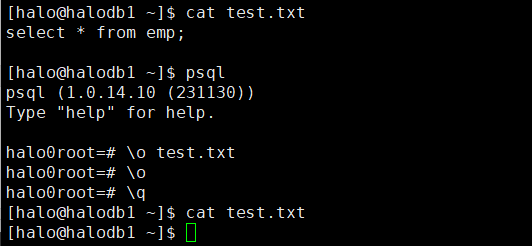
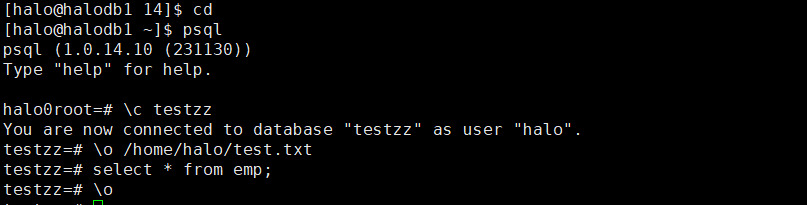
那\o的正确打开方式应该是什么呢?来,这里就不用代码块了,直接上图直观些。正确打开方式如下:
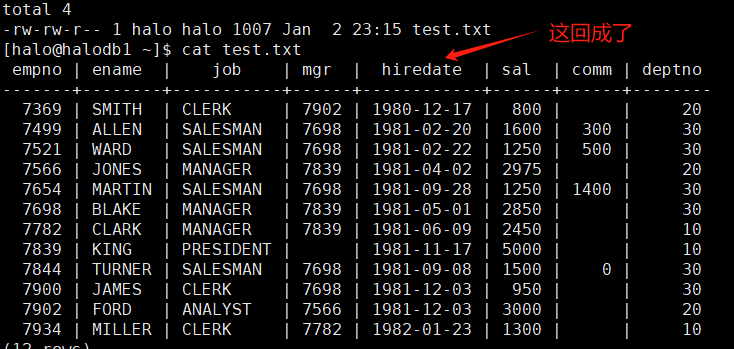
在另一窗口查询结果如下:
16、列出所有的 function和procedure:\df
testzz=# \df
List of functions
Schema | Name | Result data type | Argument data types | Type
--------+------+------------------+---------------------+------
(0 rows)
关于什么是 function和procedure的相关说明:这里为大家找到了一篇blog 参考:https://blog.csdn.net/qq_29654325/article/details/135230321
原作者写的很详细,可以给各位看官参考和借鉴,这里就不再赘述。
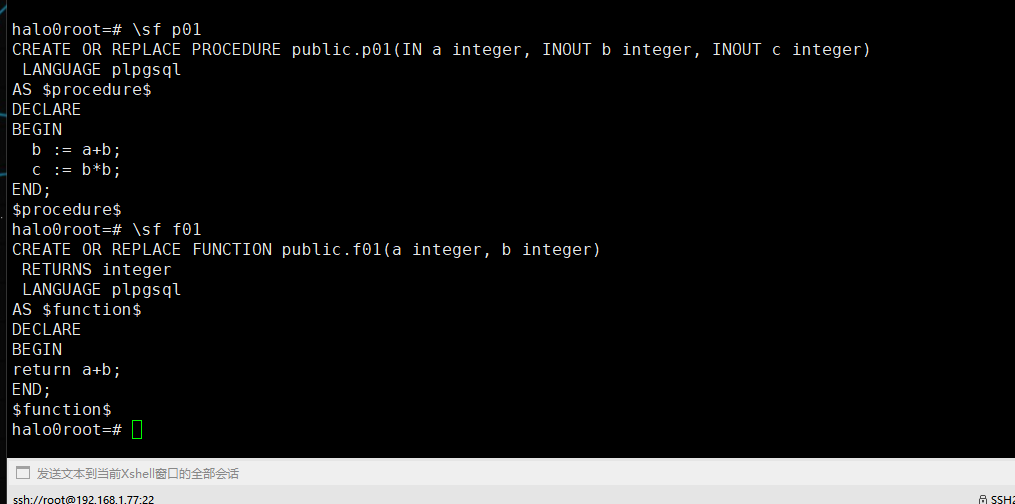
17、查看 function或procedure定义:\sf
CREATE OR REPLACE FUNCTION f01(IN a INT,IN b INT) RETURNS INT
LANGUAGE plpgsql
AS $$
DECLARE
BEGIN
return a+b;
END;
$$;
CREATE OR REPLACE PROCEDURE p01(IN a INT, INOUT b INT, INOUT c INT) Language plpgsql
AS $$
DECLARE
BEGIN
b := a+b;
c := b*b;
END;
$$;
call p01(2,3,4);同理 输出结果用截图更加直观些。
今天就给大家暂时先带来这些,学习要持之以恒,循序渐进,如果想系统的学习,可以持续关注此专栏,虽然是慢工,但是不是什么细活,如有问题还请各位批评指正。
「喜欢这篇文章,您的关注和赞赏是给作者最好的鼓励」
关注作者
【版权声明】本文为墨天轮用户原创内容,转载时必须标注文章的来源(墨天轮),文章链接,文章作者等基本信息,否则作者和墨天轮有权追究责任。如果您发现墨天轮中有涉嫌抄袭或者侵权的内容,欢迎发送邮件至:contact@modb.pro进行举报,并提供相关证据,一经查实,墨天轮将立刻删除相关内容。
