



原文链接:https://blog.llamaindex.ai/multimodal-rag-pipeline-with-llamaindex-and-neo4j-a2c542eb0206
代码链接:https://github.com/tomasonjo/blogs/blob/master/llm/neo4j_llama_multimodal.ipynb

Image by DALL·E
人工智能和大语言模型(LLM)的发展速度惊人。就在一年前,还没人用大语言模型来提升工作效率。但现在,很多人已经难以想象没有大语言模型辅助,或至少不把一些较小的任务交给它们来处理。随着研究的深入和兴趣的增加,大语言模型正变得越来越强大和智能。不仅如此,它们的理解能力也开始涵盖不同的信息表达形式(模态)。例如,随着 GPT-4-Vision 及其他跟进的大语言模型的出现,现在它们似乎能很好地处理和理解图像。这里有一个例子,是 ChatGPT 根据描述生成图片内容。
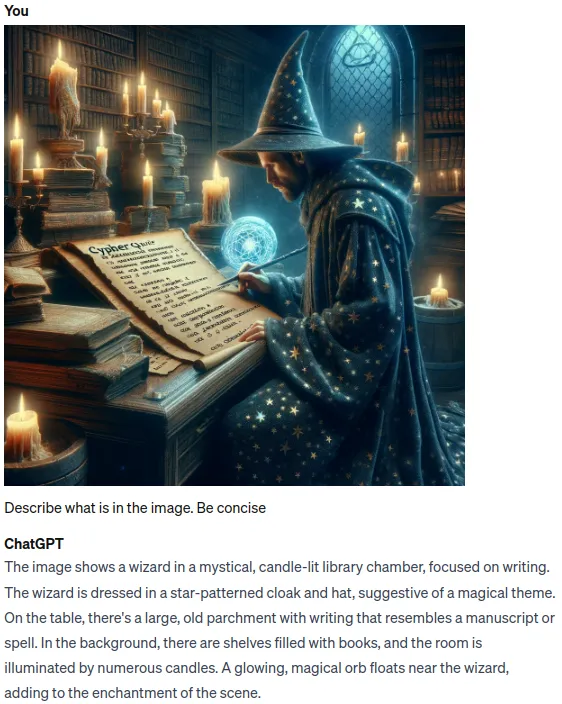
Using ChatGPT to describe images.
正如我们所见,ChatGPT 在理解和描述图像方面表现出色。我们可以在 RAG (检索增强生成) 应用中利用它解读图像的能力,不再仅仅依赖文本来生成准确、更新的答案,而是可以结合文本和图片的信息,创造出比以往任何时候都更精准的回答。使用 LlamaIndex 实现多模态 RAG 流程变得非常容易。受到他们的 multimodal cookbook example[1] 示例的启发,我打算尝试一下,是否能够利用 Neo4j 作为数据库实现一个多模态 RAG 应用。
要用 LlamaIndex 实现一个多模态 RAG 流程,你只需要创建两个向量存储库,一个存储图像信息,另一个存储文本信息。然后,通过查询这两个存储库,来检索出生成最终答案所需的相关信息。
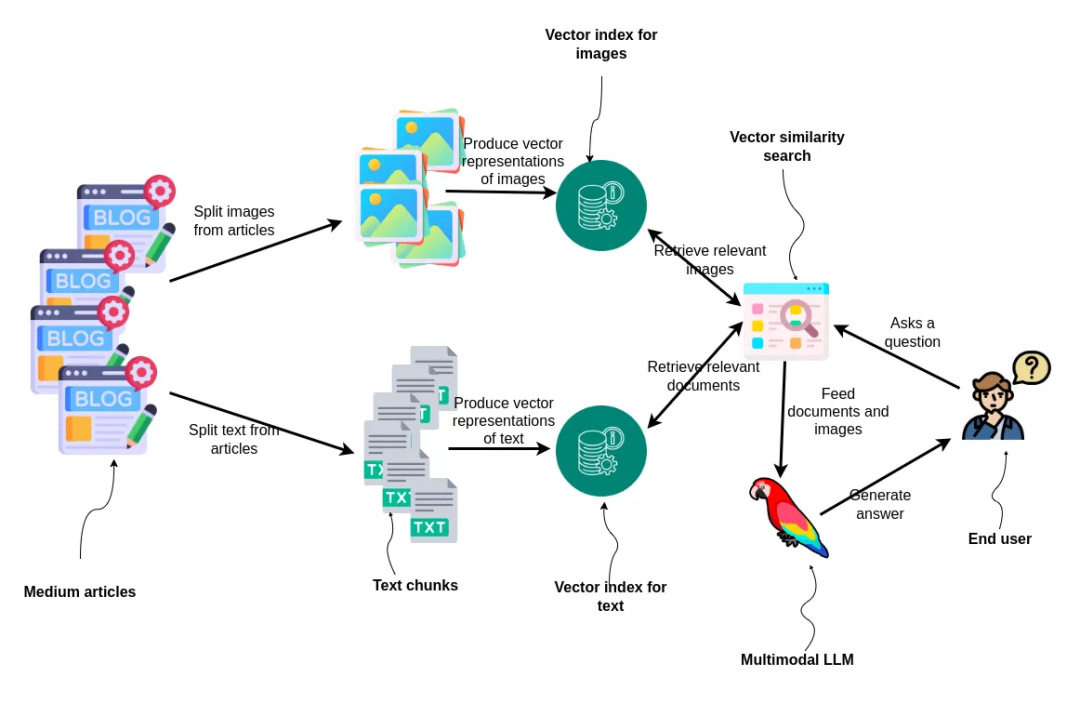
Workflow diagram for the blog post. Image by author.
首先,文章被拆分为图像和文本两部分。然后,这些部分被转化为向量形式并分别建立索引。对于文本部分,我们使用 ada-002 文本嵌入模型,而对于图像,则使用 dual encoder model CLIP[2],该模型能够在同一个嵌入空间中同时处理文本和图像。当用户提出一个问题时,系统会进行两次基于向量的相似度搜索:一次搜索相关图像,另一次搜索相关文档。搜索到的结果将被送入一个多模态大语言模型,该模型会为用户生成答案,这展示了一个综合性的方法,通过处理和利用混合媒介来进行信息检索和回答生成。
数据预处理
我将把我在 2022 和 2023 年发表在 Medium 上的文章作为 RAG 应用的数据基础[3]。这些文章中包含了丰富的信息,涉及 Neo4j 图数据科学库及如何将 Neo4j 与大语言模型框架结合的内容。下载 Medium 上的文章时,文章格式为 HTML。因此,我们需要一些编程操作来分别提取文章中的文本和图像。
def process_html_file(file_path):
    with open(file_path, "r", encoding="utf-8") as file:
        soup = BeautifulSoup(file, "html.parser")

    # Find the required section
    content_section = soup.find("section", {"data-field": "body", "class": "e-content"})

    if not content_section:
        return "Section not found."

    sections = []
    current_section = {"header": "", "content": "", "source": file_path.split("/")[-1]}
    images = []
    header_found = False

    for element in content_section.find_all(recursive=True):
        if element.name in ["h1", "h2", "h3", "h4"]:
            if header_found and (current_section["content"].strip()):
                sections.append(current_section)
            current_section = {
                "header": element.get_text(),
                "content": "",
                "source": file_path.split("/")[-1],
            }
            header_found = True
        elif header_found:
            if element.name == "pre":
                current_section["content"] += f"```{element.get_text().strip()}```\n"
            elif element.name == "img":
                img_src = element.get("src")
                img_caption = element.find_next("figcaption")
                caption_text = img_caption.get_text().strip() if img_caption else ""
                images.append(ImageDocument(image_url=img_src))
            elif element.name in ["p", "span", "a"]:
                current_section["content"] += element.get_text().strip() + "\n"

    if current_section["content"].strip():
        sections.append(current_section)

    return images, sections
我不会详细介绍解析代码,但我们会根据标题 h1-h4 分割文本,并提取图像链接。然后,我们只需通过这个函数运行所有文章,以提取所有相关信息。
all_documents = []
all_images = []

# Directory to search in (current working directory)
directory = os.getcwd()

# Walking through the directory
for root, dirs, files in os.walk(directory):
    for file in files:
        if file.endswith(".html"):
            # Update the file path to be relative to the current directory
            images, documents = process_html_file(os.path.join(root, file))
            all_documents.extend(documents)
            all_images.extend(images)

text_docs = [Document(text=el.pop("content"), metadata=el) for el in all_documents]
print(f"Text document count: {len(text_docs)}") # Text document count: 252
print(f"Image document count: {len(all_images)}") # Image document count: 328
我们共得到了 252 个文本块和 328 张图像。我创作了这么多照片有些令人惊讶,但我知道其中一些只是表格结果的图像。我们可以使用视觉模型来过滤掉不相关的照片,但我在这里跳过了这一步。
创建数据向量索引
正如前面提到的,我们需要创建两个向量存储,一个用于图像,另一个用于文本。CLIP 嵌入模型的维度为 512,而 ada-002 的维度为 1536。
text_store = Neo4jVectorStore(
    url=NEO4J_URI,
    username=NEO4J_USERNAME,
    password=NEO4J_PASSWORD,
    index_name="text_collection",
    node_label="Chunk",
    embedding_dimension=1536
)
image_store = Neo4jVectorStore(
    url=NEO4J_URI,
    username=NEO4J_USERNAME,
    password=NEO4J_PASSWORD,
    index_name="image_collection",
    node_label="Image",
    embedding_dimension=512

)
storage_context = StorageContext.from_defaults(vector_store=text_store)
现在向量存储已经初始化,我们使用 MultiModalVectorStoreIndex 来索引我们拥有的两种模态的信息。
# Takes 10 min without GPU / 1 min with GPU on Google collab
index = MultiModalVectorStoreIndex.from_documents(
    text_docs + all_images, storage_context=storage_context, image_vector_store=image_store
)
在底层,MultiModalVectorStoreIndex 使用文本和图像嵌入模型来计算 embeddings,并将结果存储和索引在 Neo4j 中。对于图像,只存储 URL,而不是实际的 base64 或其他图像表示形式。
多模态 RAG 流程
这段代码是直接从 LlamaIndex 的多模态 cookbook 中复制的。我们首先定义一个多模态大语言模型和提示模板,然后将所有内容结合起来作为一个查询引擎。
openai_mm_llm = OpenAIMultiModal(
    model="gpt-4-vision-preview", max_new_tokens=1500
)

qa_tmpl_str = (
    "Context information is below.\n"
    "---------------------\n"
    "{context_str}\n"
    "---------------------\n"
    "Given the context information and not prior knowledge, "
    "answer the query.\n"
    "Query: {query_str}\n"
    "Answer: "
)
qa_tmpl = PromptTemplate(qa_tmpl_str)

query_engine = index.as_query_engine(
    multi_modal_llm=openai_mm_llm, text_qa_template=qa_tmpl
)
现在我们可以继续测试它的表现如何。
query_str = "How do vector RAG application work?"
response = query_engine.query(query_str)
print(response)
输出
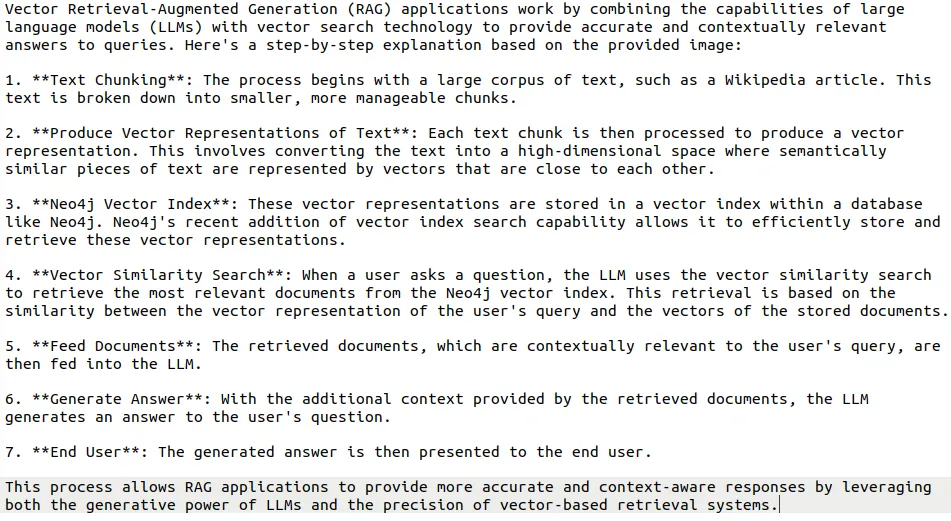
Generated response by an LLM.
我们还可以可视化检索出的图像,并用它们来帮助提供最终答案的相关信息。
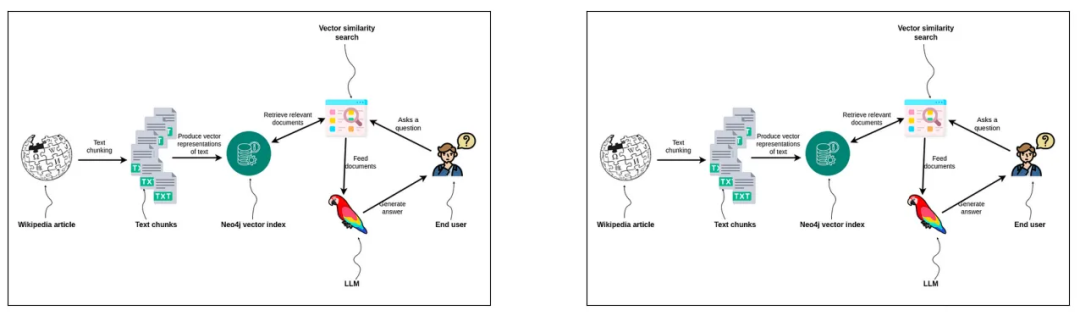
Image input to LLM.
大语言模型接收到了两张相同的图像作为输入,这表明我重复使用了一些图表。然而,我对 CLIP 嵌入感到惊喜,因为它们能够从众多图像中检索出最相关的图片。在更接近生产环境的设置中,你可能会想要清理和去重图像,但这已经超出了本文的讨论范围。
总结
大语言模型的发展速度超出了我们历史上的经验,并且正在跨越多种模态。我坚信,到明年年底,大语言模型很快就能理解视频,并因此能够在与你交谈时捕捉到非言语线索。另一方面,我们可以将图像作为输入传递给 RAG 流程,从而增强传递给大语言模型的信息多样性,使回答更加准确和优质。利用 LlamaIndex 和 Neo4j 实现多模态 RAG 流程就是如此简单。
相关链接
[1] https://github.com/run-llama/llama_index/blob/main/docs/examples/multi_modal/gpt4v_multi_modal_retrieval.ipynb
[2] https://github.com/openai/CLIP
[3] https://github.com/tomasonjo/blog-datasets/blob/main/articles.zip
