



在 Windows 上,Python 没有内置的守护进程(daemon)模块。但是你可以使用 pywin32 模块来实现类似的功能。先安装 pywin32 模块,然后使用 pywin32 模块调用 windows 服务 API 创建一个后台服务。
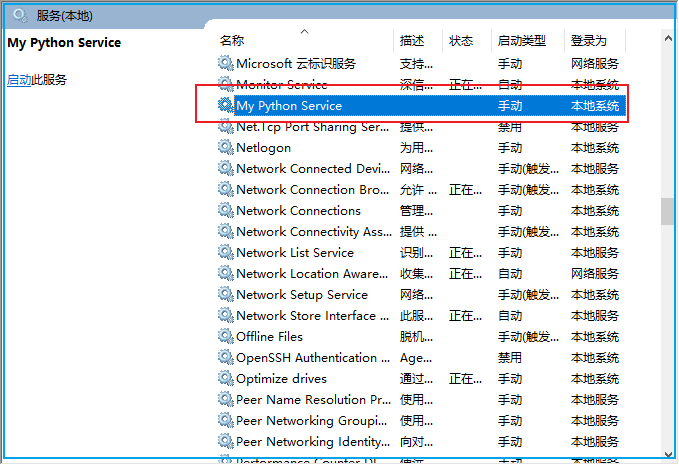
最终效果是在 services.msc 中会多出一个自定义的服务:
在给出示例代码前要先安装 pywin32 模块:
C:\> pip install pywin32
同时我们还会用到 psutil 获取进程 ID,需要安装 psutil 模块:
C:\> pip install psutil
以下代码实现了一个后台进程,它会先将进程的PID写入到指定的文件中,然后启动一个死循环,每5秒打印一条消息代表进程还存活着。
#!python3# Filename: pyservices.pyimport win32serviceutilimport win32serviceimport win32eventimport servicemanagerimport socketimport sysimport timeimport psutildef write_process_id_to_file(file_path):pid = str(psutil.Process().pid)with open(file_path, 'w') as file:file.write(pid)# 进程IDprocess_id_file_path = r"d:\MyPythonService.pid"class MyService(win32serviceutil.ServiceFramework):_svc_name_ = "MyPythonService"_svc_display_name_ = "My Python Service"def __init__(self, args):win32serviceutil.ServiceFramework.__init__(self, args)self.hWaitStop = win32event.CreateEvent(None, 0, 0, None)socket.setdefaulttimeout(60)self.is_alive = Truedef SvcStop(self):self.ReportServiceStatus(win32service.SERVICE_STOP_PENDING)win32event.SetEvent(self.hWaitStop)self.is_alive = Falsedef SvcDoRun(self):servicemanager.LogMsg(servicemanager.EVENTLOG_INFORMATION_TYPE,servicemanager.PYS_SERVICE_STARTED,(self._svc_name_, ''))self.main()def main(self):write_process_id_to_file(process_id_file_path)while self.is_alive:# 在这里编写你的守护进程主要逻辑print("Daemon is running...")time.sleep(5)if __name__ == '__main__':if len(sys.argv) == 1:servicemanager.Initialize()servicemanager.PrepareToHostSingle(MyService)servicemanager.StartServiceCtrlDispatcher()else:win32serviceutil.HandleCommandLine(MyService)
以管理员身份运行 cmd,在命令行安装当前服务:
d:\> python pyservices.py installInstalling service MyPythonServicecopying host exe 'C:\Users\Administrator\AppData\Local\Programs\Python\Python311\Lib\site-packages\win32\pythonservice.exe' -> 'C:\Users\Administrator\AppData\Local\Programs\Python\Python311\pythonservice.exe'copying helper dll 'C:\Users\Administrator\AppData\Local\Programs\Python\Python311\Lib\site-packages\pywin32_system32\pywintypes311.dll' -> 'C:\Users\Administrator\AppData\Local\Programs\Python\Python311\pywintypes311.dll'Service installed
安装完后即可在 services.msc 中查看到 MyPythonService 已经注册到系统服务中了。

此时可以在服务面板中对服务进行启停,也可以在命令行中对注册的服务进行启停:
C:\> net stop MyPythonServiceMy Python Service 服务正在停止..My Python Service 服务已成功停止。C:\> net start MyPythonServiceMy Python Service 服务正在启动 .My Python Service 服务已经启动成功。
同时,我们也可以在刚才的脚本执行位置对注册的服务进行启停:
d:\> python pyservices.py startStarting service MyPythonServiced:\> python pyservices.py stopStopping service MyPythonServiced:\> python pyservices.py restartRestarting service MyPythonService
除了启停服务之外,我们还能能 debug 方式运行服务。当以 debug 方式运行时,服务不会以后台方式运行,并且可以通过 ctrl+c 结束程序:
d:\> python pyservices.py debugDebugging service MyPythonService - press Ctrl+C to stop.Info 0x40001002 - The MyPythonService service has started.Daemon is running...Daemon is running...Daemon is running...
当代码有更新时可以通过 update 命令更新服务:
d:\> python pyservices.py updateChanging service configurationcopying host exe 'C:\Users\Administrator\AppData\Local\Programs\Python\Python311\Lib\site-packages\win32\pythonservice.exe' -> 'C:\Users\Administrator\AppData\Local\Programs\Python\Python311\pythonservice.exe'Service updated
当不再需要运行此服务时,可以注销掉服务:
d:\> python pyservices.py removeRemoving service MyPythonServiceService removed
全文完。
如果转发本文,文末务必注明:“转自微信公众号:生有可恋”。
文章转载自生有可恋,如果涉嫌侵权,请发送邮件至:contact@modb.pro进行举报,并提供相关证据,一经查实,墨天轮将立刻删除相关内容。
