



ubuntu20.04.5+mysql8.0.35修改路径后启动报错
故障现象过程:
1.检查原路径:
mysql> select @@datadir;
+-----------------+
| @@datadir       |
+-----------------+
| /var/lib/mysql/ |
+-----------------+
1 row in set (0.00 sec)
2.停mysql:
systemctl stop mysql
3.拷贝原数据路径到目的路径
mkdir /db/mysql/data
cd /db/mysql/data
cp -Rp /var/lib/mysql ./
4.更改新的目的数据库权限,用于service启动
chown -R mysql:mysql /db/mysql/data
5.修改参数文件:
root@node36:/db# cat /etc/mysql/mysql.conf.d/mysqld.cnf
[mysqld]
pid-file        = /var/run/mysqld/mysqld.pid
socket          = /var/run/mysqld/mysqld.sock
#datadir                = /var/lib/mysql
datadir         = /db/mysql/data
log-error       = /var/log/mysql/error.log
6.启动mysql服务:
systemctl start mysql
7.检查状态,发现报错:
systemctl status mysql
root@node36:/db/mysql/data# journalctl -xe
1月 08 16:32:43 node36 kubelet[52441]: I0108 16:32:43.778676   52441 server.go:693] "--cgroups-per-qos enabled, but --cgroup-root was not specified.  defaulting to /"
1月 08 16:32:43 node36 kubelet[52441]: E0108 16:32:43.778889   52441 server.go:302] "Failed to run kubelet" err="failed to run Kubelet: running with swap on is not su>
1月 08 16:32:43 node36 systemd[1]: kubelet.service: Main process exited, code=exited, status=1/FAILURE
-- Subject: Unit process exited
-- Defined-By: systemd
-- Support: http://www.ubuntu.com/support
--
-- An ExecStart= process belonging to unit kubelet.service has exited.
--
-- The process' exit code is 'exited' and its exit status is 1.
1月 08 16:32:43 node36 systemd[1]: kubelet.service: Failed with result 'exit-code'.
-- Subject: Unit failed
-- Defined-By: systemd
-- Support: http://www.ubuntu.com/support
--
-- The unit kubelet.service has entered the 'failed' state with result 'exit-code'.
1月 08 16:32:44 node36 systemd[1]: Starting MySQL Community Server...
-- Subject: A start job for unit mysql.service has begun execution
-- Defined-By: systemd
-- Support: http://www.ubuntu.com/support
--
-- A start job for unit mysql.service has begun execution.
--
-- The job identifier is 23357950.
1月 08 16:32:45 node36 audit[52557]: AVC apparmor="STATUS" operation="profile_replace" info="same as current profile, skipping" profile="unconfined" name="/usr/sbin/m>
1月 08 16:32:45 node36 kernel: audit: type=1400 audit(1704702765.067:102): apparmor="STATUS" operation="profile_replace" info="same as current profile, skipping" prof>
1月 08 16:32:45 node36 audit[52558]: AVC apparmor="DENIED" operation="mknod" profile="/usr/sbin/mysqld" name="/db/mysql/data/mysqld_tmp_file_case_insensitive_test.low>
1月 08 16:32:45 node36 kernel: audit: type=1400 audit(1704702765.403:103): apparmor="DENIED" operation="mknod" profile="/usr/sbin/mysqld" name="/db/mysql/data/mysqld_>
1月 08 16:32:45 node36 audit[52558]: AVC apparmor="DENIED" operation="mknod" profile="/usr/sbin/mysqld" name="/db/mysql/data/mysqld_tmp_file_case_insensitive_test.low>
1月 08 16:32:45 node36 audit[52558]: AVC apparmor="DENIED" operation="open" profile="/usr/sbin/mysqld" name="/db/mysql/data/binlog.index" pid=52558 comm="mysqld" requ>
1月 08 16:32:45 node36 kernel: audit: type=1400 audit(1704702765.407:104): apparmor="DENIED" operation="mknod" profile="/usr/sbin/mysqld" name="/db/mysql/data/mysqld_>
1月 08 16:32:45 node36 kernel: audit: type=1400 audit(1704702765.407:105): apparmor="DENIED" operation="open" profile="/usr/sbin/mysqld" name="/db/mysql/data/binlog.i>
1月 08 16:32:45 node36 systemd[1]: mysql.service: Main process exited, code=exited, status=1/FAILURE

处理办法:
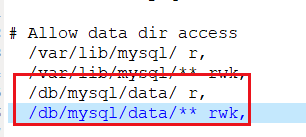
将新路径添加到/etc/apparmor.d/usr.sbin.mysqld,重启apparmor
root@node36:/db/mysql/data# vi /etc/apparmor.d/usr.sbin.mysqld
# Allow data dir access
  /var/lib/mysql/ r,
  /var/lib/mysql/** rwk,
  /db/mysql/data/ r,
  /db/mysql/data/** rwk,
root@node36:/db/mysql/data# /etc/init.d/apparmor restart
Restarting apparmor (via systemctl): apparmor.service.
root@node36:/db/mysql/data# systemctl start mysql
root@node36:/db/mysql/data# systemctl status mysql
● mysql.service - MySQL Community Server
     Loaded: loaded (/lib/systemd/system/mysql.service; enabled; vendor preset: enabled)
     Active: active (running) since Mon 2024-01-08 16:39:55 CST; 3s ago
       Docs: man:mysqld(8)
             http://dev.mysql.com/doc/refman/en/using-systemd.html
    Process: 56094 ExecStartPre=/usr/share/mysql-8.0/mysql-systemd-start pre (code=exited, status=0/SUCCESS)
   Main PID: 56133 (mysqld)
     Status: "Server is operational"
      Tasks: 38 (limit: 9830)
     Memory: 364.4M
     CGroup: /system.slice/mysql.service
             └─56133 /usr/sbin/mysqld

1月 08 16:39:52 node36 systemd[1]: Starting MySQL Community Server...
1月 08 16:39:55 node36 systemd[1]: Started MySQL Community Server.
root@node36:/db/mysql/data# id
其它问题:
修改root密码:
mysql> use mysql;
Reading table information for completion of table and column names
You can turn off this feature to get a quicker startup with -A

Database changed
mysql>  select User,Host from user;
+------------------+-----------+
| User             | Host      |
+------------------+-----------+
| mysql.infoschema | localhost |
| mysql.session    | localhost |
| mysql.sys        | localhost |
| root             | localhost |
+------------------+-----------+
4 rows in set (0.00 sec)

mysql> update user set host = '%' where user = 'root';
Query OK, 1 row affected (0.00 sec)
Rows matched: 1  Changed: 1  Warnings: 0

mysql> flush privileges;
Query OK, 0 rows affected (0.00 sec)

mysql> select @@datadir;
+-----------------+
| @@datadir       |
+-----------------+
| /var/lib/mysql/ |
+-----------------+
1 row in set (0.00 sec)

mysql>  select User,Host from user;
+------------------+-----------+
| User             | Host      |
+------------------+-----------+
| root             | %         |
| mysql.infoschema | localhost |
| mysql.session    | localhost |
| mysql.sys        | localhost |
+------------------+-----------+
4 rows in set (0.00 sec)
mysql> ALTER USER 'root'@'%' IDENTIFIED WITH mysql_native_password BY 'test';
Query OK, 0 rows affected (0.00 sec)

mysql> FLUSH PRIVILEGES;
Query OK, 0 rows affected (0.00 sec)
创建数据库和用户:
root@node36:/db/mysql/data# mysql -uroot -ptest -h192.168.207.36
mysql: [Warning] Using a password on the command line interface can be insecure.
Welcome to the MySQL monitor.  Commands end with ; or \g.
Your MySQL connection id is 10
Server version: 8.0.35 MySQL Community Server - GPL

Copyright (c) 2000, 2023, Oracle and/or its affiliates.

Oracle is a registered trademark of Oracle Corporation and/or its
affiliates. Other names may be trademarks of their respective
owners.

Type 'help;' or '\h' for help. Type '\c' to clear the current input statement.

mysql> create database resdb;
Query OK, 1 row affected (0.14 sec)

mysql> create USER 'gistar'@'%' IDENTIFIED WITH mysql_native_password BY 'test';
Query OK, 0 rows affected (0.08 sec)

mysql> grant all privileges on resdb.* to "gistar"@"%";
Query OK, 0 rows affected (0.08 sec)

mysql> flush privileges;
Query OK, 0 rows affected (0.04 sec)

mysql> show databases;
+--------------------+
| Database           |
+--------------------+
| information_schema |
| mysql              |
| performance_schema |
| resdb              |
| sys                |
+--------------------+
5 rows in set (0.09 sec)

Navicat 连接报错:错误代码 1689;1045 Access denied for user ‘root’@‘localhost’ (using password:YES),
mysql>  select User,Host,plugin from user;
+------------------+-----------+-----------------------+
| User             | Host      | plugin                |
+------------------+-----------+-----------------------+
| root             | %         | auth_socket           |
| mysql.infoschema | localhost | caching_sha2_password |
| mysql.session    | localhost | caching_sha2_password |
| mysql.sys        | localhost | caching_sha2_password |
+------------------+-----------+-----------------------+
4 rows in set (0.00 sec)

mysql> update user set plugin='mysql_native_password' where user='root';
Query OK, 1 row affected (0.00 sec)
Rows matched: 1  Changed: 1  Warnings: 0

mysql> flush privileges;
Query OK, 0 rows affected (0.00 sec)
deb的bundle文件安装MySQL需要注意顺序
root@node36:~# apt --fix-broken install
其它参考:https://blog.csdn.net/weixin_30019517/article/details/113341971
「喜欢这篇文章,您的关注和赞赏是给作者最好的鼓励」
关注作者
【版权声明】本文为墨天轮用户原创内容,转载时必须标注文章的来源(墨天轮),文章链接,文章作者等基本信息,否则作者和墨天轮有权追究责任。如果您发现墨天轮中有涉嫌抄袭或者侵权的内容,欢迎发送邮件至:contact@modb.pro进行举报,并提供相关证据,一经查实,墨天轮将立刻删除相关内容。
