



本文主要是在Linux7环境下的安装,其他版本也可以进行安装尝试。本脚本主要是对pg各个版本的最新进行一键安装,并进行一些变量的设置,有兴趣的可以进行尝试测试。
此脚本可以放置任意位置执行,软件及数据目录就为安装特定位置。
#!/bin/bash
#
#********************************************************************
#Author:       cc  zhou
#Email:          kezhoucc@icloud.com
#Date:         2023-12-20
#FileName:       postgresql.sh
#Version:          v1.0
#Description:     install postgresql
#Copyright (C):    2023 All rights reserved
#********************************************************************

#监听日志
touch /tmp/install.log
chmod 777 /tmp/install.log
MESSAGE=/tmp/install.log

install_start (){
echo "**********欢迎使用PG安装程序,请选择版本前序号**********"
cat << EOF
============+
1. v9.6.24  |
2. v10.23   |
3. v11.22   |
4. v12.17   |
5. v13.13   |
6. v14.10   |
7. v15.5    |
8. v16.1    |
9. exit     |
============+
EOF
echo "---------------------------------------------------------"
enter_version
}

enter_version(){
read -p "Enter your choose[1|2|3|4|5|6|7|8] : " version
check_version
}

check_version(){
case $version in
	1)
	VER1=9.6.24
	VER2=9
	;;
	2)
	VER1=10.23
	VER2=10
	;;
	3)
	VER1=11.22
	VER2=11
	;;
	4)
	VER1=12.17
	VER2=12
	;;
	5)
	VER1=13.13
	VER2=13
	;;
	6)
	VER1=14.10
	VER2=14
	;;
	7)
	VER1=15.5
	VER2=15
	;;
	8)
	VER1=16.1
	VER2=16
	;;
    9)
    exit;;
	*)
	echo "enter error,please enter[1|2|3|4|5|6|7|8]"
	enter_version
    ;;
esac

[ $? -eq 0 ] && base_install || exit
}

base_install(){
echo " "
echo "开始安装Postgresq$VER1版本......"
echo "---------------------------------------------------------"
echo -n "1、基础环境搭建......................................"
##1、安装依赖包
yum install -y cmake make gcc zlib zlib-devel gcc-c++ perl readline readline-devel  \
python36 tcl openssl ncurses-devel openldap pam flex >> $MESSAGE 2>&1

#关闭防火墙
systemctl stop firewalld
systemctl disable firewalld >> $MESSAGE 2>&1

#关闭selinux
sed -i "s/SELINUX=enforcing/SELINUX=disabled/g" /etc/selinux/config
setenforce 0

cat > /etc/sysctl.conf <<"EOF"
vm.swappiness=10
vm.zone_reclaim_mode=0
fs.aio-max-nr = 1048576
fs.file-max = 6815744
net.ipv4.ip_local_port_range = 9000 65500
net.core.rmem_default = 262144
net.core.rmem_max = 4194304
net.core.wmem_default = 262144
net.core.wmem_max = 1048586
kernel.shmmax = 1288490188
kernel.shmall = 314572
kernel.shmmni = 4096
kernel.sem = 50100 64128000 50100 1280
EOF

sysctl -p >> $MESSAGE 2>&1

#配置资源限制
cat >> /etc/security/limits.conf <<EOF
# nofile超过1048576的话,一定要先将sysctl的fs.nr_open设置为更大的值,并生效后才能继续设置nofile.

* soft nofile  1024000 # The maximum number of open file descriptors
* hard nofile  1024000
* soft nproc   unlimited # The maximum number of processes available to a single user
* hard nproc   unlimited
* soft memlock unlimited # The maximum size that may be locked into memory
* hard memlock unlimited
* soft core    unlimited # The maximum size of core files created
* hard core    unlimited
* soft stack   unlimited
* hard stack   unlimited
EOF

#remove IPC
sed -i "s/#RemoveIPC=no/RemoveIPC=no/g" /etc/systemd/logind.conf
systemctl restart systemd-logind

echo "* - nproc unlimited" > /etc/security/limits.d/90-nproc.conf
echo "session required pam_limits.so" >> /etc/pam.d/login

cat >> /etc/rc.local << EOF
if test -f /sys/kernel/mm/transparent_hugepage/enabled; then
echo never > /sys/kernel/mm/transparent_hugepage/enabled
fi
if test -f /sys/kernel/mm/transparent_hugepage/defrag; then
echo never > /sys/kernel/mm/transparent_hugepage/defrag
fi
EOF

chmod +x /etc/rc.d/rc.local
echo never > /sys/kernel/mm/transparent_hugepage/enabled
echo never > /sys/kernel/mm/transparent_hugepage/defrag

cat /sys/kernel/mm/transparent_hugepage/enabled  >>$MESSAGE 2>&1
cat /sys/kernel/mm/transparent_hugepage/defrag   >>$MESSAGE 2>&1

[ $? -eq 0 ] && echo "成功" || { echo "失败";exit; }

echo -n "2、创建用户及目标...................................."
#创建用户
useradd pgsql   >> $MESSAGE 2>&1
echo "lhr" | passwd --stdin pgsql   >> $MESSAGE 2>&1

##创建目录
[ -d /postgresql ] && mv /postgresql /postgresql.bak
mkdir -p /postgresql/{pgdata,archive,scripts,backup,pg${VER2},soft}
chown -R pgsql:pgsql /postgresql
chmod -R 775 /postgresql
PGHOME=/postgresql/pg${VER2}

[ $? -eq 0 ] && { echo "成功";download_file; } || { echo "失败";install_err; }
}

download_file(){
echo -n "3、下载文件.........................................."
PGFILE=postgresql-${VER1}.tar.gz
PGFILE_PATH=postgresql-${VER1}
cd /postgresql/soft
wget https://ftp.postgresql.org/pub/source/v${VER1}/$PGFILE --no-check-certificate  >>$MESSAGE 2>&1

[ $? -eq 0 ] && { echo "成功";compile_file; } || { echo "失败";install_err; }
}

compile_file(){
echo -n "4、开始编译文件......................................"
##编译
su - pgsql  >>$MESSAGE 2>&1  <<EOF
cd /postgresql/soft
tar zxvf $PGFILE
cd $PGFILE_PATH
[ $VER2 -ne 16 ] && ./configure --prefix=$PGHOME || ./configure --prefix=$PGHOME --without-icu
make -j 16 && make install
exit
EOF

[ $? -eq 0 ] && pg_env || install_err
}

pg_env(){
##配置环境变量
cat >> /home/pgsql/.bash_profile <<EOF
export PGPORT=5432
export PGDATA=/postgresql/pgdata
export PGHOME=$PGHOME
export LD_LIBRARY_PATH=\$PGHOME/lib
export PATH=\$PGHOME/bin:\$PATH
export PGUSER=postgres
export PGDATABASE=postgres
export DATE='date +"%Y%m%d%H%M"'
export PS1="[\u@\h \W]\$ "
EOF
source /home/pgsql/.bash_profile

[ $? -eq 0 ] && { echo "成功";init_pg; } || install_err
}

init_pg(){
echo -n "5、开始安装文件......................................"
su - pgsql >>$MESSAGE 2>&1 <<EOF
/postgresql/pg${VER2}/bin/initdb -D /postgresql/pgdata -E UTF8 --locale=en_US.utf8 -U postgres
exit
EOF

[ $? -eq 0 ] && { echo "成功";setting_service; } || { echo "失败";install_err; }
}

setting_service (){
echo -n "6、配置服务.........................................."
cat > /etc/systemd/system/PG$VER2.service <<EOF
[Unit]
Description=PostgreSQL database server
Documentation=man:postgres(1)
After=network.target

[Service]
Type=forking
User=pgsql
Group=pgsql
Environment=PGPORT=5432
Environment=PGDATA=/postgresql/pgdata
OOMScoreAdjust=-1000
ExecStart=/postgresql/pg$VER2/bin/pg_ctl start -D \${PGDATA} -s -o "-p \${PGPORT}" -w -t 300
ExecStop=/postgresql/pg$VER2/bin/pg_ctl stop -D \${PGDATA} -s -m fast
ExecReload=/postgresql/pg$VER2/bin/pg_ctl reload -D \${PGDATA} -s
KillMode=mixed
KillSignal=SIGINT
TimeoutSec=0

[Install]
WantedBy=multi-user.target
EOF

[ $? -eq 0 ] && { echo "成功";load_service; } || { echo "失败";install_err; }
}

load_service (){
echo -n "7、加载服务.........................................."
systemctl daemon-reload
systemctl enable PG$VER2  >>$MESSAGE 2>&1
systemctl start PG$VER2
systemctl status PG$VER2  >>$MESSAGE 2>&1

[ $? -eq 0 ] && change_passwd || install_err
}

change_passwd (){
su - pgsql >>$MESSAGE 2>&1 <<EOF
psql -h 127.0.0.1
alter user postgres with password 'Pg2023#2024';
\q
exit
EOF

[ $? -eq 0 ] && { echo "成功";change_parameter; } || { echo "失败";install_err; }
}

change_parameter (){
echo -n "8、配置文件.........................................."
echo "host      all       all    0.0.0.0/0        md5"  >> /postgresql/pgdata/pg_hba.conf
sed -i "s/  trust/  md5/g" /postgresql/pgdata/pg_hba.conf
sed -i "s/#listen_addresses = 'localhost'/listen_addresses = '*'/g" /postgresql/pgdata/postgresql.conf
sed -i "s/#port = 5432/port = 5432/g" /postgresql/pgdata/postgresql.conf
sed -i "s/#unix_socket_directories = '\/tmp'/unix_socket_directories= '\/postgresql\/pgdata'/g" /postgresql/pgdata/postgresql.conf
sed -i "s/#logging_collector = off/logging_collector = on/g" /postgresql/pgdata/postgresql.conf
sed -i "s/#log_directory = 'log'/log_directory = 'pg_log'/g" /postgresql/pgdata/postgresql.conf
sed -i "s/#log_filename = 'postgresql-%Y-%m-%d_%H%M%S.log'/log_filename = 'postgresql-%a.log'/g" /postgresql/pgdata/postgresql.conf
sed -i "s/#log_truncate_on_rotation = off/log_truncate_on_rotation = on/g" /postgresql/pgdata/postgresql.conf

systemctl stop PG$VER2.service
systemctl start PG$VER2.service
[ $? -eq 0 ] && echo "成功" || { echo "失败";install_err; }
}

install_end (){
echo "---------------------------------------------------------"
echo "PG数据库已部署成功,请尽情使用!!!"
exit
}

install_err (){
echo "安装失败,请查看/tmp/install.log检查一下失败的原因!!!"
exit
}

main(){
install_start
install_end
}

main
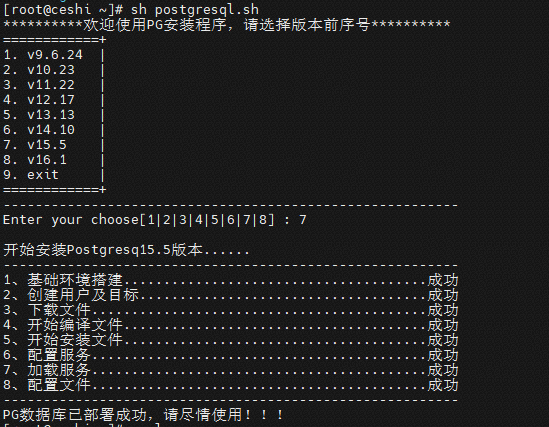
运行的效果图:
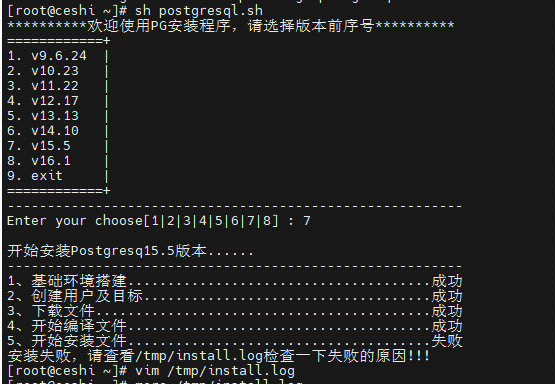
如果遇到问题,会提示在查看安装日志,修复好问题后再重新安装
注意点:
1、本脚本没有设置安装失败后清除原本安装的内容;
2、本脚本需要从网络上进行下载安装资源,有条件的可以本地搭建文件服务器进行本地拉取相应的安装包文件。
有任何问题请进行指正。
最后修改时间:2024-01-10 10:47:49
「喜欢这篇文章,您的关注和赞赏是给作者最好的鼓励」
关注作者
【版权声明】本文为墨天轮用户原创内容,转载时必须标注文章的来源(墨天轮),文章链接,文章作者等基本信息,否则作者和墨天轮有权追究责任。如果您发现墨天轮中有涉嫌抄袭或者侵权的内容,欢迎发送邮件至:contact@modb.pro进行举报,并提供相关证据,一经查实,墨天轮将立刻删除相关内容。
