



磐维数据库,简称"PanWeiDB"。是中国移动信息技术中心首个基于中国本土开源数据库打造的面向ICT基础设施的自研数据库产品。其产品内核能力基于华为openGauss开源软件,并进一步提升了系统稳定性。
闪回查询可以查询过去某个时间点或某个事物号来获取表的某个snap数据,这一特性可用于查看和逻辑重建意外删除或更改的受损数据。本文将介绍磐维数据库误删数据后的两种闪回方法。
基于timecapsule语法的闪回查询(只支持ustore表)
前置条件
- 设置enable_ustore参数为on(默认值为on)
- 创建表时指定使用ustore引擎
- 设置undo_retention_time参数
保留undo旧版本的时间,单位为s,例如3600,一个小时。
下面模拟基于时间点的闪回查询:
首先数据库设置undo_retention_time参数
show undo_retention_time;
 undo_retention_time
---------------------
 1h
(1 row)
接着创建ustore引擎的测试表
create table tab_ustore(id int,info text) with (storage_type=ustore);
插入三条数据
insert into tab_ustore values(1,'a'),(2,'b'),(3,'c');
考虑闪回查询的精度,休眠3s
select pg_sleep(3);
记录准备删除数据之前的时间
select now();
返回查询结果
2024-01-15 23:41:51.94086+08
模拟删除数据,删除第二条数据
delete from tab_ustore where id=2 ;
使用闪回查询,时间点为2024-01-15 23:41:51,上面删除之前记录的时间点。
select * from tab_ustore timecapsule timestamp to_timestamp('2024-01-15 23:41:51','YYYY-MM-DD HH24:MI:SS');
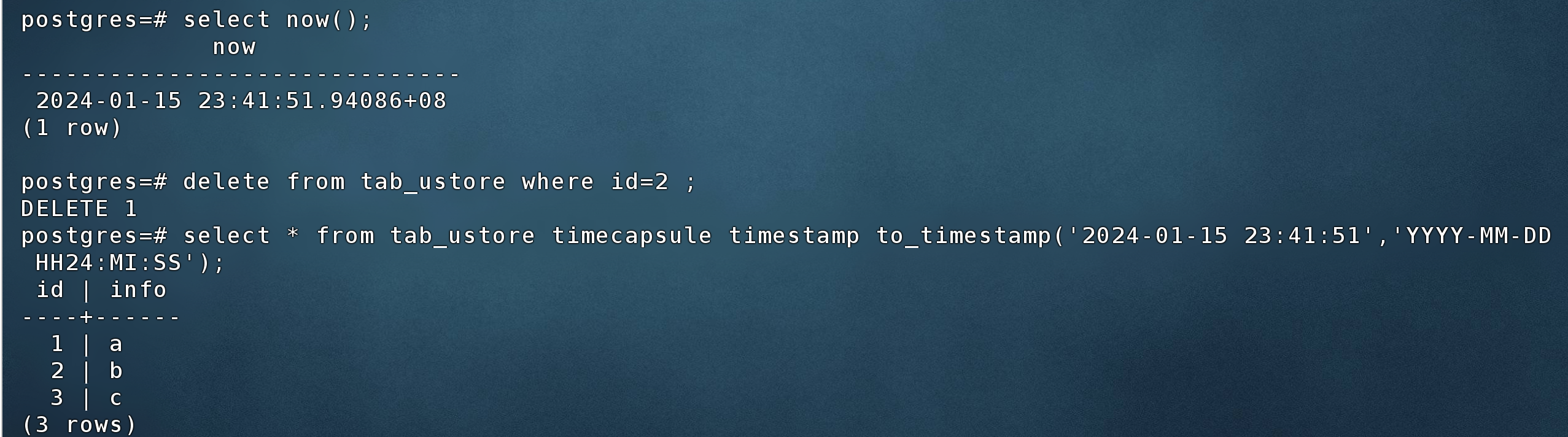
全部查询数据可能很多,也可以使用条件过滤,比如只查上面删除的第二条数据
select * from tab_ustore timecapsule timestamp to_timestamp('2024-01-15 23:41:51','YYYY-MM-DD HH24:MI:SS') where id=2;

还可以直接把数据恢复到原表
insert into tab_ustore select * from tab_ustore timecapsule timestamp to_timestamp('2024-01-15 23:41:51','YYYY-MM-DD HH24:MI:SS') where id=2;
基于flashback函数的闪回查询(支持astore表)
前置条件
- 设置max_flashback_time参数,控制闪回功能支持的最大时长,单位为秒
下面模拟基于flashback函数的闪回查询:
首先数据库设置max_flashback_time参数
show max_flashback_time;

 max_flashback_time
--------------------
 3600
(1 row)
闪回查询语法格式
SELECT select_list FROM table_name FLASHBACK(n);
n为闪回查询的时长,单位是秒。
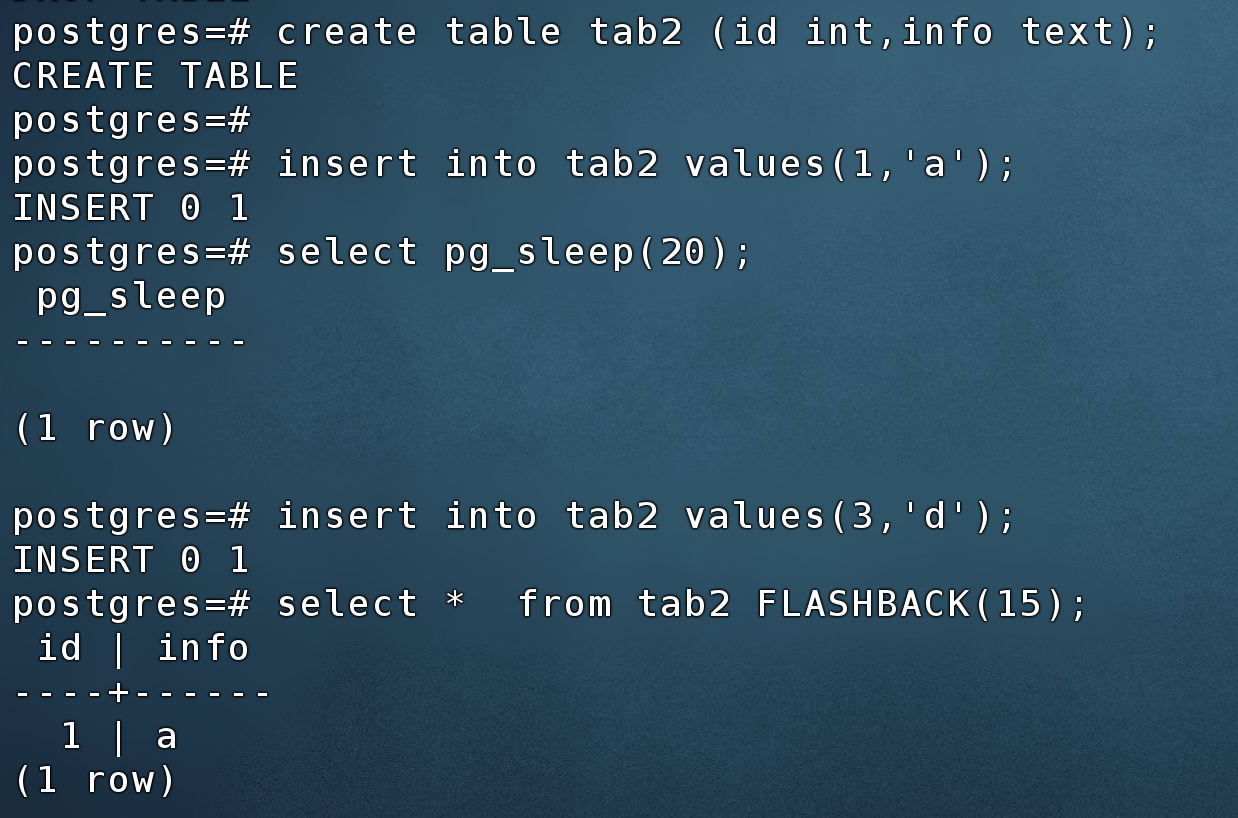
创建模拟表,插入一条数据
create table tab2 (id int,info text);

insert into tab2 values(1,'a');
休眠20s
select pg_sleep(20);
再插入第二条数据
insert into tab2 values(3,'d');
进行闪回查询,查看15秒前的表数据
select * from tab2 FLASHBACK(15);
最后修改时间:2024-01-22 19:32:30
「喜欢这篇文章,您的关注和赞赏是给作者最好的鼓励」
关注作者
【版权声明】本文为墨天轮用户原创内容,转载时必须标注文章的来源(墨天轮),文章链接,文章作者等基本信息,否则作者和墨天轮有权追究责任。如果您发现墨天轮中有涉嫌抄袭或者侵权的内容,欢迎发送邮件至:contact@modb.pro进行举报,并提供相关证据,一经查实,墨天轮将立刻删除相关内容。
