



一般流量分析系统可以记录主机间的访问关系,比如态势感知系统。通过分析流量中的源地址和目的地址可以搞清楚主机之间是否有互访关系。
对于没有互访关系的主机,一般可以通过防火墙黑名单的形式禁掉,这样可以最大程度地保护主机的安全。内网主机间因一台主机失陷而殃及池鱼的情况经常发生,所以梳理主机间的访问关系是非常必要的。
如果不想使用态势感知这种非常重的系统,可以通过编写脚本记录数据连接中的目的地址的方式来梳理主机会与哪些目的地址发生关系。
采用轮询的方式,每秒钟遍历一次系统网络连接,将目的IP记录在集合中。为防止脚本退出,可以每轮询30次写一次日志,将集合中的数据序列化后存盘。下次脚本重新运行时通过读档的形式,将数据反序列化,重新加载到集合中。
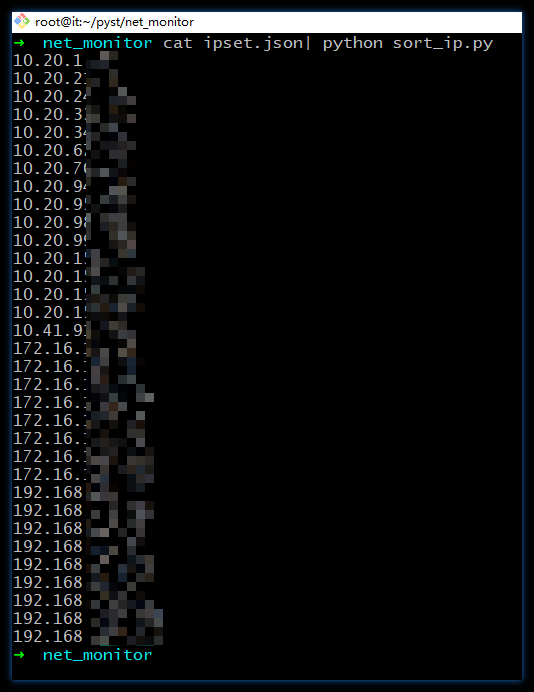
最终与主机有交互的IP都存在 json 数据文件中,通过文本处理可以对 IP 进行排序或其它后续处理:
网络连接信息通过 python psutil 模块获取,脚本如下:
#!python3# FileName: net_monitor.pyimport psutilimport osimport jsonimport atexitimport timeimport ipaddressimport sysfrom pprint import pprintdef is_ipv6(ip_str):try:ipaddress.IPv6Address(ip_str)return Trueexcept ipaddress.AddressValueError:return Falsedef cleanup():serialize_data(json_file, ipset)print('Saving ...')def serialize_data(file_name, my_set):json_data = json.dumps(list(my_set))# 将 JSON 数据写入文件with open(file_name, 'w') as json_file:json_file.write(json_data)def unserialize_data(file_name):with open(file_name, 'r') as json_file:loaded_data = json.load(json_file)return set(loaded_data)# 默认数据文件,也可以命令行指定json_file = r'd:\ipset.json'# ip 集合ipset = set()# 休眠时间,单位:秒sleep_sec = 1if __name__ == '__main__':# 命令行指定新的数据文件if len(sys.argv) == 2:json_file = sys.argv[1]# 注册清理函数atexit.register(cleanup)if os.path.isfile(json_file):ipset = unserialize_data(json_file)count = 0while True:# 获取当前网络连接信息network_connections = psutil.net_connections()for conn in network_connections:if conn.laddr and conn.raddr:ip = conn.raddr.ip# 处理 ipv6if is_ipv6(ip):continueif ip not in ipset:ipset.add(ip)time.sleep(sleep_sec)count += 1if count%30 == 0:serialize_data(json_file, ipset)count = 0
使用时可以在命令行指定 JSON 数据文件位置,也可以不加参数,使用代码中的默认位置。
$ pyhton3 net_monitor ipset.json
在处理 IP 时,可能会用到的 IP 排序函数:
import ipaddressdef sort_ips(ip_list):# 使用ipaddress.IPv4Address创建IPv4地址对象并排序sorted_ips = sorted(ipaddress.IPv4Address(ip) for ip in ip_list)return sorted_ips# 示例列表ip_list = ['192.168.1.2', '10.0.0.1', '172.16.0.1', '192.168.0.1']# 对IP地址进行排序sorted_ips = sort_ips(ip_list)# 打印排序后的IP地址for ip in sorted_ips:print(ip)
在后续处理中,我们可能还要对公网IP和私网IP分开处理,私网IP的判断函数为:
import ipaddressdef is_private_ip(ip_str):try:ip = ipaddress.ip_address(ip_str)return ip.is_privateexcept ValueError:# 无效的IP地址return False# 示例ip1 = '192.168.1.1'ip2 = '203.0.113.1'# 判断是否为私有网络IP地址print(f"{ip1} is private IP: {is_private_ip(ip1)}")print(f"{ip2} is private IP: {is_private_ip(ip2)}")
需要注意的是,我们常见的私网地址段为:
10.0.0.0-10.255.255.255 CIDR格式:10.0.0.0/8172.16.0.0-172.31.255.255 CIDR格式:172.16.0.0/12192.168.0.0-192.168.255.255 CIDR格式:192.168.0.0/16
除了这些我们常见的私网地址,还有一些不常见的,也叫保留地址。与互联网公网地址区分开,这些地址也叫私网地址,它们分别是:
0.0.0.0/8 - Current network (only valid as source address) RFC 1700100.64.0.0 ~ 100.127.255.255 (100.64.0.0/10 prefix) carrier-grade NAT communication between service provider and subscribers127.0.0.0 is reserved for loopback and IPC on the localhost.127.0.0.1 ~ 127.255.255.254 (127.0.0.0/8) - loopback IP addresses (refers to self) RFC 5735192.0.0.0/24 - reserved (IANA) RFC 5735192.88.99.0/24 - IPv6 to IPv4 relay. RFC 3068198.18.0.0/15 - network benchmark tests. RFC 2544198.51.100.0/24 - TEST-NET-2. RFC 5737203.0.113.0/24 - TEST-NET-3. RFC 5737224.0.0.0 ~ 239.255.255.255 (224.0.0.0/4) reserved for multicast addresses. RFC 3171240.0.0.0/4 - reserved (former Class E network) RFC 1700255.255.255.255 is the limited broadcast address (limited to all other nodes on the LAN) RFC 919255 in any part of the IP is reserved for broadcast addressing0.0.0.0 in routing context means the default route (to "the rest of" the internet) RFC 17000.0.0.0 in the context of firewalls means "all addresses of the local machine" RFC 1700
参考
https://www.speedguide.net/ip/203.0.113.5
全文完。
如果转发本文,文末务必注明:“转自微信公众号:生有可恋”。
文章转载自生有可恋,如果涉嫌侵权,请发送邮件至:contact@modb.pro进行举报,并提供相关证据,一经查实,墨天轮将立刻删除相关内容。
