



当前信创工作越来越引起人们的重视,其中,很多软件都有适配国产芯片的要求。对此,我们尝试在申威架构下编译按照PostgreSQL。并将其中遇到的问题以及解决办法记录下来。
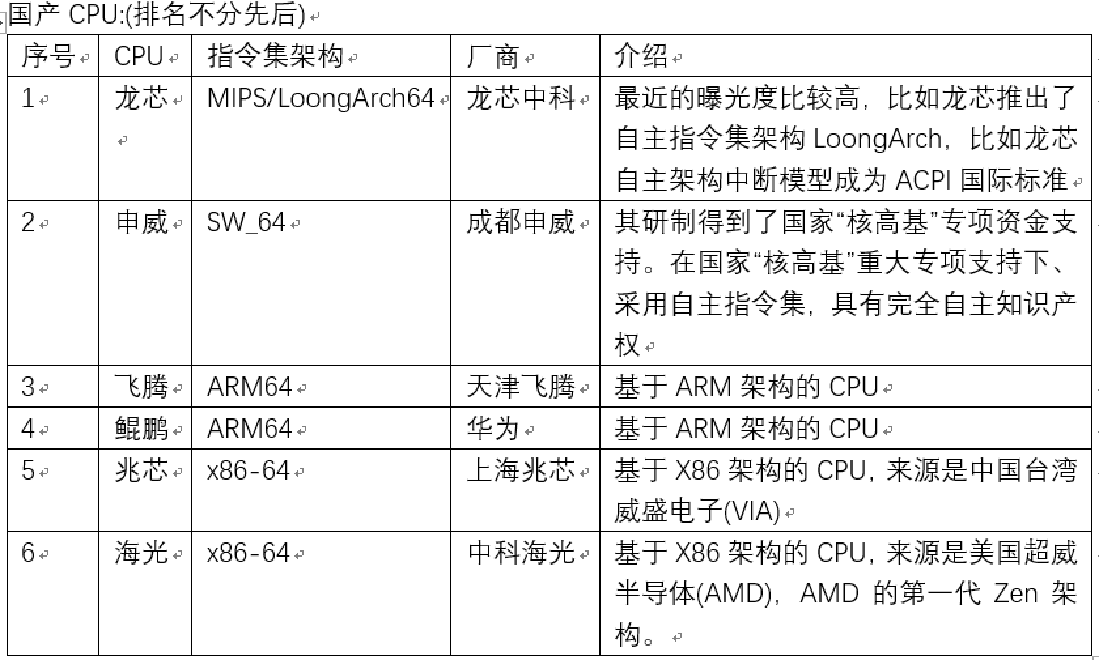
编译环境
openEular操作系统,申威架构处理器
[postgres@SW-72-49 config]$ lscpu
架构:               sw_64
  CPU 运行模式:     64-bit
  Address sizes:     48 bits physical, 53 bits virtual
  字节序:           Little Endian
CPU:                 64
  在线 CPU 列表:    0-63
厂商 ID:            sunway
  型号名称:         SW3231 CPU @ 2.40GHz
    CPU 系列:       6
    型号:           49
    每个核的线程数: 1
    每个座的核数:   32
    座:             2
    BogoMIPS:       4800.00
    标记:           fpu simd vpn upn cpuid
Caches (sum of all):
  L1d:               2 MiB (64 instances)
  L1i:               2 MiB (64 instances)
  L2:                32 MiB (64 instances)
  L3:                128 MiB (2 instances)
NUMA:
  NUMA 节点:        2
  NUMA 节点0 CPU:   0-31
  NUMA 节点1 CPU:   32-63
[postgres@SW-72-49 config]$ cat /etc/os-release
NAME="openEuler"
VERSION="22.03 (LTS-Next)"
ID="openEuler"
VERSION_ID="22.03"
PRETTY_NAME="openEuler 22.03 (LTS-Next)"
ANSI_COLOR="0;31"

[postgres@SW-72-49 config]$ uname -a
Linux SW-72-49 5.10.0-39.0.0.21.sw_64 #1 SMP Fri Feb 3 17:16:04 CST 2023 sw_64 sw_64 sw_64 GNU/Linux
编译问题
遇到了如下问题:不能识别申威架构
[postgres@SW-72-48 postgresql]$ ./configure --prefix=/home/postgres/he3pg-xc
checking build system type... config/config.guess: unable to guess system type

This script (version 2022-01-09), has failed to recognize the
operating system you are using. If your script is old, overwrite *all*
copies of config.guess and config.sub with the latest versions from:

  https://git.savannah.gnu.org/cgit/config.git/plain/config.guess
and
  https://git.savannah.gnu.org/cgit/config.git/plain/config.sub

If config/config.guess has already been updated, send the following data and any
information you think might be pertinent to config-patches@gnu.org to
provide the necessary information to handle your system.

config.guess timestamp = 2022-01-09

uname -m = sw_64
uname -r = 5.10.0-39.0.0.21.sw_64
uname -s = Linux
uname -v = #1 SMP Fri Feb 3 17:16:04 CST 2023

/usr/bin/uname -p = sw_64
/bin/uname -X     =

hostinfo               =
/bin/universe          =
/usr/bin/arch -k       =
/bin/arch              = sw_64
/usr/bin/oslevel       =
/usr/convex/getsysinfo =

UNAME_MACHINE = "sw_64"
UNAME_RELEASE = "5.10.0-39.0.0.21.sw_64"
UNAME_SYSTEM  = "Linux"
UNAME_VERSION = "#1 SMP Fri Feb 3 17:16:04 CST 2023"
configure: error: cannot guess build type; you must specify one
解决办法:
参考申威平台编译安装程序时报错
# 执行如下命令即可得到能够识别申威平台的 config.guess 脚本, 再替换安装程序中的同名文件即可正常编译安装.
yum install libtool
yum install libtool-ltdl
yum install libtool-devel
find /usr/share/libtool -name config.guess
找到config.guess以及config.sub两个文件后,拷贝到postgresql/config目录下,替换掉原来的文件。再次运行,即可。
参考文档:
申威平台源码编译python
最后修改时间:2024-07-23 16:47:49
「喜欢这篇文章,您的关注和赞赏是给作者最好的鼓励」
关注作者
【版权声明】本文为墨天轮用户原创内容,转载时必须标注文章的来源(墨天轮),文章链接,文章作者等基本信息,否则作者和墨天轮有权追究责任。如果您发现墨天轮中有涉嫌抄袭或者侵权的内容,欢迎发送邮件至:contact@modb.pro进行举报,并提供相关证据,一经查实,墨天轮将立刻删除相关内容。
